Recursive Agent Harnessing for an Open World





A harness is the system around a model that enables it to act as an agent:
prompts, tools, memory, skills, orchestration, and more. Harnessing is the
process of optimizing that system.
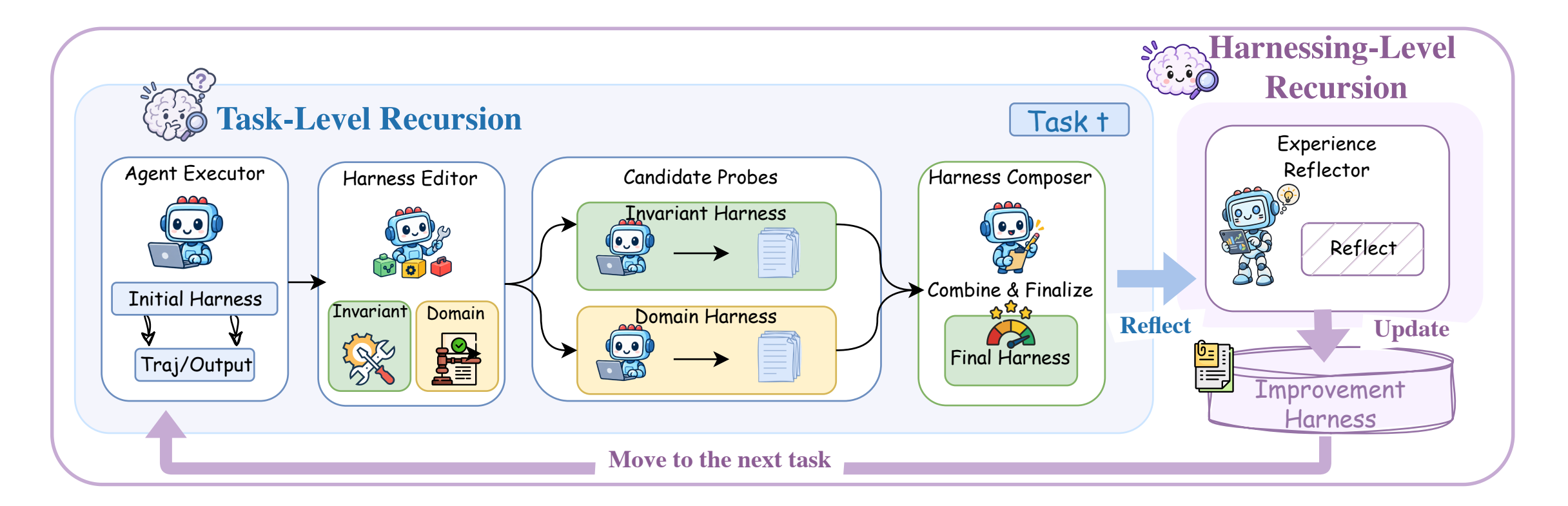
Harness² is a plug-and-play framework for recursive agent harnessing in an
open world, where agents encounter tasks unseen during harness design. It
connects two levels of recursion while keeping model weights fixed:
- Task-level recursion refines the execution harness for the current task
through a contrastive Propose–Probe–Compose step: propose edits, probe
their effects on the same task, and compose a refined harness from behavioral
contrasts between executions, without ground-truth feedback.
- Harnessing-level recursion updates a persistent improvement harness
with adopted harnesses and evidence-supported lessons from each task to guide
future refinement.
Across three professional benchmarks and four model–harness configurations, a
single Harness² step improves GLM-5 and Gemini 3.5 Flash over their base
harnesses, with gains of up to 11.5 points on WorkBuddy-Bench, 4.5 points on
JobBench, and 11.8 percentage points on LAB's partial pass rate. Increasing the
task-level recursion budget brings further gains.
The release supports parallel and sequential recursion, OpenCode and
Codex executors, and JobBench, LAB, and WorkBuddy-Bench.
Video overview
https://github.com/user-attachments/assets/76b10548-b14b-4c8f-9aa5-a93662df4d56
Contents
Harness components
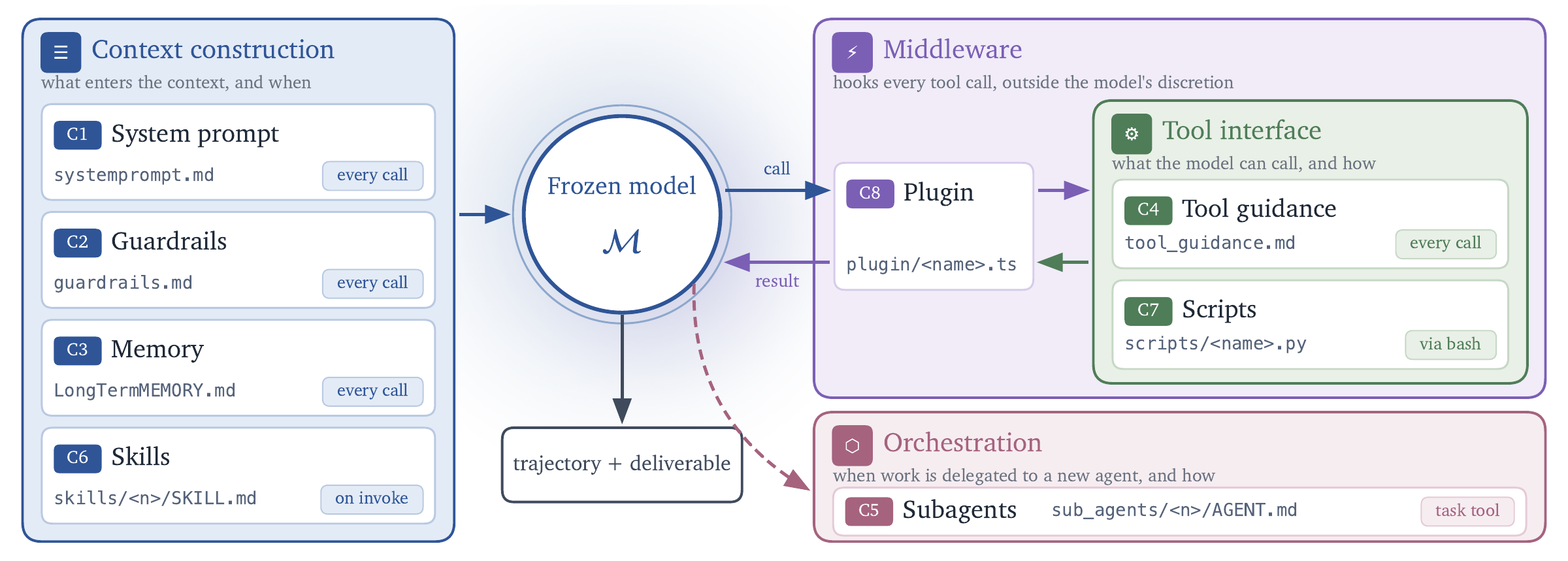
Harness² exposes eight editable components around the model: system prompt,
guardrails, memory, tool guidance, subagents, skills, scripts, and plugins.
They control context construction, the tool interface, delegation, and behavior
inside the tool loop.
Install
Use Linux, Python 3.12, and uv.
From the repository root:
uv venv --python 3.12 .venv
source .venv/bin/activate
uv pip install -e '.[render]'
harness2-demo --output runs/demo --k 2
The local demo runs both recursion modes with deterministic editors and real
Python executions. It requires no model credentials.
For model-backed benchmarks, install Node.js 20+, the Google Cloud CLI, and
the benchmark dependencies. LAB needs Pandoc and
Poppler; WorkBuddy-Bench needs Docker. Then configure your models:
cp .env.example .env
# Edit .env with your Vertex AI project and model IDs.
gcloud auth application-default login
See the setup guide for model settings, authentication
alternatives, and the Codex executor.
Run a benchmark
The following example installs LAB and runs one task, then evaluates and reports
its result. Model-backed runs incur API costs; start with a small task selection.
harness2-setup lab
harness2-check --bench lab
harness2 --bench lab --k 1 --mode parallel \
  --only-domains antitrust-competition --max-tasks 1
harness2-judge --bench lab --k 1 --mode parallel
harness2-report --bench lab --k 1 --mode parallel
Sequential recursion runs the same commands with --mode sequential. --k is
the task-level recursion budget; see Experiments. Judging and
reporting must use the same benchmark, executor, subset, --k, --mode, and
seed as the refinement run. Add --dry-run to harness2 to preview task
selection without model calls.
| Benchmark |
Tasks |
Install |
Guide |
| JobBench |
Professional work |
harness2-setup jb |
JobBench |
| LAB |
Legal work |
harness2-setup lab |
LAB |
| WorkBuddy-Bench |
Office, web, and code |
harness2-setup wb |
WorkBuddy |
Choose one benchmark per command. WorkBuddy also takes --subset office,
--subset web, or --subset code on every command after setup. The
benchmark guides cover each one's data, domains, and
grading.
Experiments
Scale task-level recursion in two ways: parallel recursion explores multiple
candidate harnesses and composes refinements from their execution evidence;
sequential recursion carries the refined harness and accumulated evidence
through successive Propose–Probe–Compose steps.
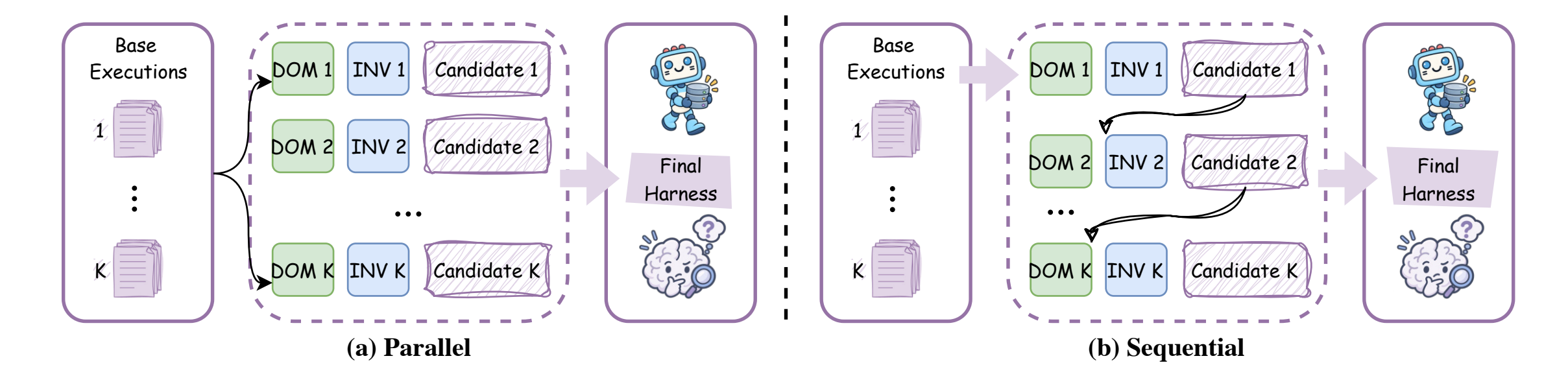
Parallel recursion explores wider; sequential recursion refines deeper.
| Option |
Behavior |
--k 1 |
One Propose–Probe–Compose step |
--k K --mode parallel |
Probe K general and K domain-specific candidates, then produce K compositions |
--k K --mode sequential |
Refine the harness through K successive steps |
--substrate cx |
Use Codex instead of the default OpenCode executor |
After each task, harnessing-level recursion retains the adopted harness and
evidence-supported lessons to guide future refinement. See the
experiment guide for task selection, concurrency,
reproducibility, and baseline comparisons.
Web access
Executor network access is unrestricted, and Codex runs with its sandbox
disabled. Public benchmark rubrics may be accessible online. Before evaluation,
configure network restrictions to prevent
access to benchmark answers and grading criteria.
Results and resume
Results are saved under runs/, organized by benchmark and subset where
applicable. They include task summaries, deliverables, adopted harnesses,
reflection notes, and evaluation results.
Repeat the same command to resume. Use a new HARNESS2_RUNS_DIR when changing
models or task selection. See results and resume
for details; each command also supports --help.
Citation
@article{xu2026harness2,
  title   = {Harness$^2$: Recursive Agent Harnessing for an Open World},
  author  = {Xu, Ruiyao and Chen, Yanfei and CuiZhu, Zhongying and Dalvi Mishra, Bhavana and Ming, Yifei and Yu, Han and Han, Rujun and Lee, Chen-Yu and Pfister, Tomas},
  journal = {arXiv preprint arXiv:2610.14224},
  year    = {2026},
  url     = {https://arxiv.org/abs/2610.14224}
}
Contributing
See CONTRIBUTING.md.
License
Harness² is licensed under Apache 2.0. Third-party code under
third_party/, benchmarks, and datasets retain their
upstream licenses; see
third-party notices.
Disclaimer
This is not an officially supported Google product. This project is not eligible
for the Google Open Source Software Vulnerability Rewards Program.


 Harness2 是一个框架,通过两层递归优化 AI 模型周围的系统(提示词、工具、记忆、技能、编排),同时保持模型权重不变,使智能体能够处理在 harness 设计阶段未曾见过的任务。