Gemini Fullstack LangGraph Quickstart
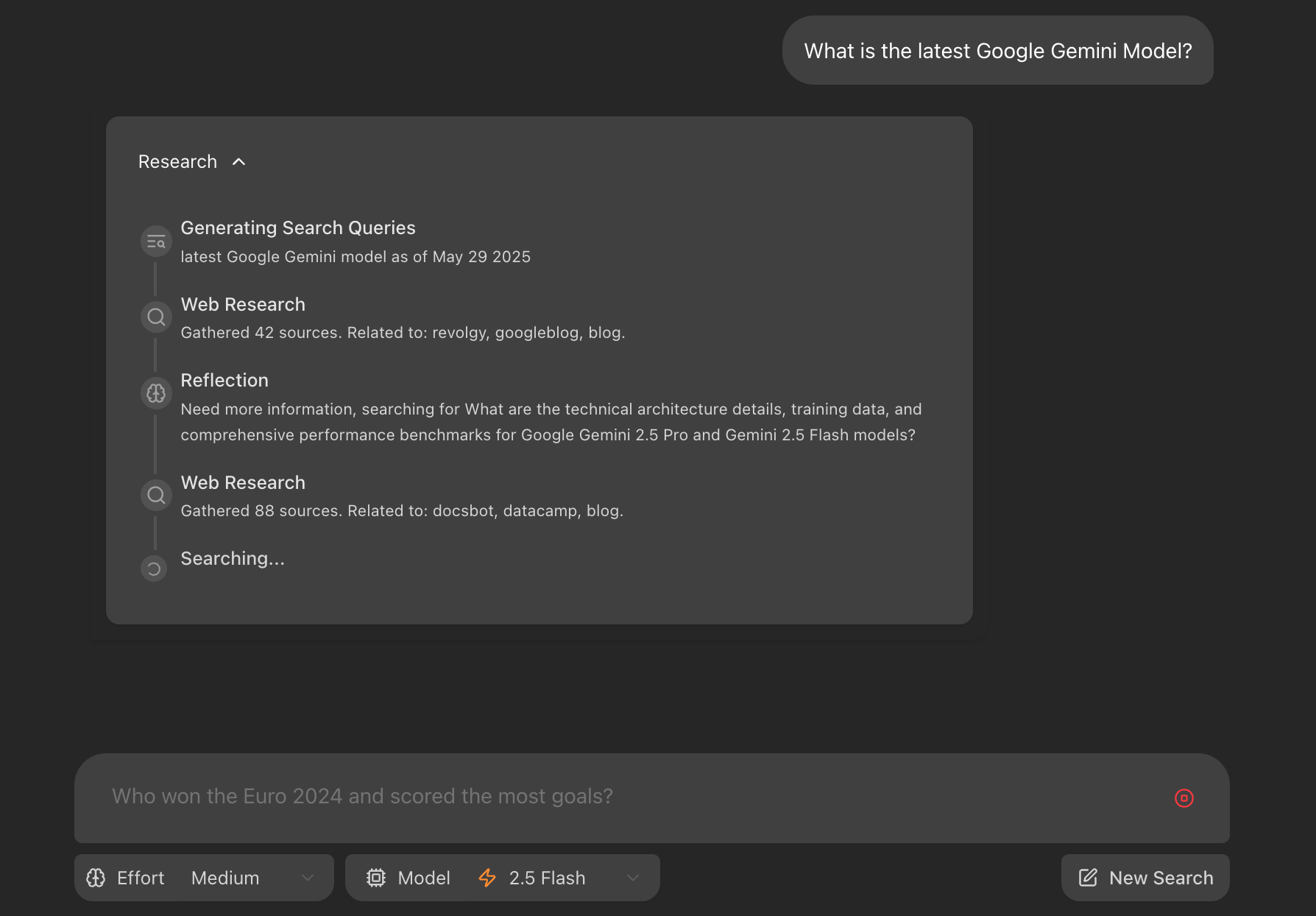
This project demonstrates a fullstack application using a React frontend and a LangGraph-powered backend agent. The agent is designed to perform comprehensive research on a user's query by dynamically generating search terms, querying the web using Google Search, reflecting on the results to identify knowledge gaps, and iteratively refining its search until it can provide a well-supported answer with citations. This application serves as an example of building research-augmented conversational AI using LangGraph and Google's Gemini models.
Features
- 💬 Fullstack application with a React frontend and LangGraph backend.
- 🧠 Powered by a LangGraph agent for advanced research and conversational AI.
- 🔍 Dynamic search query generation using Google Gemini models.
- 🌐 Integrated web research via Google Search API.
- 🤔 Reflective reasoning to identify knowledge gaps and refine searches.
- 📄 Generates answers with citations from gathered sources.
- 🔄 Hot-reloading for both frontend and backend during development.
Project Structure
The project is divided into two main directories:
frontend/: Contains the React application built with Vite.backend/: Contains the LangGraph/FastAPI application, including the research agent logic.
Getting Started: Development and Local Testing
Follow these steps to get the application running locally for development and testing.
1. Prerequisites:
- Node.js and npm (or yarn/pnpm)
- Python 3.11+
GEMINI_API_KEY: The backend agent requires a Google Gemini API key.
- Navigate to the
backend/ directory.
- Create a file named
.env by copying the backend/.env.example file.
- Open the
.env file and add your Gemini API key: GEMINI_API_KEY="YOUR_ACTUAL_API_KEY"
2. Install Dependencies:
Backend:
cd backend
pip install .
Frontend:
cd frontend
npm install
3. Run Development Servers:
Backend & Frontend:
make dev
This will run the backend and frontend development servers. Open your browser and navigate to the frontend development server URL (e.g., http://localhost:5173/app).
Alternatively, you can run the backend and frontend development servers separately. For the backend, open a terminal in the backend/ directory and run langgraph dev. The backend API will be available at http://127.0.0.1:2024. It will also open a browser window to the LangGraph UI. For the frontend, open a terminal in the frontend/ directory and run npm run dev. The frontend will be available at http://localhost:5173.
How the Backend Agent Works (High-Level)
The core of the backend is a LangGraph agent defined in backend/src/agent/graph.py. It follows these steps:
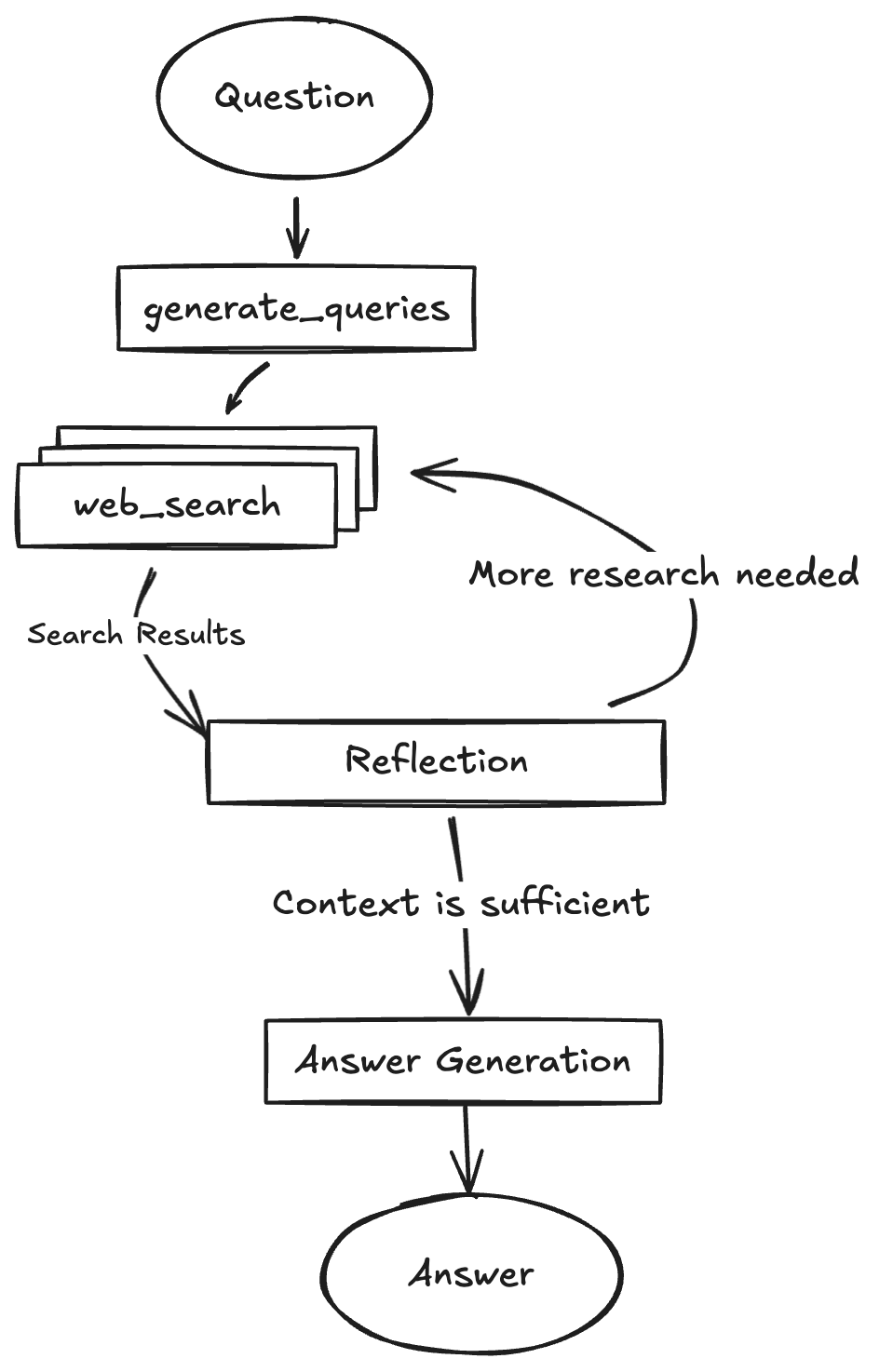
- Generate Initial Queries: Based on your input, it generates a set of initial search queries using a Gemini model.
- Web Research: For each query, it uses the Gemini model with the Google Search API to find relevant web pages.
- Reflection & Knowledge Gap Analysis: The agent analyzes the search results to determine if the information is sufficient or if there are knowledge gaps. It uses a Gemini model for this reflection process.
- Iterative Refinement: If gaps are found or the information is insufficient, it generates follow-up queries and repeats the web research and reflection steps (up to a configured maximum number of loops).
- Finalize Answer: Once the research is deemed sufficient, the agent synthesizes the gathered information into a coherent answer, including citations from the web sources, using a Gemini model.
CLI Example
For quick one-off questions you can execute the agent from the command line. The
script backend/examples/cli_research.py runs the LangGraph agent and prints the
final answer:
cd backend
python examples/cli_research.py "What are the latest trends in renewable energy?"
Deployment
In production, the backend server serves the optimized static frontend build. LangGraph requires a Redis instance and a Postgres database. Redis is used as a pub-sub broker to enable streaming real time output from background runs. Postgres is used to store assistants, threads, runs, persist thread state and long term memory, and to manage the state of the background task queue with 'exactly once' semantics. For more details on how to deploy the backend server, take a look at the LangGraph Documentation. Below is an example of how to build a Docker image that includes the optimized frontend build and the backend server and run it via docker-compose.
Note: For the docker-compose.yml example you need a LangSmith API key, you can get one from LangSmith.
Note: If you are not running the docker-compose.yml example or exposing the backend server to the public internet, you should update the apiUrl in the frontend/src/App.tsx file to your host. Currently the apiUrl is set to http://localhost:8123 for docker-compose or http://localhost:2024 for development.
1. Build the Docker Image:
Run the following command from the project root directory:
docker build -t gemini-fullstack-langgraph -f Dockerfile .
2. Run the Production Server:
GEMINI_API_KEY=<your_gemini_api_key> LANGSMITH_API_KEY=<your_langsmith_api_key> docker-compose up
Open your browser and navigate to http://localhost:8123/app/ to see the application. The API will be available at http://localhost:8123.
Technologies Used
License
This project is licensed under the Apache License 2.0. See the LICENSE file for details.

 这是 Google 官方的全栈快速上手示例,用来搭建研究型智能体:前端是 React,后端是 LangGraph,由 Gemini 驱动,能够搜索网页、反思信息缺口,并返回带引用来源的答案。