




107.5K ·GitHub
Что это такое?
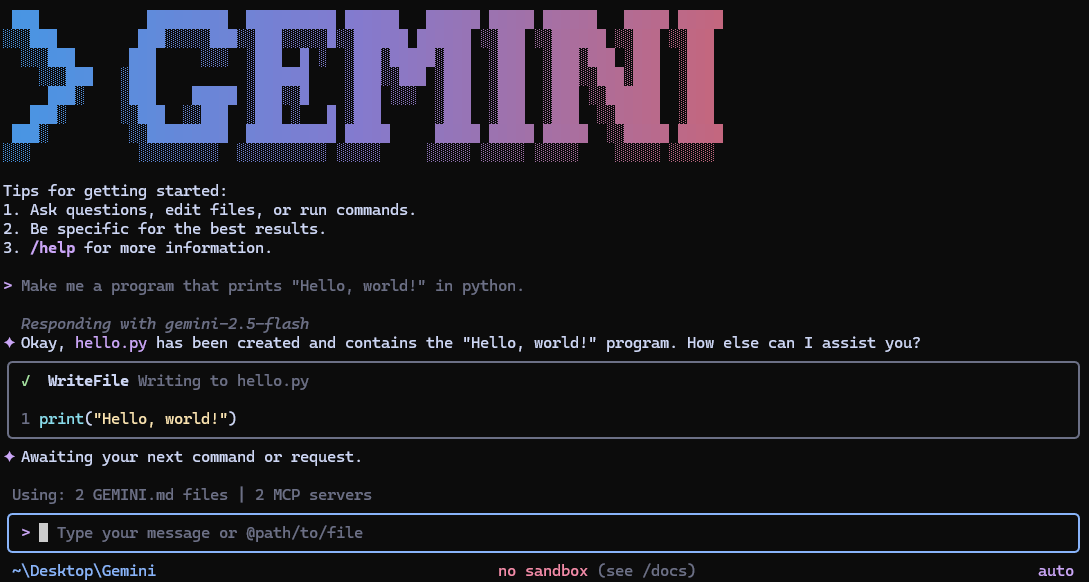
 Gemini CLI — это агент с открытым исходным кодом на основе ИИ, который переносит модели Gemini от Google прямо в терминал: можно общаться, генерировать код и запускать инструменты из командной строки.
Gemini CLI — это агент с открытым исходным кодом на основе ИИ, который переносит модели Gemini от Google прямо в терминал: можно общаться, генерировать код и запускать инструменты из командной строки.Это самостоятельное приложение для терминала или то, что я встраиваю в свой код?Это агент для терминала, который вы запускаете напрямую, а не библиотека, которую импортируют в другое приложение.
Это агент для терминала, который вы запускаете напрямую, а не библиотека, которую импортируют в другое приложение.Как мне установить и запустить?Установите через npx, npm install -g, Homebrew (macOS/Linux), MacPorts или Anaconda, затем просто запустите команду, чтобы начать общение в текущей директории.
Установите через npx, npm install -g, Homebrew (macOS/Linux), MacPorts или Anaconda, затем просто запустите команду, чтобы начать общение в текущей директории.Нужен ли мне API-ключ или можно просто войти через Google?Можно войти с аккаунтом Google для бесплатного тарифа, использовать ключ Gemini API или подключиться через Vertex AI для корпоративных задач; при входе через Google управлять ключами не нужно.
Можно войти с аккаунтом Google для бесплатного тарифа, использовать ключ Gemini API или подключиться через Vertex AI для корпоративных задач; при входе через Google управлять ключами не нужно.В чём подвох у бесплатного тарифа?При входе с личным аккаунтом Google доступно 60 запросов в минуту и 1 000 запросов в день; превью- и ночные релизы могут содержать регрессии, поэтому для надёжности используйте стабильный тег 'latest'.
При входе с личным аккаунтом Google доступно 60 запросов в минуту и 1 000 запросов в день; превью- и ночные релизы могут содержать регрессии, поэтому для надёжности используйте стабильный тег 'latest'.Можно ли расширить его своими инструментами или интеграциями?Да, поддерживаются MCP-серверы (Model Context Protocol), настроенные в ~/.gemini/settings.json; можно добавлять свои инструменты и даже генерировать медиа через Imagen, Veo или Lyria.
Да, поддерживаются MCP-серверы (Model Context Protocol), настроенные в ~/.gemini/settings.json; можно добавлять свои инструменты и даже генерировать медиа через Imagen, Veo или Lyria.Есть ли интеграция с GitHub?Да, GitHub Action для Gemini CLI автоматизирует ревью pull request, сортировку issues и помощь по запросу — достаточно упомянуть @gemini-cli в issues и pull request.
Да, GitHub Action для Gemini CLI автоматизирует ревью pull request, сортировку issues и помощь по запросу — достаточно упомянуть @gemini-cli в issues и pull request.Можно ли использовать его в скриптах вместо интерактивного режима?Да, неинтерактивный headless-режим поддерживает вывод в виде простого текста, структурированного JSON или потокового JSON для автоматизации.
Да, неинтерактивный headless-режим поддерживает вывод в виде простого текста, структурированного JSON или потокового JSON для автоматизации.Какое контекстное окно предлагает модель?Модели Gemini 3 предлагают контекстное окно на 1 млн токенов и улучшенные рассуждения для больших кодовых баз и сложных задач.
Модели Gemini 3 предлагают контекстное окно на 1 млн токенов и улучшенные рассуждения для больших кодовых баз и сложных задач.What are similar projects?trae-agent, gitagent, Baize, copperhead, qwen-code, SystemOneHarness, docker-agent, turnstone
trae-agent, gitagent, Baize, copperhead, qwen-code, SystemOneHarness, docker-agent, turnstoneWhich topics is it in?gemini-api, mcp-client, google, github-actions, model-context-protocol, agentic-ai, gemini, mcp-server, coding-agent, command-line-tool, agent, mcp
gemini-api, mcp-client, google, github-actions, model-context-protocol, agentic-ai, gemini, mcp-server, coding-agent, command-line-tool, agent, mcp