A modern, fully static, fast, secure fully proxied, highly customizable application dashboard with integrations for over 100 services and translations into multiple languages. Easily configured via YAML files or through docker label discovery.
Features
With features like quick search, bookmarks, weather support, a wide range of integrations and widgets, an elegant and modern design, and a focus on performance, Homepage is your ideal start to the day and a handy companion throughout it.
Fast - The site is statically generated at build time for instant load times.
Secure - All API requests to backend services are proxied, keeping your API keys hidden. Constantly reviewed for security by the community.
For Everyone - Images built for AMD64, ARM64.
Full i18n - Support for over 40 languages.
Service & Web Bookmarks - Add custom links to the homepage.
Docker Integration - Container status and stats. Automatic service discovery via labels.
Service Integration - Over 100 service integrations, including popular starr and self-hosted apps.
Information & Utility Widgets - Weather, time, date, search, and more.
And much more...
Docker Integration
Homepage has built-in support for Docker, and can automatically discover and add services to the homepage based on labels. See the Docker Service Discovery page for more information.
Service Widgets
Homepage also has support for hundreds of 3rd-party services, including all popular *arr apps, and most popular self-hosted apps. Some examples include: Radarr, Sonarr, Lidarr, Bazarr, Ombi, Tautulli, Plex, Jellyfin, Emby, Transmission, qBittorrent, Deluge, Jackett, NZBGet, SABnzbd, etc. As well as service integrations, Homepage also has a number of information providers, sourcing information from a variety of external 3rd-party APIs. See the Service page for more information.
Information Widgets
Homepage has built-in support for a number of information providers, including weather, time, date, search, glances and more. System and status information presented at the top of the page. See the Information Providers page for more information.
Customization
Homepage is highly customizable, with support for custom themes, custom CSS & JS, custom layouts, formatting, localization and more. See the Settings page for more information.
Please note that when using features such as widgets, Homepage can access personal information (for example from your home automation system). To keep your information private, if Homepage is reachable from any untrusted network, it:
must sit behind a reverse proxy (and/or VPN) that enforces authentication, TLS, and strictly validates Host headers.
An optional built-in OIDC login flow or simple password login is available (opt-in) offering a simple “authenticated or not” guard.
With Docker
Using docker compose:
services:
  homepage:
    image: ghcr.io/gethomepage/homepage:latest
    container_name: homepage
    environment:
      HOMEPAGE_ALLOWED_HOSTS: gethomepage.dev # required, may need port. See gethomepage.dev/installation/#homepage_allowed_hosts
      PUID: 1000 # optional, your user id
      PGID: 1000 # optional, your group id
    ports:
      - 3000:3000
    volumes:
      - /path/to/config:/app/config # Make sure your local config directory exists
      - /var/run/docker.sock:/var/run/docker.sock:ro # optional, for docker integrations
    restart: unless-stopped
Please refer to the homepage documentation website for more information. Everything you need to know about configuring Homepage is there. Please read everything carefully before asking for help, as most questions are answered there or are simple YAML configuration issues.
Development
Install NPM packages, this project uses pnpm (and so should you!):
Homepage uses Zensical for documentation. To run the documentation locally, first install the dependencies:
uv sync
Then run the development server:
uv run zensical serve # or build, to build the static site
Support & Suggestions
If you have any questions, suggestions, or general issues, please start a discussion on the Discussions page.
Troubleshooting
In addition to the docs, the troubleshooting guide can help reveal many basic config or network issues. If you're having a problem, it's a good place to start.
Contributing & Contributors
Contributions are welcome! Please see the CONTRIBUTING.md file for more information.
Thanks to the over 200 contributors who have helped make this project what it is today!
Especially huge thanks to @shamoon, who has been the backbone of this community from the very start.
homepage (gethomepage/homepage)
Choose a tag and it will appear here. With no tags selected, all catalog projects are shown.
Searching Database…
Choose a tag and it will appear here. With no tags selected, all catalog projects are shown.

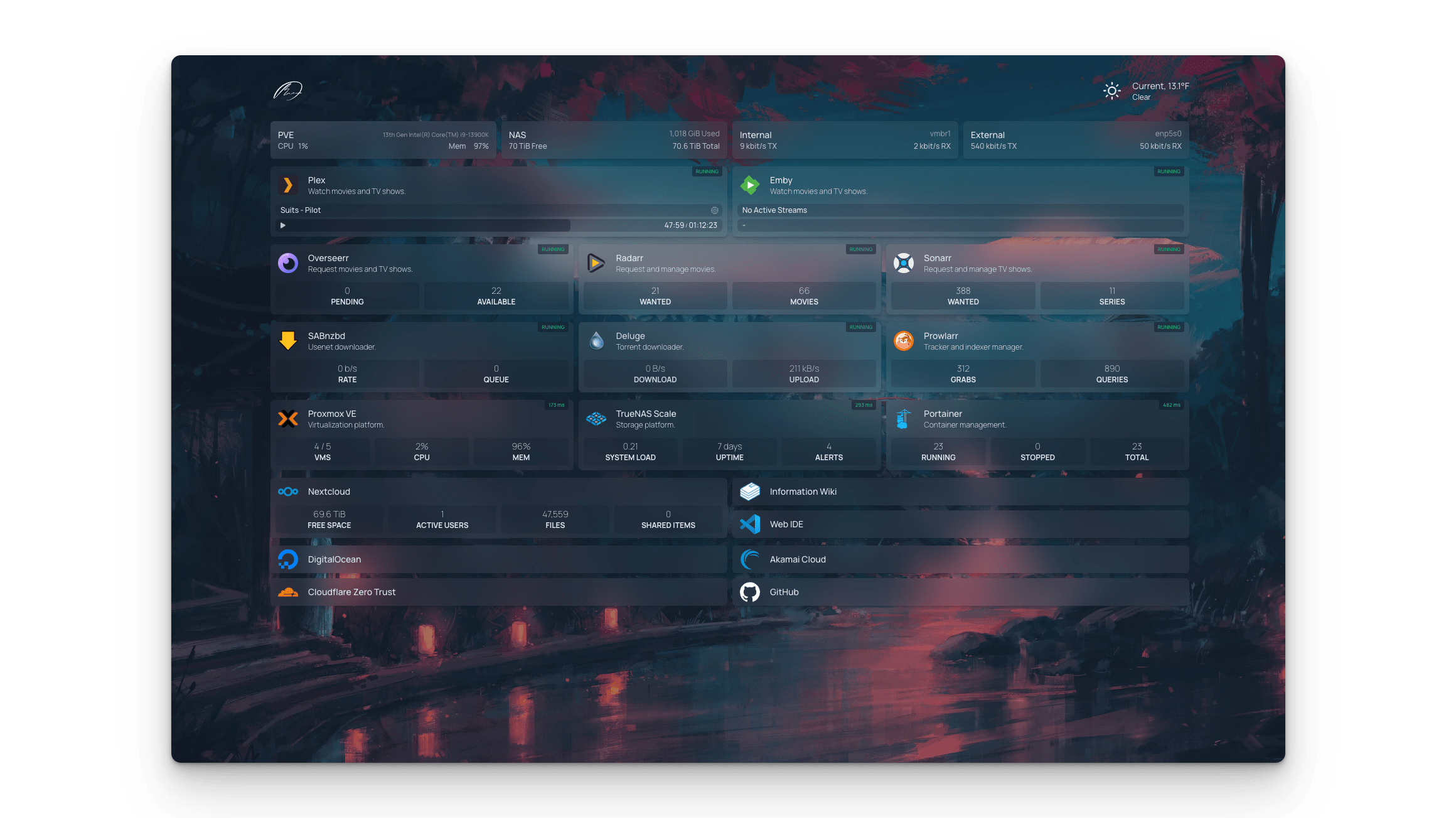






 Homepage 是一个完全静态、高度可定制的应用仪表盘(起始页),可以把服务小组件、Docker 容器状态、书签,以及天气、搜索等信息小组件集中在一个页面里。