gstack
"I don't think I've typed like a line of code probably since December, basically, which is an extremely large change." — Andrej Karpathy, No Priors podcast, March 2026
When I heard Karpathy say this, I wanted to find out how. How does one person ship like a team of twenty? Peter Steinberger built OpenClaw — 247K GitHub stars — essentially solo with AI agents. The revolution is here. A single builder with the right tooling can move faster than a traditional team.
I'm Garry Tan, President & CEO of Y Combinator. I've worked with thousands of startups — Coinbase, Instacart, Rippling — when they were one or two people in a garage. Before YC, I was one of the first eng/PM/designers at Palantir, cofounded Posterous (sold to Twitter), and built Bookface, YC's internal social network.
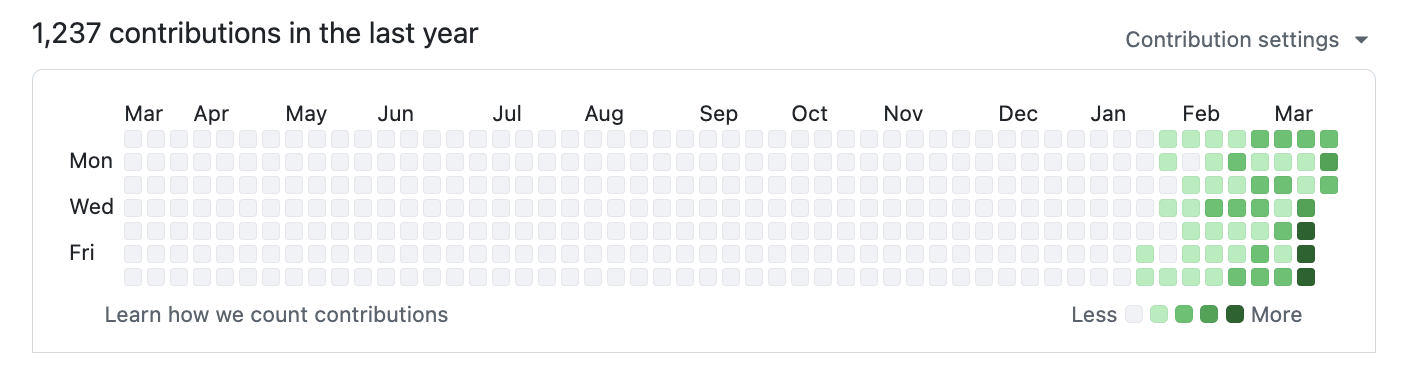
gstack is my answer. I've been building products for twenty years, and right now I'm shipping more products than I ever have. In the last 60 days: 3 production services, 40+ shipped features, part-time, while running YC full-time. On logical code change — not raw LOC, which AI inflates — my 2026 run rate is ~810× my 2013 pace (11,417 vs 14 logical lines/day). Year-to-date (through April 18), 2026 has already produced 240× the entire 2013 year. Measured across 40 public + private garrytan/* repos including Bookface, after excluding one demo repo. AI wrote most of it. The point isn't who typed it, it's what shipped.
The LOC critics aren't wrong that raw line counts inflate with AI. They are wrong that normalized-for-inflation, I'm less productive. I'm more productive, by a lot. Full methodology, caveats, and reproduction script: On the LOC Controversy.
2026 — 1,237 contributions and counting:
2013 — when I built Bookface at YC (772 contributions):
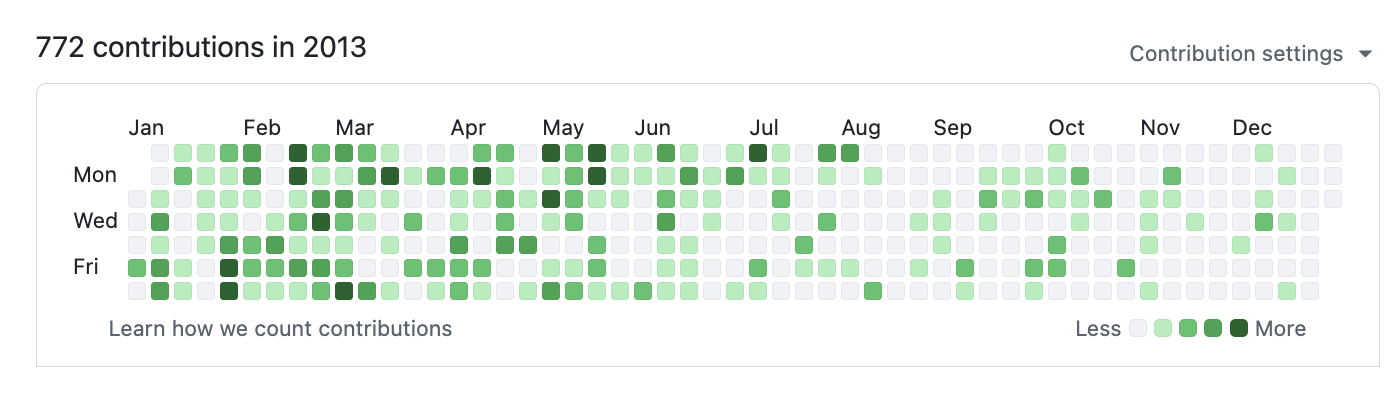
Same person. Different era. The difference is the tooling.
gstack is how I do it. It turns Claude Code into a virtual engineering team — a CEO who rethinks the product, an eng manager who locks architecture, a designer who catches AI slop, a reviewer who finds production bugs, a QA lead who opens a real browser, a security officer who runs OWASP + STRIDE audits, and a release engineer who ships the PR. Twenty-three specialists and eight power tools, all slash commands, all Markdown, all free, MIT license.
This is my open source software factory. I use it every day. I'm sharing it because these tools should be available to everyone.
Fork it. Improve it. Make it yours. And if you want to hate on free open source software — you're welcome to, but I'd rather you just try it first.
Who this is for:
- Founders and CEOs — especially technical ones who still want to ship
- First-time Claude Code users — structured roles instead of a blank prompt
- Tech leads and staff engineers — rigorous review, QA, and release automation on every PR
Quick start
- Install gstack (30 seconds — see below)
- Run
/office-hours — describe what you're building
- Run
/plan-ceo-review on any feature idea
- Run
/review on any branch with changes
- Run
/qa on your staging URL
- Stop there. You'll know if this is for you.
Install — 30 seconds
Requirements: Claude Code, Git, Bun v1.0+, Node.js (Windows only). Recommended on macOS: the Aside browser (macOS 15+) — browser skills, /make-pdf, and /diagram drive it first, with your real logged-in sessions. Without it, ./setup builds gstack's own bundled browser and the same skills use that.
Step 1: Install on your machine
Open Claude Code and paste this. Claude does the rest.
Install gstack: run git clone --single-branch --depth 1 https://github.com/garrytan/gstack.git ~/.claude/skills/gstack && cd ~/.claude/skills/gstack && ./setup then add a "gstack" section to CLAUDE.md that says to use the /browse skill from gstack for all web browsing, never use mcp__claude-in-chrome__* tools, and lists the available skills: /office-hours, /plan-ceo-review, /plan-eng-review, /plan-design-review, /design-consultation, /design-shotgun, /design-html, /review, /ship, /land-and-deploy, /canary, /benchmark, /browse, /connect-chrome, /qa, /qa-only, /design-review, /scrape, /setup-browser-cookies, /setup-deploy, /setup-gbrain, /retro, /investigate, /document-release, /document-generate, /codex, /cso, /autoplan, /plan-devex-review, /devex-review, /careful, /freeze, /guard, /unfreeze, /gstack-upgrade, /learn. Then ask the user if they also want to add gstack to the current project so teammates get it.
Step 2: Team mode — auto-update for shared repos (recommended)
From inside your repo, paste this. Switches you to team mode, bootstraps the repo so teammates get gstack automatically, and commits the change:
(cd ~/.claude/skills/gstack && ./setup --team) && ~/.claude/skills/gstack/bin/gstack-team-init required && git add .claude/ CLAUDE.md && git commit -m "require gstack for AI-assisted work"
No vendored files in your repo, no version drift, no manual upgrades. Every Claude Code session starts with a fast auto-update check (throttled to once/hour, network-failure-safe, completely silent).
Swap required for optional if you'd rather nudge teammates than block them.
OpenClaw
OpenClaw spawns Claude Code sessions via ACP, so every gstack skill just works
when Claude Code has gstack installed. Paste this to your OpenClaw agent:
Install gstack: run git clone --single-branch --depth 1 https://github.com/garrytan/gstack.git ~/.claude/skills/gstack && cd ~/.claude/skills/gstack && ./setup to install gstack for Claude Code. Then add a "Coding Tasks" section to AGENTS.md that says: when spawning Claude Code sessions for coding work, tell the session to use gstack skills. Include these examples — security audit: "Load gstack. Run /cso", code review: "Load gstack. Run /review", QA test a URL: "Load gstack. Run /qa https://...", build a feature end-to-end: "Load gstack. Run /autoplan, implement the plan, then run /ship", plan before building: "Load gstack. Run /office-hours then /autoplan. Save the plan, don't implement."
After setup, just talk to your OpenClaw agent naturally:
| You say |
What happens |
| "Fix the typo in README" |
Simple — Claude Code session, no gstack needed |
| "Run a security audit on this repo" |
Spawns Claude Code with Run /cso |
| "Build me a notifications feature" |
Spawns Claude Code with /autoplan → implement → /ship |
| "Help me plan the v2 API redesign" |
Spawns Claude Code with /office-hours → /autoplan, saves plan |
See docs/OPENCLAW.md for advanced dispatch routing and
the gstack-lite/gstack-full prompt templates.
Native OpenClaw Skills (via ClawHub)
Four methodology skills that work directly in your OpenClaw agent, no Claude Code
session needed. Install from ClawHub:
clawhub install gstack-openclaw-office-hours gstack-openclaw-ceo-review gstack-openclaw-investigate gstack-openclaw-retro
| Skill |
What it does |
gstack-openclaw-office-hours |
Product interrogation with 6 forcing questions |
gstack-openclaw-ceo-review |
Strategic challenge with 4 scope modes |
gstack-openclaw-investigate |
Root cause debugging methodology |
gstack-openclaw-retro |
Weekly engineering retrospective |
These are conversational skills. Your OpenClaw agent runs them directly via chat.
Other AI Agents
gstack works on 10 AI coding agents, not just Claude. Setup auto-detects which
agents you have installed:
git clone --single-branch --depth 1 https://github.com/garrytan/gstack.git ~/gstack
cd ~/gstack && ./setup
Or target a specific agent with ./setup --host <name>:
| Agent |
Flag |
What you get |
| OpenAI Codex CLI |
--host codex |
Full install → ${CODEX_HOME:-~/.codex}/skills/gstack-*/ |
| OpenCode |
--host opencode |
Full install → ~/.config/opencode/skills/gstack-*/ |
| Cursor |
--host cursor |
Full install → ~/.cursor/skills/gstack-*/ |
| Factory Droid |
--host factory |
Full install → ~/.factory/skills/gstack-*/ |
| Kiro |
--host kiro |
Full install → ~/.kiro/skills/gstack-*/ |
| Slate |
--host slate |
Pointer to the Claude install (Slate reads .claude/skills as a fallback) |
| OpenClaw |
--host openclaw |
ACP spawn pointers + methodology artifacts via gen:skill-docs --host openclaw + the instruction-only digest below (full guide: docs/OPENCLAW.md) |
| Hermes |
--host hermes |
Methodology artifacts via gen:skill-docs --host hermes + the instruction-only digest below |
| GBrain (mod) |
--host gbrain |
Brain-aware skill variants, shipped from the GBrain repo |
Instruction-only tier (any rules-reading agent — Zed, Amp, Jules, side projects):
copy the 2KB digest at agents-digest/gstack-AGENTS.md
into a location your agent reads (for example, append it to your project's AGENTS.md).
It carries gstack's ethos, reuse ladder, and voice rules — no install required. The
digest's first line shows its gstack version; re-copy it after upgrading.
For Codex, setup reads the top-level model from
${CODEX_HOME:-~/.codex}/config.toml and generates the matching behavioral
profile, falling back to gpt-6-astra when no usable model is configured.
gpt-5.6-sol automatically receives bounded-scope instructions that
finish the requested lake without expanding into adjacent cleanup or speculative
hardening. The Sol profile is exact-match only: dated snapshots and other 5.6
variants get the generic GPT profile, and setup warns on near-misses like
gpt-5.6-sol-2026-08-01. Override detection with ./setup --host codex --model <id> — the
override applies to that run only; set model in your Codex config.toml to
make it stick across upgrades. After changing your Codex model, rerun
./setup --host codex to regenerate the skills.
gstack-owned Codex invocations and evals default to gpt-6-astra. Set
GSTACK_CODEX_MODEL=<model> to override that runtime default; an explicitly
requested model takes precedence. Runtime model selection is separate from
the setup-time behavioral profile above. The Claude outside-voice skill
(gstack-claude on Codex) defaults to claude-fable-5-1, overridable with
GSTACK_CLAUDE_MODEL=<model> or an explicit model in your request. These are
known frontier pins maintained in gstack releases, with no automatic model
discovery. See eval defaults and overrides
for capture, judge, and benchmark model selection.
Want to add support for another agent? See docs/ADDING_A_HOST.md.
It's one TypeScript config file, zero code changes.
See it work
You:    I want to build a daily briefing app for my calendar.
You:    /office-hours
Claude: [asks about the pain — specific examples, not hypotheticals]

You:    Multiple Google calendars, events with stale info, wrong locations.
        Prep takes forever and the results aren't good enough...

Claude: I'm going to push back on the framing. You said "daily briefing
        app." But what you actually described is a personal chief of
        staff AI.
        [extracts 5 capabilities you didn't realize you were describing]
        [challenges 4 premises — you agree, disagree, or adjust]
        [generates 3 implementation approaches with effort estimates]
        RECOMMENDATION: Ship the narrowest wedge tomorrow, learn from
        real usage. The full vision is a 3-month project — start with
        the daily briefing that actually works.
        [writes design doc → feeds into downstream skills automatically]

You:    /plan-ceo-review
        [reads the design doc, challenges scope, runs 10-section review]

You:    /plan-eng-review
        [ASCII diagrams for data flow, state machines, error paths]
        [test matrix, failure modes, security concerns]

You:    Approve plan. Exit plan mode.
        [writes 2,400 lines across 11 files. ~8 minutes.]

You:    /review
        [AUTO-FIXED] 2 issues. [ASK] Race condition → you approve fix.

You:    /qa https://staging.myapp.com
        [opens real browser, clicks through flows, finds and fixes a bug]

You:    /ship
        Tests: 42 → 51 (+9 new). PR: github.com/you/app/pull/42
You said "daily briefing app." The agent said "you're building a chief of staff AI" — because it listened to your pain, not your feature request. Eight commands, end to end. That is not a copilot. That is a team.
The sprint
gstack is a process, not a collection of tools. The skills run in the order a sprint runs:
Think → Plan → Build → Review → Test → Ship → Reflect
Each skill feeds into the next. /office-hours writes a design doc that /plan-ceo-review reads. /plan-eng-review writes a test plan that /qa picks up. /review catches bugs that /ship verifies are fixed. Nothing falls through the cracks because every step knows what came before it.
| Skill |
Your specialist |
What they do |
/office-hours |
YC Office Hours |
Start here. Six forcing questions that reframe your product before you write code. Pushes back on your framing, challenges premises, generates implementation alternatives. Design doc feeds into every downstream skill. |
/plan-ceo-review |
CEO / Founder |
Rethink the problem. Find the 10-star product hiding inside the request. Four modes: Expansion, Selective Expansion, Hold Scope, Reduction. |
/plan-eng-review |
Eng Manager |
Lock in architecture, data flow, diagrams, edge cases, and tests. Forces hidden assumptions into the open. |
/plan-design-review |
Senior Designer |
Rates each design dimension 0-10, explains what a 10 looks like, then edits the plan to get there. AI Slop detection. Interactive — one AskUserQuestion per design choice. |
/plan-devex-review |
Developer Experience Lead |
Interactive DX review: explores developer personas, benchmarks against competitors' TTHW, designs your magical moment, traces friction points step by step. Three modes: DX EXPANSION, DX POLISH, DX TRIAGE. 20-45 forcing questions. |
/design-consultation |
Design Partner |
Build a complete design system from scratch. Researches the landscape, proposes creative risks, generates realistic product mockups. Writes DESIGN.md in the open DESIGN.md format, so impeccable, Google Stitch, and any tool that reads it share one file. |
/review |
Staff Engineer |
Find the bugs that pass CI but blow up in production. Auto-fixes the obvious ones. Flags completeness gaps. Advisory simplification lens flags over-built code — never blocks, never auto-applies. |
/investigate |
Debugger |
Systematic root-cause debugging. Iron Law: no fixes without investigation. Traces data flow, tests hypotheses, stops after 3 failed fixes. |
/design-review |
Designer Who Codes |
Same audit as /plan-design-review, then fixes what it finds. Atomic commits, before/after screenshots. If you have impeccable installed, its engine runs first and every mechanical finding arrives tagged with its rule id. |
/devex-review |
DX Tester |
Live developer experience audit. Actually tests your onboarding: navigates docs, tries the getting started flow, times TTHW, screenshots errors. Compares against /plan-devex-review scores — the boomerang that shows if your plan matched reality. |
/design-shotgun |
Design Explorer |
"Show me options." Generates 4-6 AI mockup variants, opens a comparison board in your browser, collects your feedback, and iterates. Taste memory learns what you like. Repeat until you love something, then hand it to /design-html. |
/design-html |
Design Engineer |
Turn a mockup into production HTML that actually works. Pretext computed layout: text reflows, heights adjust, layouts are dynamic. 30KB, zero deps. Detects React/Svelte/Vue. Smart API routing per design type (landing page vs dashboard vs form). One slop-gate pass through the impeccable engine when you have it. The output is shippable, not a demo. |
/qa |
QA Lead |
Test your app, find bugs, fix them with atomic commits, re-verify. Auto-generates regression tests for every fix. |
/qa-only |
QA Reporter |
Same methodology as /qa but report only. Pure bug report without code changes. |
/pair-agent |
Multi-Agent Coordinator |
Share gstack's own browser with any AI agent. One command, one paste, connected. Works with OpenClaw, Hermes, Codex, Cursor, or anything that can curl. Each agent gets its own tab. Auto-launches headed mode so you watch everything. Auto-starts ngrok tunnel for remote agents. Scoped tokens, tab isolation, rate limiting, activity attribution. (Runs on the bundled browser — the fallback engine; agents driving Aside just open their own tabs.) |
/cso |
Chief Security Officer |
OWASP Top 10 + STRIDE threat model. Zero-noise: 17 false positive exclusions, 8/10+ confidence gate, independent finding verification. Each finding includes a concrete exploit scenario. |
/ship |
Release Engineer |
Sync main, run tests, audit coverage, push, open PR. Bootstraps test frameworks if you don't have one. |
/land-and-deploy |
Release Engineer |
Merge the PR, wait for CI and deploy, verify production health. One command from "approved" to "verified in production." |
/canary |
SRE |
Post-deploy monitoring loop. Watches for console errors, performance regressions, and page failures. |
/benchmark |
Performance Engineer |
Baseline page load times, Core Web Vitals, and resource sizes. Compare before/after on every PR. |
/document-release |
Technical Writer |
Update all project docs to match what you just shipped. Catches stale READMEs automatically. Builds a Diataxis coverage map (reference / how-to / tutorial / explanation) so gaps are visible in the PR body. |
/document-generate |
Documentation Author |
Generate missing docs from scratch using the Diataxis framework. Researches the codebase first, then writes reference / how-to / tutorial / explanation docs that actually match the code. Invokable standalone or chained from /document-release when the coverage map finds gaps. Learn more: tutorial • how-to • why Diataxis. |
/retro |
Eng Manager |
Team-aware weekly retro. Per-person breakdowns, shipping streaks, test health trends, growth opportunities. /retro global runs across all your projects and AI tools (Claude Code, Codex, Gemini). |
/browse |
QA Engineer |
Give the agent eyes. Drives your Aside browser first — your real sessions, real clicks, real screenshots — through deterministic aside repl scripts. No Aside? It falls back to gstack's own Chromium: real clicks, ~100ms per command, and /open-gstack-browser shows it headed with sidebar, anti-bot stealth, and auto model routing. Every other browser skill stands on it. |
/scrape |
Data Extractor |
Pull structured data off a web page — tables, lists, prices — in your Aside browser with the page's real logged-in state. On the fallback browser, /skillify turns the flow into a pe |

 gstack — это персональная настройка Claude Code от Гарри Тана: набор из 23 навыков (skills) со своим подходом, которые внутри Claude Code работают как полноценная инженерная команда (CEO, инженерный менеджер, дизайнер, ревьюер, QA, специалист по безопасности, инженер релизов).