jev-router
Automatic per-turn model routing for Claude Code and OpenAI Codex. Jev sends simple work to
the fast tier and difficult work to the strong tier, while preserving each CLI's native
interface, tools, sessions, permissions, and authentication.
| Command |
Interface |
Authentication |
Routing decision |
jev-claude |
Claude Code |
Existing claude login |
Status line |
jev-codex |
OpenAI Codex |
Existing codex login |
Commentary line |
Both commands launch the real upstream CLI. Jev only chooses the model for a fresh user turn.
Quick start
Requires Node.js 20.12+ and at least one supported CLI:
Claude Code or
OpenAI Codex.
1. npm package
npm install -g jev-router
echo "JEV_API_KEY=..." > ~/.jev-router.env
2. Local repository
git clone https://github.com/gargpratyush/jev-router.git
cd jev-router
npm install
npm link
echo "JEV_API_KEY=..." > ~/.jev-router.env
On Windows PowerShell:
Set-Content "$HOME\.jev-router.env" "JEV_API_KEY=..."
Get a key from TypeSafe. Then launch either interface from any
repository:
jev-claude
jev-codex
No Anthropic or OpenAI API key is required when the corresponding CLI is already logged in
with a subscription. Every CLI argument is forwarded:
jev-claude --resume
jev-claude -p "fix the failing test"
jev-codex resume --last
jev-codex exec "fix the failing test"
For a local checkout, npm link installs both commands. Without it, run
node bin/jev-claude.mjs or node bin/jev-codex.mjs.
Claude Code interface

jev-claude launches Claude Code with Jev Router selected in /model. Selecting another
model pauses routing; selecting Jev Router resumes it.
The injected status line shows the model used for the last turn:
⚡ haiku p=0.98 · my-project · 8% context
⏸ manual Opus 4.6 · my-project · 21% context
Claude Code otherwise remains unchanged, including its keybindings, tools, permission prompts,
/compact, /resume, and session handling. An existing custom statusLine is preserved;
set JEV_NO_STATUSLINE=1 to disable Jev's status line.
The explanation skill is bundled with the npm package and loaded automatically: run
/jev-explain in jev-claude, or $jev-explain in jev-codex, to see the factors behind
the last routing decision:
┌─────────────────────────────────┐
│ Jev Router                      │
│                                 │
│ Jev request                     │
│ Prompt: explain the router      │
│ Current tier: HAIKU             │
│ Context tokens: 6200            │
│                                 │
│ Jev response                    │
│ Task complexity     0.82        │
│ Reasoning required  0.91        │
│ Tool complexity     0.64        │
│ Context size        0.31        │
│                                 │
│ Recommended tier: SONNET        │
│ Selected model: SONNET          │
│                                 │
│ Confidence: 94%                 │
│ Decision: Jev recommendation    │
└─────────────────────────────────┘
The report is rendered locally from the exact prompt, System One request, and System One
response saved when routing occurred. Recent decisions are retained per CLI session; invoking
the explanation skill does not ask Jev to score the prompt again.
Explanation data location
Both jev-claude and jev-codex keep up to 20 recent routing exchanges in one JSON file per
CLI session under Node.js's operating-system temporary directory:
| Platform |
Default location |
| Windows |
%TEMP%\jev-claude\<session-id>.json |
| macOS |
$TMPDIR/jev-claude/<session-id>.json (normally under /var/folders/.../T) |
| Ubuntu/Linux |
${TMPDIR:-/tmp}/jev-claude/<session-id>.json |
Print the exact directory selected on the current machine with:
node -e "console.log(require('node:path').join(require('node:os').tmpdir(), 'jev-claude'))"
Claude filenames use Claude Code's session UUID. Codex filenames use
codex-<jev-codex-process-id>.json. These temporary files contain prompt text and Jev's exact
request and response, so they are readable only by you (the directory is created with mode 700 and each
file with 600). Files not updated for 7 days are deleted automatically, and the operating system
may also remove them during normal temporary-file cleanup.
Choosing a model with Enter can save it as Claude Code's default. jev-claude restores
the previous default on exit so jev-router cannot break plain claude.
OpenAI Codex interface
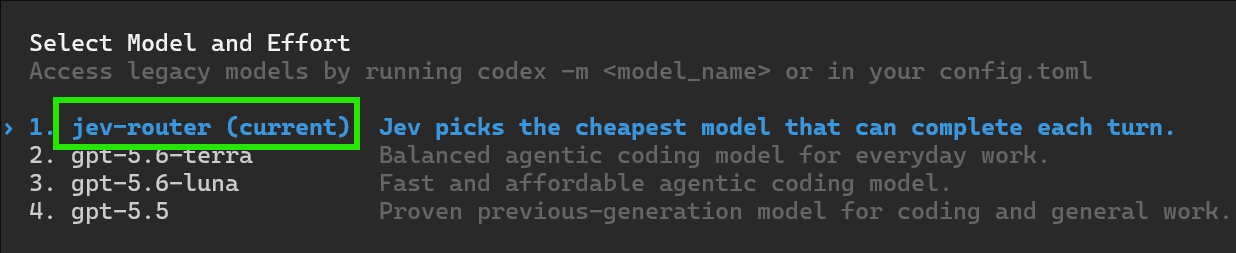
jev-codex launches Codex with a temporary Jev Router provider and selects jev-router.
The native /model picker still contains the models available to the account. Selecting a
concrete model pauses routing; selecting Jev Router resumes it.
Each fresh decision appears as Codex commentary:
[Jev] routed this turn to gpt-5.6-sol (jev, confidence 0.91).
jev-codex installs or refreshes the packaged $jev-explain skill when it starts, so it is
available from any repository without separate setup.
Codex's footer shows jev-router because it displays the selected picker entry,
not the model chosen behind that provider. If Jev is unavailable, the commentary names the
fallback model and explains how to set JEV_API_KEY.
How it works
Each command starts a loopback proxy, launches the real CLI, and forwards the CLI's existing
authorization headers without reading, storing, or modifying them.
you -> Claude Code -> jev-claude proxy -> Anthropic
                         |
                         +-> Jev: choose a tier

you -> OpenAI Codex -> jev-codex proxy -> OpenAI
                         |
                         +-> Jev: choose a tier
Claude Code uses ANTHROPIC_BASE_URL; Codex uses a temporary custom provider with
requires_openai_auth=true. Claude and Codex both use jev-router as the
routing sentinel.
Any concrete model selected by the user passes through unchanged.
Routing policy
One Jev call per fresh user turn selects a shared abstract tier:
| Tier |
Claude Code default |
Codex default |
| Fast |
Haiku |
gpt-5.6-luna |
| Balanced |
Sonnet |
gpt-5.6-terra |
| Strong |
Opus |
gpt-5.6-sol |
| Long |
Fable |
gpt-6-astra |
src/policy.mjs then applies these rules:
- explicit requests such as
use opus, use luna, or use strong win;
- failure, timeout, or an unrecognised Jev answer keeps the current model;
- low confidence never downgrades and caps upgrades at the balanced tier;
- large conversations refuse downgrades that would waste more prompt-cache work than they save;
- unavailable tiers step upward rather than silently choosing a weaker model;
- the long tier is disabled unless
JEV_ALLOW_FABLE=1.
Tool-loop continuations keep the tier chosen at the start of the turn. Main conversations and
sub-agents are pinned separately. Routing is fail-open: Jev failure never blocks the CLI.
Configuration
| Variable |
Interface |
Effect |
JEV_API_KEY |
Both |
Enables routing. TYPESAFE_API_KEY also works. |
JEV_ALLOW_FABLE |
Both |
Enables the opt-in long tier. |
JEV_DEBUG |
Both |
Logs decisions and rewrites to ~/.jev-claude.log in interactive sessions. |
JEV_DUMP |
Both |
Dumps request bodies for debugging wire-format changes. |
JEV_NO_STATUSLINE |
Claude |
Disables the injected Claude status line. |
JEV_CODEX_FAST_MODEL |
Codex |
Fast model; defaults to gpt-5.6-luna. |
JEV_CODEX_BALANCED_MODEL |
Codex |
Balanced model; defaults to gpt-5.6-terra. |
JEV_CODEX_STRONG_MODEL |
Codex |
Strong model; defaults to gpt-5.6-sol. |
JEV_CODEX_LONG_MODEL |
Codex |
Long model; defaults to gpt-6-astra. |
Existing environment variables have highest precedence, followed by .env in the launch
directory, ~/.jev-router.env, and the legacy ~/.jev-claude.env.
Tier definitions, Jev's question, confidence thresholds, and timeouts live in src/config.mjs.
Both launchers send Jev the exact models in the signed-in account's native catalog, so model
versions such as claude-opus-4-8 and claude-opus-5 remain separate choices. Static model
ids are used only until the CLI fetches its catalog.
Compatibility notes
- Claude Code needs schema normalisation for older MCP JSON Schema fields when a custom base
URL is active.
- Claude request fields unsupported by a routed tier, such as adaptive thinking on Haiku,
are removed before forwarding.
- Codex's current request format stores tool definitions inside its Responses API input.
- Codex's ChatGPT backend may stream SSE without a
Content-Type header; the proxy detects
the event stream from its first frame.
- Codex workspace-specific enterprise origins are internal to its built-in provider and
cannot be reproduced by a custom provider.
Development
npm install
echo "JEV_API_KEY=..." > .env

npm test
node test/live-routing.mjs
node bin/jev-claude.mjs -p "what is 2+2?"
node bin/jev-codex.mjs exec "what is 2+2?"
The test suite covers shared policy, both request formats, model rewriting, capability
handling, settings restoration, Codex authentication forwarding, native model-picker
injection, and decision display.
Limitations
- The user's prompt text is sent to TypeSafe for the routing decision. Nothing else is.
- Jev adds latency only to the first request of a turn; tool-loop continuations add none.
- Claude Code and Codex request formats are not public contracts. Use
JEV_DUMP to diagnose
upstream changes.
- Developed and tested on Windows against Claude Code v2.1.101 and OpenAI Codex v0.154.0.
Contributing
Issues and pull requests are welcome. Use Issues
to report bugs, request improvements, or ask questions. Include the relevant Claude Code or
Codex version, reproduction steps, expected behavior, and useful logs with secrets removed.
For a pull request:
- Open an issue first - all PRs by contributors should be linked with an approved issue. Explain the problem and validation in the issue description.
- Fork the repository and create a focused branch from
master.
- Make the smallest change that solves the problem.
- Run
npm test and include tests for non-trivial behavior changes.
- Claude/Copilot/Codex shall not be the contributors.
Please do not commit API keys or other secrets. All contributions require review, and only the
repository owner can merge pull requests.
License
MIT

 jev-router 会在 Claude Code 或 OpenAI Codex 的每一轮对话中自动挑选能胜任任务的、最便宜的 AI 模型:简单请求交给快速/廉价档,困难请求交给更强的档,同时完全不动各 CLI 原生的界面、工具和认证。