English · हिन्दी · 简体中文 · Bahasa Indonesia · اردو · Hausa · Português (Brasil) · বাংলা · Русский · አማርኛ
MixMusic
One player for YouTube Music and Spotify.
YouTube Music and Spotify client for macOS, Windows and Linux. YouTube Music works with no account. One search, one queue, mixed playlists, synced lyrics, themes and plugins.








Website ·
Download ·
Docs ·
Changelog
Why MixMusic
If your music is split between YouTube Music and Spotify, you usually need
two apps, with two searches, two queues and two libraries. MixMusic puts
both services in one player:
- One search. It looks through YouTube Music and Spotify at once, and
marks each result with the service it comes from.
- One queue and one library. A Spotify track can play right after a
YouTube Music one, and a playlist can hold tracks from both.
- No account needed. YouTube Music plays as soon as you open the app.
Sign in only if you want your own library. Spotify is optional.
- A small program. MixMusic is one Go program that draws its own
windows on the GPU. There is no browser inside it to download or keep in
memory.
- Yours to change. Four layouts and fourteen themes come with it, the
community adds more themes and plugins, and any command can have a key
of your own.
- Private. MixMusic has no account, server, analytics or telemetry of
its own.
- Free and open source, under the MIT license or the GPL 3.0.
Features
Search and play
- One search for both services. Results from YouTube Music and Spotify
side by side, each marked with its service. YouTube Music results show
how many times each track was played, so the original stands out from
covers.
- One queue. Mix tracks of both services, shuffle and repeat across
them, and let a radio carry on when the queue runs out.
- Explore. New releases, trending songs, the charts, moods and genres,
and related songs for what plays.
- Synced lyrics that follow the song, or plain text if you prefer.
- A mini player that stays on top of your other windows.
Your library
- Mixes: playlists that hold tracks from every service. Import a
service's playlist into a mix, and search and sort inside any of them.
- Liked songs from both services in one list.
- History and listening stats, day by day.
- Your accounts. Sign in to YouTube Music on Google's own page for your
home feed, liked songs, playlists, albums and artists, as your account or
one of its brand channels. Sign in to Spotify for your library there.
Likes, saved albums and playlists, and followed artists reach the service
too. What you play joins your YouTube Music history, which its
recommendations come from.
Spotify, three ways
- In MixMusic itself, at Spotify's quality, with no Spotify app open
(Premium, on Windows and macOS).
- On Spotify Connect: your Spotify app, your phone or a speaker.
- From YouTube Music: MixMusic plays the Spotify track's recording on
YouTube Music, which needs no Premium to play.
Sound
- Crossfade, even loudness and volume levelling.
- A ten-band equalizer with presets.
- A visualizer.
- An offline cache of the tracks you played.
On your desktop
- Media keys and the system's media controls on Windows, macOS and Linux.
- Global shortcuts of your own to play, pause, skip, change the volume,
mute, like or dislike what plays or show MixMusic, whichever window is
in front.
- The player's buttons on the taskbar thumbnail on Windows.
- Tray controls, notifications of new tracks, and start at login.
mixmusic:// links.- Last.fm: every track you hear joins your profile, and scrobbles made
offline are sent once you are back online.
- ListenBrainz: the same, beside Last.fm or without it, to
ListenBrainz or a server of your own, such as Maloja. Likes can go to
either as loves.
- Libre.fm: the same, to Libre.fm or another GNU FM server, with no
API account to create.
- Discord: your profile shows what plays, with its artwork and the time
left.
- Updates: MixMusic checks for a new release at start and every few
hours, checks its signature, and installs it when you say so, or by
itself if you choose.
Make it yours
- Layouts. Blend, the default, has rounded shapes and springy motion
on dense rows of big covers. Expressive, after Material 3 Expressive, is
playful, with tonal fills, pill buttons and a floating player bar. Crate
is restrained, so that the covers do the work, and Tiles is MixMusic's
first look, with flat tiles and giant lowercase words.
- Themes. Fourteen built in, each in any layout, with effects you can
tune, one theme for light mode and one for dark mode, and an accent
color of your own or taken from the artwork that plays. Material and
Material Dark make every color of the cover's.
- Community themes and plugins, one click away in the marketplace.
- Plugins add pages, commands, track actions and widgets through a
typed API, drawn in your theme.
- Keyboard first. Shortcuts for everything common, a key of your own for
any command, plugins' commands included, keys that control the music
from any app, and a command palette (Ctrl K) for
the rest.
- A settings file. Your settings are
settings.json in your data folder
(%AppData%\MixMusic on Windows, ~/Library/Application Support/MixMusic
on macOS, ~/.config/MixMusic on Linux), which you can keep with your
dotfiles. Save it while MixMusic runs, and it applies at once; Settings ›
Desktop › Settings file opens it.
A look around
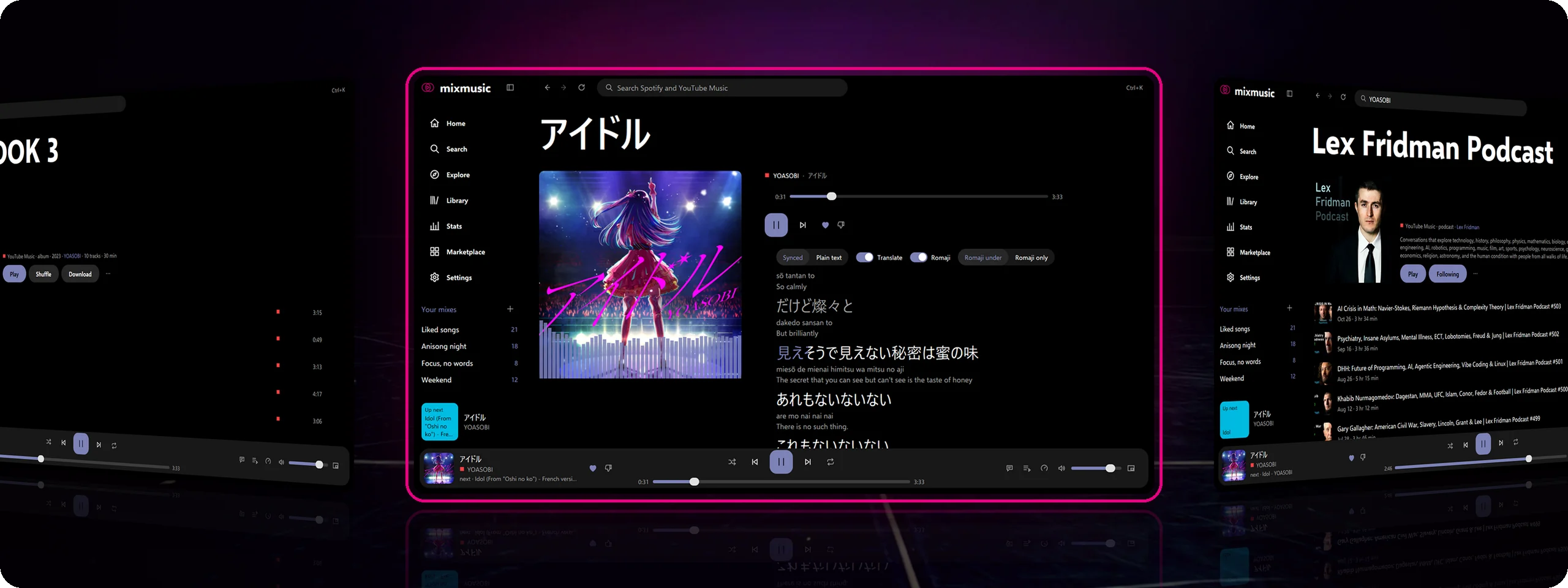
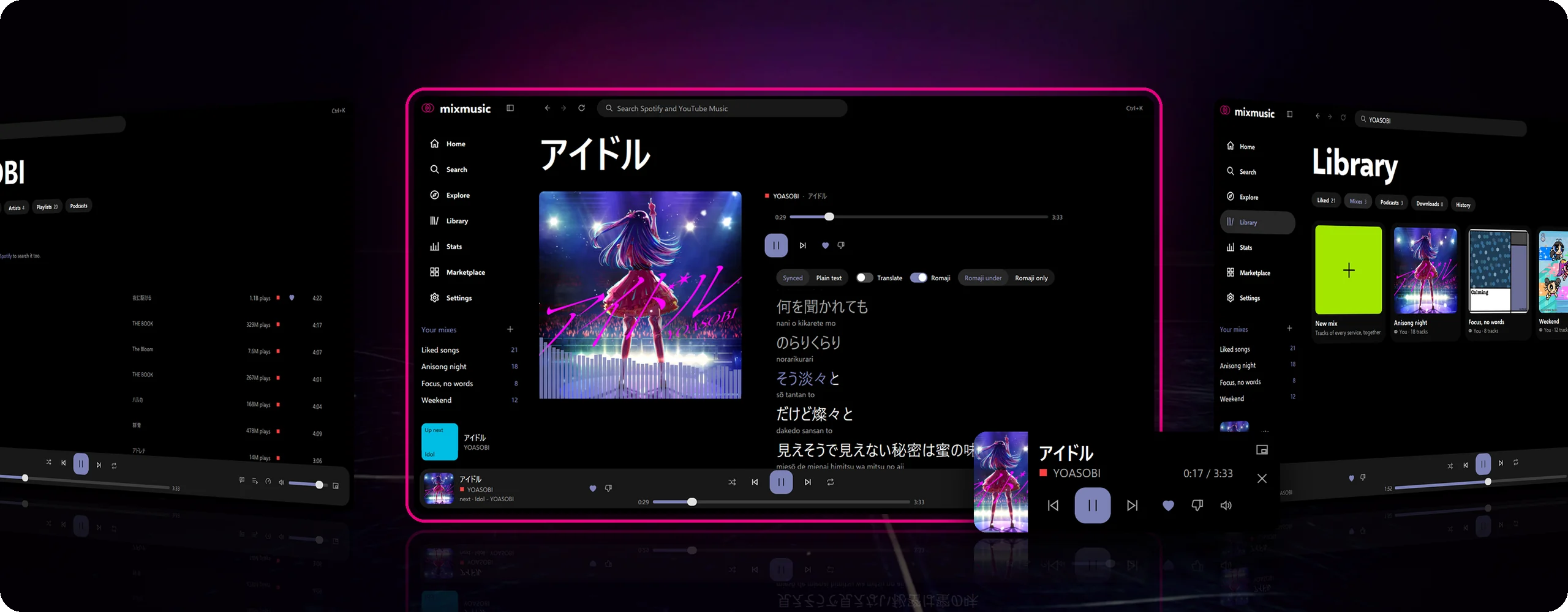
Listen. In the middle, now playing アイドル by YOASOBI: each line lights up as it's sung, with romaji and a translation under it. On the left, an album; on the right, a podcast you follow.
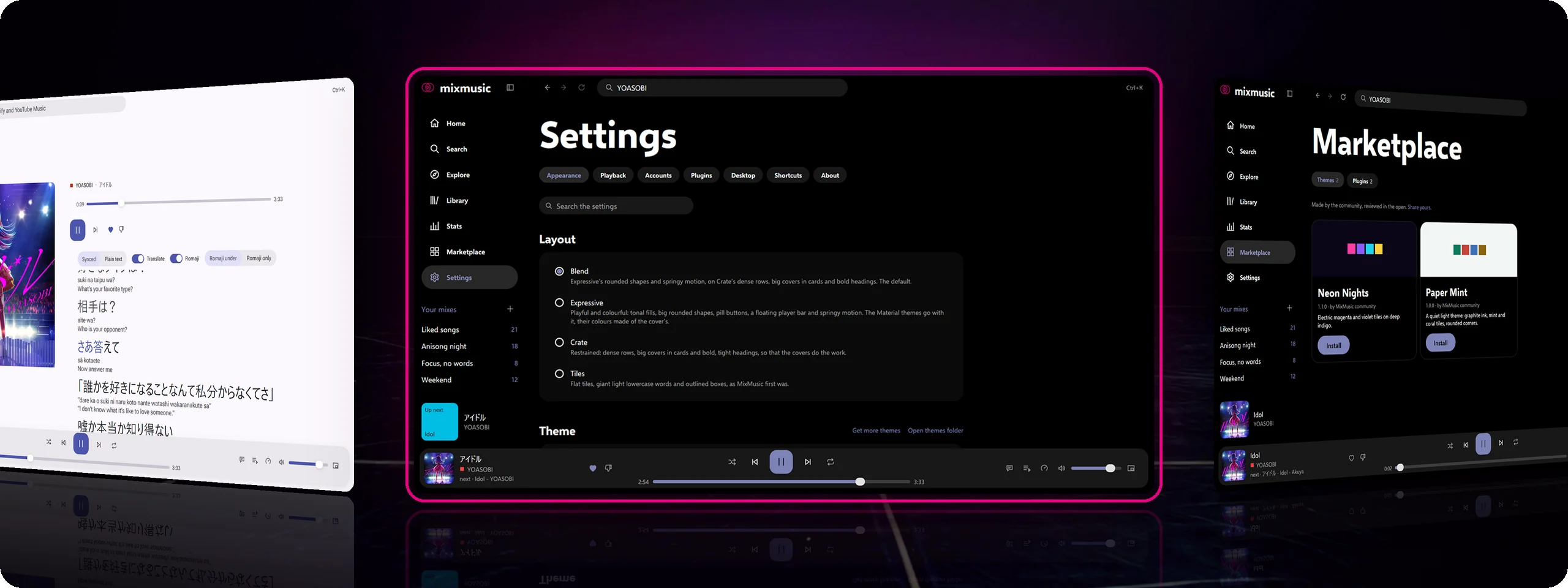
Make it yours. In the middle, the four layouts: Blend, the default, Expressive, Crate and Tiles, under the themes. On the left, a Material theme that takes its colours from the cover that plays. On the right, community themes in the marketplace.
Install
Download the file for your system from the
latest release:
| System |
Download |
| macOS 12 and later (Apple silicon and Intel) |
mixmusic-<version>-macos-universal.dmg |
| Windows 10 and 11 (x64, Arm), installer |
mixmusic-<version>-windows-<arch>-setup.exe |
| Windows, portable, no installation |
mixmusic-<version>-windows-<arch>-portable.zip |
| Debian, Ubuntu and derivatives |
mixmusic-<version>-linux-<arch>.deb |
| Fedora, openSUSE and derivatives |
mixmusic-<version>-linux-<arch>.rpm |
| Arch Linux and derivatives (coming soon) |
mixmusic-bin on the AUR: yay -S mixmusic-bin |
| Any Linux, one file |
mixmusic-<version>-linux-<arch>.AppImage |
| Any Linux, sandboxed (Flatpak) |
mixmusic-<version>-linux-<arch>.flatpak |
| Any Linux, in your home folder |
mixmusic-<version>-linux-<arch>.tar.gz, with install.sh |
<arch> is amd64 for x64 and arm64 for Arm. Each release lists
SHA256SUMS to check the downloads with. You don't need the files named
update-…, ….delta, mixmusic-<version>-macos-… or
-windows-<arch>.tar.gz: installed apps update from them.
The installers, the portable zip and the Linux archive update themselves.
The .deb, the .rpm, the AppImage and the Flatpak can't replace their
own files, so MixMusic tells you when a new version is out and downloads
it for you. The AUR's mixmusic-bin updates with the rest of your
system. For the portable zip, unpack it anywhere and open
MixMusic.exe. For the AppImage, make it executable (chmod +x) and open
it. For the Flatpak, open it with your software center, or run
flatpak install ./mixmusic-<version>-linux-<arch>.flatpak; the first time,
Flatpak fetches the GNOME runtime from Flathub.
On a Mac, Homebrew installs MixMusic too, and
brew upgrade updates it:
brew install --cask fzn0x/tap/mixmusic
The first launch
macOS: the app isn't notarized by Apple yet, so the first time you
open it, macOS says it can't check it. Open it anyway from System
Settings › Privacy & Security › Open Anyway, or run this once in
Terminal:
xattr -dr com.apple.quarantine /Applications/MixMusic.app
Windows: the installer isn't signed yet, so SmartScreen may warn
about it: choose More info, then Run anyway. Signing in to YouTube Music
and playing Spotify in MixMusic need the WebView2 Runtime, which Windows
11 includes.
Linux: MixMusic needs GTK 3, and PulseAudio (PipeWire serves it too)
or ALSA. Signing in to YouTube Music needs WebKitGTK 4.1, the tray icon
needs libayatana-appindicator3, and keeping your sign-ins in the
system's keyring needs libsecret. The .deb and the .rpm install
them, and the Flatpak brings them with it; for the AppImage and the
archive:
# Debian and Ubuntu
sudo apt install libgtk-3-0 libpulse0 libwebkit2gtk-4.1-0 libayatana-appindicator3-1 libsecret-1-0
# Fedora
sudo dnf install gtk3 pulseaudio-libs webkit2gtk4.1 libayatana-appindicator-gtk3 libsecret
Every system: MixMusic finds the audio of most YouTube Music tracks
itself. For the rest, such as tracks made for children, it uses
yt-dlp, which it installs for you
from Settings › Playback and keeps up to date. yt-dlp needs a JavaScript
runtime: Deno, Node.js, Bun or QuickJS. The Flatpak
has Node.js.
The Flatpak
The Flatpak runs MixMusic in a sandbox, which sees the network, the sound
server, the display and the GPU, and none of your home folder. MixMusic
keeps its settings and library in ~/.var/app/io.github.fzn0x.mixmusic,
apart from a .deb, .rpm, AppImage or archive copy, and both can run at
once. To bring a copy's settings and library over, quit both, then copy
settings.json, library.json, queue.json, positions.json and the
addons and mix-covers folders from ~/.config/MixMusic into
~/.var/app/io.github.fzn0x.mixmusic/config/MixMusic. Quit both first:
a running MixMusic keeps library.json and most other files in memory
and writes over a copied one at its next save. Then sign in to your
accounts again: sign-ins stay in the other copy's keyring. The
data and privacy page says
what each file holds.
In the Flatpak, start at login goes through your desktop, which may ask
you first, and a yt-dlp of your own must be in
~/.var/app/io.github.fzn0x.mixmusic, as the sandbox sees no other
folder. A Discord app that isn't a Flatpak shows what plays only if it
was running when MixMusic started, until it restarts; Discord as a
Flatpak works either way. The Flatpak is new: tell us in an
issue how it runs on your
desktop.
Accounts (all optional)
- YouTube Music: choose Sign in to YouTube Music in Settings › Accounts
and sign in to Google in the window that opens. What you type goes to
Google only. MixMusic keeps the session encrypted, with a key in your
system's keyring where there is one. Where that window can't open, or
Google refuses it, sign in with your own browser, which MixMusic opens
with a new profile of its own and deletes once you're in; import the
session of a browser you signed in with (MixMusic reads it with its
yt-dlp, and keeps YouTube's cookies alone); or paste the Cookie header
of a signed-in music.youtube.com tab.
- Spotify: Spotify lets an app serve up to five users, and only while
its owner has Premium, so you sign in with a Spotify app of your own. It
takes two minutes: docs/spotify.md walks you through
it.
- Last.fm: create an API account at
last.fm/api/account/create
(any name, no callback URL), paste its API key and shared secret in
Settings › Accounts, and approve MixMusic in your browser.
- ListenBrainz: paste the user token of your
ListenBrainz settings, or of your
own server, in Settings › Accounts.
- Libre.fm: connect in Settings › Accounts, and approve MixMusic on
Libre.fm's page in your browser, or another GNU FM server's.
- Discord: while the Discord app runs, your profile shows what you
listen to. Turn it off in Settings › Desktop.
Something not working? docs/troubleshooting.md
covers the common problems and the known issues.
Build from source
You need Go 1.27.3 or later, Bun
1.2 or later, which runs MyGo's command line, and Git. MyGo needs no C
compiler, so any system builds MixMusic for every system.
Windows
winget install GoLang.Go
winget install Oven-sh.Bun
winget install Git.Git
Open a new terminal, then:
git clone https://github.com/fzn0x/mixmusic
cd mixmusic
bun install
bun run dev
Signing in and Spotify playback need the WebView2 Runtime, which Windows 11
includes. On Windows 10, install it from
Microsoft.
macOS
With Homebrew:
brew install go oven-sh/bun/bun
git clone https://github.com/fzn0x/mixmusic
cd mixmusic
bun install
bun run dev
Linux
Install Go from go.dev/dl (distribution packages are
often older than 1.27.3), then Bun and the libraries MixMusic runs with:
curl -fsSL https://bun.sh/install | bash
# Debian and Ubuntu
sudo apt install git libgtk-3-0 libpulse0 libwebkit2gtk-4.1-0 libayatana-appindicator3-1 libsecret-1-0
# Fedora
sudo dnf install git gtk3 pulseaudio-libs webkit2gtk4.1 libayatana-appindicator-gtk3 libsecret
Then:
git clone https://github.com/fzn0x/mixmusic
cd mixmusic
bun install
bun run dev
Nix
With Nix, nix develop gives you the tools releases
are built with, at the versions flake.lock pins: Go, Bun, NSIS,
GoReleaser and Zola. nix build builds MixMusic for Linux from source,
into result/.
Develop
bun run dev builds the app, starts it, and rebuilds it as you edit. Its
data stays apart from an installed MixMusic, under the name
MixMusic Dev.
bun run build:plugins          # the plugins' JavaScript, from their TypeScript
go test ./...                  # the app's tests
bun run typecheck              # the plugin SDK and the community's plugins
go run ./tools/registry -check # the community registry
bun run build                  # the packaged app for this system, in build/
bun run build -- -platform windows/amd64,linux/amd64,linux/arm64
In the Nix shell, build Linux downloads with
.github/scripts/build.sh linux/amd64,linux/arm64, as releases do. A plain
bun run build there makes a Linux program that asks for Nix's own loader,
and it starts only on NixOS. go run ./tools/elfloader build/linux-amd64
checks a build.
The website is in site/, built with
Zola, and the guides in docs/ are its
/docs/ pages. go run ./tools/sitedocs && zola --root site serve
previews it. Releases are built in the Nix shell and published by
GoReleaser (.goreleaser.yaml).
docs/architecture explains how the parts fit
together.
Layout
The app is the root package, with the packages of internal/ under it. The
packages outside internal/ are for anyone to import, and documented on
pkg.go.dev.
*.go                 the app and its windows: the pages, the player bar, the
                     mini player, the tray, media keys, deep links
fonts/               the typefaces the windows draw with
internal/app         the services the windows call, and the desktop integration
internal/player      the queue, played by the audio engine or on Spotify's devices
internal/audio       MixMusic's audio engine, and the system's audio output
internal/plugins     plugins, each in a JavaScript engine of its own
internal/youtube     YouTube Music's catalog, and your account there
internal/spotify     the Spotify Web API, its sign-in and Spotify Connect
internal/stream      audio streams, from YouTube or yt-dlp, opened for the engine
internal/match       Spotify tracks matched to their YouTube Music recordings
internal/romaji      Japanese lyrics in romaji, kanji read by kagome
internal/library     liked and disliked songs, mixes, history and stats
internal/lastfm      scrobbling to Last.fm
internal/discord     what plays, on your Discord profile
internal/diag        the log, without secrets, and the reports of crashes
internal/addons      themes and plugins, and the community registry
builtin/themes       the themes MixMusic ships with
public/              the page of Spotify's player, on Windows
sdk/                 the types of the plugin API
community/           community themes and plugins, and their registry
The packages you can import:
opus/                an Opus decoder in pure Go, a port of libopus's
aac/                 an AAC-LC decoder in pure Go
ac3/                 an AC-3 and E-AC-3 decoder in pure Go, written from ATSC A/52
webm/                the audio of WebM files: packets, times and seeking
mp4/                 the audio of MP4 files: packets, times and seeking
resample/            sample rate conversion, with Kaiser-windowed sincs
lyrics/              synced lyrics from Better Lyrics, Unison and LRCLIB, and translations
brand/               MixMusic's logo, for code that draws it
Anyone can install community themes and plugins from the marketplace, the
store icon in the sidebar, and you can add yours.
Make a theme
A theme is a theme.json file that sets colors, fonts and corners, which
show in the layout the user chose.
docs/themes.md lists every token and shows a complete
theme. To try yours, put its folder in the themes folder (Settings ›
Appearance › open themes folder) and choose it in Settings › Appearance.
Make a plugin
A plugin is a small module, written in TypeScript or JavaScript, that adds
pages, commands, track actions and widgets.
docs/plugins.md documents the API, with its
types for your editor. The community's
sleep timer and
spectrum are working examples.
Share it
- Fork this repository.
- Add one folder:
community/themes/<id>/ for a theme, or
community/plugins/<id>/ for a plugin, with its plugin.json and its
index.ts.
- Run
bun run build:plugins, go run ./tools/registry and
go run ./tools/registry -check.
- Open a pull request.
Once it is merged, CI publishes it to the
registry branch, and it
shows up in everyone's marketplace. community/README.md
has the details.
Privacy
MixMusic has no account, server, analytics or telemetry of its own. It
talks to:
- YouTube and Google: YouTube Music's catalog, its streams and how loud
each track is, asked for while signed out, and the artwork; some streams
through yt-dlp. Signed in, your library there, and, unless you turn it
off in Settings › Accounts, the tracks you play, which join your YouTube
Music history.
- Spotify, once you sign in: your library, your Spotify Connect devices,
and Spotify's player, loaded from
sdk.scdn.co, when Spotify plays in
MixMusic.
- Better Lyrics: the title, first artist, album and length of the track
that plays, to find its lyrics, once it has an album and a length.
- Unison: the video ID of the track that plays, or, without one, its
title, artists, album and length, to find its lyrics. Only while you
turn on translate, or romanize, beside the lyrics, the lyrics of the
track that plays, with its video ID, which Unison has Google translate.
- LRCLIB: the title, artists, album and length of the track that plays,
to find its lyrics.
- SponsorBlock, while you turn on Skip the parts SponsorBlock marks:
the first 4 characters of the hash of each video's ID, never the ID, to
find the parts it marks.
- GitHub: a check for a new version at start and every few hours,
which you can turn off in Settings › About; the community registry when
you open the marketplace; the downloads of yt-dlp; and, the first time
you turn on romaji beside Japanese lyrics, the dictionary of the
readings of kanji (11.7 MB). Romaji is made on your computer: the
lyrics aren't sent.
- Last.fm, once you connect it: what you play.
- ListenBrainz, or your own server of its API, once you connect it:
what you play.
- Libre.fm, or another GNU FM server, once you connect it: what you
play.
- Discord, unless you turn it off: what plays, sent to the Discord app
on your computer, which shows it on your profile.
What it keeps on your computer:
- Your settings and library (liked and disliked songs, mixes, history and
recent searches), in the folder Settings › About names.
- The tracks you played, in the cache, as much as you allow in Settings ›
Playback, and how loud YouTube measured them.
- The covers you saw, up to 256 MB.
- The translations of lyrics you turned on, by track and language, and
the dictionary romaji reads kanji with, once you turned it on.
- Your sign-ins, the YouTube Music session included, in the system's
keyring. On Windows, when the Credential Manager can't keep one, it goes
in a file encrypted for your Windows account; on Linux without a
keyring, in files only your user can read.
- The log, without your sign-ins.
The library's history page clears what you played, Settings › Playback
clears the cache and the covers, and signing out of a service deletes its
sign-in.
On Windows, the visualizer hears the audio of Spotify playing on this
computer, in MixMusic or in the Spotify app, through Windows' process
loopback, which hears only that app. On macOS 14.2 and later, it hears
Spotify playing in MixMusic through a process tap, once you allow it, as
macOS asks. It analyzes the audio in memory and never records or sends
it.
Credits
MixMusic is built on these projects:
- MyGo, the desktop framework MixMusic
is built with. MixMusic uses MyGo's native UI: MyGo draws every window
itself, in Go, without a webview, from the pages and the player bar to the
mini player. Its command line packages the app, with its installers and
the signed updates it updates itself from.
- Go, the language of the app, with
purego, which calls the system's
libraries without cgo, and golang.org/x/image
and golang.org/x/text.
- Sobek, the JavaScript engine each
plugin runs in.
- Nix, which pins the tools releases are built
with, and builds MixMusic for Linux from source.
- GoReleaser, which publishes the releases, and
its nFPM, which makes the RPM packages.
- Bun, which runs the build, and
TypeScript, which compiles the
plugins and checks the plugin SDK's types.
- Zola, which builds the website.
- NSIS, which makes the Windows
installers, and appimagetool,
the AppImages.
- yt-dlp, which finds the audio of
the tracks MixMusic can't find itself.
- Better Lyrics, whose service keeps lyrics
timed word by word.
- Unison, the open, crowdsourced database of
lyrics, under the Unison Community License, and LRCLIB, the open
database of synced lyrics.
- kagome, the Japanese
morphological analyser that reads the kanji of lyrics for their romaji,
with the IPA dictionary of
kagome-dict, made from
mecab-ipadic, which MixMusic downloads the first time romaji is turned
on.
- libopus, whose decoder the Opus decoder is a
port of, and SharpJaad, the C#
port of JAAD the AAC decoder
derives from.
- FFmpeg, which the decoders' tests compare with.
- Selawik,
Quicksand,
Roboto Flex and
Archivo, the typefaces of
the windows.
- Material Color Utilities,
whose HCT color science the Material themes' colors are a port of.
- Kevin MacLeod, whose music, under
CC BY 4.0, plays on the
website.
Contributing
Fixes, features, themes, plugins and bug reports are all welcome.
- Report a problem from Settings › About › report a problem. It opens a
new GitHub issue with your version, system, theme and plugins filled in.
Or open an issue yourself.
- Send a change as a pull request. CONTRIBUTING.md
explains the checks to run, the commit style, and the changelog entry
that a change people will notice needs.
- Share a theme or a plugin: see Community.
CONTRIBUTORS.md thanks the people whose code, ideas and
reports shaped MixMusic.
License
MixMusic is dual-licensed: use it under the MIT license or
the GNU General Public License, version 3, whichever you
prefer. Contributions are accepted under both. The typefaces in fonts are
under the SIL Open Font License: Selawik's,
Quicksand's,
Roboto Flex's and
Archivo's. The Opus decoder is a port of
libopus, under its BSD license, the AAC decoder
derives from SharpJaad, under its MIT license, and
the HCT color science is a port of Material Color Utilities, under
its Apache license.
MixMusic is not affiliated with, endorsed by or sponsored by Spotify or
Google. It plays what these services offer their users, through the
services' own interfaces; use it as their terms allow. Spotify and YouTube
Music are trademarks of their owners.

 MixMusic 是一款原生桌面播放器,可以在一个应用里播放 YouTube Music 和 Spotify,统一搜索、统一播放队列、统一音乐库,支持 macOS、Windows 和 Linux。