PanSou 网盘搜索API
PanSou是一个高性能的网盘资源搜索API服务,支持TG搜索和自定义插件搜索。系统设计以性能和可扩展性为核心,支持并发搜索、结果智能排序和网盘类型分类。
- 高性能搜索:并发执行多个TG频道及异步插件搜索,显著提升搜索速度;工作池设计,高效管理并发任务
- 网盘类型分类:自动识别多种网盘链接,按类型归类展示
- 智能排序:基于插件等级、时间新鲜度和优先关键词的多维度综合排序算法
- 异步插件系统:支持通过插件扩展搜索来源,支持"尽快响应,持续处理"的异步搜索模式,解决了某些搜索源响应时间长的问题。详情参考插件开发指南,AI 辅助开发可参考PanSou 插件开发 Skill 使用说明
- 二级缓存:分片内存+分片磁盘缓存机制,大幅提升重复查询速度和并发性能
开发者文档
支持的网盘类型
百度网盘 (baidu)、阿里云盘 (aliyun)、夸克网盘 (quark)、光鸭云盘 (guangya)、天翼云盘 (tianyi)、UC网盘 (uc)、移动云盘 (mobile)、115网盘 (115)、PikPak (pikpak)、迅雷网盘 (xunlei)、123网盘 (123)、磁力链接 (magnet)、电驴链接 (ed2k)、其他 (others)
快速开始
在 Github 上先 本项目,并点上 Star !!!
使用Docker部署
qqpd搜索插件文档
gying搜索插件文档
weibo搜索插件文档
常见问题总结
TG/QQ频道/插件/微博
1、前后端集成版
直接使用Docker命令
一键启动,开箱即用
docker run -d --name pansou -p 80:80 ghcr.io/fish2018/pansou-web
使用Docker Compose(推荐)
# 下载配置文件
curl -o docker-compose.yml https://raw.githubusercontent.com/fish2018/pansou-web/refs/heads/main/docker-compose.yml

# 启动服务
docker-compose up -d

# 查看日志
docker-compose logs -f
2、纯后端API版
直接使用Docker命令
docker run -d --name pansou -p 8888:8888 ghcr.io/fish2018/pansou:latest
使用Docker Compose(推荐)
# 下载配置文件
curl -o docker-compose.yml  https://raw.githubusercontent.com/fish2018/pansou/refs/heads/main/docker-compose.yml

# 启动服务
docker-compose up -d

# 访问服务
http://localhost:8888
从源码安装
环境要求
- Go 1.18+
- 可选:SOCKS5代理(用于访问受限地区的Telegram站点)
- 克隆仓库
git clone https://github.com/fish2018/pansou.git
cd pansou
- 配置环境变量(可选)
基础配置
| 环境变量 |
描述 |
默认值 |
说明 |
| PORT |
服务端口 |
8888 |
修改服务监听端口 |
| PROXY |
SOCKS5代理 |
无 |
如:PROXY=socks5://127.0.0.1:1080 |
| HTTPS_PROXY/HTTP_PROXY |
HTTPS/HTTP代理 |
无 |
如:HTTPS_PROXY=http://127.0.0.1:1080,HTTP_PROXY=http://127.0.0.1:1080 |
| CHANNELS |
默认搜索的TG频道 |
tgsearchers3 |
多个频道用逗号分隔 |
| ENABLED_PLUGINS |
指定启用插件,多个插件用逗号分隔 |
无 |
必须显式指定 |
认证配置(可选)
PanSou支持可选的安全认证功能,默认关闭。开启后,所有API接口(除登录接口外)都需要提供有效的JWT Token。详见认证系统设计文档。
| 环境变量 |
描述 |
默认值 |
说明 |
| AUTH_ENABLED |
是否启用认证 |
false |
设置为true启用认证功能 |
| AUTH_USERS |
用户账号配置 |
无 |
格式:user1:pass1,user2:pass2 |
| AUTH_TOKEN_EXPIRY |
Token有效期(小时) |
24 |
JWT Token的有效时长 |
| AUTH_JWT_SECRET |
JWT签名密钥 |
自动生成 |
用于签名Token,建议手动设置 |
认证配置示例:
# 启用认证并配置单个用户
docker run -d --name pansou -p 8888:8888 \
  -e AUTH_ENABLED=true \
  -e AUTH_USERS=admin:admin123 \
  -e AUTH_TOKEN_EXPIRY=24 \
  ghcr.io/fish2018/pansou:latest

# 配置多个用户
docker run -d --name pansou -p 8888:8888 \
  -e AUTH_ENABLED=true \
  -e AUTH_USERS=admin:pass123,user1:pass456,user2:pass789 \
  ghcr.io/fish2018/pansou:latest
认证API接口:
POST /api/auth/login - 用户登录,获取TokenPOST /api/auth/verify - 验证Token有效性POST /api/auth/logout - 退出登录(客户端删除Token)
使用Token调用API:
# 1. 登录获取Token
curl -X POST http://localhost:8888/api/auth/login \
  -H "Content-Type: application/json" \
  -d '{"username":"admin","password":"admin123"}'

# 响应:{"token":"eyJhbGc...","expires_at":1234567890,"username":"admin"}

# 2. 使用Token调用搜索API
curl -X POST http://localhost:8888/api/search \
  -H "Authorization: Bearer eyJhbGc..." \
  -H "Content-Type: application/json" \
  -d '{"kw":"速度与激情"}'
高级配置(默认值即可)
点击展开高级配置选项(通常不需要修改)
| 环境变量 |
描述 |
默认值 |
| CONCURRENCY |
并发搜索数 |
自动计算 |
| CACHE_TTL |
缓存有效期(分钟) |
60 |
| CACHE_MAX_SIZE |
最大缓存大小(MB) |
100 |
| PLUGIN_TIMEOUT |
插件超时时间(秒) |
30 |
| ASYNC_RESPONSE_TIMEOUT |
快速响应超时(秒) |
4 |
| ASYNC_LOG_ENABLED |
异步插件详细日志 |
true |
| CACHE_PATH |
缓存文件路径 |
./cache |
| SHARD_COUNT |
缓存分片数量 |
8 |
| CACHE_WRITE_STRATEGY |
缓存写入策略(immediate/hybrid) |
hybrid |
| ENABLE_COMPRESSION |
是否启用压缩 |
false |
| MIN_SIZE_TO_COMPRESS |
最小压缩阈值(字节) |
1024 |
| GC_PERCENT |
Go GC触发百分比 |
50 |
| ASYNC_MAX_BACKGROUND_WORKERS |
最大后台工作者数量 |
CPU核心数×5 |
| ASYNC_MAX_BACKGROUND_TASKS |
最大后台任务数量 |
工作者数×5 |
| ASYNC_CACHE_TTL_HOURS |
异步缓存有效期(小时) |
1 |
| ASYNC_PLUGIN_ENABLED |
异步插件是否启用 |
true |
| HTTP_READ_TIMEOUT |
HTTP读取超时(秒) |
自动计算 |
| HTTP_WRITE_TIMEOUT |
HTTP写入超时(秒) |
自动计算 |
| HTTP_IDLE_TIMEOUT |
HTTP空闲超时(秒) |
120 |
| HTTP_MAX_CONNS |
HTTP最大连接数 |
自动计算 |
- 构建
CGO_ENABLED=0 GOOS=linux GOARCH=amd64 go build -ldflags="-s -w -extldflags '-static'" -o pansou .
- 运行
./pansou
其他配置参考
点击展开 supervisor 配置参考
[program:pansou]
environment=PORT=8888,CHANNELS="tgsearchers4,Aliyun_4K_Movies,bdbdndn11,yunpanx,bsbdbfjfjff,yp123pan,sbsbsnsqq,yunpanxunlei,tianyifc,BaiduCloudDisk,txtyzy,peccxinpd,gotopan,PanjClub,kkxlzy,baicaoZY,MCPH01,bdwpzhpd,ysxb48,jdjdn1111,yggpan,MCPH086,zaihuayun,Q66Share,Oscar_4Kmovies,ucwpzy,shareAliyun,alyp_1,dianyingshare,Quark_Movies,XiangxiuNBB,ydypzyfx,ucquark,xx123pan,yingshifenxiang123,zyfb123,tyypzhpd,tianyirigeng,cloudtianyi,hdhhd21,Lsp115,oneonefivewpfx,qixingzhenren,taoxgzy,Channel_Shares_115,tyysypzypd,vip115hot,wp123zy,yunpan139,yunpan189,yunpanuc,yydf_hzl,leoziyuan,pikpakpan,Q_dongman,yoyokuakeduanju",ENABLED_PLUGINS="labi,zhizhen,shandian,duoduo,muou"
command=/home/work/pansou/pansou
directory=/home/work/pansou
autostart=true
autorestart=true
startsecs=5
startretries=3
exitcodes=0
stopwaitsecs=10
stopasgroup=true
killasgroup=true
点击展开 nginx 配置参考
server {
    listen 80;
    server_name pansou.252035.xyz;

    # 将 HTTP 重定向到 HTTPS
    return 301 https://$host$request_uri;
}

limit_req_zone $binary_remote_addr zone=api_limit:10m rate=60r/m;

server {
    listen 443 ssl http2;
    server_name pansou.252035.xyz;

    access_log /home/work/logs/pansou.log;

    # 证书和密钥路径
    ssl_certificate /etc/letsencrypt/live/252035.xyz/fullchain.pem;
    ssl_certificate_key /etc/letsencrypt/live/252035.xyz/privkey.pem;

    # 增强 SSL 安全性
    ssl_protocols TLSv1.2 TLSv1.3;
    ssl_ciphers EECDH+AESGCM:EDH+AESGCM:AES256+EECDH:AES256+EDH;
    ssl_prefer_server_ciphers on;

    # 后端代理,应用限流
    location / {
        # 应用限流规则
        limit_req zone=api_limit burst=10 nodelay;
        # 当超过限制时返回 429 状态码
        limit_req_status 429;

        proxy_pass http://127.0.0.1:8888;
        proxy_set_header Host $host;
        proxy_set_header X-Real-IP $remote_addr;
        proxy_set_header X-Forwarded-For $proxy_add_x_forwarded_for;
        proxy_set_header X-Forwarded-Proto $scheme;
    }
}
API文档
认证说明
当启用认证功能(AUTH_ENABLED=true)时,除登录和健康检测接口外的所有API接口都需要提供有效的JWT Token。
请求头格式:
Authorization: Bearer <your-jwt-token>
获取Token:
- 调用登录接口获取Token(详见下方认证API)
- 在后续所有API请求的Header中添加
Authorization: Bearer <token>
- Token过期后需要重新登录获取新Token
示例:
# 未启用认证时
curl -X POST http://localhost:8888/api/search \
  -H "Content-Type: application/json" \
  -d '{"kw":"速度与激情"}'

# 启用认证时
curl -X POST http://localhost:8888/api/search \
  -H "Content-Type: application/json" \
  -H "Authorization: Bearer eyJhbGc..." \
  -d '{"kw":"速度与激情"}'
认证API
用户登录
获取JWT Token用于后续API调用。
接口地址:/api/auth/login
请求方法:POST
Content-Type:application/json
是否需要认证:否
请求参数:
| 参数名 |
类型 |
必填 |
描述 |
| username |
string |
是 |
用户名 |
| password |
string |
是 |
密码 |
请求示例:
curl -X POST http://localhost:8888/api/auth/login \
  -H "Content-Type: application/json" \
  -d '{"username":"admin","password":"admin123"}'
成功响应:
{
  "token": "eyJhbGciOiJIUzI1NiIsInR5cCI6IkpXVCJ9...",
  "expires_at": 1234567890,
  "username": "admin"
}
错误响应:
{
  "error": "用户名或密码错误"
}
验证Token
验证当前Token是否有效。
接口地址:/api/auth/verify
请求方法:POST
是否需要认证:是
请求示例:
curl -X POST http://localhost:8888/api/auth/verify \
  -H "Authorization: Bearer eyJhbGc..."
成功响应:
{
  "valid": true,
  "username": "admin"
}
退出登录
退出当前登录(客户端删除Token即可)。
接口地址:/api/auth/logout
请求方法:POST
是否需要认证:否
请求示例:
curl -X POST http://localhost:8888/api/auth/logout
成功响应:
{
  "message": "退出成功"
}
搜索API
搜索网盘资源。
接口地址:/api/search
请求方法:POST 或 GET
Content-Type:application/json(POST方法)
是否需要认证:取决于AUTH_ENABLED配置
POST请求参数:
| 参数名 |
类型 |
必填 |
描述 |
| kw |
string |
是 |
搜索关键词 |
| channels |
string[] |
否 |
搜索的频道列表,不提供则使用默认配置 |
| conc |
number |
否 |
并发搜索数量,不提供则自动设置为频道数+插件数+10 |
| refresh |
boolean |
否 |
强制刷新,不使用缓存,便于调试和获取最新数据 |
| res |
string |
否 |
结果类型:all(返回所有结果)、results(仅返回results)、merge(仅返回merged_by_type),默认为merge |
| src |
string |
否 |
数据来源类型:all(默认,全部来源)、tg(仅Telegram)、plugin(仅插件) |
| plugins |
string[] |
否 |
指定搜索的插件列表,不指定则搜索全部插件 |
| cloud_types |
string[] |
否 |
指定返回的网盘类型列表,支持:baidu、aliyun、quark、guangya、tianyi、uc、mobile、115、pikpak、xunlei、123、magnet、ed2k,不指定则返回所有类型 |
| ext |
object |
否 |
扩展参数,用于传递给插件的自定义参数,如{"title_en":"English Title", "is_all":true} |
| filter |
object |
否 |
过滤配置,用于过滤返回结果。格式:{"include":["关键词1","关键词2"],"exclude":["排除词1","排除词2"]}。include为包含关键词列表(OR关系),exclude为排除关键词列表(OR关系) |
GET请求参数:
| 参数名 |
类型 |
必填 |
描述 |
| kw |
string |
是 |
搜索关键词 |
| channels |
string |
否 |
搜索的频道列表,使用英文逗号分隔多个频道,不提供则使用默认配置 |
| conc |
number |
否 |
并发搜索数量,不提供则自动设置为频道数+插件数+10 |
| refresh |
boolean |
否 |
强制刷新,设置为"true"表示不使用缓存 |
| res |
string |
否 |
结果类型:all(返回所有结果)、results(仅返回results)、merge(仅返回merged_by_type),默认为merge |
| src |
string |
否 |
数据来源类型:all(默认,全部来源)、tg(仅Telegram)、plugin(仅插件) |
| plugins |
string |
否 |
指定搜索的插件列表,使用英文逗号分隔多个插件名,不指定则搜索全部插件 |
| cloud_types |
string |
否 |
指定返回的网盘类型列表,使用英文逗号分隔多个类型,支持:baidu、aliyun、quark、guangya、tianyi、uc、mobile、115、pikpak、xunlei、123、magnet、ed2k,不指定则返回所有类型 |
| ext |
string |
否 |
JSON格式的扩展参数,用于传递给插件的自定义参数,如{"title_en":"English Title", "is_all":true} |
| filter |
string |
否 |
JSON格式的过滤配置,用于过滤返回结果。格式:{"include":["关键词1","关键词2"],"exclude":["排除词1","排除词2"]} |
POST请求示例:
# 未启用认证
curl -X POST http://localhost:8888/api/search \
  -H "Content-Type: application/json" \
  -d '{
    "kw": "速度与激情",
    "channels": ["tgsearchers3", "xxx"],
    "conc": 2,
    "refresh": true,
    "res": "merge",
    "src": "all",
    "plugins": ["jikepan"],
    "cloud_types": ["baidu", "quark"],
    "ext": {
      "title_en": "Fast and Furious",
      "is_all": true
    }
  }'

# 启用认证时(需要添加Authorization头)
curl -X POST http://localhost:8888/api/search \
  -H "Content-Type: application/json" \
  -H "Authorization: Bearer eyJhbGciOiJIUzI1NiIsInR5cCI6IkpXVCJ9..." \
  -d '{
    "kw": "速度与激情",
    "res": "merge"
  }'

# 使用过滤器(只返回包含“合集”或“全集”,且不包含“预告”或“花絮”的结果)
curl -X POST http://localhost:8888/api/search \
  -H "Content-Type: application/json" \
  -d '{
    "kw": "唐朝诡事录",
    "filter": {
      "include": ["合集", "全集"],
      "exclude": ["预告", "花絮"]
    }
  }'
GET请求示例:
# 未启用认证
curl "http://localhost:8888/api/search?kw=速度与激情&res=merge&src=tg"

# 启用认证时(需要添加Authorization头)
curl "http://localhost:8888/api/search?kw=速度与激情&res=merge" \
  -H "Authorization: Bearer eyJhbGciOiJIUzI1NiIsInR5cCI6IkpXVCJ9..."

# 使用过滤器(GET方式需要URL编码JSON)
curl "http://localhost:8888/api/search?kw=唐朝诡事录&filter=%7B%22include%22%3A%5B%22合集%22%2C%22全集%22%5D%2C%22exclude%22%3A%5B%22预告%22%5D%7D"
成功响应:
{
  "total": 15,
  "results": [
    {
      "message_id": "12345",
      "unique_id": "channel-12345",
      "channel": "tgsearchers3",
      "datetime": "2023-06-10T14:23:45Z",
      "title": "速度与激情全集1-10",
      "content": "速度与激情系列全集,1080P高清...",
      "links": [
        {
          "type": "baidu",
          "url": "https://pan.baidu.com/s/1abcdef",
          "password": "1234",
          "datetime": "2023-06-10T14:23:45Z",
          "work_title": "速度与激情全集1-10"
        }
      ],
      "tags": ["电影", "合集"],
      "images": [
        "https://cdn1.cdn-telegram.org/file/xxx.jpg"
      ]
    },
    // 更多结果...
  ],
  "merged_by_type": {
    "baidu": [
      {
        "url": "https://pan.baidu.com/s/1abcdef",
        "password": "1234",
        "note": "速度与激情全集1-10",
        "datetime": "2023-06-10T14:23:45Z",
        "source": "tg:频道名称",
        "images": [
          "https://cdn1.cdn-telegram.org/file/xxx.jpg"
        ]
      },
      // 更多百度网盘链接...
    ],
    "quark": [
      {
        "url": "https://pan.quark.cn/s/xxxx",
        "password": "",
        "note": "凡人修仙传",
        "datetime": "2023-06-10T15:30:22Z",
        "source": "plugin:插件名",
        "images": []
      }
    ],
    "aliyun": [
      // 阿里云盘链接...
    ]
    // 更多网盘类型...
  }
}
字段说明:
SearchResult对象:
message_id: 消息IDunique_id: 全局唯一标识符channel: 来源频道名称datetime: 消息发布时间title: 消息标题content: 消息内容links: 网盘链接数组tags: 标签数组(可选)images: TG消息中的图片链接数组(可选)
Link对象:
type: 网盘类型(baidu、quark、aliyun等)url: 网盘链接地址password: 提取码/密码datetime: 链接更新时间(可选)work_title: 作品标题(可选)
- 用于区分同一消息中多个作品的链接
- 当一条消息包含≤4个链接时,所有链接使用相同的work_title
- 当一条消息包含>4个链接时,系统会智能识别每个链接对应的作品标题
MergedLink对象:
url: 网盘链接地址password: 提取码/密码note: 资源说明/标题datetime: 链接更新时间source: 数据来源标识
tg:频道名称: 来自Telegram频道plugin:插件名: 来自指定插件unknown: 未知来源
images: TG消息中的图片链接数组(可选)
- 仅在来源为Telegram频道且消息包含图片时出现
错误响应:
// 参数错误
{
  "code": 400,
  "message": "关键词不能为空"
}

// 未授权(启用认证但未提供Token)
{
  "error": "未授权:缺少认证令牌",
  "code": "AUTH_TOKEN_MISSING"
}

// Token无效或过期
{
  "error": "未授权:令牌无效或已过期",
  "code": "AUTH_TOKEN_INVALID"
}
链接检测API
检测指定网盘分享链接当前是否有效,适合前端结果页按需做可见项检测,也支持批量调试和服务端缓存复用。
接口地址:/api/check/links
请求方法:POST
Content-Type:application/json
是否需要认证:取决于AUTH_ENABLED配置
请求参数:
| 参数名 |
类型 |
必填 |
描述 |
| items |
object[] |
是 |
待检测链接数组,至少提供一项 |
| items[].disk_type |
string |
是 |
网盘类型,支持:baidu、aliyun、quark、tianyi、uc、mobile、115、xunlei、123 |
| items[].url |
string |
是 |
完整分享链接 |
| items[].password |
string |
否 |
提取码/密码,未拼接在链接中时可传 |
| proxy_url |
string |
否 |
本次检测请求使用的代理地址,位于请求根节点,支持 http://、https://、socks5://、socks5h:// |
| proxy |
string |
否 |
proxy_url 的兼容别名,位于请求根节点;同时传入时以 proxy_url 为准 |
| view_token |
string |
否 |
视图标识,用于区分当前前端检测批次 |
代理行为说明:
proxy_url/proxy 只影响当前 /api/check/links 请求,不会修改服务进程的全局代理配置。- 单次批量检测共用同一个代理;如需轮换出口IP,可由调用方在不同请求中传入不同代理。
- 未传
proxy_url/proxy 时,检测服务沿用启动时的全局HTTP客户端配置。
- 使用代理时,检测缓存会按代理地址隔离,避免不同出口IP复用同一检测结果。
- 代理地址格式非法或协议不支持时返回
400,不会静默降级为直连。
请求示例:
# 未启用认证
curl -X POST http://localhost:8888/api/check/links \
  -H "Content-Type: application/json" \
  -d '{
    "items": [
      {
        "disk_type": "quark",
        "url": "https://pan.quark.cn/s/abcdefg",
        "password": "1234"
      },
      {
        "disk_type": "xunlei",
        "url": "https://pan.xunlei.com/s/abcdefg?pwd=1234"
      },
      {
        "disk_type": "115",
        "url": "https://115cdn.com/s/abcdefg?password=1234"
      }
    ],
    "view_token": "quark-1710000000000"
  }'

# 指定本次检测使用代理,避免固定出口IP频繁触发风控
curl -X POST http://localhost:8888/api/check/links \
  -H "Content-Type: application/json" \
  -d '{
    "items": [
      {
        "disk_type": "quark",
        "url": "https://pan.quark.cn/s/abcdefg"
      }
    ],
    "proxy_url": "socks5://127.0.0.1:1080"
  }'

# 启用认证时
curl -X POST http://localhost:8888/api/check/links \
  -H "Content-Type: application/json" \
  -H "Authorization: Bearer eyJhbGc..." \
  -d '{
    "items": [
      {
        "disk_type": "baidu",
        "url": "https://pan.baidu.com/s/1abcdef?pwd=1234"
      }
    ]
  }'
成功响应:
{
  "results": [
    {
      "disk_type": "quark",
      "url": "https://pan.quark.cn/s/abcdefg",
      "normalized_url": "https://pan.quark.cn/s/abcdefg?pwd=1234",
      "state": "ok",
      "cache_hit": false,
      "checked_at": 1710000000000,
      "expires_at": 1710086400000,
      "summary": "链接有效"
    },
    {
      "disk_type": "xunlei",
      "url": "https://pan.xunlei.com/s/abcdefg?pwd=1234",
      "normalized_url": "https://pan.xunlei.com/s/abcdefg?pwd=1234",
      "state": "bad",
      "cache_hit": true,
      "checked_at": 1710000100000,
      "expires_at": 1710021700000,
      "summary": "链接失效"
    }
  ]
}
状态说明:
ok:链接有效bad:链接失效locked:需要提取码或密码错误unsupported:当前平台暂不支持检测uncertain:检测失败或结果不确定
字段说明:
results: 检测结果数组results[].disk_type: 网盘类型results[].url: 原始传入链接results[].normalized_url: 规范化后的链接results[].state: 检测状态results[].cache_hit: 是否命中服务端检测缓存results[].checked_at: 最近一次检测时间戳(毫秒)results[].expires_at: 当前缓存过期时间戳(毫秒)results[].summary: 状态说明文本
错误响应:
// 请求参数无效
{
  "code": 400,
  "message": "无效的检测请求: Key: 'CheckRequest.Items' Error:Field validation for 'Items' failed on the 'required' tag"
}

// items 为空
{
  "code": 400,
  "message": "items不能为空"
}

// 代理参数无效
{
  "code": 400,
  "message": "无效的代理参数: 不支持的代理协议: ftp"
}

// 未授权(启用认证但未提供Token)
{
  "error": "未授权:缺少认证令牌",
  "code": "AUTH_TOKEN_MISSING"
}
健康检查
检查API服务是否正常运行。
接口地址:/api/health
请求方法:GET
是否需要认证:否(公开接口)
请求示例:
curl http://localhost:8888/api/health
成功响应:
{
  "status": "ok",
  "auth_enabled": true,
  "plugins_enabled": true,
  "plugin_count": 16,
  "plugins": [
    "pansearch",
    "panta",
    "qupansou",
    "hunhepan",
    "jikepan",
    "pan666",
    "panyq",
    "susu",
    "xuexizhinan",
    "hdr4k",
    "labi",
    "shandian",
    "duoduo",
    "muou",
    "wanou",
    "ouge",
    "zhizhen",
    "huban"
  ],
  "channels_count": 1,
  "channels": [
    "tgsearchers3"
  ]
}
字段说明:
status: 服务状态,"ok"表示正常auth_enabled: 是否启用认证功能plugins_enabled: 是否启用插件plugin_count: 已启用的插件数量plugins: 已启用的插件列表channels_count: 配置的频道数量channels: 配置的频道列表
📄 许可证
本项目采用 MIT 许可证。详情请见 LICENSE 文件。
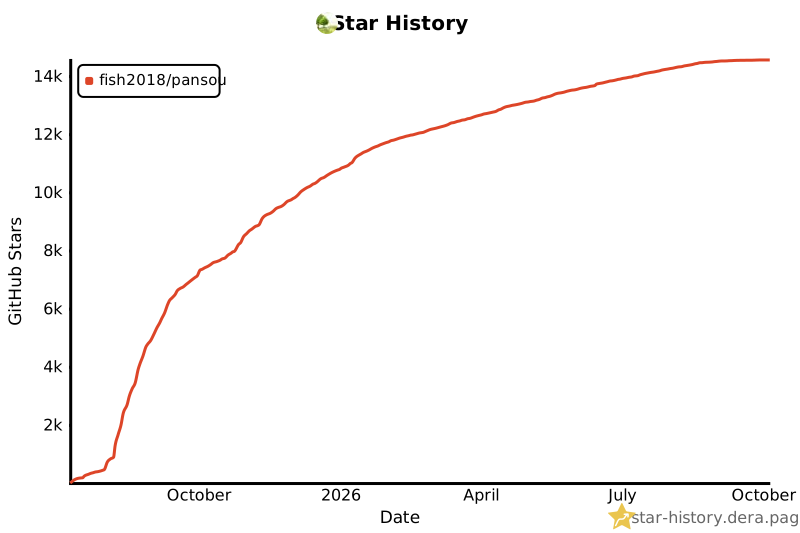
⭐ Star 历史

 PanSou is a high-performance API service for searching netdisk (cloud drive) share links. It concurrently searches Telegram channels and custom plugins, then classifies and ranks the results by drive type.