




ccg-workflow README

The project's README from github.com/fengshao1227/ccg-workflow. As one markdown file: README.md.

CCG - Claude + Codex + Gemini Multi-Model Collaboration

CCG Workflow

GitHub stars NPM Downloads npm version License: MIT CI codecov Claude Code Node Follow on X star Docs Ask DeepWiki

简体中文 | English | Documentation

♥️ Sponsor

APIMart

Thanks to APIMart for sponsoring this project! APIMart is a low-cost API platform for AI image & video generation — GPT-Image-2 from $0.006/image, 160+ images per dollar. One async API covers both image and video: submit a task, get an ID, fetch results via polling or callback. Batch tens of thousands of images without timeouts, switch models without changing code. Pay-as-you-go with no monthly fee — sign up here to get started.

💡 APIMart also exposes an Anthropic-compatible endpoint, so it can serve as your API provider for Claude Code itself — run npx ccg-workflow, pick APIMart at Step 1, and paste your key.


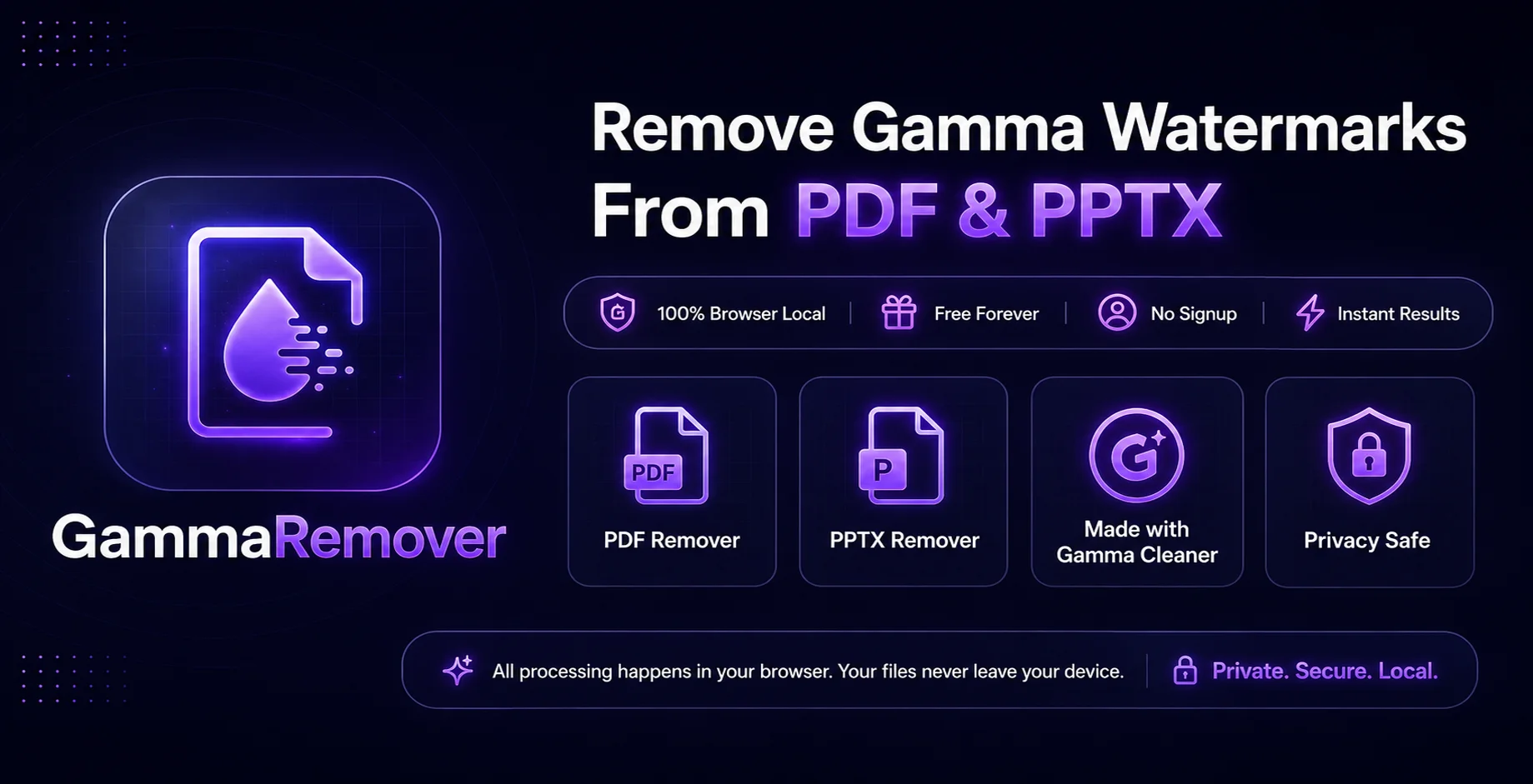
Gamma Remover

Gamma Remover — Free browser-local Gamma watermark remover for PDF & PPTX. No signup, instant results, 100% private. Your files never leave your device.


🐳 CCG on DeepSeek Harness — dsh-ccg

The same role matrix, running natively inside DeepSeek Harness. It ships inside this package — no second install, no second version to track.

npx ccg-workflow dsh install    # every profile found; --profile <name> for one
npx ccg-workflow dsh list       # which profiles have it

Or pick D. DeepSeek Harness from npx ccg-workflow.

Seven role-pinned delegation tools, each on its own model with its own expert persona — and two things the Claude Code side cannot do as cleanly:

No external CLI, no binary bridge, no cold-start tax — every hop is a provider API request. Source lives in dsh-ccg/; full README →

🧩 Also by the author

DSH Marketplace — a directory of DeepSeek Harness plugins. 2,500+ indexed across 14 categories, bilingual EN / 中文.

Not a sponsor — same author as CCG, built out of a plain annoyance: DSH plugins are multiplying fast, but figuring out what one does, whether it still installs, and what the command actually is meant opening one GitHub README after another. So the install commands here are put through a throwaway container first. A plugin only gets a check mark if it really installs — and if it can't, the listing says why (buried in a monorepo subdirectory, never published to npm, and so on). A verified index, not another awesome list.

dsh plugin --profile web add dshmarketplace-plugin   # browse the store from inside DSH
npx dshmarketplace-cli add owner/repo                # install any plugin from your shell

There is also a Python SDK and a public API. Early days — bug reports and plugin submissions are very welcome on GitHub.


What is CCG?

CCG is a workflow engine for Claude Code. It turns Claude into a multi-model orchestrator — Claude stays in control while dispatching specialized work to Codex (OpenAI), Grok (xAI), Kimi Code (Moonshot), and Antigravity through a Go binary bridge.

One command. Describe what you want. The engine handles the rest.

npx ccg-workflow    # Install in 60 seconds

Architecture

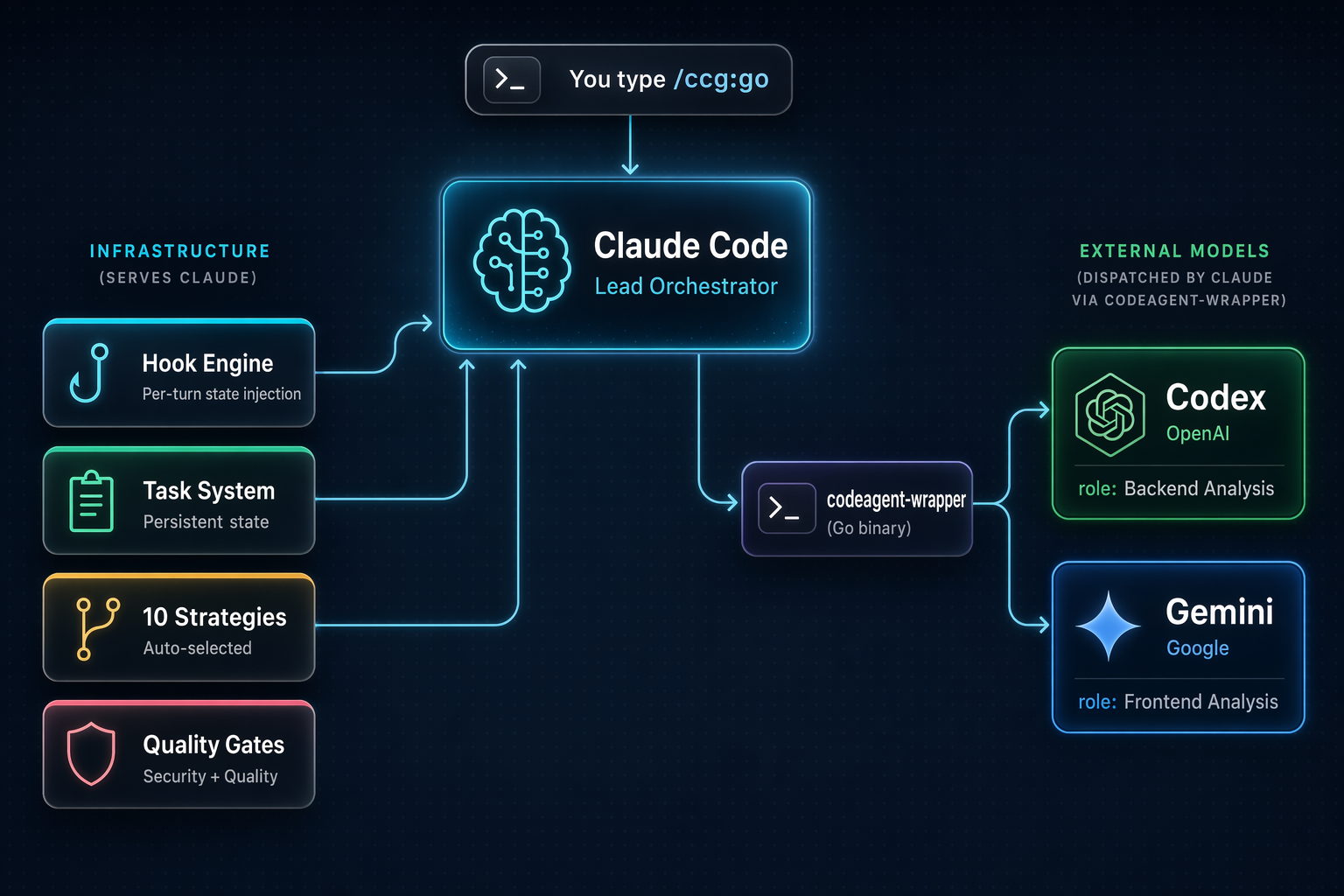
CCG Architecture

Claude Code is the lead orchestrator. It analyzes your intent, selects a strategy, and manages the entire workflow. The Hook Engine injects state every turn so Claude never loses context — even after compaction. The codeagent-wrapper (a compiled Go binary) bridges Claude to external models for parallel analysis and review.

How It Works

You: /ccg:go add JWT authentication to this API

CCG Engine:
  1. Reads project context (git status, tech stack, file structure)
  2. Classifies: feature / L complexity / backend / high risk
  3. Selects strategy: full-collaborate
  4. Creates .ccg/tasks/add-jwt-auth/task.json
  5. Launches dual-model analysis (Codex + Gemini in parallel)
  6. Produces plan → HARD STOP for your approval
  7. Spawns Agent Teams Builders for parallel implementation
  8. Runs quality gates + dual-model cross-review
  9. Reports results

Every turn, a hook injects:
  <ccg-state>
  Task: add-jwt-auth (in_progress)
  Strategy: full-collaborate
  Phase: 4-implementation
  </ccg-state>

10 Built-in Strategies

The engine auto-selects the right strategy based on task type and complexity:

Strategy When External Models Agent Teams
direct-fix Simple bug, single file — —
quick-implement Small feature, clear scope — —
guided-develop Medium feature, needs planning Single —
full-collaborate Complex feature, multi-module Dual parallel ✓
debug-investigate Complex bug, unknown cause Dual diagnosis —
refactor-safely Code restructuring Dual review —
deep-research Technical research Dual exploration —
optimize-measure Performance optimization Optional —
review-audit Code review Dual cross-review —
git-action commit, rollback, branches — —

Simple tasks run fast with zero overhead. Complex tasks get the full engine.

Core Features

Hook Engine — Never Lose Context

4 JavaScript hooks inject state into every Claude Code session:

Hook Event What it does
workflow-state.js Every turn Injects current task state as breadcrumb
session-start.js Session start/compact Re-injects full project context
subagent-context.js Agent/Bash spawn Injects spec directly into subagent prompts
skill-router.js Every turn Auto-injects domain knowledge by keyword

Context survives compaction. Sub-agents born with spec in their prompt. Zero state loss.

Task System — Persistent Lifecycle

Medium+ complexity tasks get a persistent directory:

.ccg/tasks/add-jwt-auth/
├── task.json         # Status, strategy, phase, gate
├── requirements.md   # Enhanced requirements
├── plan.md           # Approved implementation plan
├── context.jsonl     # Spec files for sub-agent injection
├── review.md         # Review results
└── research/         # Persisted research findings

Quality Gates — Built-in Security & Quality

Gate Trigger
/ccg:verify-security New modules, security changes
/ccg:verify-quality Changes > 30 lines
/ccg:verify-change Doc sync check
/ccg:verify-module Module structure check
/ccg:gen-docs Auto-generate README + DESIGN

100+ Domain Knowledge Files

When your message mentions security, caching, RAG, Kubernetes, etc., the relevant knowledge file is auto-injected. 10 domains, 61 files:

Security · Architecture · DevOps · AI/MLOps · Development · Frontend Design · Infrastructure · Mobile · Data Engineering · Orchestration

Standalone Skills — battle-tested website workflows (v3.5.1)

Self-contained skills, each usable on its own or auto-triggered by intent. Drawn from real site-building work and shipped with their scripts:

Skill What it does
/ccg:bt-panel Drive a BaoTa / aaPanel server over its HTTP API — deploy a build, update a live site, read/write files, run shell, run MySQL. No SSH or rsync; just a panel URL + API key. Ships bt_client.py + one-shot bt_deploy.py.
/ccg:seo-page-builder Build, audit, or optimize SEO tool pages (AI generator / remover / enhancer / converter / editor). SERP-intent driven, with a runnable onpage-audit.py keyword-density meter.
/ccg:adsense-site-auditor Audit a site for Google AdSense readiness against the full official checklist — eligibility, ownership, content quality, ads.txt, privacy, Publisher Policies — before you apply or after a rejection.

bt-panel reads credentials only from env vars / a git-ignored sites.json; nothing is hardcoded. seo-page-builder is adapted from yuzeiki's skill of the same name (see its SKILL.md).

Commands

Core (v3.0 default: 13 commands)

Command Description
/ccg:go Smart entry — describe what you want, engine handles the rest
/ccg:commit Smart conventional commit
/ccg:rollback Interactive rollback
/ccg:clean-branches Clean merged branches
/ccg:worktree Worktree management
/ccg:init Initialize project CLAUDE.md
/ccg:context Project context management

OpenSpec Integration

Command Description
/ccg:spec-init Initialize OPSX environment
/ccg:spec-research Requirements → constraints
/ccg:spec-plan Constraints → zero-decision plan
/ccg:spec-impl Execute plan + archive
/ccg:spec-review Dual-model cross-review

Legacy Mode (18 additional commands)

Includes /ccg:workflow, /ccg:plan, /ccg:execute, /ccg:frontend, /ccg:backend, /ccg:analyze, /ccg:debug, /ccg:optimize, /ccg:test, /ccg:review, /ccg:team, and more.

Quick Start

Option A — full install (multi-model orchestration + commands + hooks + binary, recommended)

# Install (interactive 4-step wizard)
npx ccg-workflow

# Or non-interactive with defaults
npx ccg-workflow init --skip-prompt

Requires Node.js 20+ and Claude Code CLI. Codex CLI, Grok CLI, Kimi Code CLI, and Antigravity are optional (enable multi-model features).

Option B — native plugin (skills only, zero dependencies, v3.5.1+)

Want just the skills (web-ops toolkit, quality gates, frontend-design, domain knowledge) without the multi-model orchestration?

claude plugin marketplace add fengshao1227/ccg-workflow
claude plugin install ccg@ccg

Skills are invoked as /ccg:<skill>. No npx, no binary. The multi-model commands ship only through Option A (their templates carry install-time placeholders that a native plugin can't resolve).

CLI Commands

npx ccg-workflow                          # Interactive menu
npx ccg-workflow init                     # 4-step install wizard
npx ccg-workflow doctor                   # Environment health check
npx ccg-workflow status                   # Installation overview
npx ccg-workflow codex-mode install       # Install Codex-Led mode
npx ccg-workflow codex-mode uninstall     # Uninstall Codex-Led mode
npx ccg-workflow dsh install              # Install CCG into DeepSeek Harness
npx ccg-workflow dsh list                 # Which dsh profiles have it
npx ccg-workflow dsh uninstall            # Remove it from every profile
npx ccg-workflow uninstall                # Uninstall CCG
npx ccg-workflow config mcp               # Configure MCP tokens
npx ccg-workflow diagnose-mcp             # Diagnose MCP issues

Configuration

~/.claude/
├── commands/ccg/          # Slash commands
├── hooks/ccg/             # Hook scripts (5 files)
├── skills/ccg/            # Quality gates + 100+ domain knowledge
├── rules/                 # Auto-trigger rules
├── .ccg/
│   ├── config.toml        # Model routing, MCP, performance
│   ├── engine/            # 10 strategy files + model router
│   └── prompts/           # Expert prompts (codex/gemini/claude)
└── bin/codeagent-wrapper  # Multi-model bridge (Go binary)

Environment Variables

Set in ~/.claude/settings.json under "env":

Variable Default Description
CODEX_TIMEOUT 7200 Wrapper timeout (seconds)
CODEAGENT_POST_MESSAGE_DELAY 5 Post-completion delay
CLAUDE_CODE_EXPERIMENTAL_AGENT_TEAMS unset Set 1 for parallel Agent Teams

Update / Uninstall

npx ccg-workflow@latest     # Update to latest
npx ccg-workflow doctor     # Check health after update
npx ccg-workflow uninstall  # Clean uninstall

Credits

Contributors

fengshao1227
fengshao1227
SXP-Simon
SXP-Simon
RebornQ
RebornQ
Sakuranda
Sakuranda
Mriris
Mriris
23q3
23q3
MrNine-666
MrNine-666
GGzili
GGzili

Contact

Star History

Star History Chart

License

MIT


v3.6.4 | Issues | Contributing

ccg-workflow (fengshao1227/ccg-workflow)

Searching Database…

What is this?CCG is a workflow engine for Claude Code that turns Claude into a multi-model orchestrator, dispatching work to Codex, Grok, Kimi Code, and Antigravity through a Go binary bridge while Claude stays in control.
Is this a standalone app or a plugin on top of Claude Code?It is a plugin/extension layer for Claude Code: it installs commands, hooks, and a compiled Go binary bridge that Claude Code uses, rather than running on its own.
How do I install CCG?Run npx ccg-workflow for the full install (multi-model orchestration, commands, hooks, binary), or install it as a native plugin if you only want the skills without the multi-model orchestration.
What do I need before installing?Full install requires Node.js 20+ and the Claude Code CLI; Codex CLI, Grok CLI, Kimi Code CLI, and Antigravity are optional and only needed to enable the multi-model features.
What's the catch with the lightweight plugin install?The native-plugin option only gives you the standalone skills, not the multi-model commands — those templates carry install-time placeholders that a native plugin can't resolve, so they only ship through the full npx install.
Does it work on Linux, macOS, and Windows?Yes, it is a Node.js CLI/plugin (Node 20+) with no OS-specific restrictions mentioned, so it should run anywhere Claude Code and Node run.
Does it send my code or credentials anywhere unexpected?The bt-panel skill reads server credentials only from environment variables or a git-ignored sites.json, with nothing hardcoded; other data flows go through the configured model provider APIs you set up yourself.
How does CCG decide which strategy to use?The engine auto-selects from 10 built-in strategies (direct-fix, quick-implement, guided-develop, full-collaborate, debug-investigate, refactor-safely, deep-research, optimize-measure, review-audit, git-action) based on task type and complexity, so simple tasks run fast with zero overhead while complex tasks get the full multi-model treatment.
How does CCG avoid losing context across long sessions?A Hook Engine injects state every turn via four JavaScript hooks (workflow-state.js, session-start.js, subagent-context.js, skill-router.js), so context survives compaction and sub-agents are born with the relevant spec already in their prompt.
What are the Quality Gates?Built-in checks like /ccg:verify-security, /ccg:verify-quality, /ccg:verify-change, and /ccg:verify-module trigger automatically on new modules, large diffs, or structural changes to enforce security and quality standards.
What is dsh-ccg?It is the same CCG role matrix running natively inside DeepSeek Harness, shipped bundled in this package so there is no separate install or version to track, with features like model panels and persistent live teammates that the Claude Code side cannot do as cleanly.
Size
40 MB
Stars
5.9K
Updated
CommitOct 12
Age
9mo
Commits · 90 Days
