Build your company's intelligence layer, without losing control.
Where your team and AI agents work together — a complete, fully open-source platform,
from a native desktop app to a secure, self-hosted backend.
Bring your own model keys; every risky action waits for a human "yes."
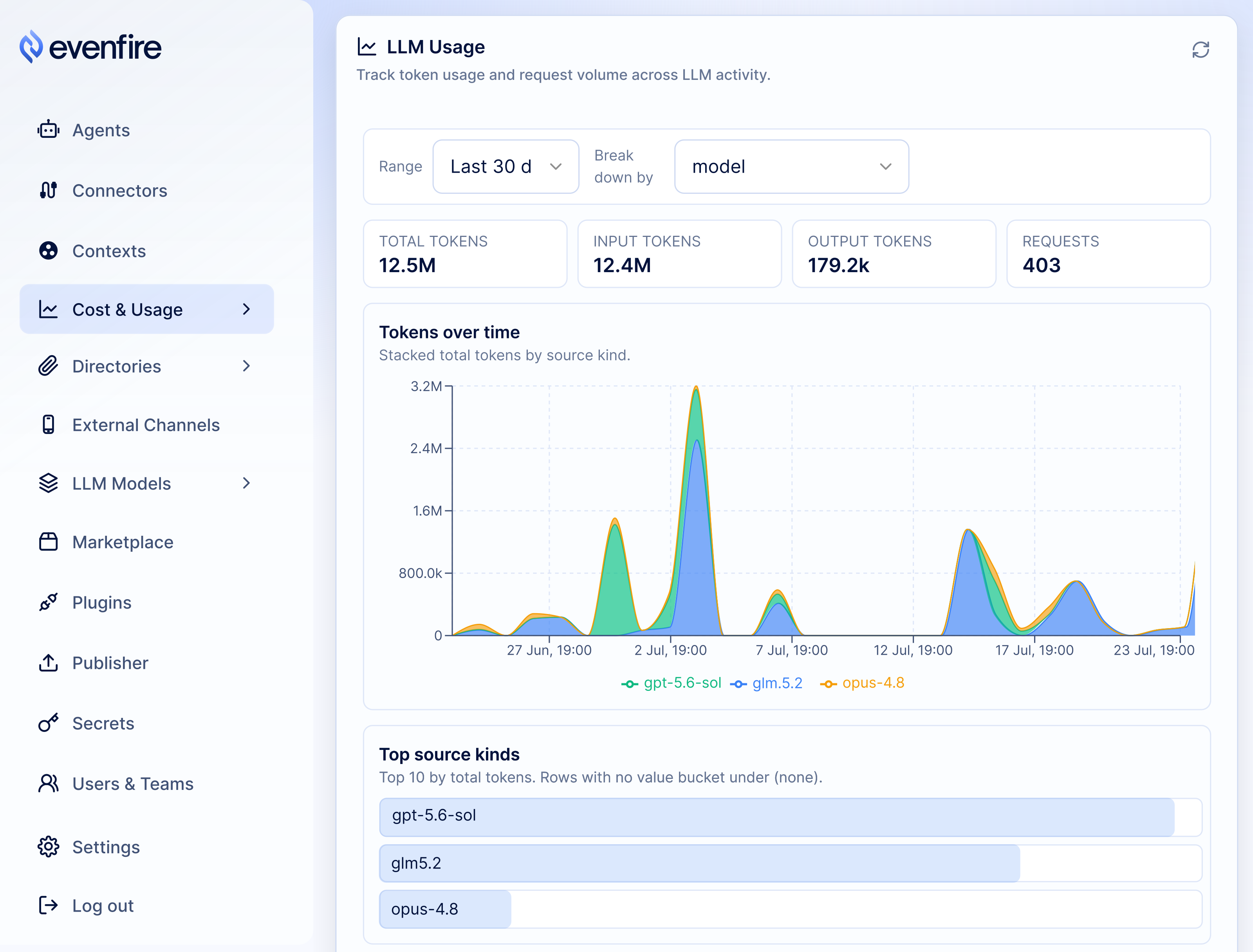
The Control UI's usage dashboard: token consumption per model, over time. Tour all three UIs →
Quick start
This quick start runs the whole platform on a local minikube cluster — the fastest way to try Evenfire on your workstation.
Stand up every service on minikube with one command, including a seeded agent
named chatllm. On a fresh minimal install, setup consumes the first-run
admin bootstrap before any login, creates the matching Desktop identity, and
records the governed initial_setup GFS operator link atomically:
git clone https://github.com/evenfire-ai/evenfire.git && cd evenfire
cp .env.example .env
# edit .env: set ADMIN_PASSWORD (required, no default ships) and ONE LLM key
MINIKUBE_IMAGE_TAG=latest make minikube-setup   # see the note below on this override
make minikube-status                            # wait for every deployment READY
The seeded [email protected] Desktop account is therefore the initial GFS
operator. Re-running setup is idempotent: it may log in to verify the existing
active link, but it never recreates a revoked link or silently creates a second
ordinary member. If the link is missing, setup stops with an actionable error.
Then run the UIs from your workstation and say hello to the chatllm agent:
make install-all && npm --prefix control-ui install
npm run ui              # Control UI + Profile UI + Desktop App
The full walkthrough (prerequisites, login, and the pure-API path) is in
Get started on minikube.
Configure guardrails through approval thresholds, budget caps, network
deny-rules, and tool-level scopes so risky actions automatically pause
for human review
Install plugins that ship their own UX and expose themselves as MCP server tools, so agents can interact
with them through chat
Every piece of the fleet — agents, connectors, channels, workflows, policies,
plugins — is a Kubernetes custom resource, so your platform is version-controlled,
reviewable configuration. You bring your own model keys, so prompts and data
flow only to the provider you choose
The platform
Evenfire is not just an agent runtime. It is nine first-class capabilities,
each backed by code in this repo and declared as configuration. Each row links
to its deep dive.
Capability
What you get
Deep dive
Agents
Real actions across Telegram / Email / Slack / desktop (shell_exec, HTTP, a real browser, files), plus memory and approval gates
vs a hosted assistant: you own the data and the infrastructure. Evenfire
adds no vendor to the request path: with your own model keys, prompts and files
go straight to the model provider you choose. Point an agent at a self-hosted
or local model and nothing leaves your environment at all.
vs an in-process agent framework: real isolation and governance:
per-agent pods, default-deny networking, multi-tenant teams and roles, and
approvals enforced by the platform rather than by the calling application.
vs rolling your own: batteries included. You get channels, approvals, a
connector registry, shared files, and cost accounting, all declared as
configuration instead of assembled by hand.
vs betting on one provider: the same agents, tools, and configuration run
across a growing roster of providers, from frontier labs to local LLMs. Pick
whichever model gives the best cost/quality tradeoff for each job, and switch
providers without rebuilding, so your setup and data are never locked to a
single vendor.
Security model
We never fully trust the model. It can be steered, misled, or simply wrong, so
four layers constrain what it can do:
Risky actions wait for a human. Commands, outbound HTTP, and browser
control are approval-gated: the task suspends until someone approves from the
channel, and callbacks are signature-verified.
Least privilege. Each agent reaches only the connectors its Context
grants, through short-lived, scope-narrowed tokens that can't widen
themselves; container images must match a pinned digest and an allowlist.
Deny-all networking. Runtime namespaces start with no connectivity;
access is opened per (agent, connector), and outbound traffic is pinned to
the specific hosts a connector declares, never the open internet.
Authenticated internals. Every service-to-service call carries a
short-lived, audience-scoped token; shared-file access is re-checked and
audited on each request, and inbound webhooks are signature-verified.
A broad, growing set of providers behind one interface, from frontier labs to
local models. Keys live in a Kubernetes Secret you create (dev mode: a single
environment variable; setup infers the matching provider).
The quick start runs on local minikube for evaluation. Evenfire
is meant to be run on a remote Kubernetes cluster — deploy the platform there
with a NetworkPolicy-capable CNI (Calico or equivalent).
Build on the Kubernetes manifests in deploy/base and the
kustomize deploy/overlays — the shipped minikube overlay
is the reference to copy and adapt for your own cluster. Then follow the
production deployment guide for the rollout order,
signing/JWT keys, secrets, and the security non-negotiables.
Development and testing
Each service is an independent npm package. Run npm test in a package, or
make test-unit-all after installing deps; make test-counts prints the live
unit-test file and case totals: "is it real, is it tested" without a hardcoded
number to drift. E2E suites run against minikube with Calico NetworkPolicies and
the approval flow: docs/testing/e2e-guide.md.
Contributor loop: CONTRIBUTING.md.
Evenfire is in beta and under active development. The whole platform runs
end to end and comes up locally with one command, but some APIs and CRDs may
still change before a 1.0 release; pin a release tag if you need stability.
The code uses the internal name clerum for the same project (clerum.io CRDs,
CLERUM_* env vars, clerum-* packages); see
code names.





 Evenfire 是一个自托管平台,用于运行能在你自己的基础设施上执行真实操作的 LLM 代理,它带有 Kubernetes 后端、管理用 Control UI 和原生 Electron 桌面客户端,让你的团队和 AI 代理协同工作而不失控。