

booking-microservices README

The project's README from github.com/evangelosvlachos96-dotcom/booking-microservices. As one markdown file: README.md.

booking-microservices

ci-status

Booking Microservices

A practical flight-booking system built as microservices with .NET 10, using Vertical Slice Architecture, DDD, CQRS, Event Sourcing, gRPC, RabbitMQ, Wolverine, PostgreSQL, MongoDB and .NET Aspire.

Developed by Evangelos Vlachos.

Table of Contents

Overview

This repository demonstrates how to design and run a production-style microservices system end to end: independent services with their own databases, asynchronous messaging with durable inbox/outbox, synchronous gRPC calls between services, an API gateway, centralized identity, observability and container/Kubernetes deployment.

Key goals:

Architecture

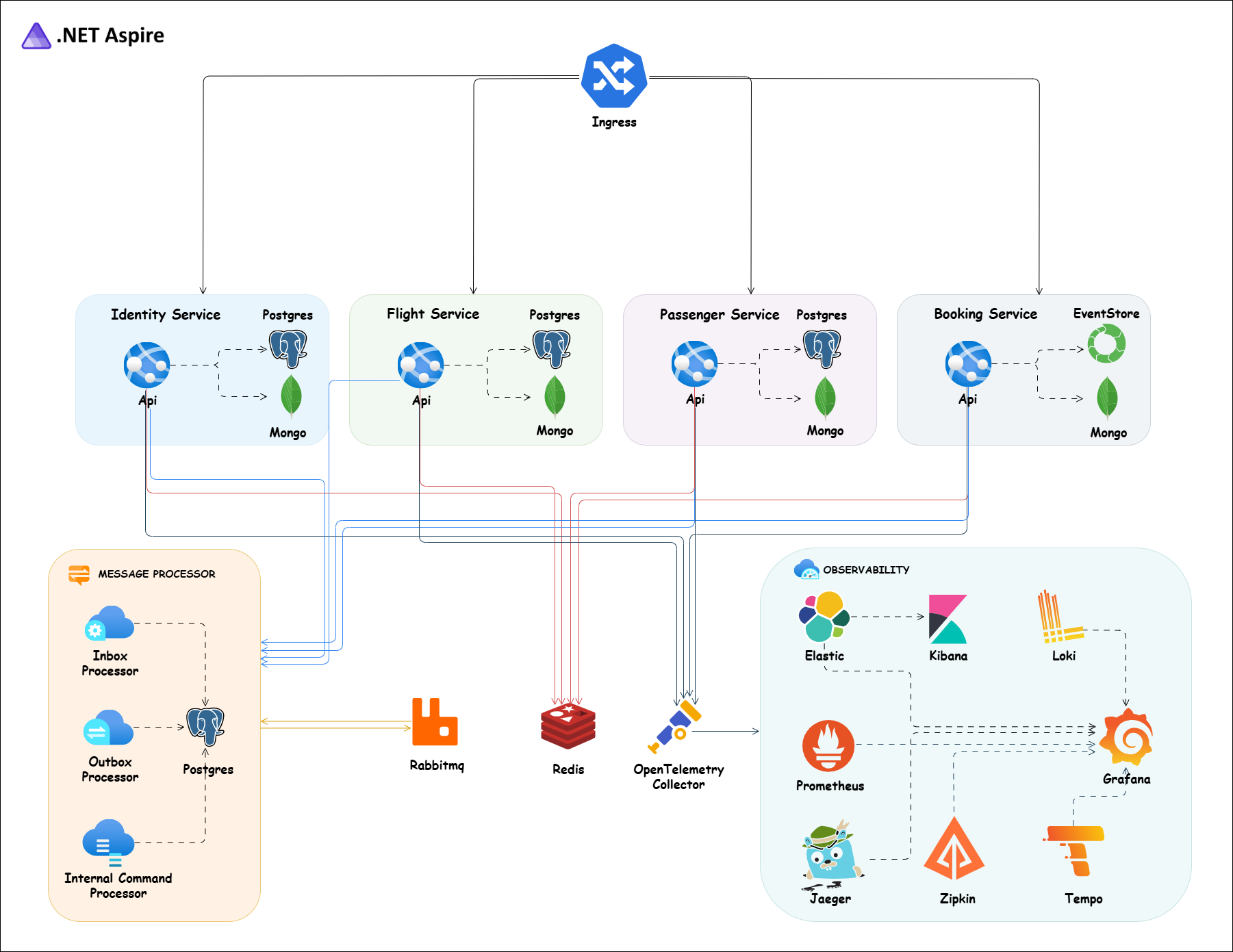
architecture diagram

Each service owns its data and exposes a small REST surface through minimal APIs. Commands mutate the write store (PostgreSQL or EventStoreDB) and publish integration events through Wolverine's durable outbox to RabbitMQ. Consumers process those events through the durable inbox and project them into MongoDB read models. Queries read from MongoDB only. Cross-service reads that must be synchronous (for example Booking validating a flight or passenger) go over gRPC.

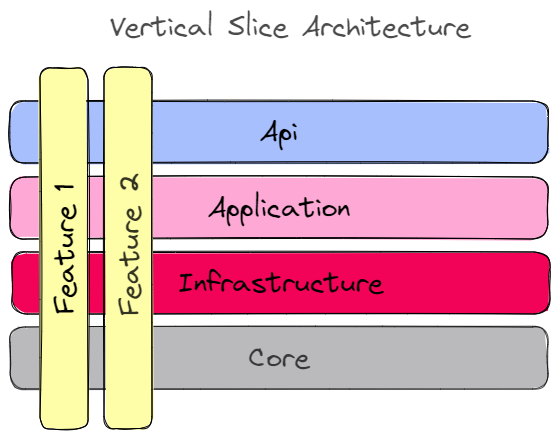
vertical slice architecture

Services

Service Responsibility Write store Read store
Identity Users, roles, tokens (IdentityServer) PostgreSQL -
Flight Flights, airports, aircraft, seats PostgreSQL MongoDB
Passenger Passenger profiles PostgreSQL MongoDB
Booking Booking a seat on a flight for a passenger EventStoreDB MongoDB
ApiGateway Single public entry point (YARP) - -
Aspire AppHost Local orchestration and dashboard - -

Technology Stack

Project Structure

.
├── src
│   ├── ApiGateway/            # YARP gateway
│   ├── Aspire/                # Aspire AppHost and service defaults
│   ├── BuildingBlocks/        # Shared cross-cutting code (Core, EFCore, Mongo, Wolverine, Jwt, Logging, OpenTelemetry, Polly, TestBase, ...)
│   └── Services
│       ├── Booking/           # src/Booking, src/Booking.Api, tests/
│       ├── Flight/
│       ├── Identity/
│       └── Passenger/
├── deployments
│   ├── configs/               # otel-collector, prometheus, grafana configs
│   ├── docker-compose/        # infrastructure and full-stack compose files
│   └── kubernetes/            # manifests + cert-manager
├── assets/                    # diagrams and logo
├── booking.rest               # REST Client requests for manual API testing
└── booking-microservices.sln

Inside every service, code is grouped by feature (for example Flights/Features/CreatingFlight/V1/) rather than by technical layer. Each feature folder holds its endpoint, command/query, handler, validator and any events it raises, so a change to one use case touches only that folder.

Getting Started

Prerequisites

Dev Certificate

Create and trust a development HTTPS certificate so the containers can serve TLS.

Windows (PowerShell):

dotnet dev-certs https -ep $env:USERPROFILE\.aspnet\https\aspnetapp.pfx -p password
dotnet dev-certs https --trust

macOS / Linux:

dotnet dev-certs https -ep ${HOME}/.aspnet/https/aspnetapp.pfx -p password
dotnet dev-certs https --trust

Run with Aspire

The fastest way to get everything up locally, with a dashboard for logs, traces and metrics:

aspire run

The Aspire dashboard is available at http://localhost:18888.

Run with Docker Compose

Infrastructure only (RabbitMQ, PostgreSQL, EventStoreDB, MongoDB, Redis, Jaeger, Zipkin, OTel Collector, Prometheus, Grafana):

docker-compose -f ./deployments/docker-compose/docker-compose.infrastructure.yaml up -d

Full stack including the services:

docker-compose -f ./deployments/docker-compose/docker-compose.yaml up -d

Run with Kubernetes

Install cert-manager first, then apply the TLS issuer and the application manifests:

kubectl apply -f ./deployments/kubernetes/booking-cert-manager.yml
kubectl apply -f ./deployments/kubernetes/booking-microservices.yml

The manifests reference images under the evangelosvlachos96/ Docker Hub namespace. Build and push the service images there (or change the image names) before deploying.

Build, Run and Test manually

Build the whole solution from the repository root:

dotnet build

Run a single service from its *.Api project folder (for example src/Services/Flight/src/Flight.Api):

dotnet run

Run all tests (integration and end-to-end tests start their dependencies with Testcontainers, so Docker must be running):

dotnet test

API Documentation

Every service exposes OpenAPI documentation at /swagger (Swagger UI) and /scalar/v1 (Scalar).

For quick manual testing, open booking.rest with the VS Code REST Client extension. Seeded users are van1 / Admin@123456 (admin) and van2 / User@123456 (user).

Development Tooling

.NET tools (CSharpier formatter, dotnet-outdated) are declared in .config/dotnet-tools.json:

dotnet tool restore

Husky + commitlint enforce Conventional Commits and run the formatter before each commit:

npm install

Upgrade NuGet packages across the solution:

dotnet outdated -u

booking-microservices (evangelosvlachos96-dotcom/booking-microservices)

Searching Database…

这是什么?一个以 .NET 10 微服务构建的实用机票预订系统,使用了 Vertical Slice Architecture、DDD、CQRS、事件溯源、gRPC、RabbitMQ、Wolverine、PostgreSQL、MongoDB 和 .NET Aspire。
这是可复用的框架,还是完整的示例应用?它是一个完整、可运行的示例系统,包含五个独立服务(Identity、Flight、Passenger、Booking、ApiGateway),每个服务拥有自己的数据库,适合端到端运行和研究,而不是作为库导入。
怎么让整个技术栈跑起来?最快的路径是 .NET Aspire,它会启动每个服务外加一个用于日志、追踪和指标的仪表板;也可以使用 Docker Compose(仅基础设施或完整技术栈),或者在安装 cert-manager 后应用 Kubernetes 清单。
运行之前需要安装什么?你需要 .NET 10 SDK 和 Docker Desktop;Husky 提交钩子需要 Node.js,.NET Aspire CLI/kubectl 则是相应工作流的可选附加项。
我能原样部署这些 Kubernetes 清单吗?不能开箱即用 —— 清单指向作者自己的 'evangelosvlachos96/' Docker Hub 命名空间下的 Docker 镜像,因此你需要构建并推送自己的镜像(或重命名它们),部署才能真正生效。
开发 HTTPS 证书的配置因操作系统而异吗?是的,README 分别给出了在 Windows(PowerShell)和 macOS/Linux 上信任开发证书的说明,之后容器才能提供 TLS 服务。
为什么只有 Booking 服务使用事件溯源而不是普通数据库?Booking 是写侧,最能从完整的状态变更历史中受益,因此它使用 EventStoreDB,而 Flight 和 Passenger 使用普通的 PostgreSQL 表;三者的数据都会投影到 MongoDB 以实现快速读取。
各服务之间的读写如何保持同步?命令写入 PostgreSQL 或 EventStoreDB,并通过 Wolverine 的持久化 outbox 把事件发布到 RabbitMQ;消费者通过持久化 inbox 处理事件,并把结果投影到 MongoDB —— 查询只从 MongoDB 读取。
不创建账号,我怎么能登录并试用 API?系统内置两个预置用户:van1/Admin@123456(管理员)和 van2/User@123456(普通用户),每个服务都在 /swagger 和 /scalar/v1 提供 OpenAPI 文档。
项目包含哪些类型的自动化测试?它包含用 xUnit、NSubstitute、Testcontainers 和 PactNet 构建的单元测试、集成测试、端到端测试和契约测试;集成测试和端到端测试通过 Testcontainers 自行启动依赖,因此需要 Docker 处于运行状态。
Size
0.9 MB
Stars
756
Updated
CommitSep 13
Age
1mo
Commits · 90 Days