What is this?
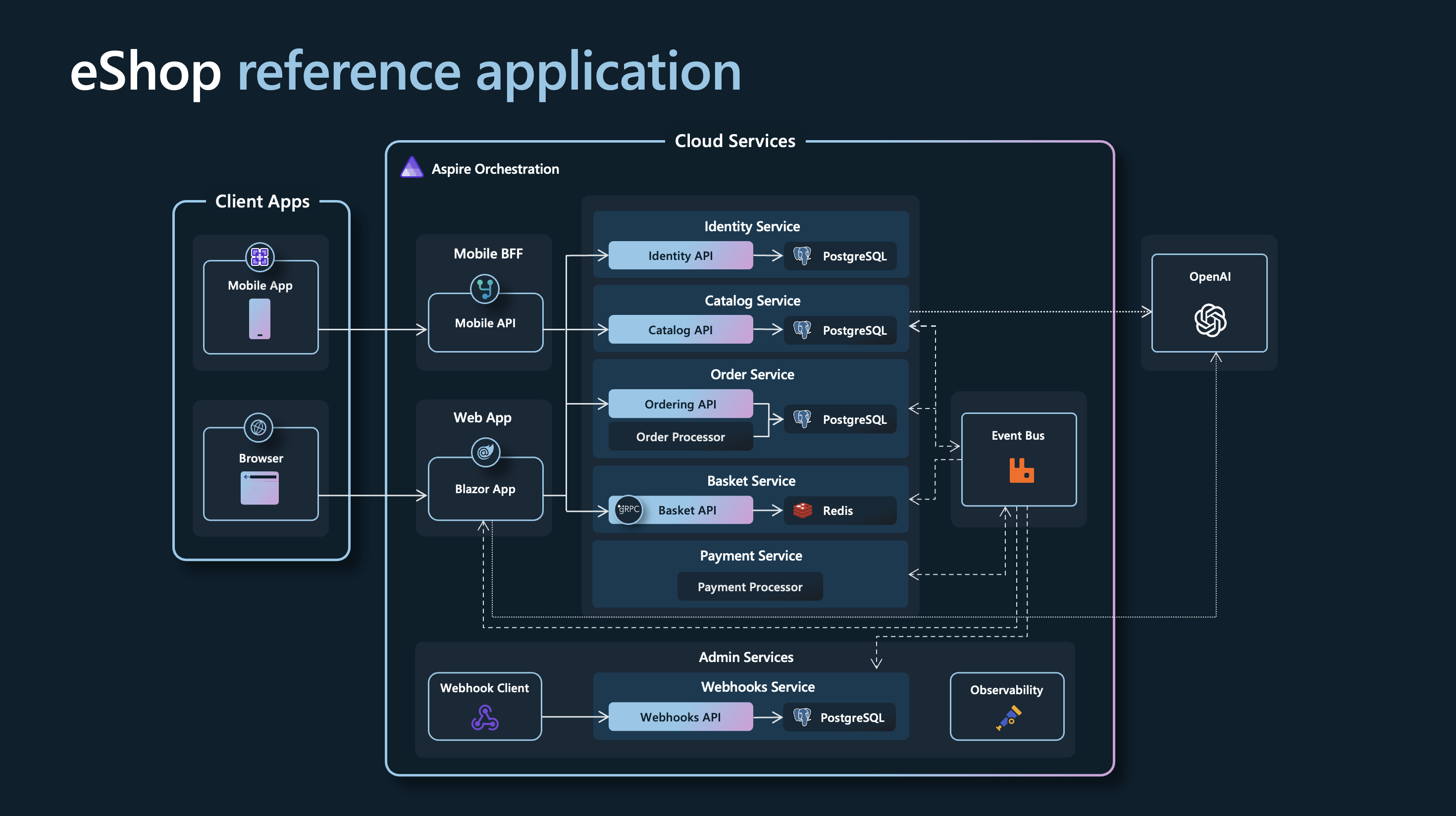
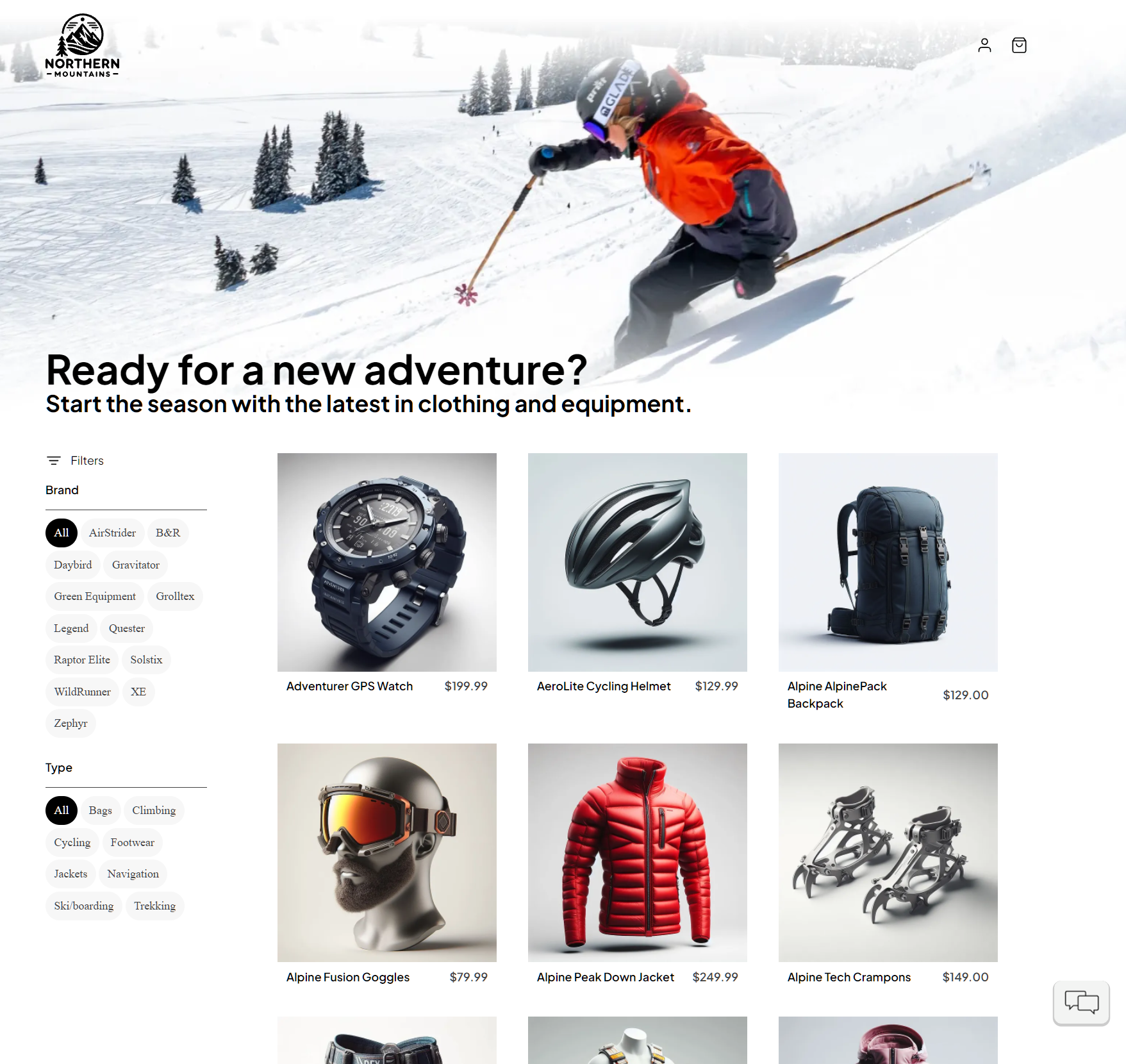
 A reference .NET application implementing an e-commerce website ('AdventureWorks') using a services-based microservices architecture built on .NET Aspire.
A reference .NET application implementing an e-commerce website ('AdventureWorks') using a services-based microservices architecture built on .NET Aspire.Is this a library I import, or a full app I run?It is a complete multi-service sample application, not a package you import - you run the whole AppHost to launch all the eCommerce microservices together.
It is a complete multi-service sample application, not a package you import - you run the whole AppHost to launch all the eCommerce microservices together.How do I get it running?Clone the repo, make sure a container runtime is started, then run the Aspire CLI from the repo root (or open eShop.Web.slnf in Visual Studio and press Ctrl+F5) to launch the AppHost and open the Aspire dashboard.
Clone the repo, make sure a container runtime is started, then run the Aspire CLI from the repo root (or open eShop.Web.slnf in Visual Studio and press Ctrl+F5) to launch the AppHost and open the Aspire dashboard.What do I need installed before running it?A .NET 10 SDK matching global.json, the Aspire CLI, and an OCI-compatible container runtime (Docker Desktop recommended, Podman also supported) are required first.
A .NET 10 SDK matching global.json, the Aspire CLI, and an OCI-compatible container runtime (Docker Desktop recommended, Podman also supported) are required first.Any pitfalls when deploying this to the cloud?Deploying to Azure Container Apps spins up PostgreSQL, Redis, and RabbitMQ as live containers, which the README explicitly says is meant only for evaluation and demos, not production data.
Deploying to Azure Container Apps spins up PostgreSQL, Redis, and RabbitMQ as live containers, which the README explicitly says is meant only for evaluation and demos, not production data.What's the optional AI chatbot feature about?eShop can optionally provision a Microsoft Foundry resource during local development to add an AI chatbot, using the gpt-4.1-mini and text-embedding-3-small models that Aspire injects automatically into the app.
eShop can optionally provision a Microsoft Foundry resource during local development to add an AI chatbot, using the gpt-4.1-mini and text-embedding-3-small models that Aspire injects automatically into the app.Is the product catalog data real?No, the product names, descriptions, brand names, and images in catalog.json are fictional, generated with GPT-3.5-Turbo and DALL-E 3.
No, the product names, descriptions, brand names, and images in catalog.json are fictional, generated with GPT-3.5-Turbo and DALL-E 3.Can I deploy eShop to Azure directly from here?Yes, the AppHost already has an Azure Container Apps environment configured, so running 'aspire deploy' provisions and deploys it straight from the application model.
Yes, the AppHost already has an Azure Container Apps environment configured, so running 'aspire deploy' provisions and deploys it straight from the application model.Is there a version meant for production Azure deployment?The project points to a separate 'eShop on Azure' repo that is specifically configured for that purpose, since this version's Azure deployment is only for demos.
The project points to a separate 'eShop on Azure' repo that is specifically configured for that purpose, since this version's Azure deployment is only for demos.What are similar projects?Smartstore, booking-microservices, aspnetcore, eShopOnWeb, nopCommerce, garnet, microservices-demo, abp
Smartstore, booking-microservices, aspnetcore, eShopOnWeb, nopCommerce, garnet, microservices-demo, abpWhich topics is it in?rabbitmq, azure, ecommerce, architecture, containers, cloud-native, playwright, microservices, dotnet, enterprise, c#, csharp
rabbitmq, azure, ecommerce, architecture, containers, cloud-native, playwright, microservices, dotnet, enterprise, c#, csharp