

Что это?
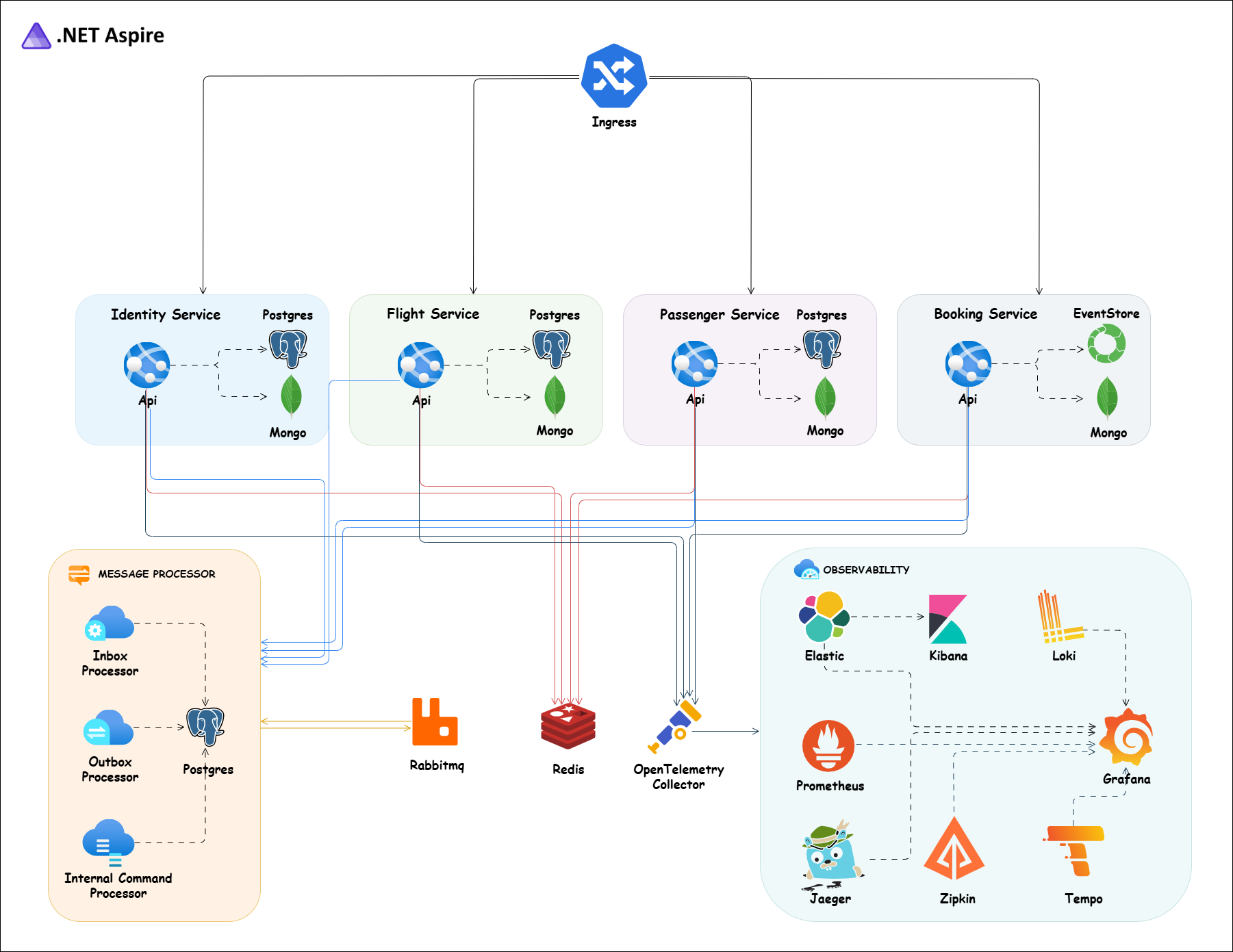
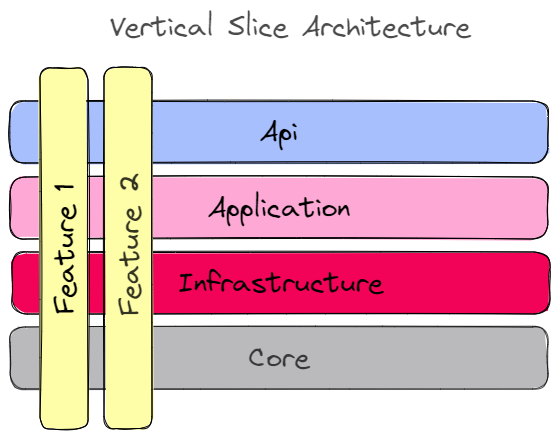
 Практичная система бронирования авиабилетов, построенная как микросервисы на .NET 10, с использованием Vertical Slice Architecture, DDD, CQRS, Event Sourcing, gRPC, RabbitMQ, Wolverine, PostgreSQL, MongoDB и .NET Aspire.
Практичная система бронирования авиабилетов, построенная как микросервисы на .NET 10, с использованием Vertical Slice Architecture, DDD, CQRS, Event Sourcing, gRPC, RabbitMQ, Wolverine, PostgreSQL, MongoDB и .NET Aspire.Это переиспользуемый фреймворк или полноценный пример приложения?Это полная запускаемая система-пример с пятью независимыми сервисами (Identity, Flight, Passenger, Booking, ApiGateway), у каждого своя база данных; её задумано запускать целиком и изучать, а не импортировать как библиотеку.
Это полная запускаемая система-пример с пятью независимыми сервисами (Identity, Flight, Passenger, Booking, ApiGateway), у каждого своя база данных; её задумано запускать целиком и изучать, а не импортировать как библиотеку.Как запустить весь стек?Самый быстрый путь — .NET Aspire, который запускает каждый сервис плюс дашборд с логами, трассировками и метриками; альтернативно используйте Docker Compose (только инфраструктура или весь стек) или примените манифесты Kubernetes после установки cert-manager.
Самый быстрый путь — .NET Aspire, который запускает каждый сервис плюс дашборд с логами, трассировками и метриками; альтернативно используйте Docker Compose (только инфраструктура или весь стек) или примените манифесты Kubernetes после установки cert-manager.Что должно быть установлено перед запуском?Нужны .NET 10 SDK и Docker Desktop; Node.js требуется для commit-хуков Husky, а .NET Aspire CLI/kubectl — опциональные дополнения для соответствующих сценариев.
Нужны .NET 10 SDK и Docker Desktop; Node.js требуется для commit-хуков Husky, а .NET Aspire CLI/kubectl — опциональные дополнения для соответствующих сценариев.Можно ли развернуть манифесты Kubernetes как есть?Не из коробки — манифесты указывают на Docker-образы в собственном пространстве имён автора 'evangelosvlachos96/' на Docker Hub, поэтому нужно собрать и отправить свои образы (или переименовать их), прежде чем деплой реально заработает.
Не из коробки — манифесты указывают на Docker-образы в собственном пространстве имён автора 'evangelosvlachos96/' на Docker Hub, поэтому нужно собрать и отправить свои образы (или переименовать их), прежде чем деплой реально заработает.Настройка dev-сертификата HTTPS различается по ОС?Да, README даёт отдельные инструкции о доверии dev-сертификату на Windows (PowerShell) и на macOS/Linux, прежде чем контейнеры смогут отдавать TLS.
Да, README даёт отдельные инструкции о доверии dev-сертификату на Windows (PowerShell) и на macOS/Linux, прежде чем контейнеры смогут отдавать TLS.Почему только сервис Booking использует Event Sourcing вместо обычной базы данных?Booking — записывающая сторона, которой больше всех выгодна полная история изменений состояния, поэтому она использует EventStoreDB, тогда как Flight и Passenger используют обычные таблицы PostgreSQL; все три проецируют свои данные в MongoDB для быстрого чтения.
Booking — записывающая сторона, которой больше всех выгодна полная история изменений состояния, поэтому она использует EventStoreDB, тогда как Flight и Passenger используют обычные таблицы PostgreSQL; все три проецируют свои данные в MongoDB для быстрого чтения.Как чтение и запись остаются синхронными между сервисами?Команды пишут в PostgreSQL или EventStoreDB и публикуют события через персистентный outbox Wolverine в RabbitMQ; потребители обрабатывают их через персистентный inbox и проецируют результаты в MongoDB, из которой запросы и читают — это единственное хранилище для чтений.
Команды пишут в PostgreSQL или EventStoreDB и публикуют события через персистентный outbox Wolverine в RabbitMQ; потребители обрабатывают их через персистентный inbox и проецируют результаты в MongoDB, из которой запросы и читают — это единственное хранилище для чтений.Как войти и попробовать API, не создавая аккаунт?В системе предустановлены два пользователя: van1/Admin@123456 (админ) и van2/User@123456 (пользователь), и каждый сервис открывает документацию OpenAPI на /swagger и /scalar/v1.
В системе предустановлены два пользователя: van1/Admin@123456 (админ) и van2/User@123456 (пользователь), и каждый сервис открывает документацию OpenAPI на /swagger и /scalar/v1.Какие виды автоматических тестов есть в проекте?Есть модульные, интеграционные, сквозные и контрактные тесты на xUnit, NSubstitute, Testcontainers и PactNet; интеграционные и e2e-тесты поднимают свои зависимости через Testcontainers, поэтому Docker должен быть запущен.
Есть модульные, интеграционные, сквозные и контрактные тесты на xUnit, NSubstitute, Testcontainers и PactNet; интеграционные и e2e-тесты поднимают свои зависимости через Testcontainers, поэтому Docker должен быть запущен.What are similar projects?modular-monolith-with-ddd, awesome-software-architecture, AspNetCore-Developer-Roadmap, Smartstore, eShop, nopCommerce, domain-driven-hexagon, eShopOnWeb
modular-monolith-with-ddd, awesome-software-architecture, AspNetCore-Developer-Roadmap, Smartstore, eShop, nopCommerce, domain-driven-hexagon, eShopOnWebWhich topics is it in?event-driven-architecture, cqrs, domain-driven-design, ddd, event-sourcing, microservices-architecture, rabbitmq, opentelemetry, event-driven, api-gateway, grpc, oauth2
event-driven-architecture, cqrs, domain-driven-design, ddd, event-sourcing, microservices-architecture, rabbitmq, opentelemetry, event-driven, api-gateway, grpc, oauth2