The open-source outreach platform that runs on your Claude or ChatGPT plan.
Sellbird finds companies that need what you sell, finds the person who decides, checks their email address, writes each one a personal cold email, sends it and handles the replies.
It runs on your own machine, and by default nothing goes out until you approve it.
Prefer not to run it yourself? sellbird.ai is the hosted version, with sending domains, inboxes and warmup set up for you. It's in early access.
The demo data is invented: "Bookwell" selling online booking to roofers, dental practices and HVAC shops, on .test domains.
What it does
Sellbird is a pipeline you can run end to end, or stop at any step.
What happens
More
Find companies
Searches for businesses that match your customer: free on OpenStreetMap, or on a paid source you pick. Every paid search shows its cost before it runs.
Reads each company's own website for the buying signals you confirmed, like no online booking, ads running or a role they're hiring for. No model calls, no cost.
Learns the company's email pattern and verifies one address. Every address is marked verified, risky, guess or invalid, and only deliverable ones are ever sent to.
Writes a short sequence for each person from what it found, then sends from your Gmail, Microsoft 365 or SMTP mailbox inside your daily limit and their office hours.
Only want the list? Stop after verifying and run sellbird export for a sequencer-ready CSV of everything it found.
$ sellbird run

============================================================
Sellbird is online.
============================================================
Checking pipeline state...
Decision: write_campaign (3 new prospects with no drafts)
  handler   → Elena Park, Harbor Dental Studio     interested, answer drafted
  handler   → Priya Nair, Highline Roofing         objection, answer drafted
  writer    → 2-email sequence: Phoenix HVAC hiring a dispatcher
  outbox    → 5 emails waiting for your approval
Cycle complete. Sleeping for 15 minutes.
No model API bill
Sellbird thinks through the Claude Code CLI on your Claude Pro or Max plan, or through Codex on a ChatGPT plan. There's no API key and no per-token billing, and Sellbird throttles itself to leave room for your own work.
Claude Pro or Max, or a ChatGPT plan with Codex
the subscription you already have
Finding businesses
$0 on the default source, or about $0.37 per 1,000 on the cheapest paid one
Reading their websites
$0: three HTTP requests each, no model call
Writing and sending
your subscription and a mailbox (about $7 a month for Google Workspace)
Python 3.11 or newer. macOS ships 3.9, so run brew install [email protected] first if python3 --version says so.
Claude Pro or Max with the CLI signed in (claude login), or a ChatGPT plan with the Codex CLI (Codex setup).
A mailbox to send from, ideally Google Workspace on a separate sending domain. Microsoft 365 and SMTP work too.
Warmup on that mailbox. We recommend TrulyInbox: it warms a new mailbox before cold email and keeps it out of spam after, and Sellbird reads its inbox rate to tell you when you're ready.
Let Claude set it up
git clone https://github.com/ethanplusai/sellbird.git
cd sellbird
claude
Then say "set up Sellbird for me". The repo's CLAUDE.md turns Claude Code into the setup guide: it checks where you are, installs what's missing, asks what it needs and trains Sellbird on your product.
Or do it yourself
# 1. Install. Use python3.13, not python3: on macOS bare python3 is 3.9.
python3.13 -m venv .venv && source .venv/bin/activate && pip install -e .

# 2. Add credentials. Every variable is documented inline.
cp .env.example .env && $EDITOR .env

# 3. Learn your product from your website (writes sellbird.local.yaml).
sellbird train https://your-company.com

# 4. Confirm what makes a good prospect.
sellbird signals --confirm free

# 5. Find businesses. The default source is free and needs no account.
sellbird discover

# 6. Open the dashboard and start the loop.
sellbird dashboard          # prints a private link to http://127.0.0.1:5555
sellbird run
Every outgoing email waits in the Outbox for your approval until you turn on autopilot yourself. Before anything leaves, a pre-send check with no model involved rejects unfilled merge tags, banned phrases, overlong emails, extra links and undeliverable addresses. Autopilot still holds back any email that links to a domain that isn't yours or quotes Sellbird's own instructions. sellbird sending pause stops everything at once.
Harvey was renamed Sellbird in 0.4.0. Your configuration, data and dashboard sign-in carry over:
git pull
pip install -e .        # once, to get the new `sellbird` command
sellbird dashboard
On first run Sellbird renames harvey.local.yaml to sellbird.local.yaml and data/harvey.db (and its log) to data/sellbird.*. It never overwrites a file that already exists under the new name, and waits if a Harvey process is still running from the folder. Stop that first.
HARVEY_* environment variables still work when the SELLBIRD_* one isn't set; rename them when convenient.
The harvey command and python -m harvey still work for now and say they moved. They will be removed in a later release.
If you edited the tracked harvey.yaml directly, git pull stops with "your local changes would be overwritten". Run git stash, git pull, then git stash pop. Git carries your edits into sellbird.yaml. If it reports a conflict there, keep your lines, delete the conflict markers, and run git stash drop. Better still, put your settings in sellbird.local.yaml, which git never touches.
Docker: the service is now sellbird. Run docker compose down, git pull, docker compose build, then docker compose up -d. HARVEY_UID/HARVEY_GID are still read.
Links to github.com/ethanplusai/harvey keep working: GitHub redirects them here.
Where your files live
Your config, knowledge and data live in one home folder. Which one, first match wins:
SELLBIRD_HOME, if you set it (the Docker image sets it to /app).
A checkout: the checkout folder itself, as before.
Otherwise, for an installed package (pip or pipx), your user data folder:
Inside it are sellbird.yaml (and sellbird.local.yaml once you train), .env,
prompts/ and skills/, all yours to edit. An installed package copies the defaults in on
first run and never overwrites them, so your edits survive upgrades. data/ holds the
database, the logs and the dashboard token.
Pull requests are welcome. Read CONTRIBUTING.md first: it covers keeping real contact data out of the repo, test email, and signing off your commits. Found a security problem? Follow SECURITY.md instead of opening an issue.
See CHANGELOG.md for what changed in each release.
我怎么把它跑起来?安装 Python 3.11+,登录 Claude Code CLI(或者设置好 Codex),然后让 Claude Code 执行 'set up Harvey for me' —— 仓库里自带一份 CLAUDE.md,充当设置向导:检查你的环境状态、安装缺少的东西,并让 Harvey 学习你的产品。
运行它需要 Claude 或 OpenAI 的 API key 吗?不需要单独的 API key —— Harvey 默认通过 Claude Code CLI 使用你已有的 Claude Pro/Max 订阅,也可以选择通过 Codex 使用 ChatGPT 套餐(macOS/Linux 上可选启用),另外还需要一个邮箱(如 Gmail/Google Workspace)来实际发送邮件。






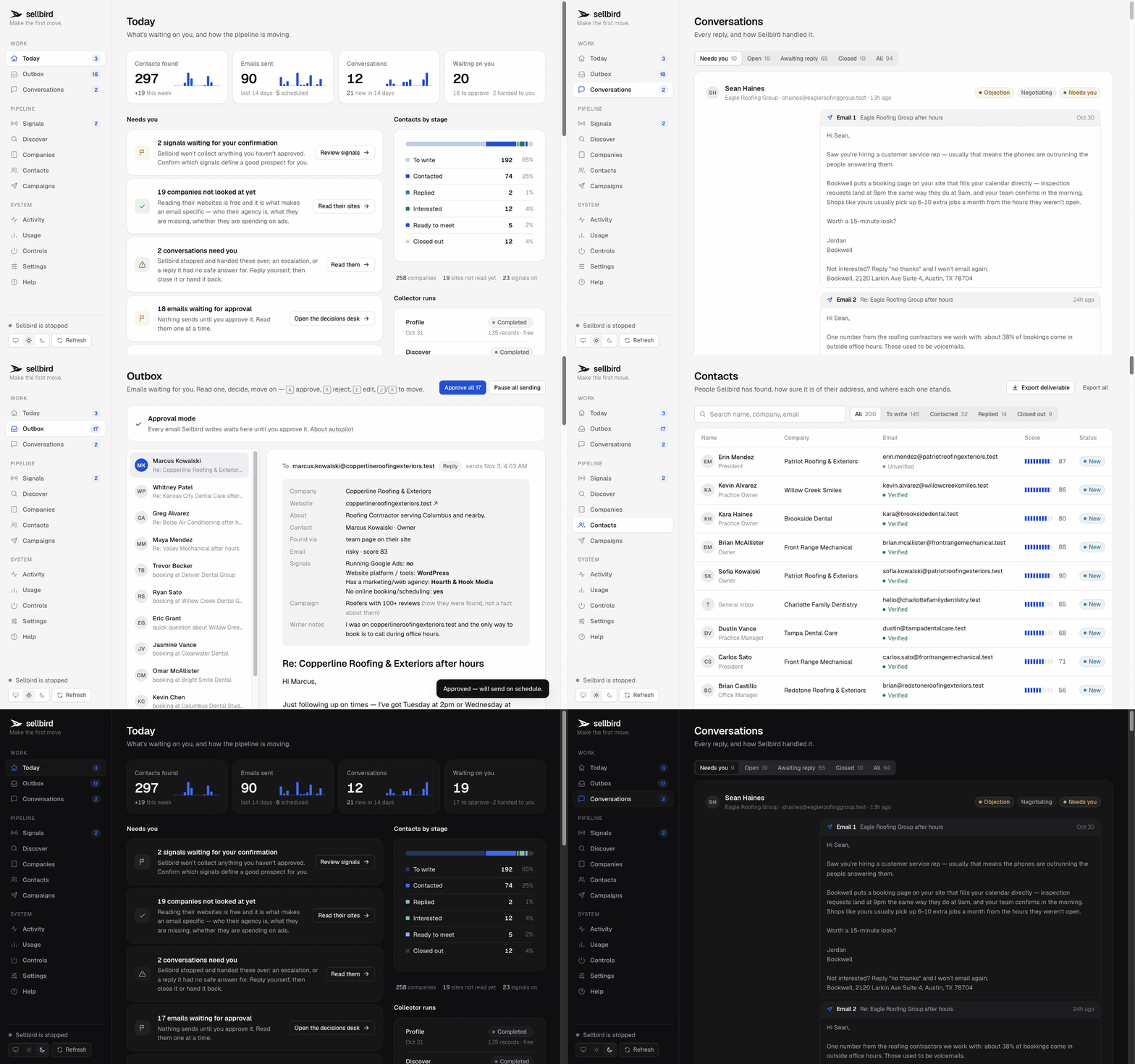

 Harvey 是一个自主运行的 AI 销售代理:它会自己寻找潜在客户商家,研究每家的具体情况,撰写个性化的冷邮件并发送出去,阅读对方回复,一步步把对话推进到约定会议——整个过程在你的自己电脑上循环运行。