
django-rest-framework README

The project's README from github.com/encode/django-rest-framework. As one markdown file: README.md.

Django REST framework

build-status-image coverage-status-image pypi-version

Awesome web-browsable Web APIs.

Full documentation for the project is available at https://www.django-rest-framework.org/.


Overview

Django REST framework is a powerful and flexible toolkit for building Web APIs.

Some reasons you might want to use REST framework:

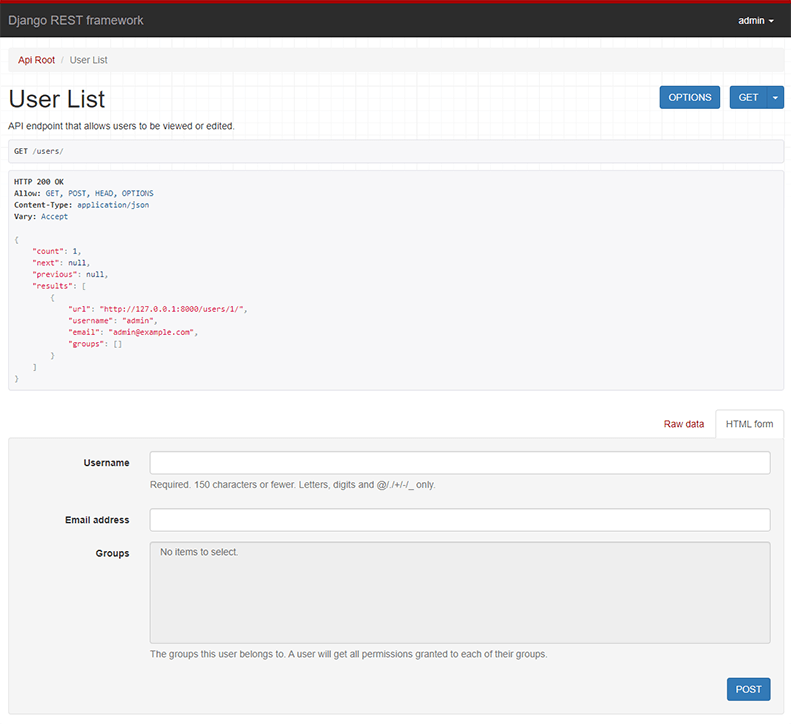
Below: Screenshot from the browsable API

Screenshot


Requirements

We highly recommend and only officially support the latest patch release of each Python and Django series.

Installation

Install using pip...

pip install djangorestframework

Add 'rest_framework' to your INSTALLED_APPS setting.

INSTALLED_APPS = [
    # ...
    "rest_framework",
]

Example

Let's take a look at a quick example of using REST framework to build a simple model-backed API for accessing users and groups.

Start up a new project like so...

pip install django
pip install djangorestframework
django-admin startproject example .
./manage.py migrate
./manage.py createsuperuser

Now edit the example/urls.py module in your project:

from django.contrib.auth.models import User
from django.urls import include, path
from rest_framework import routers, serializers, viewsets


# Serializers define the API representation.
class UserSerializer(serializers.HyperlinkedModelSerializer):
    class Meta:
        model = User
        fields = ["url", "username", "email", "is_staff"]


# ViewSets define the view behavior.
class UserViewSet(viewsets.ModelViewSet):
    queryset = User.objects.all()
    serializer_class = UserSerializer


# Routers provide a way of automatically determining the URL conf.
router = routers.DefaultRouter()
router.register(r"users", UserViewSet)

# Wire up our API using automatic URL routing.
# Additionally, we include login URLs for the browsable API.
urlpatterns = [
    path("", include(router.urls)),
    path("api-auth/", include("rest_framework.urls", namespace="rest_framework")),
]

We'd also like to configure a couple of settings for our API.

Add the following to your settings.py module:

INSTALLED_APPS = [
    # ... make sure to include the default installed apps here.
    "rest_framework",
]

REST_FRAMEWORK = {
    # Use Django's standard `django.contrib.auth` permissions,
    # or allow read-only access for unauthenticated users.
    "DEFAULT_PERMISSION_CLASSES": [
        "rest_framework.permissions.DjangoModelPermissionsOrAnonReadOnly",
    ]
}

That's it, we're done!

./manage.py runserver

You can now open the API in your browser at http://127.0.0.1:8000/, and view your new 'users' API. If you use the Login control in the top right corner you'll also be able to add, create and delete users from the system.

You can also interact with the API using command line tools such as curl. For example, to list the users endpoint:

$ curl -H 'Accept: application/json; indent=4' -u admin:password http://127.0.0.1:8000/users/
[
    {
        "url": "http://127.0.0.1:8000/users/1/",
        "username": "admin",
        "email": "[email protected]",
        "is_staff": true,
    }
]

Or to create a new user:

$ curl -X POST -d username=new -d [email protected] -d is_staff=false -H 'Accept: application/json; indent=4' -u admin:password http://127.0.0.1:8000/users/
{
    "url": "http://127.0.0.1:8000/users/2/",
    "username": "new",
    "email": "[email protected]",
    "is_staff": false,
}

Documentation & Support

Full documentation for the project is available at https://www.django-rest-framework.org/.

For questions and support, use the REST framework discussion group, or #restframework on libera.chat IRC.

Security

Please see the security policy.

django-rest-framework (encode/django-rest-framework)

Searching Database…

这是干什么用的?Django REST framework 是一个强大而灵活的工具包,用来在 Django 的基础上构建 Web API:把它加到项目里,就能为你的数据生成一整套 REST API。
它是一个独立的应用,还是需要加到我的 Django 项目里的东西?它不是独立应用:你需要用 pip install djangorestframework 安装,再把 'rest_framework' 加进 INSTALLED_APPS,这样它就运行在你的 Django 项目内部,把项目变成一个 API。
我怎么才能把第一个 API 跑起来?先用 pip 安装 django 和 djangorestframework,运行 django-admin startproject 创建项目,在 settings 里加上 'rest_framework' 并配置好 urls.py,然后运行 ./manage.py runserver;README 里的示例最后会得到一个能在浏览器中正常工作的用户(users)API。
它支持哪些 Python 和 Django 版本?支持 Python 3.10+ 以及 Django 5.2、6.0 或 6.1;官方只支持每个系列的最新补丁版本,所以要记得及时更新。
我只能用通用视图和视图集吗,还是也可以直接写普通视图?都不是:它自上而下都可以自定义,如果你用不到更强大的 generic views、viewsets 和 routers,直接写普通的函数视图也完全没问题。
serializers 只能配合 Django 的模型使用吗?不是——序列化同时支持 ORM 和非 ORM 的数据来源,所以普通的 Python 对象和其他来源也可以用。
我能不能不用浏览器,直接在命令行里调用这个 API?可以,它就是普通的 HTTP:README 里演示了用 curl 加基本认证(-u admin:password)以及 'Accept: application/json; indent=4' 请求头,来列出和创建用户,并输出格式化好的 JSON。
这个 API 只支持 JSON 吗?README 里的示例返回的是 JSON,而用浏览器打开同样的接口时,会渲染出可浏览的 HTML 界面;你得到什么,取决于你发送的 Accept 请求头。
What are similar projects?martini, node-restify, echo, hapi, starlette, django-allauth, ky, grape
Creator
encode
Size
64.7 MB
Stars
30.2K
Age
15y
Commits · 90 Days
