


30.2K ·GitHub
Что это такое?
 Django REST framework — это мощный и гибкий набор инструментов для создания веб-API на Django: вы подключаете его к проекту и получаете полноценный REST API вокруг своих данных.
Django REST framework — это мощный и гибкий набор инструментов для создания веб-API на Django: вы подключаете его к проекту и получаете полноценный REST API вокруг своих данных.Это отдельное приложение или то, что добавляется в мой Django-проект?Это не отдельное приложение: вы устанавливаете пакет через pip install djangorestframework и добавляете 'rest_framework' в INSTALLED_APPS, после чего он живёт внутри вашего Django-проекта и превращает его в API.
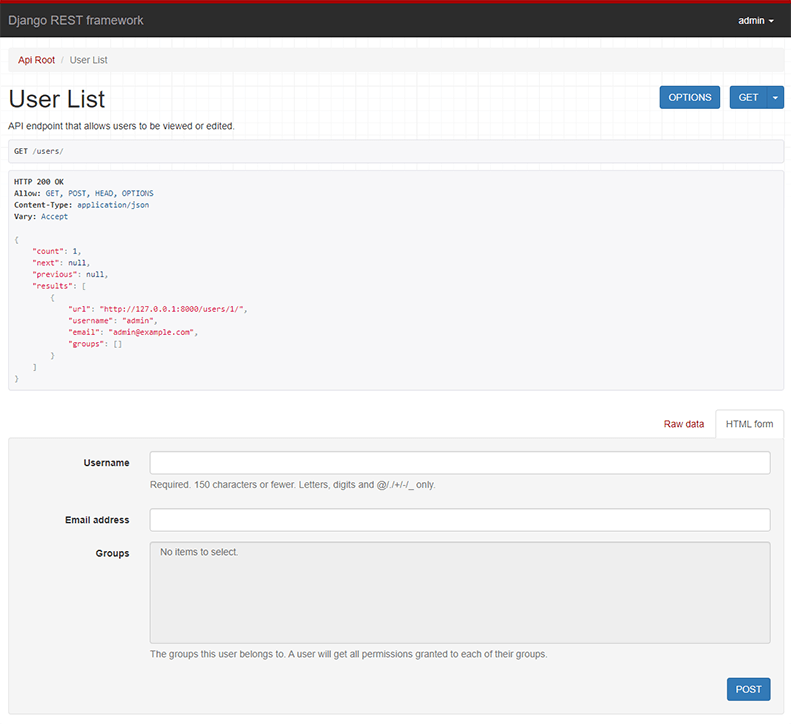
Это не отдельное приложение: вы устанавливаете пакет через pip install djangorestframework и добавляете 'rest_framework' в INSTALLED_APPS, после чего он живёт внутри вашего Django-проекта и превращает его в API.Как запустить свой первый API?Установите django и djangorestframework через pip, выполните django-admin startproject, добавьте 'rest_framework' в settings и настройте urls.py, затем запустите ./manage.py runserver; пример из README заканчивается работающим API пользователей прямо в браузере.
Установите django и djangorestframework через pip, выполните django-admin startproject, добавьте 'rest_framework' в settings и настройте urls.py, затем запустите ./manage.py runserver; пример из README заканчивается работающим API пользователей прямо в браузере.Какие версии Python и Django поддерживаются?Python 3.10+ и Django 5.2, 6.0 или 6.1; официально поддерживается только последний патч-релиз каждой серии версий, поэтому лучше не отставать от обновлений.
Python 3.10+ и Django 5.2, 6.0 или 6.1; официально поддерживается только последний патч-релиз каждой серии версий, поэтому лучше не отставать от обновлений.Я ограничен generic views и viewsets или могу писать обычные вьюхи?Ни то, ни другое: фреймворк настраивается на любую глубину, так что обычные function-based views вполне подойдут, если вам не нужны более мощные generic views, viewsets и роутеры.
Ни то, ни другое: фреймворк настраивается на любую глубину, так что обычные function-based views вполне подойдут, если вам не нужны более мощные generic views, viewsets и роутеры.Сериализаторы работают только с моделями Django?Нет — сериализация поддерживает и данные из ORM, и источники без ORM, так что обычные объекты Python и другие источники тоже подходят.
Нет — сериализация поддерживает и данные из ORM, и источники без ORM, так что обычные объекты Python и другие источники тоже подходят.Можно работать с API из командной строки, а не через браузер?Да, это обычный HTTP: в README показано, как через curl с базовой аутентификацией (-u admin:password) и заголовком 'Accept: application/json; indent=4' получать список пользователей и создавать новых, получая красиво отформатированный JSON.
Да, это обычный HTTP: в README показано, как через curl с базовой аутентификацией (-u admin:password) и заголовком 'Accept: application/json; indent=4' получать список пользователей и создавать новых, получая красиво отформатированный JSON.API понимает только JSON?В примерах из README возвращается JSON, но те же эндпоинты, открытые в браузере, показывают удобный HTML-интерфейс; формат ответа зависит от заголовка Accept, который вы отправляете.
В примерах из README возвращается JSON, но те же эндпоинты, открытые в браузере, показывают удобный HTML-интерфейс; формат ответа зависит от заголовка Accept, который вы отправляете.What are similar projects?martini, node-restify, echo, hapi, starlette, django-allauth, ky, grape
martini, node-restify, echo, hapi, starlette, django-allauth, ky, grapeWhich topics is it in?pip, django, rest, oauth2, python-library, web-framework, oauth, http, authentication, json, rest-api, backend
pip, django, rest, oauth2, python-library, web-framework, oauth, http, authentication, json, rest-api, backend