jevgrep



Same intelligence. ~30% lower cost.
Find code by asking what it does. In our ten-task SWE-bench comparison, Jevgrep
successfully completed the same 8 of 10 tasks as the baseline, at lower cost.
Coding agents spend part of every unfamiliar task finding the right files.
Jevgrep gives them a place to start: ask a repository question, and jg returns
relevant files, reading leads, and verbatim source excerpts in one stdout response.
It uses Jev to judge relevance across
folders, files, and declarations. Your coding agent then implements and tests the change.
npm install -g @dzhng/jevgrep
jg auth
jg skill
jg "How are telemetry events recorded and sent?" ./my-project
Requires Node.js 22+, macOS or Linux, and a key for Vercel AI Gateway, TypeSafe, OpenRouter, or OpenCode Zen.
No separate Python, Bun, or ripgrep installation is required to use jg.
Provider selection requires 0.3.0 or newer. Upgrade an older installation with
npm install --global @dzhng/jevgrep@latest.
Install the agent skill — required for agent setup
Installing the CLI alone does not teach your coding agent to use it. Install
the skill as well, from the project where your agent works:
jg skill
The installer detects your coding agents (Claude Code, Codex, OpenCode and
others) and asks where to install. Add --global for a user-wide install, or
--yes for unattended installation. The
skill explains installation, invocation and the meaning of returned context.
It leaves research and implementation decisions to the calling agent. The current repository skill
checks for jg and installs the CLI if it is missing; authentication still needs
your selected provider’s key. The skill installer itself does not configure credentials.
jg skill delegates to the skills CLI
and needs npm/npx plus network access. You can also run that installer directly,
without the CLI installed:
npx skills add dzhng/jevgrep --skill jevgrep
In 0.1.0, jg skill only prints the bundled skill; use npx skills with that version.
Upgrade
There is currently no jg upgrade command. Upgrade the CLI with npm:
npm install -g @dzhng/jevgrep@latest
jg --version
Update the installed skill separately by rerunning jg skill. Updating the npm package does not
overwrite skill files in your projects. See the package guide
for authentication details.
Start with a question, leave with source
Use jg when you know the behavior you need to understand but not where it lives:
jg "Where is authentication checked before a request reaches a handler?" .
jg "How are database connections created, pooled, and closed?" ./src
jg "Which tests cover retry behavior when a request times out?" .
Jevgrep explores the repository hierarchy and follows qualifying branches. It
selects files using content previews, then identifies useful source units and
surrounding context. It keeps qualifying file locations even when it cannot
confidently return an excerpt; it does not force every search into a fixed top-two
list.
The summary and compact file list come first, followed by selected source with
line references, then detailed declaration and call locations. Python and TypeScript/JavaScript support declaration
parsing; other text uses a fallback. The output is evidence for the agent to use,
not a generated answer or a guarantee that every relevant file was found.
See a recorded output example.
When you already know an exact symbol or path, a direct read or rg search may be
all you need. Jevgrep is most useful for questions that span unfamiliar files.
What we measured
Same intelligence, ~30% lower coding-agent cost. Both
Jevgrep and the no-Jev baseline solved 8/10 tasks. Full Sol cost fell from
$7.62 to $5.44—a measured 28.6% reduction, rounded to ~30%—including failed
attempts and excluding Jev cost.
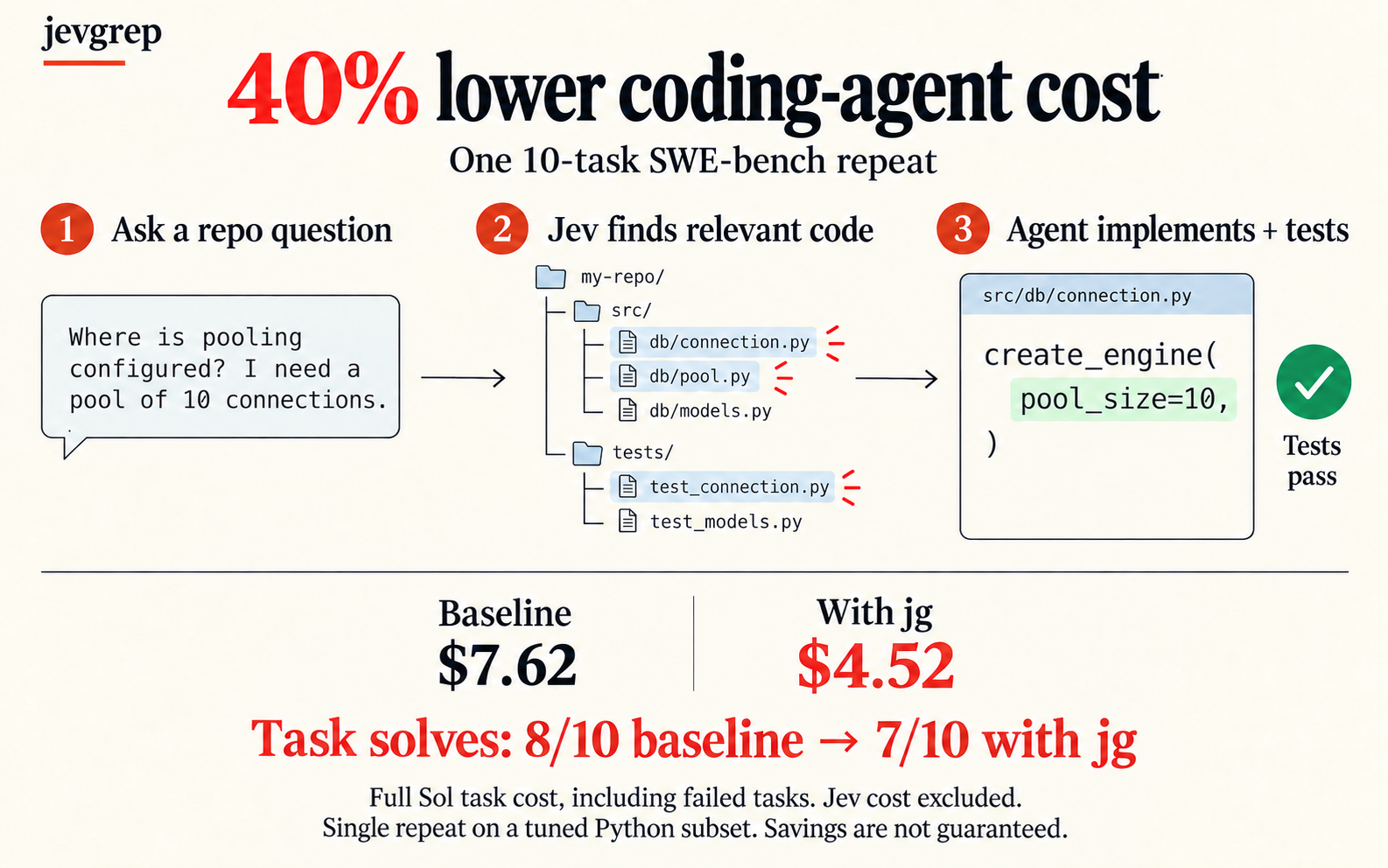
This comparison uses ten tuned Python SWE-bench tasks, one frozen installed
package and the exact public skill in this repository. It measures task success
and cost, not a speed improvement or guaranteed savings on every repository.
See the results and methodology
for per-task costs, artifact identities and limitations.
Source, credentials, and local state
Searches send eligible source content to Jev through the provider selected during auth. Default
filesystem filtering respects ignore files and excludes hidden, dependency/build,
binary, and obvious credential files. These filters are not a guarantee that all
sensitive information has been removed; choose a search root you intend to send.
jg auth asks for your provider, then saves its key in an owner-only config file.
Re-running auth replaces that setup; searches always use the saved provider.
jg doctor checks it with synthetic input. Existing saved keys without a provider
remain Vercel keys. Environment-based credentials and endpoint overrides are not
used; run jg auth if you previously relied on them.
Evaluation answers are cached locally by default. The CLI writes its output to
stdout and does not create report files. Use jg --help for cache controls,
search overrides, and incomplete-result behavior.
Development
The repository uses TypeScript, Bun workspaces, and Turborepo. From a checkout:
bun install --frozen-lockfile
bun run dev --help
bun run verify
Verification includes Docker tests of the installed Node-only package. For the
reasoning behind retrieval, parsing, caching, and failure handling, start with the
architecture and implementation record.
Release guidance covers tag-triggered npm publication and
verification of the exact public package.
MIT. Artwork and generation prompts.

 jevgrep(即 jg 命令行工具)让编程智能体通过用一个问题描述代码的功能来找到相关代码,而不是搜索确切的文本或路径。它使用名为 Jev 的引擎来判断文件夹、文件和声明的相关性,并把阅读线索和逐字源码摘录输出到 stdout。