




Before moving on, please consider giving us a GitHub star ⭐️. Thank you!
Other languages: 简体中文 日本語 한국어 Português ภาษาไทย
Website • Docs • Quick Start • Community Discord • Dragonfly User Conference • Join the Dragonfly Community
GitHub Discussions • GitHub Issues • Contributing • AI Agents Guide • Dragonfly Cloud
The world's most efficient in-memory data store
Dragonfly is an in-memory data store built for modern application workloads.
Fully compatible with Redis and Memcached APIs, Dragonfly requires no code changes to adopt. Compared to legacy in-memory datastores, Dragonfly delivers 25X more throughput, higher cache hit rates with lower tail latency, and can run on up to 80% less resources for the same sized workload.
Contents
We first compare Dragonfly with Redis on m5.large instance which is commonly used to run Redis
due to its single-threaded architecture. The benchmark program runs from another
load-test instance (c5n) in the same AZ using memtier_benchmark -c 20 --test-time 100 -t 4 -d 256 --distinct-client-seed
Dragonfly shows a comparable performance:
- SETs (
--ratio 1:0):
| Redis |
DF |
| QPS: 159K, P99.9: 1.16ms, P99: 0.82ms |
QPS:173K, P99.9: 1.26ms, P99: 0.9ms |
|
|
- GETs (
--ratio 0:1):
| Redis |
DF |
| QPS: 194K, P99.9: 0.8ms, P99: 0.65ms |
QPS: 191K, P99.9: 0.95ms, P99: 0.8ms |
The benchmark above shows that the algorithmic layer inside DF that allows it to scale vertically
does not take a large toll when running single-threaded.
However, if we take a bit stronger instance (m5.xlarge), the gap between DF and Redis starts growing.
(memtier_benchmark -c 20 --test-time 100 -t 6 -d 256 --distinct-client-seed):
- SETs (
--ratio 1:0):
| Redis |
DF |
| QPS: 190K, P99.9: 2.45ms, P99: 0.97ms |
QPS: 279K , P99.9: 1.95ms, P99: 1.48ms |
- GETs (
--ratio 0:1):
| Redis |
DF |
| QPS: 220K, P99.9: 0.98ms , P99: 0.8ms |
QPS: 305K, P99.9: 1.03ms, P99: 0.87ms |
Dragonfly throughput capacity continues to grow with instance size,
while single-threaded Redis is bottlenecked on CPU and reaches local maxima in terms of performance.
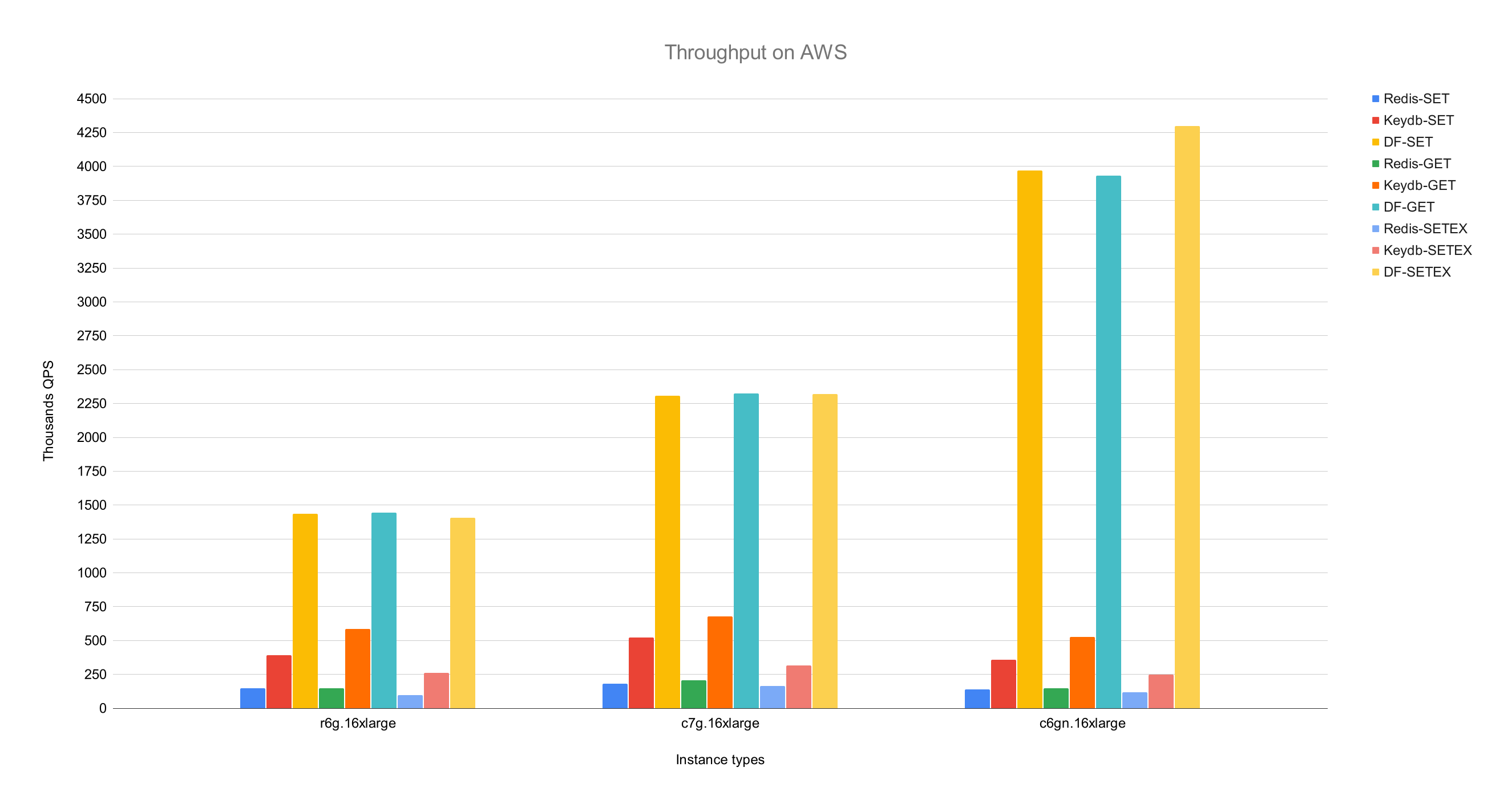
If we compare Dragonfly and Redis on the most network-capable instance c6gn.16xlarge,
Dragonfly showed a 25X increase in throughput compared to Redis single process, crossing 3.8M QPS.
Dragonfly's 99th percentile latency metrics at its peak throughput:
| op |
r6g |
c6gn |
c7g |
| set |
0.8ms |
1ms |
1ms |
| get |
0.9ms |
0.9ms |
0.8ms |
| setex |
0.9ms |
1.1ms |
1.3ms |
All benchmarks were performed using memtier_benchmark (see below) with number of threads tuned per server and instance type. memtier was run on a separate c6gn.16xlarge machine. We set the expiry time to 500 for the SETEX benchmark to ensure it would survive the end of the test.
  memtier_benchmark --ratio ... -t <threads> -c 30 -n 200000 --distinct-client-seed -d 256 \
     --expiry-range=...
In pipeline mode --pipeline=30, Dragonfly reaches 10M QPS for SET and 15M QPS for GET operations.
Dragonfly vs. Memcached
We compared Dragonfly with Memcached on a c6gn.16xlarge instance on AWS.
With a comparable latency, Dragonfly throughput outperformed Memcached throughput in both write and read workloads. Dragonfly demonstrated better latency in write workloads due to contention on the write path in Memcached.
SET benchmark
| Server |
QPS(thousands qps) |
latency 99% |
99.9% |
| Dragonfly |
🟩 3844 |
🟩 0.9ms |
🟩 2.4ms |
| Memcached |
806 |
1.6ms |
3.2ms |
GET benchmark
| Server |
QPS(thousands qps) |
latency 99% |
99.9% |
| Dragonfly |
🟩 3717 |
1ms |
2.4ms |
| Memcached |
2100 |
🟩 0.34ms |
🟩 0.6ms |
Memcached exhibited lower latency for the read benchmark, but also lower throughput.
Memory efficiency
To test memory efficiency, we filled Dragonfly and Redis with ~5GB of data using the debug populate 5000000 key 1024 command, sent update traffic with memtier, and kicked off the snapshotting with the bgsave command.
This figure demonstrates how each server behaved in terms of memory efficiency.
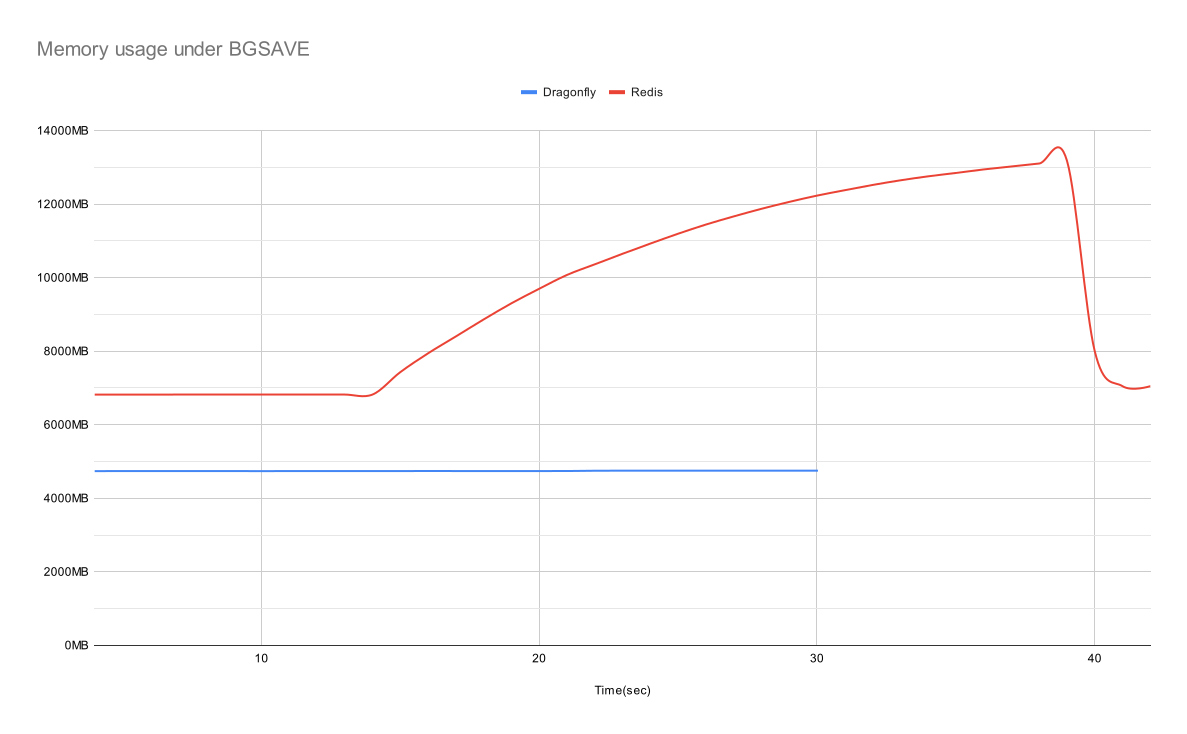
Dragonfly was 30% more memory efficient than Redis in the idle state and did not show any visible increase in memory use during the snapshot phase. At peak, Redis memory use increased to almost 3X that of Dragonfly.
Dragonfly finished the snapshot faster, within a few seconds.
For more info about memory efficiency in Dragonfly, see our Dashtable doc.
Dragonfly supports common Redis arguments where applicable. For example, you can run: dragonfly --requirepass=foo --bind localhost.
Dragonfly currently supports the following Redis-specific arguments:
port: Redis connection port (default: 6379).bind: Use localhost to only allow localhost connections or a public IP address to allow connections to that IP address (i.e. from outside too). Use 0.0.0.0 to allow all IPv4.requirepass: The password for AUTH authentication (default: "").maxmemory: Limit on maximum memory (in human-readable bytes) used by the database (default: 0). A maxmemory value of 0 means the program will automatically determine its maximum memory usage.dir: Dragonfly Docker uses the /data folder for snapshotting by default, the CLI uses "". You can use the -v Docker option to map it to your host folder.dbfilename: The filename to save and load the database (default: dump).
There are also some Dragonfly-specific arguments:
memcached_port: The port to enable Memcached-compatible API on (default: disabled).
keys_output_limit: Maximum number of returned keys in keys command (default: 8192). Note that keys is a dangerous command. We truncate its result to avoid a blowup in memory use when fetching too many keys.
dbnum: Maximum number of supported databases for select.
cache_mode: See the novel cache design section below.
hz: Key expiry evaluation frequency (default: 100). Lower frequency uses less CPU when idle at the expense of a slower eviction rate.
snapshot_cron: Cron schedule expression for automatic backup snapshots using standard cron syntax with the granularity of minutes (default: "").
Here are some cron schedule expression examples below, and feel free to read more about this argument in our documentation.
| Cron Schedule Expression |
Description |
* * * * * |
At every minute |
*/5 * * * * |
At every 5th minute |
5 */2 * * * |
At minute 5 past every 2nd hour |
0 0 * * * |
At 00:00 (midnight) every day |
0 6 * * 1-5 |
At 06:00 (dawn) from Monday through Friday |
primary_port_http_enabled: Allows accessing HTTP console on main TCP port if true (default: true).
admin_port: To enable admin access to the console on the assigned port (default: disabled). Supports both HTTP and RESP protocols.
admin_bind: To bind the admin console TCP connection to a given address (default: any). Supports both HTTP and RESP protocols.
admin_nopass: To enable open admin access to console on the assigned port, without auth token needed (default: false). Supports both HTTP and RESP protocols.
cluster_mode: Cluster mode supported (default: ""). Currently supports only emulated.
cluster_announce_ip: The IP that cluster commands announce to the client.
announce_port: The port that cluster commands announce to the client, and to replication master.
Example start script with popular options:
./dragonfly-x86_64 --logtostderr --requirepass=youshallnotpass --cache_mode=true -dbnum 1 --bind localhost --port 6379 --maxmemory=12gb --keys_output_limit=12288 --dbfilename dump.rdb
Arguments can be also provided via:
--flagfile <filename>: The file should list one flag per line, with equal signs instead of spaces for key-value flags. No quotes are needed for flag values.- Setting environment variables. Set
DFLY_x, where x is the exact name of the flag, case sensitive.
For more options like logs management or TLS support, run dragonfly --help.
Novel cache design
Dragonfly has a single, unified, adaptive caching algorithm that is simple and memory efficient.
You can enable caching mode by passing the --cache_mode=true flag. Once this mode is on, Dragonfly will evict items least likely to be stumbled upon in the future but only when it is near the maxmemory limit.
Expiration deadlines with relative accuracy
Expiration ranges are limited to ~8 years.
Expiration deadlines with millisecond precision (PEXPIRE, PSETEX, etc.) are rounded to the closest second for deadlines greater than 2^28ms, which has less than 0.001% error and should be acceptable for large ranges. If this is not suitable for your use case, get in touch or open an issue explaining your case.
For more detailed differences between Dragonfly expiration deadlines and Redis implementations, see here.
Native HTTP console and Prometheus-compatible metrics
By default, Dragonfly allows HTTP access via its main TCP port (6379). That's right, you can connect to Dragonfly via Redis protocol and via HTTP protocol — the server recognizes the protocol automatically during the connection initiation. Go ahead and try it with your browser. HTTP access currently does not have much info but will include useful debugging and management info in the future.
Go to the URL :6379/metrics to view Prometheus-compatible metrics.
The Prometheus exported metrics are compatible with the Grafana dashboard, see here.
Important! The HTTP console is meant to be accessed within a safe network. If you expose Dragonfly's TCP port externally, we advise you to disable the console with --http_admin_console=false or --nohttp_admin_console.
Dragonfly started as an experiment to see how an in-memory datastore could look if it was designed in 2022. Based on lessons learned from our experience as users of memory stores and engineers who worked for cloud companies, we knew that we need to preserve two key properties for Dragonfly: Atomicity guarantees for all operations and low, sub-millisecond latency over very high throughput.
Our first challenge was how to fully utilize CPU, memory, and I/O resources using servers that are available today in public clouds. To solve this, we use shared-nothing architecture, which allows us to partition the keyspace of the memory store between threads so that each thread can manage its own slice of dictionary data. We call these slices "shards". The library that powers thread and I/O management for shared-nothing architecture is open-sourced here.
To provide atomicity guarantees for multi-key operations, we use the advancements from recent academic research. We chose the paper "VLL: a lock manager redesign for main memory database systems” to develop the transactional framework for Dragonfly. The choice of shared-nothing architecture and VLL allowed us to compose atomic multi-key operations without using mutexes or spinlocks. This was a major milestone for our PoC and its performance stood out from other commercial and open-source solutions.
Our second challenge was to engineer more efficient data structures for the new store. To achieve this goal, we based our core hashtable structure on the paper "Dash: Scalable Hashing on Persistent Memory". The paper itself is centered around the persistent memory domain and is not directly related to main-memory stores, but it's still most applicable to our problem. The hashtable design suggested in the paper allowed us to maintain two special properties that are present in the Redis dictionary: The incremental hashing ability during datastore growth the ability to traverse the dictionary under changes using a stateless scan operation. In addition to these two properties, Dash is more efficient in CPU and memory use. By leveraging Dash's design, we were able to innovate further with the following features:
- Efficient record expiry for TTL records.
- A novel cache eviction algorithm that achieves higher hit rates than other caching strategies like LRU and LFU with zero memory overhead.
- A novel fork-less snapshotting algorithm.
Once we had built the foundation for Dragonfly and we were happy with its performance, we went on to implement the Redis and Memcached functionality. We have to date implemented ~185 Redis commands (roughly equivalent to Redis 5.0 API) and 13 Memcached commands.
And finally,
Our mission is to build a well-designed, ultra-fast, cost-efficient in-memory datastore for cloud workloads that takes advantage of the latest hardware advancements. We intend to address the pain points of current solutions while preserving their product APIs and propositions.
Thanks to all the contributors to Dragonfly project!


 An in-memory data store built as a modern replacement for Redis and Memcached — fully compatible with both APIs, so no code changes needed; it claims 25X more throughput on up to 80% fewer resources.