Typo-resistant path and content search, frequency-ranked file access, a background watcher, and a lightweight in-memory content index. Way faster than CLIs like ripgrep and fzf in any long-running process that searches more than once.
fff is MIT and open source forever. Development is supported by these companies:
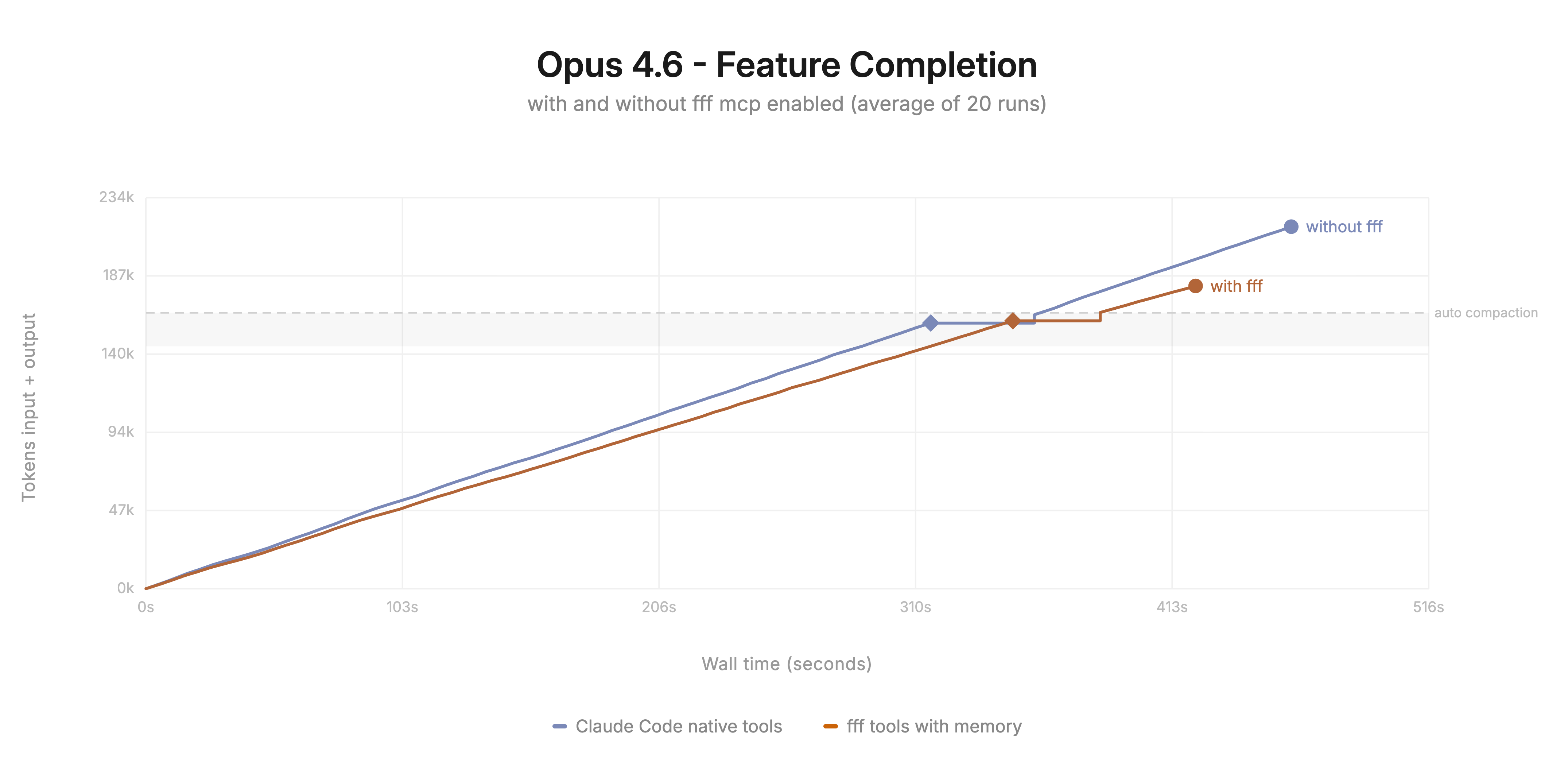
The MCP server gives any agent a file search tool that is faster and more token-efficient than the built-in one.
The Pi extension swaps pi's native tools for FFF implementations and feeds the interactive editor's @-mention autocomplete from the frecency-ranked index.
fff.nvim
Demo on the Linux kernel repo (100k files, 8GB):
https://github.com/user-attachments/assets/5d0e1ce9-642c-4c44-aa88-01b05bb86abb
Installation
lazy.nvim
-- Package name changed from `fff.nvim` to `fff`. If you installed fff.nvim before, clean with `:Lazy clean`
{
  'dmtrKovalenko/fff',
  build = function()
    -- downloads a prebuilt binary or falls back to cargo build
    require("fff.download").download_or_build_binary()
  end,
  -- for nixos:
  -- build = "nix run .#release",
  opts = {
    debug = {
      enabled = true,
      show_scores = true,
    },
  },
  lazy = false, -- the plugin lazy-initialises itself
  keys = {
    { "ff", function() require('fff').find_files() end, desc = 'FFFind files' },
    { "fg", function() require('fff').live_grep() end, desc = 'LiFFFe grep' },
    { "fz",
      function() require('fff').live_grep({ grep = { modes = { 'fuzzy', 'plain' } } }) end,
      desc = 'Live fffuzy grep',
    },
    { "fw",
      function() require('fff').live_grep_under_cursor() end,
      mode = { 'n', 'x' },
      desc = 'Search current word / selection',
    },
  },
}
vim.pack
-- Package name changed from `fff.nvim` to `fff`. If you installed fff.nvim before, clean with `:packdel fff.nvim`
vim.pack.add({ 'https://github.com/dmtrKovalenko/fff' })

vim.api.nvim_create_autocmd('PackChanged', {
  callback = function(ev)
    local name, kind = ev.data.spec.name, ev.data.kind
    if name == 'fff' and (kind == 'install' or kind == 'update') then
      if not ev.data.active then vim.cmd.packadd('fff') end
      require('fff.download').download_or_build_binary()
    end
  end,
})

vim.g.fff = {
  lazy_sync = true,
  debug = { enabled = true, show_scores = true },
}

vim.keymap.set('n', 'ff', function() require('fff').find_files() end, { desc = 'FFFind files' })
Public API
require('fff').find_files()                        -- find files in current repo
require('fff').live_grep()                         -- live content grep
require('fff').live_grep_under_cursor()            -- grep <cword> in normal, selection in visual
require('fff').scan_files()                        -- force rescan
require('fff').refresh_git_status()                -- refresh git status
require('fff').find_files_in_dir(path)             -- find in a specific dir
require('fff').change_indexing_directory(new_path) -- change root

-- Programmatic search (no UI). Useful for plugin integrations.
require('fff').file_search(query, opts)            -- fuzzy search files / dirs / mixed
require('fff').content_search(query, opts)         -- programmatic grep
file_search(query, opts)
Returns a structured result { items, scores, total_matched, total_files?, total_dirs?, location? }. Each item has a type field ("file" or "directory") and name / relative_path. File items also expose size, modified, git_status, is_binary, and frecency scores.
local r = require('fff').file_search('button', {
  mode             = 'mixed',  -- 'files' (default) | 'directories' | 'mixed'
  max_results      = 50,
  page             = 0,        -- 0-based pagination
  current_file     = nil,      -- path to deprioritize for distance scoring
  max_threads      = 4,
  cwd              = nil,      -- switch indexed root if different (see below)
  wait_for_index_ms = nil,     -- override the default scan wait timeout
})
for _, item in ipairs(r.items) do
  print(item.type, item.relative_path)
end
content_search(query, opts)
Returns a GrepResult { items, total_matched, total_files_searched, total_files, filtered_file_count, next_file_offset, regex_fallback_error? }. Each match item has relative_path, name, line_number, col, line_content, match_ranges, plus the same file metadata as file_search.
local r = require('fff').content_search('TODO', {
  mode                  = 'plain',  -- 'plain' (default) | 'regex' | 'fuzzy'
  max_file_size         = 10 * 1024 * 1024,
  max_matches_per_file  = 100,
  smart_case            = true,
  page_size             = 50,
  file_offset           = 0,
  time_budget_ms        = 0,
  enforce_time_budget   = false,    -- also bound zero-match searches
  trim_whitespace       = false,
  cwd                   = nil,      -- switch indexed root if different
  wait_for_index_ms     = nil,      -- override the default scan wait timeout
})
for _, m in ipairs(r.items) do
  print(string.format('%s:%d %s', m.relative_path, m.line_number, m.line_content))
end
Both functions accept the same constraint syntax as the UI pickers (e.g. git:modified, *.rs, !test/, glob patterns).
cwd and indexing
Both file_search and content_search honour an optional cwd field. The first call to either function lazily initialises the picker at config.base_path (your Neovim cwd by default).
- If
cwd matches the currently indexed root, the call returns immediately against the existing index.
- If
cwd differs, the picker is re-indexed at the new root and the call blocks (default up to 10 s) until the new picker is installed and its initial scan completes — so callers always get results from the right tree.
- If the index is still warming up after a
change_indexing_directory, you can pass wait_for_index_ms = N to block for up to N ms regardless of whether cwd triggered the swap. Pass 0 to skip waiting entirely (useful for fire-and-forget calls where partial results are acceptable).
- Invalid or non-existent
cwd paths return an empty result and emit an error via vim.notify.
Autocmds
The picker fires User autocmds when it opens and closes. FFFOpen runs with the prompt window focused, FFFClose runs after every picker window is gone — so hide global UI, not window-local options of the picker itself:
vim.api.nvim_create_autocmd('User', {
  pattern = { 'FFFOpen', 'FFFClose' },
  callback = function(ev) vim.o.showtabline = ev.match == 'FFFOpen' and 0 or 2 end,
})
Commands
:FFFScan. Rescan files.:FFFRefreshGit. Refresh git status.:FFFClearCache [all|frecency|files]. Clear caches.:FFFHealth. Health check.:FFFDebug [on|off|toggle]. Toggle the scoring display.:FFFOpenLog. Open ~/.local/state/nvim/log/fff.log.
Configuration
Defaults are sensible. Override only what you care about.
require('fff').setup({
  base_path = vim.fn.getcwd(),
  prompt = '🪿 ',
  title = 'FFFiles',
  max_results = 100,
  max_threads = 4,
  lazy_sync = true,
  prompt_vim_mode = false,
  wrap_around = false, -- true to wrap the cursor around when moving past the first/last item
  follow_symlinks = false,
  -- Allow indexing the user's $HOME directory. Enabled by default.
  -- Disable if you strictly sure you don't want this, as it makes whole fff error hard
  enable_home_dir_scanning = true,
  -- Allow indexing a filesystem root (e.g. `/`, `C:\`). Disabled by default
  enable_fs_root_scanning = false,
  layout = {
    height = 0.8,
    width = 0.8,
    prompt_position = 'bottom',   -- or 'top'
    preview_position = 'right',   -- 'left' | 'right' | 'top' | 'bottom'
    preview_size = 0.5,
    -- Border style for the picker windows. Leave unset (nil) to follow the
    -- global `vim.o.winborder`; set it to override fff's borders independently.
    border = nil, -- 'single' | 'double' | 'rounded' | 'solid' | 'shadow' | 'none'
    -- border = {
    --   { ' ', ' ', ' ', ' ', ' ', ' ', ' ', ' ' },
    --   { ' ', ' ', ' ', ' ', ' ' },
    -- },

    flex = { size = 130, wrap = 'top' },
    min_list_height = 10, --  do not display anything except the list below this threshold
    show_scrollbar = true,
    path_shorten_strategy = 'middle', -- 'middle' | 'middle_number' | 'end' | 'start'
    -- 'center' | 'top' | 'bottom' | 'left' | 'right' | 'top_left' | 'top_right' | 'bottom_left' | 'bottom_right'
    anchor = 'center',
    show_path_first = false, -- true renders results as `path/to/file` instead of `file path/to`
  },
  -- find_files specific rendering
  file_picker = {
    current_file_label = '(current)', -- virtual text marking the buffer the picker was opened from
    fuzzy_query_highlighting = false, -- true to highlight fuzzy query matches, not just the literal query
  },
  preview = {
    enabled = true,
    max_size = 10 * 1024 * 1024,
    chunk_size = 8192,
    binary_file_threshold = 1024,
    imagemagick_info_format_str = '%m: %wx%h, %[colorspace], %q-bit',
    line_numbers = false,
    cursorlineopt = 'both',
    wrap_lines = false,
    filetypes = {
      svg = { wrap_lines = true },
      markdown = { wrap_lines = true },
      text = { wrap_lines = true },
    },
  },
  keymaps = {
    close = '<Esc>',
    select = '<CR>',
    select_split = '<C-s>',
    select_vsplit = '<C-v>',
    select_tab = '<C-t>',
    move_up = { '<Up>', '<C-p>' },
    move_down = { '<Down>', '<C-n>' },
    preview_scroll_up = '<C-u>',
    preview_scroll_down = '<C-d>',
    toggle_debug = '<F2>',
    cycle_grep_modes = '<S-Tab>',
    insert_newline_escape = '<C-CR>',
    -- grep mode only: jump cursor to first match of next/prev file group
    grep_jump_to_next_file = { '<C-A-n>', '<A-Down>' },
    grep_jump_to_prev_file = { '<C-A-p>', '<A-Up>' },
    cycle_previous_query = '<C-Up>',
    cycle_forward_query = '<C-Down>',
    -- unbound by default, wipes the whole input line
    -- clear_query = '<C-u>', -- overrides preview_scroll_up in insert mode
    toggle_select = '<Tab>',
    send_to_quickfix = '<C-q>',
    focus_list = '<leader>l',
    focus_preview = '<leader>p',
  },
  -- extra keymaps for the picker input, keyed by mode, applied over the built-ins
  mappings = {
    -- i = { ['<A-BS>'] = function() vim.api.nvim_input('<C-w>') end },
  },
  frecency = {
    enabled = true,
    db_path = vim.fn.stdpath('cache') .. '/fff_nvim',
  },
  history = {
    enabled = true,
    db_path = vim.fn.stdpath('data') .. '/fff_queries',
    min_combo_count = 3,
    combo_boost_score_multiplier = 100,
  },
  git = {
    status_text_color = false, -- true to color filenames by git status
  },
  select = {
    -- Return winid to open the chosen file in, or nil to open in the original window
    select_window = function(current_buf, action) --[[ default impl ]] end,
  },
  grep = {
    max_file_size = 10 * 1024 * 1024,
    max_matches_per_file = 100,
    smart_case = true,
    time_budget_ms = 150,
    enforce_time_budget = false, -- apply time_budget_ms even before anything matched (off = zero-match queries scan everything)
    modes = { 'plain', 'regex', 'fuzzy' },
    trim_whitespace = false,
    enable_filename_constraint = false, -- treat filename-like tokens (e.g. `score.rs`) in a grep query as a file-path filter scoping the search; off = searched as literal text
    location_format = ':%d:%d', -- printf format for line:col prefix in grep results, e.g. ':%d' for line-only
  },
  debug = {
    enabled = false, -- show the file info panel next to the preview
    show_scores = false, -- inline scores in the file list
    -- Per-section toggles for the file info panel. Accepts a boolean shorthand
    -- (`show_file_info = true|false`) to flip everything at once. The panel
    -- adapts to width: narrow renders sections vertically, wide renders them
    -- as a two-column grid. Disable a section to also shrink the panel.
    show_file_info = {
      file_info = true, -- size, type, git status, frecency
      score_breakdown = true, -- total + match type, bonuses, modifiers, penalty
      -- modified + accessed timestamps; pass a table to hide individual rows:
      --   timings = { modified = false, accessed = true }
      timings = true,
      full_path = true, -- relative path at the bottom (wraps if too long)
    },
  },
  logging = {
    enabled = true,
    -- logs will be written in a parent directory of this file path in files like
    -- `<stem>+<UTC-timestamp>+<pid>.<ext>`. Run :FFFOpenLog to open current one
    log_file = vim.fn.stdpath('log') .. '/fff.log',
    log_level = 'info',
    retain_runs = 20,
  },
})
Live grep modes
<S-Tab> cycles between plain, regex, and fuzzy. The list is configurable via grep.modes, and single-mode setups hide the indicator entirely.
Per-call override:
require('fff').live_grep({ grep = { modes = { 'fuzzy', 'plain' } } })
require('fff').live_grep({ query = 'search term' }) -- pre-fill
Constraints
Both find and grep accept these tokens to refine a query:
git:modified. One of modified, staged, deleted, renamed, untracked, ignored.test/. Any deeply nested children of test/.!something, !test/, !git:modified. Exclusion. Text exclusions need at least 3 alphanumeric-containing characters, so operators like != or !== work../**/*.{rs,lua}. Any valid glob, powered by zlob.
Grep-only:
*.md, *.{c,h}. Extension filter.src/main.rs. Grep inside a single file.




 Набор инструментов для поиска файлов на Rust, созданный для людей и ИИ-агентов: поиск по путям и содержимому, устойчивый к опечаткам, с ранжированием по тому, как часто вы работаете с файлами. Поставляется как SDK, MCP-сервер и плагин для Neovim. На нём работает поиск в opencode и nushell.