





1.2K ·GitHub
What is this?


 It is a browser and phone client for herdr: it lets you open the agent sessions you already have running, chat with them, see a live terminal for each pane, and reply from anywhere.
It is a browser and phone client for herdr: it lets you open the agent sessions you already have running, chat with them, see a live terminal for each pane, and reply from anywhere.Is this a standalone app or does it need herdr already running?It is a plugin/client for herdr, not a replacement for it: herdr still runs and owns the agents, this app just connects to them over the browser or as a PWA on your phone.
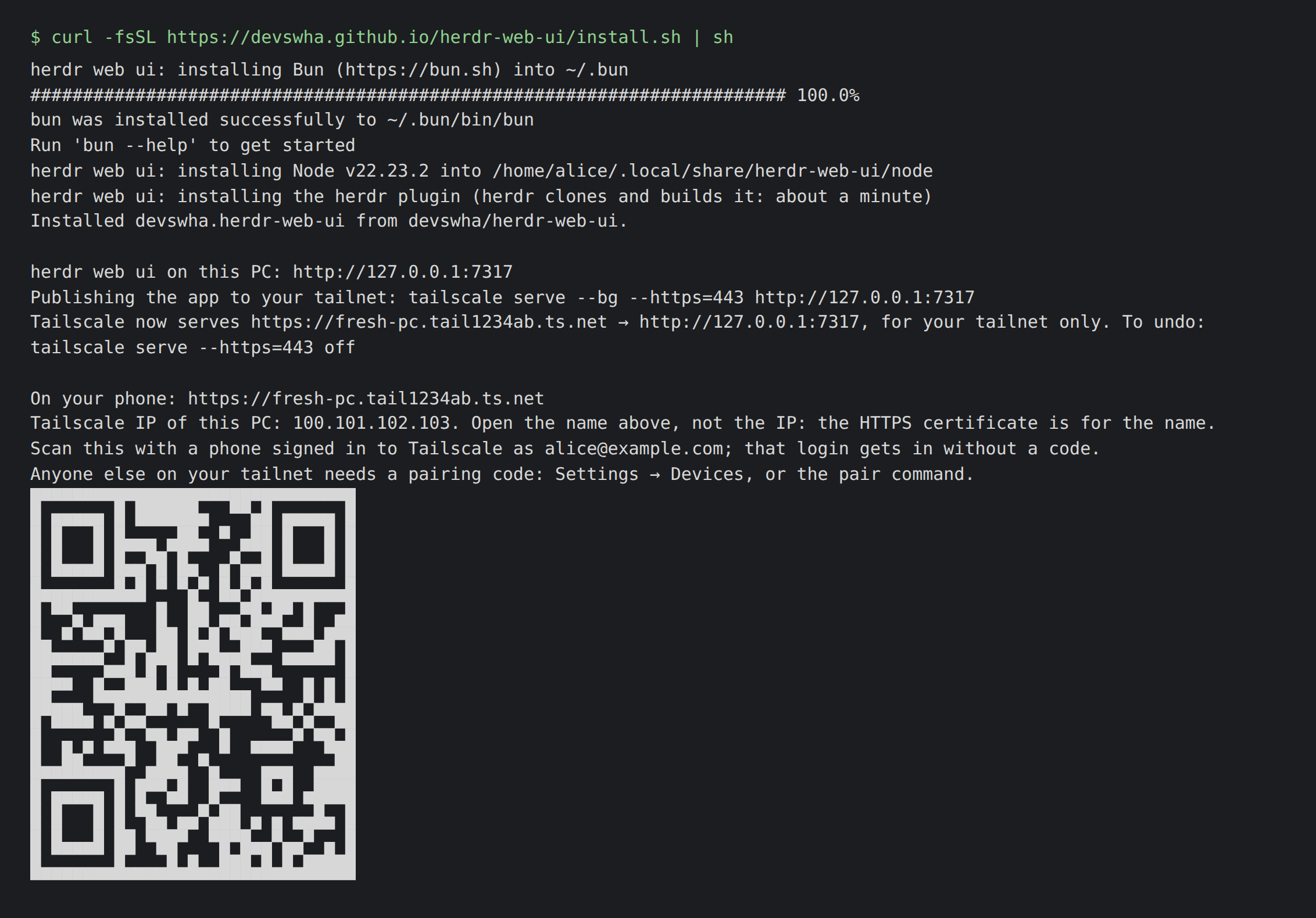
It is a plugin/client for herdr, not a replacement for it: herdr still runs and owns the agents, this app just connects to them over the browser or as a PWA on your phone.How do I install and open it?Run the Linux/macOS installer (or the Windows PowerShell command), which installs herdr, Bun and Node for your user and adds this UI as a herdr plugin, then open localhost:7317 and pick a pane or start a new session.
Run the Linux/macOS installer (or the Windows PowerShell command), which installs herdr, Bun and Node for your user and adds this UI as a herdr plugin, then open localhost:7317 and pick a pane or start a new session.What do I need installed beforehand?On Linux/macOS you need (or the installer sets up) herdr 0.9.0+, Bun 1.4+ and Node 18+; on Windows you just need Git for Windows, since no Node or WSL is required there.
On Linux/macOS you need (or the installer sets up) herdr 0.9.0+, Bun 1.4+ and Node 18+; on Windows you just need Git for Windows, since no Node or WSL is required there.Does the live terminal work the same on every OS?On Windows it falls back to a screen-mirror view with typing and a fixed grid instead of full terminal attach, until herdr adds that support for Windows.
On Windows it falls back to a screen-mirror view with typing and a fixed grid instead of full terminal attach, until herdr adds that support for Windows.Which coding agents can I actually chat with?It renders native transcripts and gives a live terminal for Claude Code, Codex, omp, omo, gjc and pi sessions running in herdr panes.
It renders native transcripts and gives a live terminal for Claude Code, Codex, omp, omo, gjc and pi sessions running in herdr panes.Where does my voice go when I use dictation?Dictated speech is not sent anywhere until you hit send, and it is processed with your own OpenAI key or the browser's built-in speech recognition.
Dictated speech is not sent anywhere until you hit send, and it is processed with your own OpenAI key or the browser's built-in speech recognition.How do I reach the app from my phone outside my home network?The installer sets up HTTPS over your Tailscale network, giving you a private tailnet address and a QR code that opens the PWA on your phone.
The installer sets up HTTPS over your Tailscale network, giving you a private tailnet address and a QR code that opens the PWA on your phone.Can it control other machines besides the one herdr runs on?Yes, you can add other Linux and macOS computers to the sidebar and connect to them over SSH.
Yes, you can add other Linux and macOS computers to the sidebar and connect to them over SSH.How are agent approvals and plan prompts handled?Approvals, questions and plan menus from the agent are turned into tappable cards, which are re-checked to be current right before your answer is sent.
Approvals, questions and plan menus from the agent are turned into tappable cards, which are re-checked to be current right before your answer is sent.What was this built on top of?It is built on herdr, took inspiration from chatmux, and uses xterm.js, React, Bun and Lucide under the hood.
It is built on herdr, took inspiration from chatmux, and uses xterm.js, React, Bun and Lucide under the hood.What are similar projects?pi-pocket, Codync, agent-router, hapi, WindTerm, Netcatty, happy, zoetrope
pi-pocket, Codync, agent-router, hapi, WindTerm, Netcatty, happy, zoetropeWhich topics is it in?herdr, herdr-plugin, xterm, ssh-client, push-notifications, tailscale, coding-assistant, remote-desktop, file-manager, remote-access, qr-code, pwa
herdr, herdr-plugin, xterm, ssh-client, push-notifications, tailscale, coding-assistant, remote-desktop, file-manager, remote-access, qr-code, pwa