WhatCable
What can this USB-C cable actually do?
Website: whatcable.uk (overview, screenshots, and CLI docs)
A small macOS menu bar app that tells you, in plain English, what each USB-C cable plugged into your Mac can actually do, and why your Mac might be charging slowly.
USB-C hides a lot under one connector. Anything from a USB 2.0 charge-only cable to a 240W / 40 Gbps Thunderbolt 4 cable, all looking identical in your drawer. macOS already exposes the relevant info via IOKit; WhatCable surfaces it as a friendly menu bar popover.
Part of a family: WhatBattery for battery health and charging, WhatPort for every port at once.





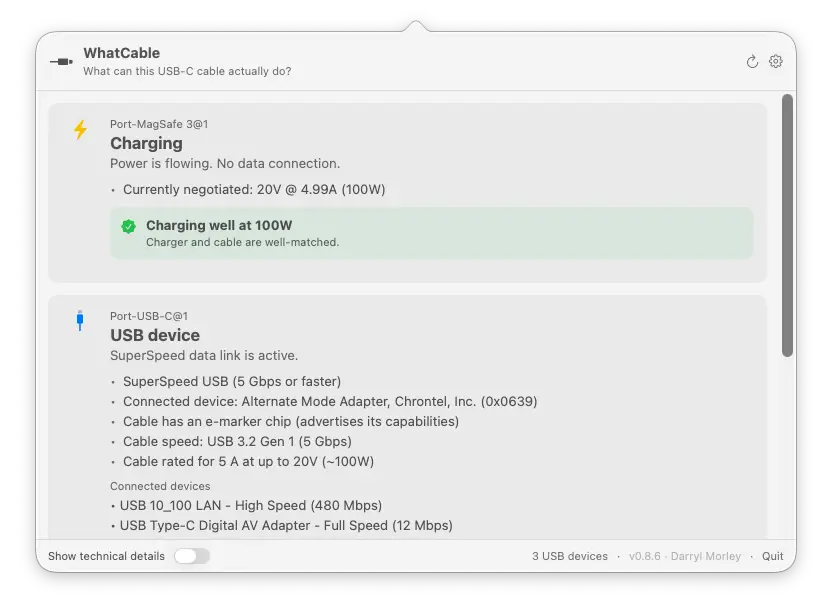
What it shows
Per port, in plain English:
- At-a-glance headline: Thunderbolt / USB4, USB device, Display connected, Charging only, Slow USB / charge-only cable, Nothing connected
- Charging diagnostic: when something's plugged in, a banner identifies the bottleneck:
- "Cable is limiting charging speed" (cable rated below the charger)
- "Charging at 30W (charger can do up to 96W)" (Mac is asking for less, e.g. battery near full)
- "Charging well at 96W" (everything matches)
- "Battery full, not charging" (plugged in, battery full, so the Mac isn't drawing power)
- Mid-session fault warnings: if a cable develops trouble while it's plugged in (a power overcurrent, or the connection dropping and coming back), a banner appears on the port. It reads the port's own fault counters, so it catches faults that only show up once a cable is under load.
- Data-speed diagnostic: a plain-English verdict on what's limiting the link, the Mac port, the cable, or the device. For example "Cable is limiting data speed", "Device runs at 10 Gbps, this is the fastest it supports, not a cable problem", or "Running slower than expected" when the link came up degraded. Shown inline, in the CLI, and in JSON.
- Cable e-marker info: the cable's actual speed (USB 2.0, 5 / 10 / 20 / 40 / 80 Gbps), current rating (3 A / 5 A up to 60W / 100W / 240W), and the chip's vendor
- USB-IF certification: cables that carry a certificate ID (XID) get a "USB-IF certified" line naming the manufacturer. The ID is read off the cable itself and matched against a list of USB-IF certifications bundled with the app, which is where the manufacturer name comes from. Nothing is looked up over the network. A cable advertising an ID that USB-IF doesn't publish gets a neutral "certified but unlisted" line instead. Certification is voluntary and Apple's own cables land there, so it's a fact about the ID, never a verdict on the cable. The raw XID is in the JSON output.
- Cable trust signals: an orange card appears when the e-marker reports values that look unusual against the USB-PD spec, like a zero vendor ID, a reserved bit pattern in the speed / current / cable-latency fields, or a VID that isn't in USB-IF's published list. Wording is hedged on purpose: a flag means "this looks unusual," not "this cable is fake."
- Charger PDO list: every voltage profile the charger advertises (5V / 9V / 12V / 15V / 20V…) with the currently negotiated profile highlighted in real time
- Connected device identity: vendor name and product type, decoded from the PD Discover Identity response
- Connected devices: each device is shown inside the thing it's actually plugged into, so a dock chained off a display reads as a chain instead of a flat pile. Hubs are hidden by default, since they're plumbing and make up about half of a typical list. Any device left sitting behind a hidden hub says "via N hubs" so nothing disappears without explanation, and a Show N hubs control brings them back for that port. Devices are grouped by USB controller when a port has more than one, and named by their maker where the name alone wouldn't tell two apart. The CLI still prints everything.
- Thunderbolt fabric: when a Thunderbolt / USB4 link is active, shows per-lane speed, generation (TB3, TB4, TB5), and the full switch topology for multi-hop connections through docks, plus the active tunnels riding that link so you can see which protocol is going where
- Cable identification: if the cable's e-marker fingerprint matches a known cable in the bundled database, the brand and model are shown alongside the raw specs
- Active transports: USB 2 / USB 3 / Thunderbolt / DisplayPort
- Desktop widget: small, medium, and large WidgetKit widgets showing live cable status on your desktop
- ⌥-click the menu bar icon (or flip the toggle in Settings) to reveal the underlying IOKit properties for engineers
Click the gear icon in the popover header to open Settings, where you can:
- Hide empty ports
- Launch at login
- Run as a regular Dock app instead of a menu bar icon
- Pick the menu bar icon, and show the live charging wattage next to it as either a number or a small fill bar
- Adjust the font size and the window opacity
- Show technical details (the same raw IOKit data that ⌥-click reveals)
- Skip deep USB probing, a compatibility switch for the few KVM switches and hubs that misbehave when WhatCable reads capability info from the devices behind them
- Switch language (English, Armenian, Brazilian Portuguese, Dutch, French, German, Hindi, Italian, Japanese, Korean, Latvian, Norwegian, Polish, Russian, Simplified Chinese, Spanish, Traditional Chinese, Turkish, Ukrainian, or follow your system default)
- Get notifications when cables are connected or disconnected, and when an app update is available
- Contribute anonymised port and power diagnostics to improve hardware coverage (opt-in, manual)
Right-click the menu bar icon for Refresh, a Keep window open toggle (handy for screenshots and demos), and Settings…. The Pro screens (Power Monitor, Negotiation Diagnostics, Display Diagnostics, Saved Cables) and Licence… live here too. Below those: Check for Updates…, Contribute Diagnostic Data…, About, WhatCable on GitHub, and Quit.
WhatCable Pro
WhatCable is free and open source. If you find it useful, you can support the project by picking up WhatCable Pro. Pro is for finding the weak link in a connection and keeping the evidence: live measurements, per-connection diagnostics, and a history of how each cable performs. It unlocks:
- Cable history: add a cable, give it a name, and WhatCable keeps a record of how it actually performs over time. It recognises the cable on later connections and builds a timeline: when you last used it, what it negotiated, whether it's been misbehaving. A saved-cables list, an all-time summary per cable, and a verdict right on the port card.
- Live power metering and PD contract inspection
- Power Monitor with a live system power-input graph
- Negotiation Diagnostics: the full per-connection breakdown, what the Mac port, cable, and device each support vs what was negotiated, side by side with the weak link highlighted, plus an e-marker vs Thunderbolt-controller cross-check
- Display Diagnostics: reads your monitor's live display mode straight from macOS and compares it against what the DisplayPort link is carrying, so a screen stuck below its top resolution or refresh has an explanation. Shows the true resolution even on 5K and 6K displays, confirms full quality when a screen reaches its top mode via compression (DSC), and names any HDMI or DisplayPort adapter in the chain
- Port health counters and cable resistance estimation
- Terminal dashboard: a live full-screen view of every port, power, and Thunderbolt for the SSH and tmux crowd. Three screens (Overview, Negotiation, Power), Tab to switch, with a plain cable-health verdict per port. Run
whatcable --dashboard
- Pin diagrams and liquid detection status
- Pro screens open inside the app, with an optional detach into their own window
- Works even on Macs that don't expose live per-port metering
One-time purchase, works on up to 2 Macs. See whatcable.uk/pro for details.

Install
Visit whatcable.uk for an overview and screenshots, or install directly below.
Download the latest WhatCable.zip from the Releases page, unzip, and drag WhatCable.app to /Applications.
The app is signed with a Developer ID and notarised by Apple, so there are no Gatekeeper warnings.
It's not on the Mac App Store on purpose. Most of what WhatCable reads would in fact survive the App Sandbox: we tested it, and the IOKit registry reads come back identical either way. What the sandbox does block is the SMC access behind Pro's live power metering, and the bundled whatcable CLI doesn't fit the store's install model. So it ships signed and notarised outside the store instead.
Requires macOS 14 (Sonoma) or later, Apple Silicon only. This is measured, not assumed: every Intel Mac in the community diagnostic corpus reports its USB-C port-controller services as empty, so the USB-PD state and cable e-marker data WhatCable depends on are not published on those machines through any public IOKit accessor. Thunderbolt fabric data is still present on Intel; it is the port-controller layer that is missing.
Note: The manual install gives you the menu bar app only. The whatcable CLI is bundled inside the .app and is not on your PATH by default. If you want to use it from the shell, see the Command-line interface section below for the one-line symlink. Or install via Homebrew, which sets up the CLI automatically.
Homebrew
brew install --cask darrylmorley/whatcable/whatcable
This installs the menu bar app and symlinks the whatcable CLI into your PATH.
If you don't want the menu bar app, install just the command-line tool:
brew install darrylmorley/whatcable/whatcable-cli
Same signed and notarised binary, packaged on its own. Useful in terminal-only or scripting environments. Pick one of the two Homebrew installs (both ship the same whatcable binary).
Homebrew 6 may warn about untrusted third-party taps on first install. If an existing install starts complaining about an untrusted tap, run brew trust darrylmorley/whatcable or see https://docs.brew.sh/Tap-Trust for details.
Command-line interface
A whatcable binary ships alongside the menu bar app, driven by the same diagnostic engine:
$ whatcable

USB-C Port 1
  ✓ Charging well at 96W
  Cable: 5A, 100W, USB4 40 Gbps
  Charger: 5V / 9V / 15V / 20V PDOs

USB-C Port 2
  ! Cable is limiting charging speed
  Cable: 3A, 60W, USB 2.0
  Device: External SSD, USB 10 Gbps
Flags:
whatcable                # human-readable summary of every port
whatcable --json         # structured JSON, pipe into jq
whatcable --watch        # stream updates as cables come and go (Ctrl+C to exit)
whatcable --raw          # include underlying IOKit properties
whatcable --report       # open a pre-filled GitHub issue for the connected cable
whatcable --test-kit     # run diagnostic probes and submit anonymised data
whatcable --no-usb-probe # skip deep USB probing (for KVM switches and hubs that misbehave)
whatcable --desktop      # launch the GUI app in Dock mode
whatcable --popover      # launch the GUI app in menu bar mode
whatcable --version
whatcable --help
Pro from the command line:
whatcable --monitor                        # Pro: live power telemetry (Ctrl+C to exit)
whatcable --monitor-json                   # Pro: live power telemetry as newline-delimited JSON
whatcable --dashboard                      # Pro: full-screen TUI dashboard (Tab cycles screens, q quits)
whatcable --activate XXXX-XXXX-XXXX-XXXX   # validate and store a Pro licence
whatcable --licence                        # show current licence status
whatcable --deactivate                     # remove the stored licence
whatcable --pro                            # show Pro features, open purchase page
The CLI prints a one-line Pro hint at the end of plain text output for unlicensed users. Run whatcable --silence-pro-hints to hide it (or --show-pro-hints to bring it back). Suppressed automatically when output is piped, redirected, or used with --json.
If you installed the .app manually rather than via Homebrew, the CLI lives at WhatCable.app/Contents/Helpers/whatcable. Symlink it into your PATH if you want it on the shell:
ln -s /Applications/WhatCable.app/Contents/Helpers/whatcable /usr/local/bin/whatcable
The Homebrew install does this for you automatically.
How it works
WhatCable reads four families of IOKit services. No entitlements, no private APIs, no helper daemons:
| Service |
What it gives us |
AppleHPMInterfaceType10/11/12 (M3-era), AppleHPMInterfaceType18 (MacBook Neo A-series), AppleTCControllerType10/11 (M1 / M2) |
Per-port state: connection, transports, plug orientation, e-marker presence. Type11 is what M2 MacBook Air uses for its MagSafe 3 port. |
IOPortFeaturePowerSource |
Full PDO list from the connected source, with the live "winning" PDO |
IOPortTransportComponentCCUSBPDSOP, ...SOPp, ...SOPpp |
PD Discover Identity VDOs from the port partner (SOP), the cable's near-end e-marker (SOP'), and the far-end e-marker (SOP'') if present |
| XHCI controller subtree |
Each connected USB device is paired to its physical port via the XHCI port node's UsbIOPort registry path, falling back to a bus-index derived from the controller's locationID upper byte and the port's hpm SPMI ancestor on machines that don't expose UsbIOPort. |
Cable speed and power decoding follow the USB Power Delivery spec (aligned to USB-PD R3.2 V1.2, March 2026). Vendor names come from a bundled SQLite database (whatcable.db) that merges USB-IF's published vendor list, the community usb.ids list, and a curated set of cable fingerprints reported by users.
Build from source
swift build                  # compile everything
swift run WhatCable          # run the menu bar app (dev mode, no widget or bundle structure)
swift run whatcable-cli      # run the CLI
swift test                   # run the test suite
Requires Swift 5.9+ (Xcode 15+). Note: swift run WhatCable launches a working dev build but without the widget extension or proper .app bundle. For a distributable build, use the build scripts below.
Build a distributable .app
./scripts/smoke-test.sh
Builds, signs, notarises (if configured), and smoke-tests the app. Produces dist/WhatCable.app and dist/WhatCable.zip. Safe to run on any branch, any time. Does not touch the Homebrew tap.
Modes:
| Configuration |
Result |
No .env |
Ad-hoc signed. Works locally; Gatekeeper warns on other Macs. |
.env with DEVELOPER_ID |
Developer ID signed + hardened runtime. |
.env with DEVELOPER_ID + NOTARY_PROFILE |
Full notarisation + stapled ticket. Gatekeeper-clean for everyone. |
Cutting a release:
# write release-notes/v<version>.md first, then:
./scripts/release.sh <version>
The wrapper does the whole pipeline: bumps the version, runs build-app.sh
(which builds, signs, notarises, smoke-tests, and bumps the local cask),
tags and pushes the commit, creates the GitHub release with the notes
file, verifies the uploaded asset's sha matches the local zip, copies the
notes into the tap, and pushes the tap. Use --dry-run first to validate
state. Requires gh (auth'd) and the env vars from .env.example.
One-time setup for full notarisation:
# 1. Find your signing identity
security find-identity -v -p codesigning

# 2. Store notarytool credentials in the keychain
xcrun notarytool store-credentials "WhatCable-notary" \
    --apple-id "[email protected]" \
    --team-id "ABCDE12345" \
    --password "<app-specific-password>"   # generate at appleid.apple.com

# 3. Create your .env from the template
cp .env.example .env
# ...and fill in DEVELOPER_ID
Caveats
- Cable e-marker info only appears for cables that carry one. Most USB-C cables under 60 W are unmarked. Any Thunderbolt / USB4 cable, any 5 A / 100 W+ cable, and most quality data cables will be e-marked.
- Some cables only reveal their e-marker once something is plugged in at the other end. The chip in the cable's plug runs off VCONN (a small power rail your Mac feeds into the cable) and only answers when the host issues a "Discover Identity" message. With nothing attached, some Macs read the e-marker straight away, others wait until they see a real partner to negotiate with. If a cable shows up as basic when bare, plug a charger, dock, or device into the far end and check again.
- WhatCable reads from the Mac's USB-C port, the connected device or charger, and the cable itself. It cross-checks what each part of the chain reports, so if a cable claims high specs but the negotiated result is lower, you'll see where the mismatch is. That said, software cannot verify what's physically inside the jacket. If a cable's e-marker chip claims 240W / 40 Gbps but the wiring can't deliver, the chip is lying, not WhatCable. The trust-signals card flags a small set of internal-consistency tells (zero VID, reserved bit patterns in the Cable VDO, a VID not in the USB-IF list). These are common in budget cables and don't necessarily mean anything is wrong. They're informational, not a verdict.
- Desktop front USB-C ports show devices, but no cable detail. On Apple Silicon desktops (Mac mini, Studio), the front USB-C ports are plain USB behind an internal hub, not full USB-C ports with their own controller like the rear Thunderbolt ports. Anything plugged into them now appears under a Built-in USB ports section, but the Mac exposes no cable, power, or PD data for them, so there's no e-marker or charging detail to show. The rear Thunderbolt ports work fully.
- PD spec coverage: the decoder is aligned to USB-PD R3.2 V1.2 (March 2026). Earlier 3.0 / 3.1 cables work fine.
- Vendor name lookup uses a bundled database (thousands of USB-IF entries plus the community usb.ids list). VIDs assigned after the bundled snapshot will show as "Unregistered / unknown" and trip a trust-signal flag until the database is refreshed.
Linux port
@abrauchli built a Rust port for Linux called usbeehive. Install it with cargo install usbeehive. It reads from the kernel's typec sysfs interface rather than IOKit, so it's an independent implementation rather than a fork. It started life as a whatcable crate on crates.io before being renamed to avoid confusion with this repo. He's also working on [usbee](http

 一款 macOS 菜单栏应用,用通俗的语言告诉你插在 Mac 上的每根 USB-C 线到底能干什么,以及为什么你的 Mac 充电可能很慢。