

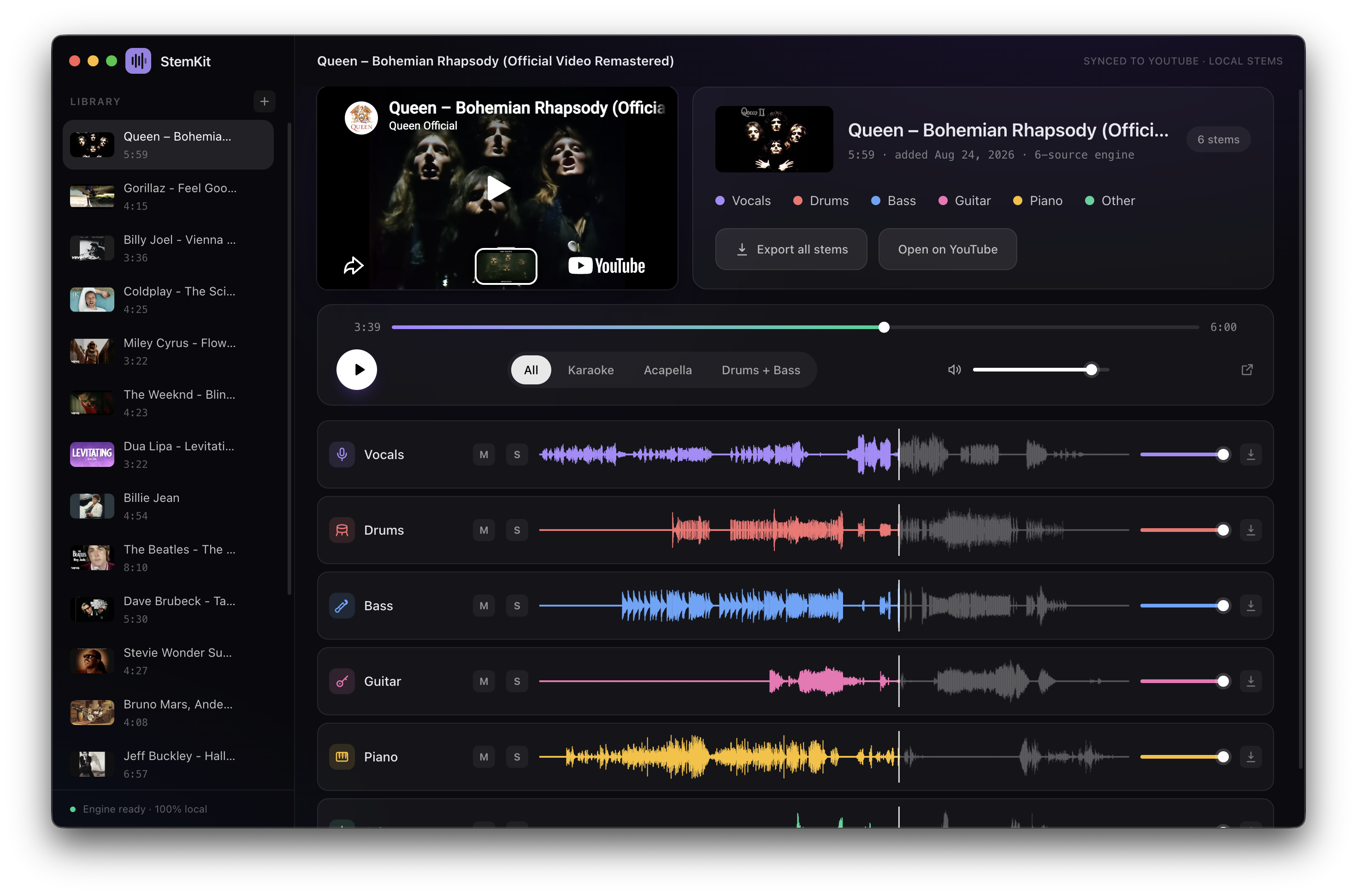
这是什么?
 StemKit 可以把任何 YouTube 歌曲分离成独立的音轨——人声、鼓、贝斯、吉他、钢琴等——完全在你自己的机器上运行,并带有迷你 DAW 风格的播放器,可以对每条音轨进行混音/静音/独奏。
StemKit 可以把任何 YouTube 歌曲分离成独立的音轨——人声、鼓、贝斯、吉他、钢琴等——完全在你自己的机器上运行,并带有迷你 DAW 风格的播放器,可以对每条音轨进行混音/静音/独奏。这是网页应用,还是要安装到我电脑上的东西?它是一款用 Electron 和 TypeScript 构建的原生桌面应用,以安装包(DMG、EXE、AppImage/deb)形式分发,不是网页服务。
它是一款用 Electron 和 TypeScript 构建的原生桌面应用,以安装包(DMG、EXE、AppImage/deb)形式分发,不是网页服务。怎么让它跑起来?从 GitHub Releases 页面下载对应的安装包——Apple Silicon Mac 用 DMG,Windows 用 EXE 安装程序或便携 zip,Linux 用 AppImage/deb——然后运行。
从 GitHub Releases 页面下载对应的安装包——Apple Silicon Mac 用 DMG,Windows 用 EXE 安装程序或便携 zip,Linux 用 AppImage/deb——然后运行。需要我自己先安装 Python 或 ffmpeg 吗?不需要——首次启动时 StemKit 会按需自动下载专用 Python 运行时(分离引擎需一次性下载约 2GB),ffmpeg 则随应用捆绑。
不需要——首次启动时 StemKit 会按需自动下载专用 Python 运行时(分离引擎需一次性下载约 2GB),ffmpeg 则随应用捆绑。安装上有什么坑需要提前知道?在 macOS 上应用已签名但未经公证,所以在你手动允许之前,Gatekeeper 会提示「无法验证开发者」;在 Windows 上,SmartScreen 首次运行时可能会警告,需要选择「仍要运行」。
在 macOS 上应用已签名但未经公证,所以在你手动允许之前,Gatekeeper 会提示「无法验证开发者」;在 Windows 上,SmartScreen 首次运行时可能会警告,需要选择「仍要运行」。它能用于 Intel Mac 吗,还是只支持 Apple Silicon?macOS(12+)只支持 Apple Silicon Mac;同时支持 Windows 10/11 x64 和 Linux x64。
macOS(12+)只支持 Apple Silicon Mac;同时支持 Windows 10/11 x64 和 Linux x64。设置好之后还需要联网吗?一次性设置(运行时 + 分离引擎)完成后,StemKit 就完全离线运行——只有最初搜索/下载 YouTube 音频本身才需要联网。
一次性设置(运行时 + 分离引擎)完成后,StemKit 就完全离线运行——只有最初搜索/下载 YouTube 音频本身才需要联网。我的音频或 YouTube 链接会被发送到别处吗?不会——包括分离本身在内的一切都在你的机器上本地运行,不涉及任何账号、云服务或 API 密钥。
不会——包括分离本身在内的一切都在你的机器上本地运行,不涉及任何账号、云服务或 API 密钥。用它下载 YouTube 音频真的合法吗?项目本身采用 MIT 许可,但 README 坦言,从 YouTube 提取音频违反其面向公开产品的服务条款,所以它仅用于个人用途。
项目本身采用 MIT 许可,但 README 坦言,从 YouTube 提取音频违反其面向公开产品的服务条款,所以它仅用于个人用途。必须要有 NVIDIA GPU 吗,还是 CPU 上也能跑?GPU 能加速(Apple Silicon 走 MPS,NVIDIA 走 CUDA),但如果没有 GPU,分离也可以在普通 CPU 上运行。
GPU 能加速(Apple Silicon 走 MPS,NVIDIA 走 CUDA),但如果没有 GPU,分离也可以在普通 CPU 上运行。StemKit 能分离哪些乐器?人声、鼓、贝斯、吉他、钢琴等——你选择乐器,StemKit 会自动为它们选择合适的分离引擎。
人声、鼓、贝斯、吉他、钢琴等——你选择乐器,StemKit 会自动为它们选择合适的分离引擎。一键预设有哪些?全部、卡拉OK、纯人声(Acapella)和鼓 + 贝斯预设,无需手动选择即可立刻得到你想要的音轨组合。
全部、卡拉OK、纯人声(Acapella)和鼓 + 贝斯预设,无需手动选择即可立刻得到你想要的音轨组合。可以导出分离出的音轨吗?可以,任何单条音轨或全部音轨都可以导出为 WAV 文件。
可以,任何单条音轨或全部音轨都可以导出为 WAV 文件。有更高质量的分离选项吗?有,在设置齿轮图标中可选的一次性下载可以添加 Mel-Band Roformer 录音室级人声(+913MB)、微调过的 Demucs 模型(约 +320MB,最慢可达 4 倍),以及额外的精修处理(最慢可达 3 倍)。
有,在设置齿轮图标中可选的一次性下载可以添加 Mel-Band Roformer 录音室级人声(+913MB)、微调过的 Demucs 模型(约 +320MB,最慢可达 4 倍),以及额外的精修处理(最慢可达 3 倍)。What are similar projects?ISpotify, ultimatevocalremovergui, yovoice, ytDownloader, openspot-music-app, SCM, course2md, demucs
ISpotify, ultimatevocalremovergui, yovoice, ytDownloader, openspot-music-app, SCM, course2md, demucsWhich topics is it in?karaoke, music-downloader, yt-dlp, auto-update, linux-app, electron-app, audio-processing, youtube, installer, music, privacy-first, ffmpeg
karaoke, music-downloader, yt-dlp, auto-update, linux-app, electron-app, audio-processing, youtube, installer, music, privacy-first, ffmpeg