

Что это?
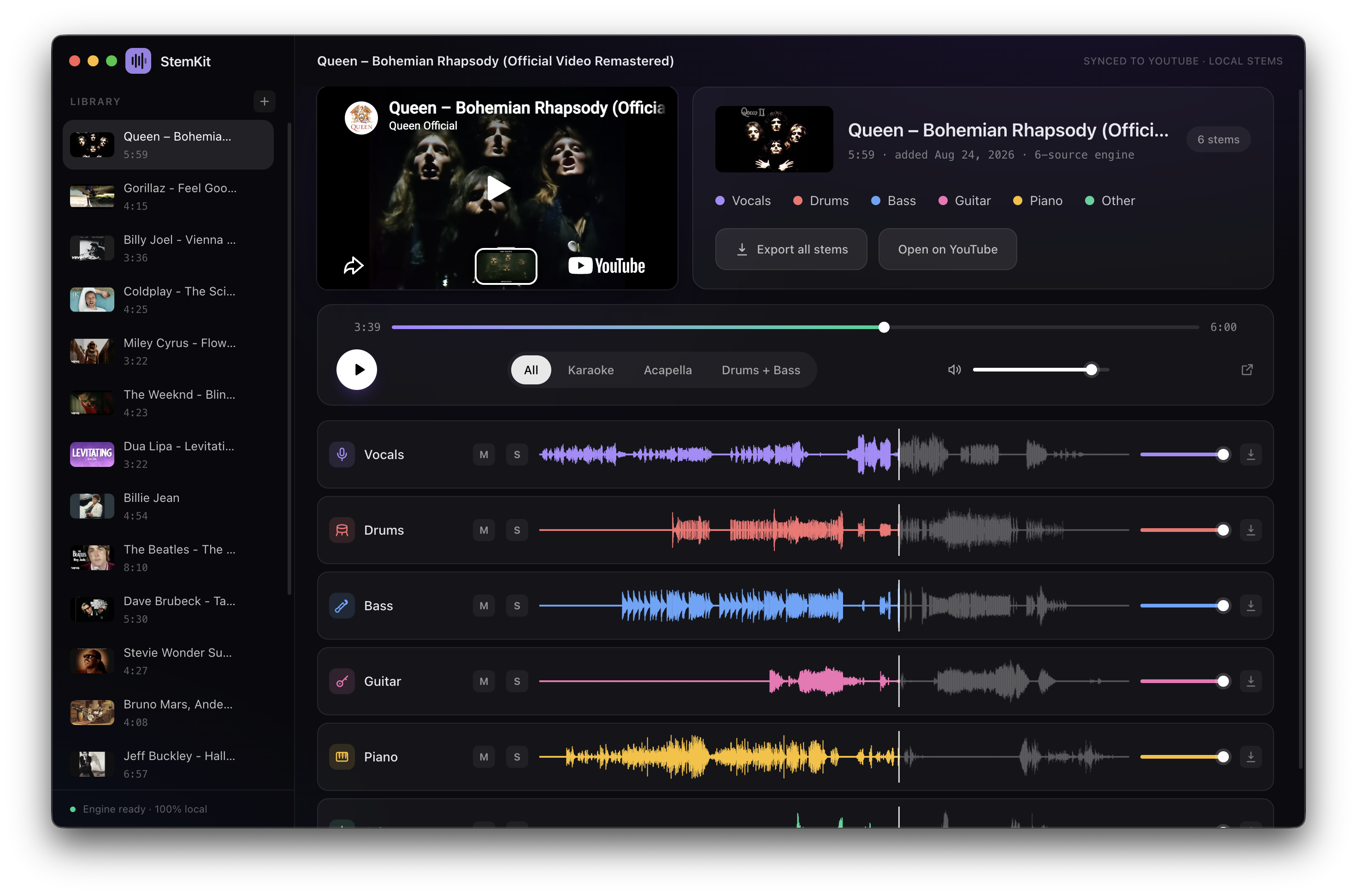
 StemKit разделяет любую песню с YouTube на отдельные дорожки (stems) — вокал, ударные, бас, гитару, фортепиано и другие — целиком на вашей собственной машине, с мини-плеером в стиле DAW для сведения/мьюта/соло каждой дорожки.
StemKit разделяет любую песню с YouTube на отдельные дорожки (stems) — вокал, ударные, бас, гитару, фортепиано и другие — целиком на вашей собственной машине, с мини-плеером в стиле DAW для сведения/мьюта/соло каждой дорожки.Это веб-приложение или то, что я ставлю на компьютер?Это нативное десктоп-приложение на Electron и TypeScript, распространяемое установщиками (DMG, EXE, AppImage/deb), а не веб-сервис.
Это нативное десктоп-приложение на Electron и TypeScript, распространяемое установщиками (DMG, EXE, AppImage/deb), а не веб-сервис.Как его запустить?Скачайте подходящий установщик со страницы GitHub Releases — DMG для Mac на Apple Silicon, EXE-установщик или портативный zip для Windows, либо AppImage/deb для Linux — и запустите.
Скачайте подходящий установщик со страницы GitHub Releases — DMG для Mac на Apple Silicon, EXE-установщик или портативный zip для Windows, либо AppImage/deb для Linux — и запустите.Нужно ли самому сначала ставить Python или ffmpeg?Нет — при первом запуске StemKit при необходимости сам скачивает собственный рантайм Python (разовая загрузка около 2 ГБ для движка разделения), а ffmpeg идёт в комплекте с приложением.
Нет — при первом запуске StemKit при необходимости сам скачивает собственный рантайм Python (разовая загрузка около 2 ГБ для движка разделения), а ffmpeg идёт в комплекте с приложением.Есть ли подводные камни при установке, о которых стоит знать?В macOS приложение подписано, но не нотаризовано, поэтому Gatekeeper скажет «не удаётся проверить разработчика», пока вы не разрешите вручную; в Windows SmartScreen может предупредить при первом запуске — нужно «Run anyway».
В macOS приложение подписано, но не нотаризовано, поэтому Gatekeeper скажет «не удаётся проверить разработчика», пока вы не разрешите вручную; в Windows SmartScreen может предупредить при первом запуске — нужно «Run anyway».Работает ли на Mac с Intel или только на Apple Silicon?На macOS (12+) поддерживаются только Mac на Apple Silicon; Windows 10/11 x64 и Linux x64 тоже поддерживаются.
На macOS (12+) поддерживаются только Mac на Apple Silicon; Windows 10/11 x64 и Linux x64 тоже поддерживаются.Нужно ли интернет-соединение после настройки?Когда разовая настройка (рантайм + движок разделения) завершится, StemKit работает полностью офлайн — интернет нужен только чтобы изначально найти и скачать само аудио с YouTube.
Когда разовая настройка (рантайм + движок разделения) завершится, StemKit работает полностью офлайн — интернет нужен только чтобы изначально найти и скачать само аудио с YouTube.Отправляется ли моё аудио или ссылка на YouTube куда-либо?Нет — всё, включая само разделение, выполняется локально на вашей машине, без аккаунтов, облачных сервисов и API-ключей.
Нет — всё, включая само разделение, выполняется локально на вашей машине, без аккаунтов, облачных сервисов и API-ключей.А законно ли вообще скачивать аудио с YouTube этим инструментом?Сам проект под лицензией MIT, но README прямо говорит, что вытягивание аудио с YouTube нарушает его Условия использования для публичных продуктов, поэтому он предназначен только для личного использования.
Сам проект под лицензией MIT, но README прямо говорит, что вытягивание аудио с YouTube нарушает его Условия использования для публичных продуктов, поэтому он предназначен только для личного использования.Нужна ли GPU NVIDIA или работает и на CPU?GPU ускоряет работу (Apple Silicon через MPS, NVIDIA через CUDA), но разделение идёт и на обычном CPU, если GPU нет.
GPU ускоряет работу (Apple Silicon через MPS, NVIDIA через CUDA), но разделение идёт и на обычном CPU, если GPU нет.Какие инструменты умеет разделять StemKit?Вокал, ударные, бас, гитару, фортепиано и другие — вы выбираете инструменты, а StemKit автоматически подбирает для них подходящий движок разделения.
Вокал, ударные, бас, гитару, фортепиано и другие — вы выбираете инструменты, а StemKit автоматически подбирает для них подходящий движок разделения.Что за пресеты в один клик?Пресеты All, Karaoke, Acapella и Drums + Bass мгновенно дают нужную комбинацию дорожек без ручного выбора.
Пресеты All, Karaoke, Acapella и Drums + Bass мгновенно дают нужную комбинацию дорожек без ручного выбора.Можно ли экспортировать разделённые дорожки?Да, любую отдельную дорожку или все сразу можно экспортировать в WAV-файлы.
Да, любую отдельную дорожку или все сразу можно экспортировать в WAV-файлы.Есть ли варианты разделения покачественнее?Да, опциональные разовые загрузки в шестерёнке Settings добавляют вокал студийного качества Mel-Band Roformer (+913 МБ), дообученную модель Demucs (+~320 МБ, до 4 раз медленнее) и дополнительные проходы доводки (до 3 раз медленнее).
Да, опциональные разовые загрузки в шестерёнке Settings добавляют вокал студийного качества Mel-Band Roformer (+913 МБ), дообученную модель Demucs (+~320 МБ, до 4 раз медленнее) и дополнительные проходы доводки (до 3 раз медленнее).What are similar projects?ISpotify, ultimatevocalremovergui, yovoice, ytDownloader, openspot-music-app, SCM, course2md, demucs
ISpotify, ultimatevocalremovergui, yovoice, ytDownloader, openspot-music-app, SCM, course2md, demucsWhich topics is it in?karaoke, music-downloader, yt-dlp, auto-update, linux-app, electron-app, audio-processing, youtube, installer, music, privacy-first, ffmpeg
karaoke, music-downloader, yt-dlp, auto-update, linux-app, electron-app, audio-processing, youtube, installer, music, privacy-first, ffmpeg