Rembg is a tool to remove image backgrounds. It can be used as a CLI, Python library, HTTP server, or Docker container.

If this project has helped you, please consider making a donation.
Requirements
python: >=3.11, <3.14
Installation
Choose one of the following backends based on your hardware:
CPU support
pip install "rembg[cpu]" # for library
pip install "rembg[cpu,cli]" # for library + cli
GPU support (NVIDIA/CUDA)
First, check if your system supports onnxruntime-gpu by visiting onnxruntime.ai and reviewing the installation matrix.
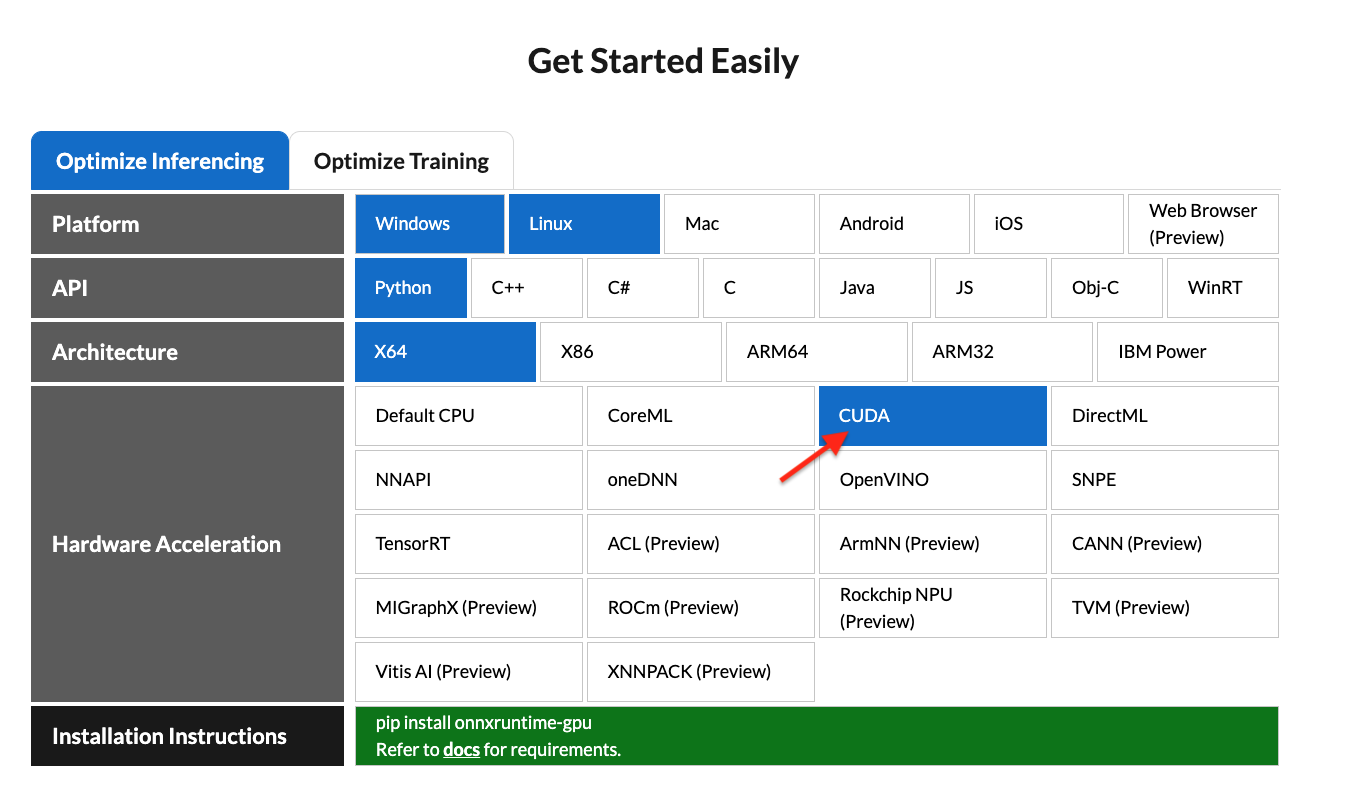
If your system is compatible, run:
pip install "rembg[gpu]" # for library
pip install "rembg[gpu,cli]" # for library + cli
Note: NVIDIA GPUs may require onnxruntime-gpu, CUDA, and cudnn-devel. See #668 for details. If rembg[gpu] doesn't work and you can't install CUDA or cudnn-devel, use rembg[cpu] with onnxruntime instead.
GPU support (AMD/ROCm)
ROCm support requires the onnxruntime-rocm package. Install it by following AMD's documentation.
Once onnxruntime-rocm is installed and working, install rembg with ROCm support:
pip install "rembg[rocm]" # for library
pip install "rembg[rocm,cli]" # for library + cli
Usage as a CLI
After installation, you can use rembg by typing rembg in your terminal.
The rembg command has these subcommands:
i - single filesp - folders (batch processing)s - HTTP serverb - RGB24 pixel binary streamd - download models ahead of timem - migrate models from the legacy ~/.u2net directory
You can get help about the main command using:
rembg --help
You can also get help for any subcommand:
rembg <COMMAND> --help
rembg i
Used for processing single files.
Remove background from a remote image:
curl -s http://input.png | rembg i > output.png
Remove background from a local file:
rembg i path/to/input.png path/to/output.png
Omit the output path (writes <input_stem>.out.png next to the input):
rembg i path/to/input.png
# → path/to/input.out.png
If stdout is redirected (e.g. rembg i input.png > out.png), the output is written to stdout instead.
Specify a model:
rembg i -m u2netp path/to/input.png path/to/output.png
Return only the mask:
rembg i -om path/to/input.png path/to/output.png
Apply alpha matting:
rembg i -a path/to/input.png path/to/output.png
Remove color fringing from soft edges:
rembg i -dc path/to/input.png path/to/output.png
See Color decontamination for what this does.
Pass extra parameters (SAM example):
rembg i -m sam -x '{ "sam_prompt": [{"type": "point", "data": [724, 740], "label": 1}] }' examples/plants-1.jpg examples/plants-1.out.png
Pass extra parameters (custom model):
rembg i -m u2net_custom -x '{"model_path": "~/.u2net/u2net.onnx"}' path/to/input.png path/to/output.png
Use the withoutBG cloud API:
Get 50 free credits with signup. Sample results.
export WITHOUTBG_API_KEY=sk_...
rembg i -m withoutbg path/to/input.png path/to/output.png
Or pass the key via extras:
rembg i -m withoutbg -x '{"api_key":"sk_..."}' path/to/input.png path/to/output.png
rembg p
Used for batch processing entire folders.
Process all images in a folder:
rembg p path/to/input path/to/output
Watch mode (process new/changed files automatically):
rembg p -w path/to/input path/to/output
rembg s
Used to start an HTTP server.
rembg s --host 0.0.0.0 --port 7000 --log_level info
For complete API documentation, visit: http://localhost:7000/api
Disable the Gradio UI (reduces idle CPU usage):
rembg s --no-ui
Remove background from an image URL:
curl -s "http://localhost:7000/api/remove?url=http://input.png" -o output.png
Remove background from an uploaded image:
curl -s -F file=@/path/to/input.jpg "http://localhost:7000/api/remove" -o output.png
rembg b
Process a sequence of RGB24 images from stdin. This is intended to be used with programs like FFmpeg that output RGB24 pixel data to stdout.
rembg b <width> <height> -o <output_specifier>
Arguments:
| Argument |
Description |
width |
Width of input image(s) |
height |
Height of input image(s) |
output_specifier |
Printf-style specifier for output filenames (e.g., output-%03u.png produces output-000.png, output-001.png, etc.). Omit to write to stdout. |
Example with FFmpeg:
ffmpeg -i input.mp4 -ss 10 -an -f rawvideo -pix_fmt rgb24 pipe:1 | rembg b 1280 720 -o folder/output-%03u.png
Note: The width and height must match FFmpeg's output dimensions. The flags -an -f rawvideo -pix_fmt rgb24 pipe:1 are required for FFmpeg compatibility.
Usage as a Library
Input and output as bytes:
from rembg import remove

with open('input.png', 'rb') as i:
    with open('output.png', 'wb') as o:
        input = i.read()
        output = remove(input)
        o.write(output)
Input and output as a PIL image:
from rembg import remove
from PIL import Image

input = Image.open('input.png')
output = remove(input)
output.save('output.png')
Input and output as a NumPy array:
from rembg import remove
import cv2

input = cv2.imread('input.png')
output = remove(input)
cv2.imwrite('output.png', output)
Force output as bytes:
from rembg import remove

with open('input.png', 'rb') as i:
    with open('output.png', 'wb') as o:
        input = i.read()
        output = remove(input, force_return_bytes=True)
        o.write(output)
Batch processing with session reuse (recommended for performance):
from pathlib import Path
from rembg import remove, new_session

session = new_session()

for file in Path('path/to/folder').glob('*.png'):
    input_path = str(file)
    output_path = str(file.parent / (file.stem + ".out.png"))

    with open(input_path, 'rb') as i:
        with open(output_path, 'wb') as o:
            input = i.read()
            output = remove(input, session=session)
            o.write(output)
withoutBG cloud API:
Get 50 free credits with signup. Sample results.
from rembg import remove, new_session

session = new_session("withoutbg", api_key="sk_...")
# or set WITHOUTBG_API_KEY and omit api_key=

with open('input.png', 'rb') as i:
    with open('output.png', 'wb') as o:
        output = remove(i.read(), session=session)
        o.write(output)
For more examples, see the examples page.
Choosing an edge mode
Rembg has three ways to turn a mask into a cutout. They differ only in how they
treat the soft pixels along an edge — hair, fur, fabric, motion blur.
| Mode |
Flag |
Fixes edge color |
Refines the mask |
Cost |
| Naive |
(default) |
No |
No |
Free |
| Decontaminate |
-dc |
Yes |
No |
Negligible |
| Alpha matting |
-a |
Yes |
Yes |
Slow |
| ViTMatte |
-vm |
Yes |
Yes |
Slow, extra download |
They are alternatives, not layers — -a already decontaminates internally, so
passing both changes nothing. Pick one:
Use the default (naive) when the subject has hard edges — products, cars,
logos, screenshots — or when the background was already close in color to the
subject. There is nothing to correct, so the extra work buys nothing.
Use -dc when the cutout has a colored halo: the subject was shot against
a strongly colored background (green grass, blue sky, a painted wall) and that
color survives as a rim around hair or fine detail. This is the common case,
and it is cheap enough to leave on for a whole batch.
Use -a when the shape of the mask is wrong, not just its color — the
model cut through strands of hair, or left a hard stair-stepped edge where the
subject is genuinely soft. It re-estimates coverage with a closed-form solver,
and it is much slower than -dc. That solver can fail to converge on some
images; rembg falls back to a decontaminated cutout when that happens.
Use -vm for the same problem as -a, when you want the fine detail back.
ViTMatte predicts the alpha with a network instead of solving for it, so it
recovers more of the wispy strands -a tends to clip, and it cannot fail to
converge. It costs an extra ~110 MB download on first use and runs slower than
-a. Pick a different checkpoint with
-x '{"vitmatte_model": "base-distinctions-646"}':
| Checkpoint |
Download |
Notes |
small-distinctions-646 |
~110 MB |
The default. Best quality per byte. |
small-composition-1k |
~110 MB |
Trained on synthetic composites. |
base-distinctions-646 |
~380 MB |
Slightly more detail, ~2.5x the runtime. |
base-composition-1k |
~380 MB |
Larger, synthetic training set. |
Which model to pair it with
The newer models (bria-rmbg, birefnet-*, isnet-general-use) already
produce a soft, well-shaped alpha, so their masks rarely need -a — reach for
-dc first and only try -a if the edge shape itself is wrong. bria-rmbg is
the default, so this is the advice that applies unless you pass -m.
The older models (u2net, u2netp, silueta) tend to produce firmer, blockier
edges. They benefit most from -a on hair-heavy portraits, and are also where
its solver is most likely to struggle.
For portraits specifically, birefnet-portrait with -dc is a good starting
point, and -vm when the hair detail matters more than the runtime. If you are
batch-processing and cannot inspect each result, prefer -dc over -a: it is
faster and cannot fail.
Note: -ppm (post-process mask) thresholds the mask into a fully binary one,
which leaves no partially transparent pixels at all. Combining it with -dc
is pointless — there is nothing left to correct. Use one or the other.
Color decontamination
On a soft edge — hair, fur, motion blur — a pixel is not purely foreground or
purely background. The camera captured a blend of the two:
captured = alpha * foreground + (1 - alpha) * background
Making that pixel semi-transparent does not undo the blend, so the background
color stays mixed into it and shows up as a colored halo around fine detail.
A subject shot against green grass keeps a green rim; against a blue wall, a
blue one. This is the same operation Photoshop calls Decontaminate Colors
and Nuke calls decontamination.
Rembg can estimate the true foreground color and write that instead. This is
opt-in:
from rembg import remove

output = remove(input, decontaminate=True)
rembg i -dc path/to/input.png path/to/output.png   # single file
rembg p -dc path/to/input path/to/output           # folder
curl -s "http://localhost:7000/api/remove?url=...&dc=true" > output.png
Notes:
- It only changes color, never coverage — the alpha channel is untouched.
- The cost is negligible next to model inference, which dominates runtime.
--alpha-matting already does this internally, so the flag is ignored there.
Usage with Docker
CPU Only
Replace the rembg command with docker run danielgatis/rembg:
docker run -v .:/data danielgatis/rembg i /data/input.png /data/output.png
NVIDIA CUDA GPU Acceleration
Requirements: Your host must have the NVIDIA Container Toolkit installed.
CUDA acceleration requires cudnn-devel, so you need to build the Docker image yourself. See #668 for details.
Build the image:
docker build -t rembg-nvidia-cuda-cudnn-gpu -f Dockerfile_nvidia_cuda_cudnn_gpu .
Note: This image requires ~11GB of disk space (CPU version is ~1.6GB). Models are not included.
Run the container:
sudo docker run --rm -it --gpus all -v /dev/dri:/dev/dri -v $PWD:/data rembg-nvidia-cuda-cudnn-gpu i -m birefnet-general /data/input.png /data/output.png
Tips:
- You can create your own NVIDIA CUDA image and install
rembg[gpu,cli] in it.
- Use
-v /path/to/models/:/root/.rembg to store model files outside the container, avoiding re-downloads.
Models
Local ONNX models are automatically downloaded on first use and saved under ~/.rembg/models/ (see Where models are stored). The withoutbg model is a cloud API backend and does not download a local model.
Available Models
- u2net (download, source): A pre-trained model for general use cases.
- u2netp (download, source): A lightweight version of u2net model.
- u2net_human_seg (download, source): A pre-trained model for human segmentation.
- u2net_cloth_seg (download, source): A pre-trained model for Cloths Parsing from human portrait. Here clothes are parsed into 3 category: Upper body, Lower body and Full body.
- silueta (download, source): Same as u2net but the size is reduced to 43Mb.
- isnet-general-use (download, source): A new pre-trained model for general use cases.
- isnet-anime (download, source): A high-accuracy segmentation for anime character.
- sam (download encoder, download decoder, source): A pre-trained model for any use cases.
- birefnet-general (download, source): A pre-trained model for general use cases.
- birefnet-general-lite (download, source): A light pre-trained model for general use cases.
- birefnet-portrait (download, source): A pre-trained model for human portraits.
- birefnet-dis (download, source): A pre-trained model for dichotomous image segmentation (DIS).
- birefnet-hrsod (download, source): A pre-trained model for high-resolution salient object detection (HRSOD).
- birefnet-cod (download, source): A pre-trained model for concealed object detection (COD).
- birefnet-massive (download, source): A pre-trained model with massive dataset.
- bria-rmbg (download, source): The default. A state-of-the-art background removal model by BRIA AI. At ~1.02 GB it is the largest local model here and runs at 1024x1024, so it is slower than u2net; pass
-m u2net for a smaller, faster model with blockier edges. Note that RMBG-2.0 is released under a BRIA license that requires a paid agreement for commercial use. Model weights carry their own licenses, independent of rembg's MIT license — check the linked source before using any model commercially.
- withoutbg (API, sample results): Cloud API backend. Get 50 free credits with signup. Pass
api_key via -x / new_session(...), or set WITHOUTBG_API_KEY. Images ar







 Rembg 用 AI 分割模型把图片的背景去掉。你给它一张照片,它会返回一张背景透明、只留主体的抠图 —— 可以在终端里用命令,也可以作为 Python 函数调用,或者通过 HTTP 接口来用。