
Earthworm
English | 中文
⚡ Introduction
By constructing sentences with conjunctions, it helps you learn English better~ 😊
🚀 How To Start?
The mentioned operations below are based on the root directory of the current project, please be attentive to ensure there are no errors!
Requirements
docker --version # Docker version 24.0.7, build afdd53b

node --version # v20+

pnpm -v # 8+
Editor
VSCode
1. Install Dependencies
pnpm install
You can choose to copy the contents of ./apps/api/.env.example to./apps/api/.env. note that the' example' file contains sample configuration. the main storage system's environment variable information, such as database connection address, user name, password, port, key, etc. the back-end service will read the configuration from this file, of course you can also change it to your own configuration information.
Windows users recommend shortcut keys to copy and paste, Linux users can operate through the following command.
Server
cp ./apps/api/.env.example ./apps/api/.env
Client
cp ./apps/client/.env.example ./apps/client/.env
3. Restore Data Of Logto
Uncompress logto_db_init_data.zip to .volumes/
unzip logto_db_init_data.zip -d .volumes/
if you want to Manual Configuration Logto
4. Start Docker Compose Service
The backend relies on Postgres and Redis services. Start and stop these services using the commands configured in package.json below.
# start
pnpm docker:start

# When needed, execute the following command
# stop
pnpm docker:stop
# delete
pnpm docker:delete
# Complete deletion (including Volume data)
pnpm docker:down
If you prefer manual, you can use the commands below.
docker compose up -d
docker compose stop
docker compose down

# commands compatible with older versions of Docker
docker-compose up -d
5. Initialize Database Schema
When executing this command, try to keep a little time from the previous command, because the -d parameter just used will suspend its service execution in the background. At this time, the docker service may still be running. If an error is found, execute it again.
pnpm db:init
6. Create and Upload Course Data
Only Execute This During the Initial Database Initialization.
pnpm db:upload
7. Start the Backend Service
pnpm dev:serve
8. Start the Frontend Service
pnpm dev:client
🛠️ About testing
Run the test before submitting the commit, and submit the code after the test passes, so as to avoid multiple commits to solve the test problem.
Front-end Testing
The main is the single test of Vitest and the automated test of cypress, execute the following command:
# Enter the front-end project directory
cd apps/client

# vitest
pnpm test:unit:run
# cypress
pnpm test:e2e:run

# monitor vitest, convenient hot update to see test results
pnpm test:unit:watch
Backend Testing
Mainly Jest single test and end-to-end test, but need to access the test database, so you need to ensure that:
- testdb and testRedis services in Docker Compose started normally.
- The configuration information in the
.env.test file is correct. If there is no such file, you can copy the contents of the apps/api/.env.test.example file to the apps/api/.env.test file. The following command is provided to directly use.
Execute the following command:
# Enter Backend Project Directory
cd apps/api

# If you have an.env.test file, you don't need to run this step
cp .env.test.example .env.test

# Single test
pnpm test:unit
# End-to-end testing
pnpm test:e2e
# Single test and end-to-end test run together
pnpm test
Docs Project
Project based on Vitepress documentation,execute the following command:
# Local Development
pnpm docs:dev
❓ FAQ
Database connection failed
My Docker and the database inside are running normally, but when I run the db:init command, I still report an error, indicating that the database connection failed.
You can check whether the database configuration in the .env file is correct, or even whether this file has it! 😠
How To Correctly Update Course Data?
when you identify incorrect course data and make modifications, you should use the following command to update the course data in the database.
pnpm db:update
pnpm Install Error?
Some dependencies require compilation during installation, necessitating the presence of relevant build environments.
If these environments are not available, the compilation process may fail. Additionally, different modules may require different build environments, so specific issues need to be analyzed individually.
Below are specific problems encountered along with their solutions.
First try the following command to update pnpm.
pnpm i -g
# or
pnpm i -g pnpm
# or
npx pnpm i -g pnpm@latest
Error Installing the argon2 Module On Windows
- Install Visual Studio 2015 or later, specifically the "Desktop development with C++" component. (In practice, any component containing C++ development tools and libraries will suffice.)
- If you encounter Chinese characters display issues during compilation, execute
chcp 437 in the command prompt, then rerun the install command.
Docker Permission Denied in Docker?
When using WSL2 as a development environment in Windows, the following error occurs when starting Docker with docker compose up -d :
permission denied while trying to connect to the Docker daemon socket at unix:///var/run/docker.sock: Get "http://%2Fvar%2Frun%2Fdocker.sock/v1.24/containers/json": dial unix /var/run/docker.sock: connect: permission denied
Solution
Add the current user to the docker group
# Add docker user group
sudo groupadd docker
# Add the logged-in user to the docker user group
sudo gpasswd -a $USER docker
# Update user group
newgrp docker
# Test if docker command is working properly
docker images
🤝 Frontend Development Guideline
Do not Destructure Pinia store.
- The readability will be better when using
store
- Destructuring can lead to reactivity loss and using
storeToRefs is also quite cumbersome
Avoid including UI logic in composables.
- Such as
toast.info()
- We categorize the router as UI logic, and for ease of testing, avoid including routerrelated logic in there
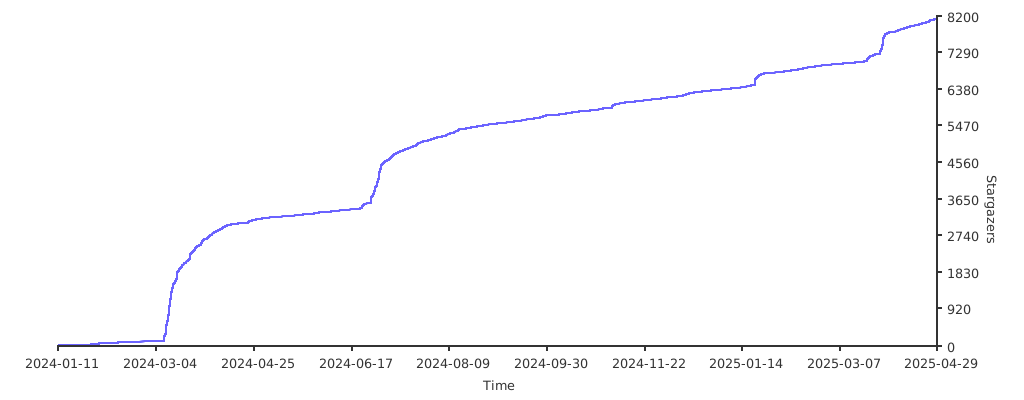
🚀 Star History
🌟 Contributing
Thanks to everyone who has already contributed to Earthworm! 🎉



 Earthworm 是一个开源的网页应用,通过连词造句来学英语——你是一步一步地把句子搭建出来,而不是死背单词表。