

StarLive README

The project's README from github.com/SMNETSTUDIO/StarLive. As one markdown file: README.md.

StarLive 星播

可自部署的直播互动平台 · Self-hosted live-streaming & interaction platform

推流自托管 MediaMTX / 云端 Mux 可切换,实时互动走 Socket.IO,数据存 Redis,内置 星币(StarCoin)虚拟货币经济。 Streams via self-hosted MediaMTX or cloud Mux (switchable), real-time via Socket.IO, data in Redis, with a built-in StarCoin virtual-currency economy.

功能 Features · 架构 Architecture · 快速开始 Quick Start · 配置 Configuration · 文档 Docs · 许可证 License

CI Docker community Telegram Group


项目为 LDLive 旧版(Netlify Serverless)的重构升级版,从「无状态函数 + HTTP 轮询」迁移为「独立 NestJS 后端 + Socket.IO 实时长连接」。 A rewrite of the legacy LDLive (Netlify Serverless), migrating from "stateless functions + HTTP polling" to "standalone NestJS backend + Socket.IO persistent connections".

功能 Features

中文 English
直播:MediaMTX 自托管推流/播放(RTMP 入 + HLS 出);Mux 云端 Provider 后台一键切换(RTMPS 推流 + 自动录制回放),存量房间沿用原 Provider Streaming: self-hosted MediaMTX (RTMP in + HLS out); Mux cloud provider switchable in admin (RTMPS ingest + auto-recorded VOD), existing rooms keep their provider
实时互动:Socket.IO 全房广播 —— 弹幕、礼物特效、红包、抽奖、在线人数 Real-time: Socket.IO room broadcast — danmaku, gift effects, red packets, lottery, presence
经济系统:星币充值(多支付网关)、提现(手续费 + 资金冻结)、交易流水 Economy: StarCoin top-up (multi-gateway), withdrawal (fees + fund freezing), transaction ledger
互动玩法:弹幕、礼物、红包(随机/均分)、抽奖、在线心跳 Interactions: danmaku, gifts, red packets (random/equal split), lottery, viewer heartbeat
治理:房管任命/禁言/操作日志、禁言实时反馈、敏感词过滤(即时生效)、举报、审计日志 Governance: moderators/mute/action log, live mute feedback, sensitive-word filter (instant), reports, audit log
社交:关注主播、公开用户主页(/user/:id,粉丝数 + 直播间列表) Social: follow streamers, public profiles (/user/:id with followers + rooms)
界面:深色/浅色主题、骨架屏、移动端自适应、管理后台分页 UI: dark/light theme, skeleton loading, responsive layout, paginated admin
安全:登录/注册/下单速率限制、私密房间 WS 层密码校验 Security: rate limits on auth/orders, password-gated private rooms at WS layer
管理后台:数据概览(14 天趋势)、用户/房间/提现/订单管理(CSV 导出)、RBAC、审计、内容治理、系统设置 Admin: overview (14-day trends), users/rooms/withdrawals/orders (CSV export), RBAC, audit, moderation, settings
开箱即用:前后端一体化单端口部署,首访网页向导创建管理员 Out-of-the-box: single-port unified deploy, first-visit setup wizard creates the admin
录播:独立 Worker(FFmpeg)转码/落盘,默认关闭可开关 Recording: standalone FFmpeg worker for transcode/persist, off by default

技术栈 Tech Stack

层 Layer 技术 Technology
后端 Backend Node 20 · NestJS 10 · TypeScript
实时通信 Real-time Socket.IO 4
数据库 Database Redis(ioredis,自托管或 Upstash / self-hosted or Upstash)
推流/分发 Streaming MediaMTX(自托管首选 self-hosted, preferred)/ Mux(云端 Provider,零 SDK 直连 REST / cloud provider, zero-SDK REST);推流鉴权钩子兼容 SRS(auth hook SRS-compatible)
转码/录播 Transcode FFmpeg(独立 Worker,可开关 / standalone worker, toggleable)
前端 Frontend React 18 · Vite 5 · TailwindCSS · React Router · hls.js
认证 Auth JWT(jose,HS256)+ bcrypt
支付 Payments PaymentProvider 多网关适配器(易支付/支付宝/微信 APIv3 Native/Stripe/mock)multi-gateway adapters
构建 Build pnpm workspaces(monorepo)

架构 Architecture

自托管 Self-hosted(默认 default):
OBS ──RTMP──► MediaMTX(:1935/{streamKey})
                ├─► HLS (fMP4) ──► 前端 hls.js 播放 / played by hls.js in browser
                ├─► WebRTC(可选 optional) ──► 超低延迟 ultra-low latency
                └─► Worker(FFmpeg) ──► 转码/落盘录制 transcode/record ──► 对象存储 object storage

云端 Cloud(后台一键切换 switch in admin):
OBS ──RTMPS──► Mux ──► Mux HLS ──► 前端 hls.js 播放
                 └─► 自动录制 auto-recorded VOD ──► 录播页回放 playback

浏览器 ──► 一体化服务 :3000(网页 + /api + /socket.io + /hls 同源)──► Redis
Browser ──► unified service :3000 (web + /api + /socket.io + /hls same-origin) ──► Redis

REST 负责写操作,后端落库后经 RealtimeGateway 向 room:{roomId} 广播事件(danmaku / gift / redpacket.* / lottery.* / presence / room.status / mute)。REST 与 WS 共用同一 JWT 鉴权。 REST handles writes; after persisting, the backend broadcasts events to room:{roomId} via RealtimeGateway. REST and WS share the same JWT auth.

快速开始 Quick Start

Docker 一键部署 One-Click Deploy

# 准备环境变量 Configure env
cp .env.example .env

# 基本启动(server + redis + mediamtx)Basic stack
docker compose up -d

# 开启录播 Worker(FFmpeg)Enable recording worker
docker compose --profile recording up -d

也可直接使用 GHCR 预构建镜像 / Or use the prebuilt GHCR image:

docker run -d -p 3000:3000 \
  -e REDIS_URL=rediss://default:[email protected]:6379 \
  -e JWT_SECRET=$(openssl rand -hex 32) \
  ghcr.io/smnetstudio/starlive:main

前后端一体化,对外只暴露 3000 端口;Redis 数据持久化在卷 redis-data,录播落盘在卷 recordings-data。首次访问 http://<host>:3000 进入初始化向导创建管理员。 Unified frontend + backend on a single port 3000. Redis persists in volume redis-data, recordings in recordings-data. First visit launches the setup wizard to create the admin.

本地运行 Local Development

pnpm install
pnpm build        # 构建前端 + 后端 build web + server
pnpm start        # 一体化服务 unified service: http://localhost:3000

开发调试(前端热更新)/ Dev mode with HMR:

pnpm dev:server   # NestJS 后端 backend (:3000)
pnpm dev:web      # Vite 前端 frontend (:5173, /api proxied to :3000)
pnpm dev:worker   # 录播 Worker recording worker

需要本地 Redis(或 REDIS_URL 指向 Upstash)与 MediaMTX(可 docker compose up -d redis mediamtx 单独起依赖)。 Requires local Redis (or point REDIS_URL at Upstash) and MediaMTX (docker compose up -d redis mediamtx for deps only).

页面 / Pages:

路径 Path 说明 Description
/ 首页 + 我的直播间 Home + my room
/live-list 直播广场 Live square
/room/:roomId 直播间(弹幕/礼物/红包/抽奖)Room (danmaku/gifts/red packets/lottery)
/dashboard 主播工作台(收益统计)Streamer dashboard (earnings)
/recharge · /withdrawal 充值 / 提现 Top-up / withdrawal
/user/:id 公开用户主页 Public profile
/admin 管理后台 Admin dashboard

配置 Configuration

环境变量只需两个必填项(见 .env.example)/ Only two required env vars (see .env.example):

部署拓扑相关变量(PORT/HOST、MEDIAMTX_*、FFMPEG_PATH、Cookie 策略等)有合理默认值。 Infra vars (PORT/HOST, MEDIAMTX_*, FFMPEG_PATH, cookie policy, …) have sensible defaults.

其余业务配置在管理后台设置(/admin → 系统设置,存 Redis、即时生效、优先于环境变量): Everything else is configured in the admin panel (/admin → Settings; stored in Redis, takes effect instantly, overrides env):

同名环境变量仍作为「后台未设置时的兜底值」被读取,适合 CI/IaC 管密钥的场景;凭据不提交仓库。 Same-named env vars still act as fallbacks when unset in the panel — good for CI/IaC-managed secrets; never commit credentials.

文档 Docs

文档 Doc 内容 Content
docs/architecture.md 系统架构与功能规划:模块清单、Redis Key 约定、支付网关抽象、分阶段实施 Architecture & roadmap: modules, Redis key conventions, payment abstraction, phases

仓库结构 Repository Structure

StarLive/
├── apps/
│   ├── server/     # NestJS 后端(REST + Socket.IO 网关)backend (REST + Socket.IO gateway)
│   ├── web/        # React 前端 frontend
│   └── worker/     # 录播/转码 Worker(FFmpeg)recording/transcode worker
├── packages/
│   └── shared/     # 共享 TS 类型 / DTO / WS 事件 / Redis key / 错误码 shared types & contracts
├── infra/
│   ├── docker-compose.yml
│   └── mediamtx.yml
└── docs/
    └── architecture.md

测试 Testing

pnpm build        # 全部包类型检查 + 构建 type-check & build all packages
pnpm test         # 单元测试(Vitest)unit tests

许可证 License

Apache-2.0

允许商用:可自由使用、修改、分发及用于商业产品,需保留版权与许可声明。详见 LICENSE。

Commercial use allowed: free to use, modify, distribute, and build commercial products on top, provided copyright and license notices are retained. See LICENSE.


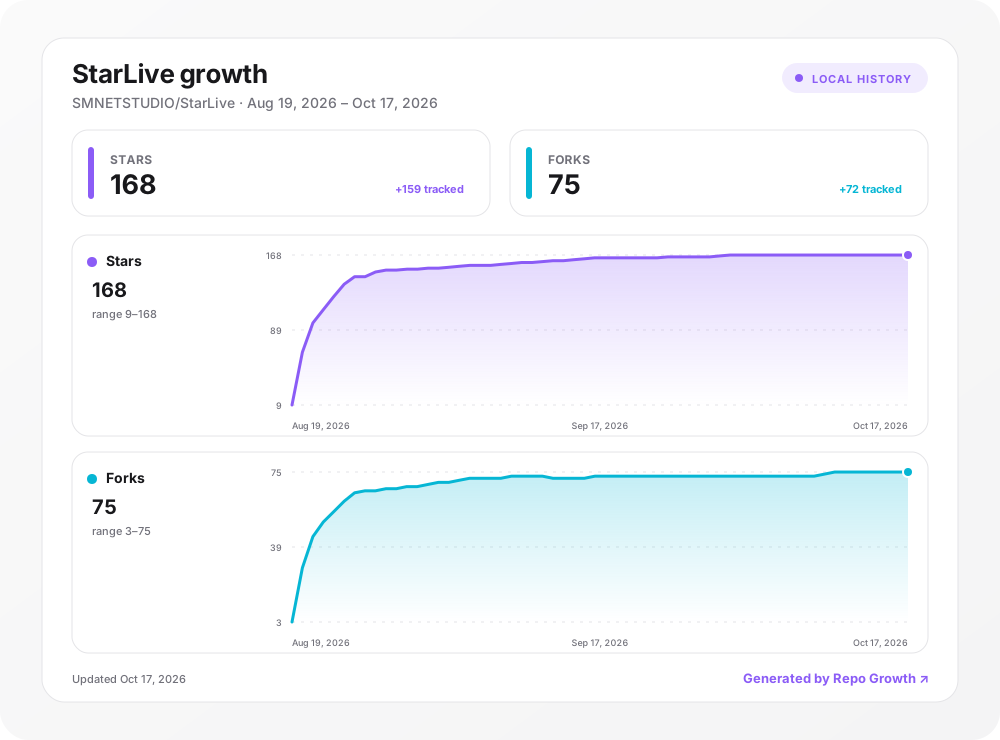
项目增长 Project Growth

Project growth

由 repo-growth 每日自动更新 / Updated daily by repo-growth.

StarLive (SMNETSTUDIO/StarLive)

Searching Database…

What is this?StarLive is a self-hosted live-streaming and interaction platform: it handles the video stream, real-time danmaku/gifts/red-packets/lottery, moderation, and a built-in StarCoin virtual-currency economy. It's a rewrite of the legacy LDLive, moving from serverless HTTP polling to a standalone NestJS backend with persistent Socket.IO connections.
Is this one app or several separate services I have to wire together?It's a pnpm-workspaces monorepo containing a NestJS backend, a React/Vite frontend, and an optional FFmpeg recording worker, but the Docker deploy ships them as one unified app exposed on a single port.
How do I get it running?Use the one-click Docker deploy (docker compose or the prebuilt GHCR image) which exposes everything on port 3000; the first visit launches a setup wizard that creates the admin account.
What do I need running alongside the app itself?Redis (self-hosted or Upstash) for data storage and MediaMTX for self-hosted stream ingest/playback; locally you can spin up just these two with `docker compose up -d redis mediamtx`. Only two env vars are strictly required: REDIS_URL and JWT_SECRET.
Does it record streams automatically?No — recording goes through a separate FFmpeg worker that transcodes and persists VOD, but it's off by default and must be explicitly enabled.
Can I switch between self-hosted streaming and a cloud provider?Yes — the admin panel lets you switch from self-hosted MediaMTX (RTMP in / HLS out) to Mux as a cloud provider with RTMPS ingest and auto-recorded VOD, with zero SDK integration needed. Rooms created under one provider keep using it even after you switch.
What is StarCoin and how does the money side work?StarCoin is the platform's built-in virtual currency used for gifts and red packets. It supports top-up through multiple payment gateways and withdrawal with fees and fund freezing, all tracked in a transaction ledger.
Which payment gateways are supported?The PaymentProvider abstraction ships adapters for YiPay, Alipay, WeChat Pay APIv3 Native, Stripe, and a mock gateway for testing, each independently configurable and toggleable from the admin panel.
Can I run it without touching environment variables for config?Almost everything besides Redis connection and JWT secret is configured live from /admin → Settings (payment gateways, OAuth, feature flags, site URL), stored in Redis and taking effect instantly; matching env vars only act as fallbacks.
What are similar projects?KVideo, centrifugo, sphere, documenso, ApeAdmin, LibreTV, TREK, dockge
Size
0.5 MB
Stars
168
Updated
CommitOct 17
Age
1mo
Commits · 90 Days