



spotifast README

The project's README from github.com/crmne/spotifast. As one markdown file: README.md.

Fastpotify

Spotify, native and fast. Fastpotify is a Spotify client written in Rust with egui. It plays music through librespot. It typically uses 100–250 MB of RAM, while Spotify's desktop app often uses 600 MB to over 1 GB. It runs on Linux, macOS, and Windows, starts in well under a second, and has no browser engine.

Playback needs Spotify Premium. Free accounts can browse and search, but cannot play music through Fastpotify on this computer or another device.

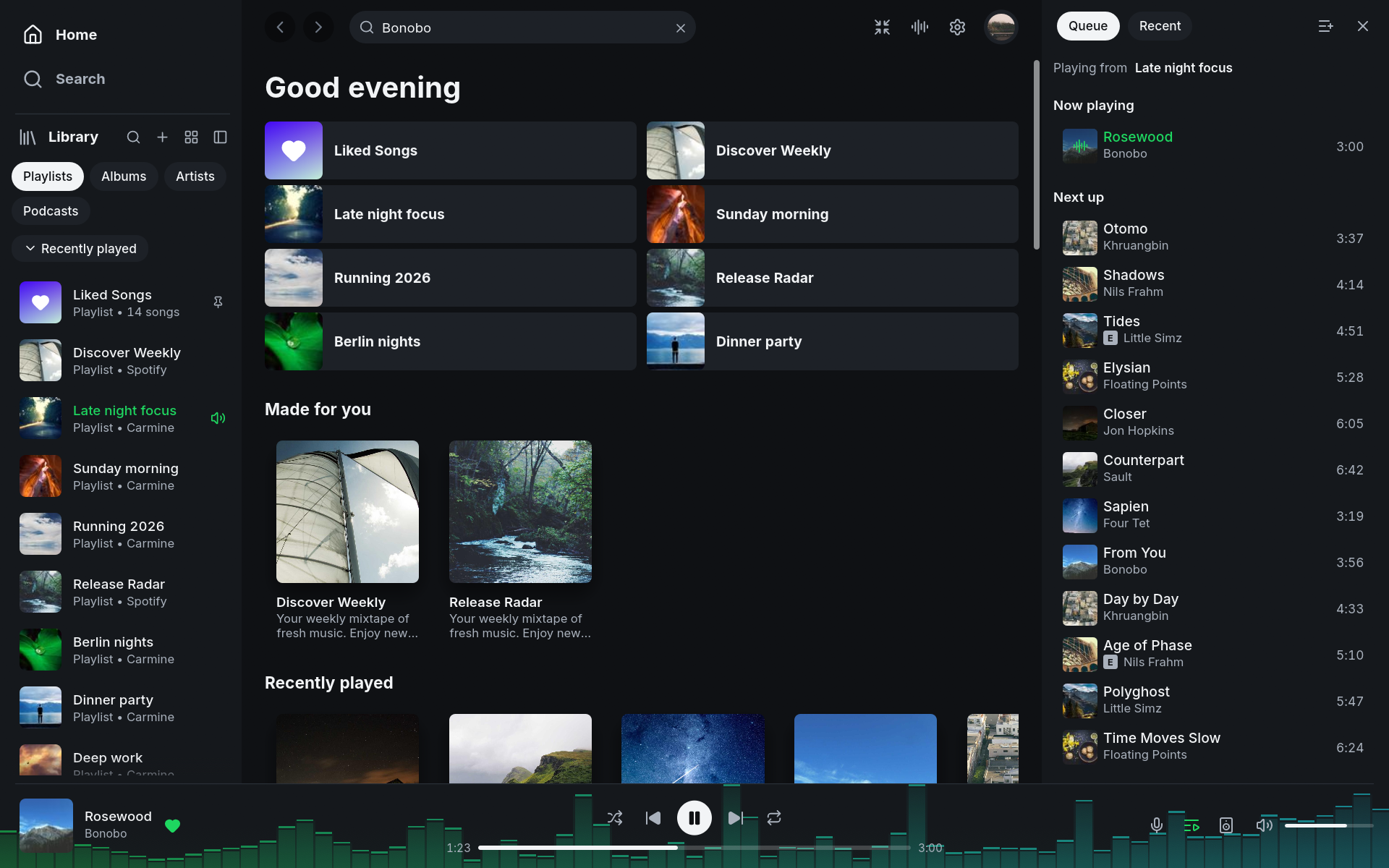
Fastpotify Home with the playlist library, recommendations, queue, and player visible

See fastpotify.rocks for installation, setup, everyday use, and connection details.

What it does

Install

On Arch Linux, Fastpotify is in the AUR:

yay -S fastpotify-bin      # the released build, ready made
yay -S fastpotify          # the release, built from source
yay -S fastpotify-git      # built from the latest commit

On macOS, with Homebrew:

brew install --cask crmne/tap/fastpotify

Everywhere else, build the single binary with Rust 1.95 or newer:

cargo install --path . --locked

MilkDrop uses libprojectM, which is built from source. This needs CMake, a C++ compiler, and libclang. To build without MilkDrop or those tools, run cargo install --path . --locked --no-default-features. On Linux, you also need the development packages for ALSA, PulseAudio or PipeWire, and the windowing libraries. On Arch:

sudo pacman -S --needed alsa-lib libpulse libxkbcommon wayland cmake clang

and on Debian or Ubuntu:

sudo apt install libasound2-dev libpulse-dev libxkbcommon-dev libwayland-dev \
  cmake clang libclang-dev

and on Fedora:

sudo dnf install alsa-lib-devel pulseaudio-libs-devel libxkbcommon-devel \
  wayland-devel cmake clang libclang-devel

On Windows, libprojectM is built with Visual Studio 2022, CMake, LLVM, and vcpkg (vcpkg install glew:x64-windows-static, with VCPKG_INSTALLATION_ROOT pointing at the vcpkg folder).

With Nix, nix develop provides all of it, along with the exact toolchain rust-toolchain.toml pins.

On macOS, the flake also exposes packages.<system>.fastpotify-app, an ad-hoc signed Fastpotify.app bundle for the Dock, Launch Services, and spotify: links. With nix-darwin, add it to environment.systemPackages and link "/Applications" through environment.pathsToLink; with Home Manager, home.packages is enough, as its darwin support links the bundle into ~/Applications.

Fastpotify uses system fonts for scripts not covered by its interface font, including Chinese, Japanese, Korean, Arabic, Hebrew, Thai, and Indic scripts. On macOS it draws each of them with the face the system itself uses, in the language order set in System Settings, so Chinese titles follow the Traditional or Simplified preference set there. Windows includes common fonts. On Linux, install noto-fonts and noto-fonts-cjk (Arch) or fonts-noto and fonts-noto-cjk (Debian or Ubuntu) if titles appear as empty boxes.

A desktop entry is provided in packaging/applications/fastpotify.desktop. It registers Fastpotify for spotify: links; xdg-mime default fastpotify.desktop x-scheme-handler/spotify makes it the one the desktop uses when another Spotify client is installed too.

Sign in

Press Sign in with Spotify. Your browser opens Spotify's consent page (Authorization Code with PKCE), so Fastpotify never sees your password. The app keeps its grants in the system credential store: Secret Service on Linux, Keychain on macOS, and Credential Manager on Windows. You usually sign in once per machine. If the store is unavailable or locked, a new sign-in works for this session and Fastpotify explains that it could not save it.

Playing music on this computer needs a second, one-time browser approval. Spotify handles streaming separately from library access. Start it from the device menu (Set up playback here) or Settings. It needs Spotify Premium. Its reusable credential uses the same protected storage, independently of the two Web API grants.

Existing token files migrate after the protected write has been read back successfully. A failed migration keeps the original for recovery and reports an error. Sign-out removes shared, personal, and playback grants, including legacy files and pending writes. Non-secret revocation markers prevent a failed keychain deletion from silently restoring a signed-out session. See credential storage and file locations. On main, after 0.7.1, Flatpak also preserves its fallback state directory across full quits, including on older Flatpak versions.

Playback approval requests Spotify's streaming permission separately. A verified personal app can complete sign-in while the shared app is busy.

The Web API uses a shared app by default. You can add a personal Spotify Development Mode app in Settings → Account for a separate quota. Fastpotify still uses the shared app for requests that personal apps do not support. On main, after 0.7.1, Premium listeners using shared access see a one-time prompt explaining the personal app option, with a button that opens setup. Dismissal is remembered across restarts.

Account safety

We are not aware of a Spotify account being suspended for using Fastpotify or another librespot player with Premium. Sign-in happens on Spotify's own pages, audio uses the quality included with Premium, DRM stays intact, and Fastpotify does not rip tracks or block ads.

Reported suspensions usually involve modded apps that remove ads from free accounts, track ripping, or stream manipulation. Fastpotify does none of those things, and CONTRIBUTING.md prohibits them.

Keyboard shortcuts

Hold Shift while turning the mouse wheel to scroll horizontal shelves, including Made for you and Recently played on Home.

The main window exposes named playback controls, library and song rows, menus, sliders, and settings switches to screen readers. Use Tab and Shift+Tab to move focus, then Enter or Space to activate a control or play a focused song. Left and right arrows adjust a focused volume or seek slider. Windows testing with NVDA and accessibility for Winamp skins are still in progress.

Shortcut What it does
Space Play or pause
Ctrl+← / Ctrl+→ Previous or next
Shift+← / Shift+→ Seek 10 seconds
Ctrl+↑ / Ctrl+↓ Volume
M Mute
B Like or unlike the playing song
S / R Shuffle / cycle repeat
Q Queue panel
Ctrl+F or / Search
Ctrl+B Show or hide the sidebar
Alt+← / Alt+→ Back or forward
Ctrl+H / Ctrl+L Home / Liked Songs
Ctrl+Shift+A / Ctrl+Shift+B Playing artist / album
Ctrl+M Winamp mini player
Ctrl+Shift+K MilkDrop
Ctrl+, Settings
Ctrl+/ or ? All shortcuts
Ctrl+Q Quit

On macOS, Cmd replaces Ctrl.

Controlling it from outside

On Linux, Fastpotify is an MPRIS player, so playerctl --player=fastpotify play-pause already works.

macOS and Windows have no such bus, so the same verbs are subcommands. They talk to the instance already running and print nothing on success:

fastpotify play-pause          fastpotify volume 40
fastpotify play                fastpotify volume-up [percent]
fastpotify pause               fastpotify volume-down [percent]
fastpotify next                fastpotify mute
fastpotify previous            fastpotify shuffle [on|off]
fastpotify seek 15             fastpotify repeat [off|context|track]
fastpotify seek -- -15         fastpotify like
fastpotify seek-to 90          fastpotify play-uri spotify:playlist:37i9…
fastpotify show                fastpotify transfer <device-id>
fastpotify now-playing [--raw] fastpotify devices [--raw]

shuffle and repeat toggle when used without an argument. Pass a state to set it directly. like adds or removes the playing track from your library.

now-playing prints one readable line. --raw prints tab-separated fields: state, title, artists, album, position_ms, duration_ms, volume, shuffle, repeat, art_url, saved, and device. saved is yes, no, or unknown while loading. New fields are appended to keep older scripts working.

devices lists Spotify Connect devices with the ID first and the active one marked with *. --raw prints JSON. The command refreshes the device list, so the first call after startup may be empty. Run it again if needed.

A verb exits non-zero when Fastpotify is not running.

On every platform, fastpotify <link> opens a Spotify link, a spotify: URI or an open.spotify.com address, in the running app, or starts the app on it. This is what the desktop runs when a link is clicked.

Launchers such as Raycast or Alfred can use these commands. The Stream Deck plugin uses the same interface.

Settings

Settings live in one readable JSON file (~/.config/fastpotify/settings.json on Linux). They include the Connect device name, bitrate, normalisation, autoplay, gapless playback, the audio backend (PulseAudio/PipeWire or ALSA on Linux), audio cache size, theme, sidebar state, whether pages take colour from artwork, and the mini player's skin and size. Playback settings apply when you press Apply and restart playback. You can also check for a new release from Settings. On macOS, the same command is in the application menu.

Caches (audio, artwork) live under the cache directory and can be deleted at any time without signing you out.

How it is built

Fastpotify pins its Rust toolchain in rust-toolchain.toml; cargo test covers the API models, dual-session routing, PKCE, the player state machine, and a headless render of every page, panel, and dialog.

To look at the interface without a Spotify account, build with the demo feature and start it with sample data:

cargo run --features demo -- --demo --demo-page playlist:pl1 --demo-show queue

Demo mode never writes settings. --demo-shot <PATH> writes the window to a PNG and exits, which is useful for reproducible interface screenshots. --demo-size WIDTHxHEIGHT sets the window size for that shot.

Contributing

Read CONTRIBUTING.md before opening an issue or pull request. It covers project scope and required checks.

Translations use standard gettext .po files in assets/i18n/, with an English .pot template. The current pilot translates navigation and Library labels in 12 languages, including Portuguese and Chinese variants, in demo mode; the production interface remains English. See Translating Fastpotify for editing with existing translation tools, previewing, and reporting translation problems.

Issues and discussions receive automated triage, including reassessment after new or edited comments. A rocket on the report or comment means its assessment completed successfully; it does not promise a reply or a fix. See automated triage for details.

Acknowledgements

Fastpotify uses librespot, egui, the Inter typeface (OFL), and Lucide icons (ISC).

Fastpotify is an independent project and is not affiliated with Spotify. Spotify is a trademark of Spotify AB.

Licensed under the MIT License.

spotifast (crmne/spotifast)

Searching Database…

Что это такое?Fastpotify — это лёгкий нативный клиент Spotify, написанный на Rust с использованием набора инструментов egui. Музыку он воспроизводит через librespot и при этом расходует лишь малую часть оперативной памяти по сравнению с официальным настольным приложением Spotify.
Это отдельный клиент Spotify или он модифицирует официальное приложение Spotify?Это самостоятельный сторонний настольный клиент, а не взломанная или изменённая версия Spotify. Вход выполняется через настоящие страницы согласия Spotify, а защита DRM сохраняется: треки не копируются и не извлекаются.
Можно ли пользоваться им с бесплатным аккаунтом Spotify?С бесплатным аккаунтом можно просматривать и искать музыку, но для воспроизведения через Fastpotify — на этом компьютере или на другом устройстве — нужна подписка Spotify Premium.
Может ли он управлять колонками и другими устройствами или только воспроизводит музыку на этом компьютере?Он также работает как пульт: находит librespot, spotifyd и совместимые аппаратные приёмники по mDNS, позволяет перенести воспроизведение на них и продолжать управлять им из списка устройств в Fastpotify.
Может ли вход через Fastpotify привести к блокировке моего аккаунта Spotify?Мейнтейнеры проекта заявляют, что им не известно о блокировках аккаунтов из-за использования Fastpotify или другого плеера на основе librespot с Premium, поскольку используется официальный вход, обычное качество звука Premium и сохранённая защита DRM.
Видит ли Fastpotify мой пароль от Spotify?Нет — вход открывает собственную страницу согласия Spotify по схеме Authorization Code with PKCE, поэтому Fastpotify никогда не получает ваш пароль, а полученные токены хранятся в защищённом хранилище учётных данных вашей операционной системы.
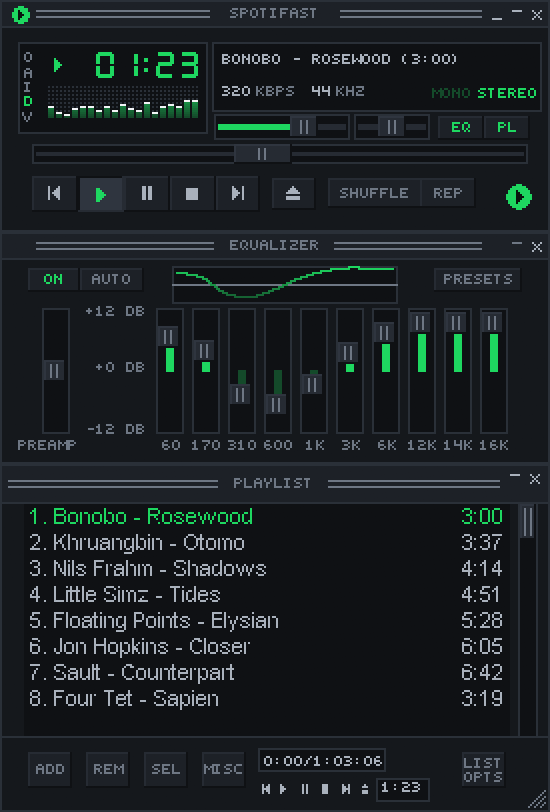
Что такое мини-плеер Winamp?Ctrl+M открывает небольшой плеер в классическом стиле, который загружает настоящие скины Winamp в формате .wsz в масштабе от 1x до 4x, с анализатором спектра, плейлистом и десятиполосным эквалайзером.
Что добавляет MilkDrop?Он включает визуализатор projectM в отдельном процессе, работает в полноэкранном режиме и при первом использовании автоматически загружает более 10 000 классических пресетов .milk (около 26 МБ).
Можно ли управлять воспроизведением из терминала или с помощью горячих клавиш?Да — в Linux Fastpotify регистрируется как плеер MPRIS, поэтому такие инструменты, как playerctl, работают без дополнительной настройки. В macOS и Windows исполняемый файл fastpotify предлагает подкоманды вроде next, play-pause и тому подобные, которые обращаются к уже запущенному экземпляру.
Что происходит, когда я закрываю окно?Fastpotify продолжает работать в системном трее, а не завершается, поэтому медиаклавиши и значок в трее по-прежнему управляют воспроизведением. В настройках можно сделать так, чтобы кнопка закрытия завершала программу.
Creator
crmne
Size
50.6 MB
Stars
8.5K
Age
1mo
Commits · 90 Days