


Cursor for circuit boards. An AI agent that designs, documents, and validates real PCBs from a prompt, working directly on existing KiCad repositories.
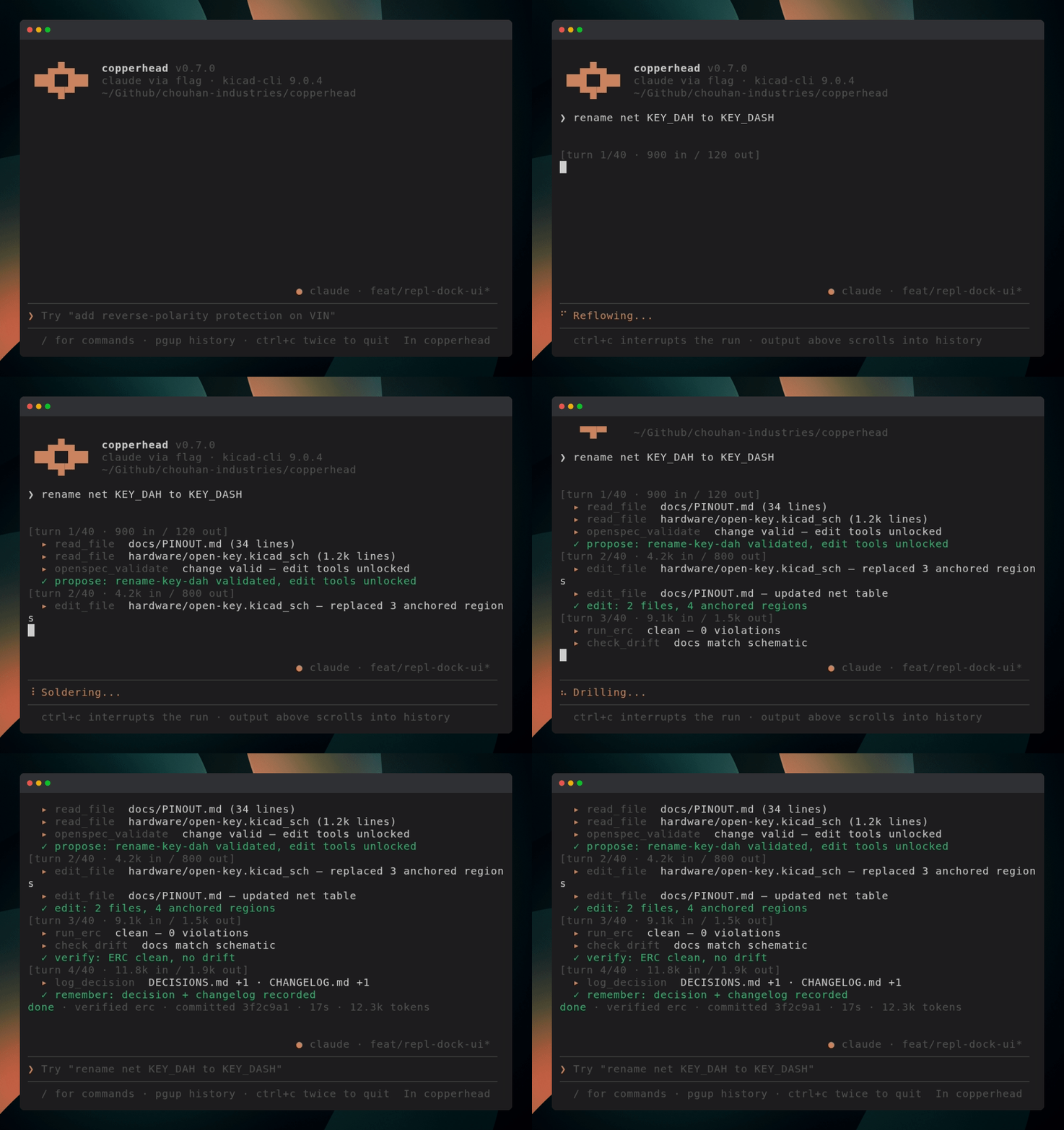
Status: early. Phase 1 is implemented and the CLI runs. The technical specification is the source of truth; expect the surface to move before 1.0.
Full documentation lives at docs.copperhead.sh.
What it is
An AI product-development agent for hardware: from a product brief to manufacturable files, firmware, and a build plan.
copperhead create: full pipeline from a natural-language brief: spec, architecture, part selection, schematic, first-draft layout, then gerbers, firmware scaffold, and dev plan.copperhead do "<change>": operates on an existing KiCad repo the way a coding agent operates on a codebase.
It reads and edits real .kicad_sch / .kicad_pcb files (s-expression text), maintains markdown design docs as memory, propagates every change across all artifacts that reference it, and verifies its own work by running kicad-cli ERC/DRC until the checks pass.
Install
[!TIP]
Most users should not install copperhead by hand. If you are working inside an AI coding assistant (like Claude Code, Cursor, or Codex), you can install and configure copperhead automatically for your repository by pasting this single line:
Install copperhead for this repo using https://raw.githubusercontent.com/copperheadhq/copperhead/main/agent-install-prompt.md
If you prefer to install manually:
npm install -g copperhead # or: npx copperhead check
Bootstrap script (macOS and Linux)
Prefer a one-command setup? install.sh checks the prerequisites below, installs copperhead (globally via npm, or built from source when run inside a checkout), and verifies the result with copperhead doctor:
./install.sh                # interactive: asks before installing anything
./install.sh --yes          # assume yes to the install prompts
./install.sh --check-only   # report what is missing, install nothing
The script is conservative by design: it never runs sudo and never edits shell config; whenever it cannot act safely on its own it prints the exact command for you to run instead. Rerunning is safe: on a ready machine it installs nothing and exits 0.
Requirements
- Node.js ≥ 20
- KiCad ≥ 8 with
kicad-cli on PATH (on Windows and macOS, copperhead also searches standard installation directories automatically; override with COPPERHEAD_KICAD_CLI)
- One model backend: a locally installed, ChatGPT-authenticated Codex CLI, a logged-in Cursor Agent CLI (
agent login), logged-in Claude Code (see Saved login), or ANTHROPIC_API_KEY/OPENAI_API_KEY in the environment. check never calls an LLM.
Quick start
In an existing KiCad repository:
export ANTHROPIC_API_KEY=...   # or OPENAI_API_KEY; optional: with no key, `copperhead` offers a model picker
copperhead init                # scaffold docs/ from the schematic; idempotent
copperhead                     # interactive agent shell (Claude Code–style REPL)
copperhead demo --tour          # what the agent does (no LLM)
copperhead demo --model cursor # full USB-C breakout create pipeline
# or one-shot:
copperhead do "add reverse-polarity protection on VIN"
copperhead check               # ERC + DRC + doc drift; no LLM, CI-safe
Starting from nothing instead? Write a product brief and run copperhead create --brief brief.md. The examples/ directory has ready-made briefs sorted by difficulty, plus a note on which one is designed to fail.
Use your existing Codex login
No model API key is needed when Codex CLI is already authenticated:
npm install -g @openai/codex-sdk   # optional adapter, loaded only for --model codex
codex login status
copperhead do "rename net KEY_DAH to KEY_DASH" --model codex
Plain codex follows your Codex model configuration. Use codex:<model-id> for an explicit model. If the executable is not on PATH, set COPPERHEAD_CODEX_PATH=/absolute/path/to/codex.
The optional SDK also installs a compatible launcher; for a global install, use
COPPERHEAD_CODEX_PATH="$(npm root -g)/@openai/codex/bin/codex.js" as a fallback.
Codex's read-only sandbox prevents native writes but does not confine native reads. Copperhead instructs Codex not to use its own filesystem tools, but the CLI can technically read files such as .env. Codex also keeps session logs under ~/.codex/sessions/; those files are outside Copperhead's transcript-redaction boundary and should be protected according to your local data-retention policy.
How it works
It's a loop, and it looks a lot like pair-programming, except the codebase is a circuit board.
- Start from the docs. Every decision lives in the design docs, so the agent reads those first and knows the whole design, not just the part in front of it.
- Talk through the change. Describe what you want ("add an external key jack", "cut the sleep current"). The agent proposes the parts and circuit; you push back until the reasoning holds up.
- Edit the real files. The agent writes changes straight into the KiCad schematic and the design docs, using the same part names and net names everywhere so nothing drifts.
- Propagate. Change one value, like a charge current or a pin, and it carries across every doc and schematic that references it. The boring, easy-to-get-wrong step is the one the agent is best at.
- Check the work. The agent runs ERC/DRC, reads the errors back, and fixes them. Nothing is "done" until the tools agree.
- Write down why. Every real decision gets a one-line reason next to it, so the next change doesn't quietly undo it.
Two invariants make this trustworthy:
- Nothing starts without a spec. The agent cannot touch a KiCad file until a validated change proposal exists; the edit tools are structurally unavailable until it does. Every edit is traceable to a documented intent.
- Nothing is "done" until the tools agree. Every file mutation is followed by an ERC/DRC run before the agent reports success.
Spec-gated in, verification-gated out: the design can't drift from its requirements, because drift is a build failure.
CLI
copperhead init [--path hardware/]   # scaffold docs/ from an existing schematic; idempotent
copperhead do "<change request>"     # the core loop: propose, edit, verify, propagate, commit
copperhead skill list                # registered skills (no LLM)
copperhead skill run generate-report # read-only design report (needs a model)
copperhead check                     # ERC + DRC + doc-drift + spec validation; no LLM calls (alias: verify)
copperhead doctor                    # env preflight: node, kicad-cli, git, openspec, provider credential; no LLM/network
copperhead sync [--dry-run]          # verify the whole design state, resolve drift
copperhead create --brief brief.md   # brief → full output package
copperhead export bom --supplier jlcpcb   # supplier-ready ordering file from docs/BOM.md
copperhead mcp                       # EXPERIMENTAL: serve the gated pipeline to MCP hosts over stdio
Global flags: --repo <path> (default: cwd) and --json for machine-readable output. --model is available on do, sync, create, skill run, and doctor; --interactive only on do and create; do also takes --dry-run, --max-turns, and --allow-dirty.
copperhead create still uses its own hardcoded stages; those are not yet skills.
--model accepts gpt-5 (OpenAI), claude / claude-<id> (Anthropic API), claude-code / claude-code:<id> (Claude Code, saved login), cursor / cursor:<id> (Cursor Agent CLI, saved login), and codex / codex:<id> (Codex CLI, saved login). Routing is by prefix; claude-code is matched before the claude prefix. compat:<id> targets any OpenAI-compatible endpoint (Groq, OpenRouter, Gemini, or a local Ollama) via COPPERHEAD_BASE_URL and COPPERHEAD_API_KEY_ENV - worked examples for each in .env.example and the configuration reference.
Saved login (Cursor Agent)
--model cursor drives the Cursor Agent CLI with your saved login from agent login, so you can run copperhead with no OPENAI_API_KEY or ANTHROPIC_API_KEY. Cursor is used purely as a reasoning backend in plan mode: the agent loop, safety gates, and every file edit stay inside copperhead.
agent status
copperhead do "add reverse-polarity protection on VIN" --model cursor
If agent is not on PATH, set COPPERHEAD_CURSOR_PATH to the CLI binary (also available as cursor-agent on some installs). Cursor's JSON schema does not report token usage, so run summaries show 0 tokens for --model cursor.
Saved login (Claude Code)
--model claude-code drives Claude Code through the Claude Agent SDK and reuses your saved login (the CLAUDE_CODE_OAUTH_TOKEN from claude setup-token), so a Claude subscription runs copperhead with no ANTHROPIC_API_KEY. Claude Code is used purely as a reasoning backend: the agent loop, its safety gates, and every file edit stay inside copperhead, identical to the other providers.
claude setup-token                          # while logged into Claude Code
export CLAUDE_CODE_OAUTH_TOKEN=...           # the token setup-token printed
copperhead do "add reverse-polarity protection on VIN" --model claude-code
The Claude Agent SDK ships as an optional dependency, so a normal install pulls it in. copperhead loads it only when you select claude-code, and prints an actionable error if it is missing (for example after npm install --omit=optional), telling you to add it with npm i @anthropic-ai/claude-agent-sdk.
copperhead never reads, copies, or logs the credential; the CLI owns authentication. A missing dependency or an unauthenticated install fails with an actionable message and touches nothing.
Ordering (export bom)
copperhead export bom turns the drift-checked docs/BOM.md into a file a supplier accepts without hand-editing. It is deterministic, LLM-free, and network-free, safe anywhere check is, and it reads BOM.md (never the schematic) so it inherits the drift guarantee; it refuses to export while BOM.md disagrees with the schematic.
copperhead export bom --supplier jlcpcb                 # JLCPCB assembly CSV → outputs/jlcpcb-bom.csv
copperhead export bom --supplier digikey --boards 25    # DigiKey cart CSV, quantities for 25 boards
copperhead export bom --supplier mouser --spares 15     # Mouser cart CSV, 15% spare parts
--supplier <jlcpcb|digikey|mouser> (required). JLCPCB gets the assembly-service format (Comment, Designator, Footprint, LCSC Part #, designators grouped per line); DigiKey and Mouser get cart-upload lists (MPN, manufacturer, quantity, customer reference).--boards <n> (default 1) and --spares <percent> (default 10) set the order quantity: ceil(perBoardCount × boards × (1 + spares/100)), raised to perBoardCount × boards + 2 for passive lines (footprints R_/C_/L_); losing a couple of 0402s to tweezers is the norm, and percentage-only spares under-order low-count passives.- Rows without an MPN, and rows still flagged
UNVERIFIED, are excluded from the supplier file and named in a warnings footer on stderr. --include-unverified opts the flagged-but-MPN'd rows back in (it never includes MPN-less rows). create stage 6 also emits outputs/jlcpcb-bom.csv automatically.
docs/BOM.md may carry optional Manufacturer and LCSC columns beyond the base Refdes | Value | Footprint | MPN | Rationale; the exporter matches columns by header, so add them when you want them populated in supplier files; init scaffolds the base columns only. Only appending columns is safe: keep Refdes | Value | Footprint first and in that order, because the drift check (check/sync, which the exporter gates on) reads those three by position, so reordering them makes it compare the wrong cells and refuse the export with a spurious drift message.
Nothing is a black box: decisions land in an append-only docs/DECISIONS.md, every run writes a human-readable summary next to its transcript, and a per-run docs/CHANGELOG.md narrates the design history.
MCP server (experimental)
Coding agents are already pointed at KiCad repos through generic file tools, which
means a host agent can rewrite a .kicad_sch with no spec gate, no verification,
and no rollback. copperhead mcp closes that: it serves the gated pipeline to any
MCP host as five opaque, outcome-level tools — copperhead_check, copperhead_do,
copperhead_sync, copperhead_init, copperhead_doctor — and nothing finer. There is no file-edit
tool, no raw KiCad tool, and no partial-loop tool to reach around, so a host agent
cannot skip spec-gating or verification by any sequence of calls.
// .mcp.json
{
  "mcpServers": {
    "copperhead": {
      "command": "copperhead",
      "args": ["mcp", "--repo", "/absolute/path/to/your/kicad/project"]
    }
  }
}
The surface is experimental and unstable. It declares a 0. protocol major:
tool names, inputs, and result shapes may change in any release, and there is no
registry listing until the stabilization criteria are met. Host configuration for
Claude Code and generic stdio hosts, the companion skill, the Codex gap, and those
criteria are all in integrations/.
copperhead_check, copperhead_init and copperhead_doctor need no credential; copperhead_do and
copperhead_sync with resolve: true refuse with a typed error naming the missing
environment variable. The server opens no network transport of its own — stdio only,
and LLM calls happen exactly where the CLI already makes them.
What it is not
- Not an autorouter. Routing stays human or delegated; copperhead produces the DRC-clean draft that layout tools optimize from.
- Not a new editor. No walled garden; your KiCad install remains the editor.
- Not the engineer of record. A human signs off; the agent never claims a design is fab-ready beyond "ERC/DRC clean".
Simple demo
From a checkout of this repo, run the smallest create-pipeline demo with the USB-C power breakout brief:
npm run demo:simple
The script creates or resumes a git repo at demo-runs/usb-c-breakout/ and runs:
copperhead create --brief examples/simple/usb-c-breakout.md
Pass normal create flags after --, for example npm run demo:simple -- --model claude.
If a stage fails, rerun the same command; the demo repo keeps a baseline commit and ignores run transcripts so retries start from the last committed design state.
More briefs, including medium and hard tiers, live in examples/.
Maturity
Honest read of where the current release stands, so you can calibrate before pointing this at a board you care about:
- Solid.
init and check/verify are deterministic, LLM-free, and covered by the offline test suite against a real KiCad fixture: scaffolding, ERC/DRC, the s-expression reader, drift detection, and fab export all run green in CI.
- Implemented, not yet proven. The agent loop (
do, sync --resolve, create) is complete and structurally gated, but its acceptance tests need a live model and have not been observed passing end to end. Expect rough edges.
- Always. Every mutation runs inside a git snapshot and rolls back if verification fails, so the worst case is a no-op commit, not a mangled schematic. Work on a branch anyway.
Open source
The entire tool (agent core, prompts, tools) is public under Apache-2.0, built on an open stack (KiCad, kicad-cli, OpenSpec). Everything it produces is plain markdown and JSON in your own repo: no proprietary formats, no lock-in. This is a Chouhan Industries project, and the same commitment that puts every hardware schematic in public applies to the tool that designs them.
Contributing
Contributions are welcome; see CONTRIBUTING.md for setup and workflow. Note that your first pull request requires signing the Contributor License Agreement; a bot posts instructions on the PR and signing is a one-time comment.
Project layout
License
Apache-2.0

 Copperhead 是一个面向硬件产品开发的 AI 智能体:你给它一份自然语言写的产品需求,它会生成电路原理图、PCB 布局、可投产的 Gerber 文件、固件脚手架和一份制作计划,并且直接在你的 KiCad 项目里工作。