Coolify
An open-source & self-hostable Heroku / Netlify / Vercel alternative.

About the Project
Coolify is an open-source & self-hostable alternative to Heroku / Netlify / Vercel / etc.
It helps you manage your servers, applications, and databases on your own hardware; you only need an SSH connection. You can manage VPS, Bare Metal, Raspberry PIs, and anything else.
Imagine having the ease of a cloud but with your own servers. That is Coolify.
No vendor lock-in, which means that all the configurations for your applications/databases/etc are saved to your server. So, if you decide to stop using Coolify (oh nooo), you could still manage your running resources. You lose the automations and all the magic. 🪄️
For more information, take a look at our landing page at coolify.io.
Installation
curl -fsSL https://cdn.coollabs.io/coolify/install.sh | bash
You can find the installation script source here.
[!NOTE]
Please refer to the docs for more information about the installation.
Support
Contact us at coolify.io/docs/contact.
Cloud
If you do not want to self-host Coolify, there is a paid cloud version available: app.coolify.io
For more information & pricing, take a look at our landing page coolify.io.
Why should I use the Cloud version?
The recommended way to use Coolify is to have one server for Coolify and one (or more) for the resources you are deploying. A server is around 4-5$/month.
By subscribing to the cloud version, you get the Coolify server for the same price, but with:
- High-availability
- Free email notifications
- Better support
- Less maintenance for you
Donations
To stay completely free and open-source, with no feature behind the paywall and evolve the project, we need your help. If you like Coolify, please consider donating to help us fund the project's future development.
coolify.io/sponsorships
Thank you so much!
- Context.dev - Web scraping API for AI agents
- SerpAPI - Google Search API — Scrape Google and other search engines from our fast, easy, and complete API.
- MVPS - Cheap VPS servers at the highest possible quality
- ScreenshotOne - Screenshot API for devs
- PrivateAlps - Cloud Services Provider, VPS, servers infrastructure for people who care about privacy and control
- Seibert Group - Boost productivity company-wide with AI agents like Claude Code
- Contabo - Cloud VPS & dedicated servers at unbeatable prices
- Cloudways - Managed cloud hosting platform by DigitalOcean
- ByteBase - Database CI/CD and Security at Scale
- Ramnode - High Performance Cloud VPS Hosting
- 23M - Your experts for high-availability hosting solutions!
- Macarne - Best IP Transit & Carrier Ethernet Solutions for Simplified Network Connectivity
- Hetzner - Server, cloud, hosting, and data center solutions
- Logto - The better identity infrastructure for developers
- Supadata - Scrape YouTube, web, and files. Get AI-ready, clean data for your next project.
- Tolgee - The open source localization platform
- Best Consultant - Your trusted technology consulting partner
- ArcJet - Advanced web security and performance solutions
- SupaGuide - Your comprehensive guide to Supabase
- CodeRabbit - Cut Code Review Time & Bugs in Half
- Convex - Convex is the open-source reactive database for web app developers.
- GoldenVM - Premium virtual machine hosting solutions
- Comit International - New York Times award–winning contractor!
- Compai - The open source compliance automation platform that does everything you need to get compliant, fast. Open source alternative to Drata & Vanta.
- Tigris - Modern S3 Alternative
- Blacksmith - Infrastructure automation platform
- JobsCollider - 30,000+ remote jobs for developers
- Darweb - Design. Develop. Deliver. Specialized in 3D CPQ Solutions for eCommerce.
- Hostinger - Web hosting and VPS solutions
- Mobb - Secure Your AI-Generated Code to Unlock Dev Productivity
- Ubicloud - Open source cloud infrastructure platform
- PFGLabs - Build Real Projects with Golang
- JuxtDigital - Digital PR & AI Authority Building Agency
- SaasyKit - Complete SaaS starter kit for developers
- American Cloud - US-based cloud infrastructure services
- LiquidWeb - Premium managed hosting solutions
- Greptile - The AI Code Reviewer
- VPSDime - Cheap VPS Hosting - 4GB for $5/month
- dataforest Cloud - Deploy cloud servers as seeds independently in seconds. Enterprise hardware, premium network, 100% made in Germany.
- ISHosting - Hosting and VPS solutions
- PetroSky Cloud - Open source cloud deployment solutions
- QuickSrv - Fast and reliable server hosting



















...and many more at GitHub Sponsors
Recognitions



Core Maintainers
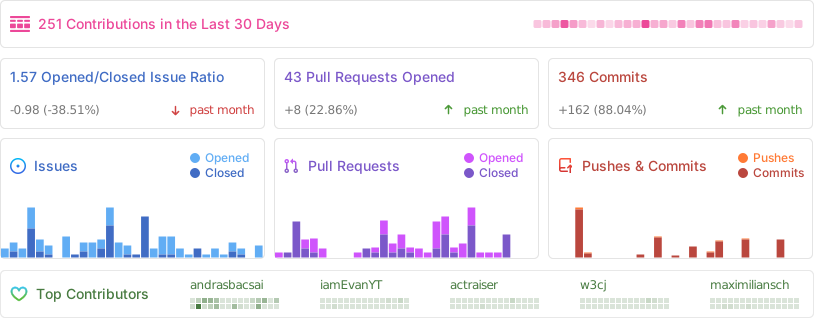
Repo Activity
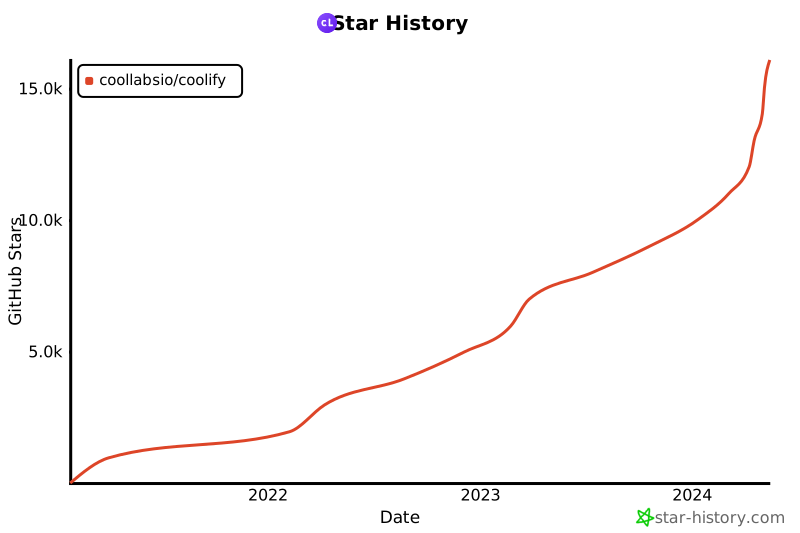
Star History



 Coolify 是一个开源、可自托管的 Heroku、Netlify 和 Vercel 替代方案,让你能在自己的服务器上部署静态网站、数据库、全栈应用,以及 280 多种一键安装的服务。