

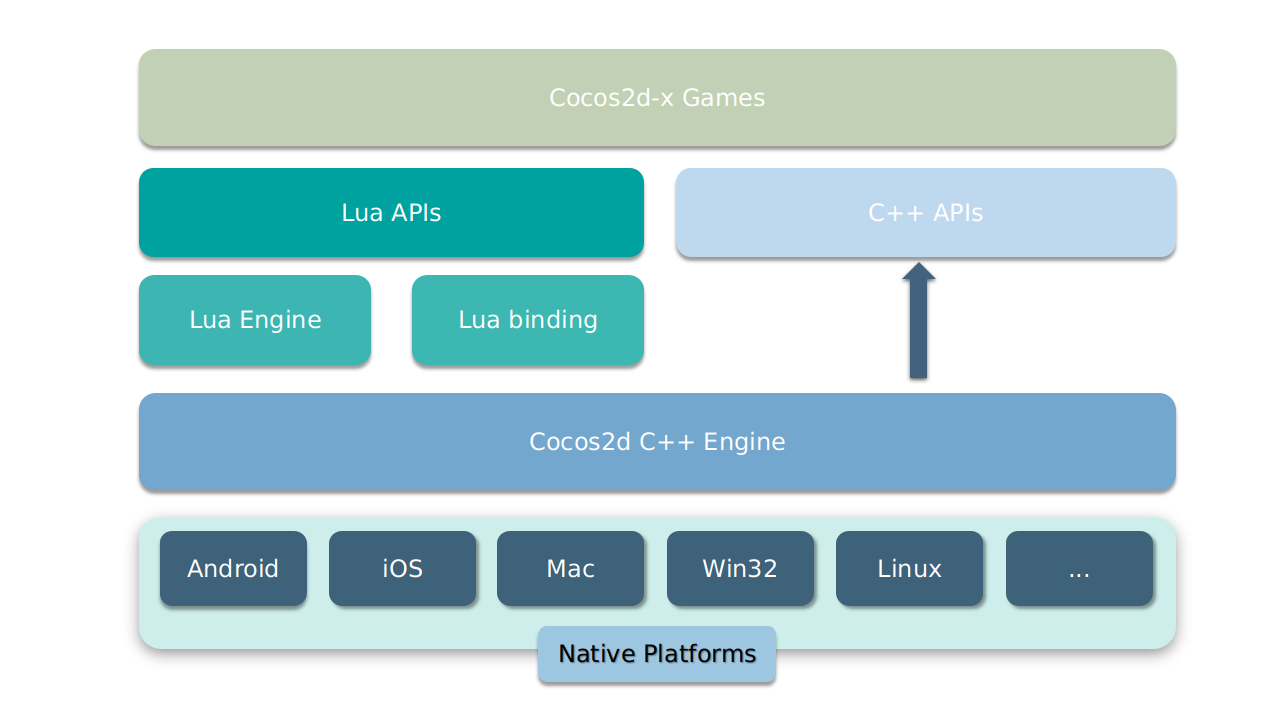
这是什么?
 一个开源、跨平台的 C++ 框架,用来开发 2D 游戏、互动图书、演示程序和其他图形应用——它最初是 cocos2d-iphone 的 C++ 移植版,支持 iOS、Android、macOS、Windows 和 Linux。
一个开源、跨平台的 C++ 框架,用来开发 2D 游戏、互动图书、演示程序和其他图形应用——它最初是 cocos2d-iphone 的 C++ 移植版,支持 iOS、Android、macOS、Windows 和 Linux。它是一个完整的游戏引擎,还是需要我自己拼装的底层库?是一个完整的 2D 引擎:带场景切换的场景管理、精灵和精灵图集、动作与缓动系统、基础菜单和按钮、瓦片地图、视差滚动以及声音引擎。你以一组场景的形式来搭建游戏。
是一个完整的 2D 引擎:带场景切换的场景管理、精灵和精灵图集、动作与缓动系统、基础菜单和按钮、瓦片地图、视差滚动以及声音引擎。你以一组场景的形式来搭建游戏。我怎样才能把第一个游戏跑起来?克隆仓库,运行 'python download-deps.py' 和 'git submodule update --init',然后运行 './setup.py'。用 'cocos new MyGame -p com.yourcompany.mygame -l cpp -d NEWPROJECTSDIR' 创建项目,再用 'cocos run --proj-dir .. -p mac' 运行。
克隆仓库,运行 'python download-deps.py' 和 'git submodule update --init',然后运行 './setup.py'。用 'cocos new MyGame -p com.yourcompany.mygame -l cpp -d NEWPROJECTSDIR' 创建项目,再用 'cocos run --proj-dir .. -p mac' 运行。在这些步骤之前,我的电脑上需要装好什么?需要 Python 2.7.5+——README 明确说明不能用 Python 3。各平台要求:macOS 上需要 Xcode 8+,Windows 上需要 VS 2015,Linux 上需要 CMake 3.1+;做 Android 开发需要 NDK r16+ 和 Android Studio 3.0.0+;发布 Web 版需要 JRE 或 JDK 1.6+。
需要 Python 2.7.5+——README 明确说明不能用 Python 3。各平台要求:macOS 上需要 Xcode 8+,Windows 上需要 VS 2015,Linux 上需要 CMake 3.1+;做 Android 开发需要 NDK r16+ 和 Android Studio 3.0.0+;发布 Web 版需要 JRE 或 JDK 1.6+。在花时间投入之前,有什么坑我该知道的?README 本身已不再推荐用 cocos2d-x 开发新项目——团队引导新用户改用 Cocos Creator,而且两个引擎的 API 不一样,已有经验无法直接迁移。
README 本身已不再推荐用 cocos2d-x 开发新项目——团队引导新用户改用 Cocos Creator,而且两个引擎的 API 不一样,已有经验无法直接迁移。我做完的游戏能在哪些平台上运行?按运行环境要求:iOS 8.0+、Android 3.0.0+、OS X v10.9+ 和 Windows 7+。开发本身支持在 macOS、Windows 和 Linux(Ubuntu 14.04+)上进行。
按运行环境要求:iOS 8.0+、Android 3.0.0+、OS X v10.9+ 和 Windows 7+。开发本身支持在 macOS、Windows 和 Linux(Ubuntu 14.04+)上进行。我可以用它发布闭源的商业游戏吗?可以——Cocos2d-x 采用 MIT 许可证,明确对商业使用友好,兼容开源和闭源项目。
可以——Cocos2d-x 采用 MIT 许可证,明确对商业使用友好,兼容开源和闭源项目。我的游戏可以用哪些物理引擎?Box2d 和 Chipmunk 都已内置开箱即用,另外还内置了粒子系统,并可通过 Spine 和 Armature 支持骨骼动画。
Box2d 和 Chipmunk 都已内置开箱即用,另外还内置了粒子系统,并可通过 Spine 和 Armature 支持骨骼动画。它底层用什么来渲染?移动端用 OpenGL ES 2.0,桌面端用 OpenGL 2.1,macOS 和 iOS 上还支持 Metal。
移动端用 OpenGL ES 2.0,桌面端用 OpenGL 2.1,macOS 和 iOS 上还支持 Metal。cocos2d-x 和 Cocos Creator 是什么关系?cocos2d-x 的核心后来成了 Cocos Creator 1.x 和 2.x 的基础;Creator 是更新的、以编辑器为主并支持 3D 的引擎,而 cocos2d-x 仍是经典的以 C++ 代码为核心的引擎。
cocos2d-x 的核心后来成了 Cocos Creator 1.x 和 2.x 的基础;Creator 是更新的、以编辑器为主并支持 3D 的引擎,而 cocos2d-x 仍是经典的以 C++ 代码为核心的引擎。Which topics is it in?physics, opengl, c-plus-plus, metal, game-engine, gamedev, lua, game-development, animation, cpp, c++, mobile
physics, opengl, c-plus-plus, metal, game-engine, gamedev, lua, game-development, animation, cpp, c++, mobile