

Что это такое?
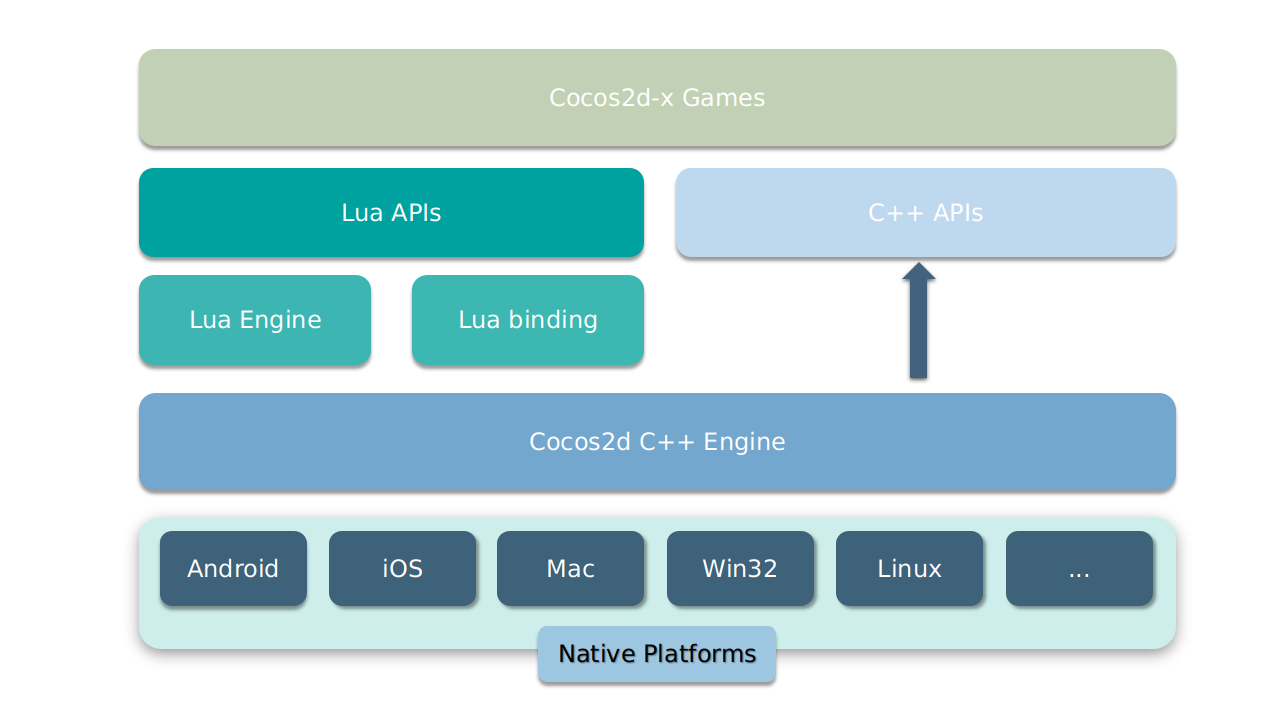
 Опенсорсный кроссплатформенный C++-фреймворк для создания 2D-игр, интерактивных книг, демо и других графических приложений — он начинался как C++-порт cocos2d-iphone и работает на iOS, Android, macOS, Windows и Linux.
Опенсорсный кроссплатформенный C++-фреймворк для создания 2D-игр, интерактивных книг, демо и других графических приложений — он начинался как C++-порт cocos2d-iphone и работает на iOS, Android, macOS, Windows и Linux.Это полноценный игровой движок или низкоуровневая библиотека, из которой я всё соберу сам?Полноценный 2D-движок: управление сценами с переходами между ними, спрайты и спрайт-листы, система действий и плавных анимаций (easing), простые меню и кнопки, тайловые карты, параллакс-скроллинг и звуковой движок. Игра строится как набор сцен.
Полноценный 2D-движок: управление сценами с переходами между ними, спрайты и спрайт-листы, система действий и плавных анимаций (easing), простые меню и кнопки, тайловые карты, параллакс-скроллинг и звуковой движок. Игра строится как набор сцен.Как запустить свою первую игру?Склонируйте репозиторий, выполните 'python download-deps.py' и 'git submodule update --init', затем './setup.py'. Создайте проект командой 'cocos new MyGame -p com.yourcompany.mygame -l cpp -d NEWPROJECTSDIR' и запустите его через 'cocos run --proj-dir .. -p mac'.
Склонируйте репозиторий, выполните 'python download-deps.py' и 'git submodule update --init', затем './setup.py'. Создайте проект командой 'cocos new MyGame -p com.yourcompany.mygame -l cpp -d NEWPROJECTSDIR' и запустите его через 'cocos run --proj-dir .. -p mac'.Что должно быть установлено на моём компьютере, чтобы всё это заработало?Python 2.7.5+ — в README прямо сказано, что Python 3 не подходит. По платформам: Xcode 8+ на macOS, VS 2015 на Windows, CMake 3.1+ на Linux; для Android нужны NDK r16+ и Android Studio 3.0.0+, а для публикации веб-версий — JRE или JDK 1.6+.
Python 2.7.5+ — в README прямо сказано, что Python 3 не подходит. По платформам: Xcode 8+ на macOS, VS 2015 на Windows, CMake 3.1+ на Linux; для Android нужны NDK r16+ и Android Studio 3.0.0+, а для публикации веб-версий — JRE или JDK 1.6+.Есть ли подвох, о котором стоит знать, прежде чем тратить на это время?Сам README уже не рекомендует начинать новые проекты на cocos2d-x — команда отправляет новичков к Cocos Creator, а у этих двух движков разные наборы API, так что знания напрямую не перенесутся.
Сам README уже не рекомендует начинать новые проекты на cocos2d-x — команда отправляет новичков к Cocos Creator, а у этих двух движков разные наборы API, так что знания напрямую не перенесутся.Где будет работать моя готовая игра?Согласно системным требованиям: iOS 8.0+, Android 3.0.0+, OS X v10.9+ и Windows 7+. Сама разработка поддерживается на macOS, Windows и Linux (Ubuntu 14.04+).
Согласно системным требованиям: iOS 8.0+, Android 3.0.0+, OS X v10.9+ и Windows 7+. Сама разработка поддерживается на macOS, Windows и Linux (Ubuntu 14.04+).Могу ли я выпустить проприетарную коммерческую игру на нём?Да — Cocos2d-x распространяется по лицензии MIT и открыто позиционируется как дружелюбная к коммерции, совместимая как с открытыми, так и с закрытыми проектами.
Да — Cocos2d-x распространяется по лицензии MIT и открыто позиционируется как дружелюбная к коммерции, совместимая как с открытыми, так и с закрытыми проектами.Какие физические движки можно использовать в моей игре?Box2d и Chipmunk встроены из коробки, кроме того есть встроенная система частиц и поддержка скелетной анимации через Spine и Armature.
Box2d и Chipmunk встроены из коробки, кроме того есть встроенная система частиц и поддержка скелетной анимации через Spine и Armature.С помощью чего происходит рендеринг внутри?OpenGL ES 2.0 на мобильных платформах, OpenGL 2.1 на настольных и Metal на macOS и iOS.
OpenGL ES 2.0 на мобильных платформах, OpenGL 2.1 на настольных и Metal на macOS и iOS.Как cocos2d-x связан с Cocos Creator?Ядро cocos2d-x легло в основу Cocos Creator 1.x и 2.x; Creator — это более новый движок с редактором и поддержкой 3D, а cocos2d-x остаётся классическим C++-движком, где всё пишется кодом.
Ядро cocos2d-x легло в основу Cocos Creator 1.x и 2.x; Creator — это более новый движок с редактором и поддержкой 3D, а cocos2d-x остаётся классическим C++-движком, где всё пишется кодом.Which topics is it in?physics, opengl, c-plus-plus, metal, game-engine, gamedev, lua, game-development, animation, cpp, c++, mobile
physics, opengl, c-plus-plus, metal, game-engine, gamedev, lua, game-development, animation, cpp, c++, mobile