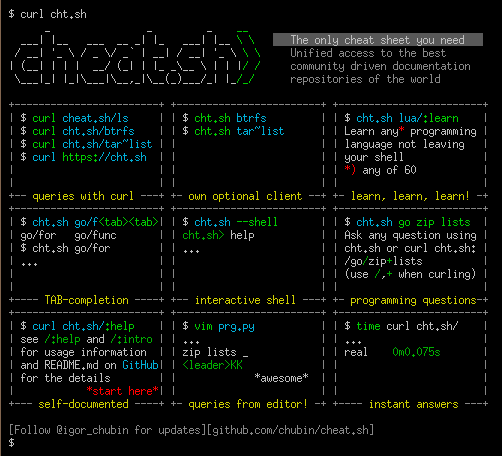
Unified access to the best community driven cheat sheets repositories of the world.
Let's imagine for a moment that there is such a thing as an ideal cheat sheet.
What should it look like?
What features should it have?
- Concise — It should only contain the things you need, and nothing else.
- Fast — It should be possible to use it instantly.
- Comprehensive — It should contain answers for every possible question.
- Universal — It should be available everywhere, anytime, without any preparations.
- Unobtrusive — It should not distract you from your main task.
- Tutoring — It should help you to learn the subject.
- Inconspicuous — It should be possible to use it completely unnoticed.
Such a thing exists! It's easy to install and there's even auto-complete.
Features
cheat.sh
- Has a simple curl/browser/editor interface.
- Covers 56 programming languages, several DBMSes, and more than 1000 most important UNIX/Linux commands.
- Provides access to the best community driven cheat sheets repositories in the world, on par with StackOverflow.
- Available everywhere, no installation needed, but can be installed for offline usage.
- Ultrafast, returns answers within 100 ms, as a rule.
- Has a convenient command line client,
cht.sh, that is very advantageous and helpful, though not mandatory.
- Can be used directly from code editors, without opening a browser and not switching your mental context.
- Supports a special stealth mode where it can be used fully invisibly without ever touching a key and making sounds.

Contents
Usage
To get a cheat sheet for a UNIX/Linux command from a command line, query the service using curl or any other HTTP/HTTPS client
specifying the name of the command in the query:
    curl cheat.sh/tar
    curl cht.sh/curl
    curl https://cheat.sh/rsync
    curl https://cht.sh/tr
As you can see, you can use both HTTPS and HTTP to access the service, and both the long (cheat.sh) and the short (cht.sh) service names.
Here tar, curl, rsync, and tr are names of the UNIX/Linux commands you want to get cheat sheets for.
If you don't know the name of the command you need, you can search for it using the ~KEYWORD notation.
For example, to see how you can make snapshots of a filesystem/volume/something else:
curl cht.sh/~snapshot
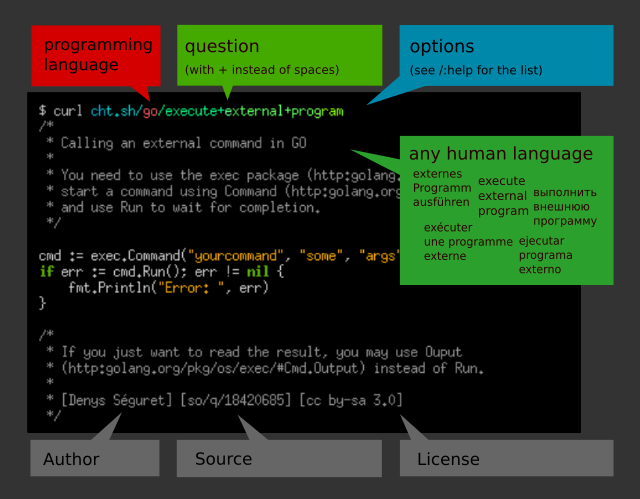
The programming language cheat sheets are located in special namespaces dedicated to them.
    curl cht.sh/go/Pointers
    curl cht.sh/scala/Functions
    curl cht.sh/python/lambda
To get the list of available programming language cheat sheets, use the special query :list:
curl cht.sh/go/:list
Almost each programming language has a special page named :learn
that describes the language basics (that's a direct mapping from the "Learn X in Y" project).
It could be a good starting point if you've just started learning a language.
If there is no cheat sheet for a programming language query (and it is almost always the case),
it is generated on the fly, based on available cheat sheets and answers on StackOverflow.
Of course, there is no guarantee that the returned cheat sheet will be a 100% hit, but it is almost always exactly what you are looking for.
Try these (and your own) queries to get the impression of that, what the answers look like:
    curl cht.sh/go/reverse+a+list
    curl cht.sh/python/random+list+elements
    curl cht.sh/js/parse+json
    curl cht.sh/lua/merge+tables
    curl cht.sh/clojure/variadic+function
If you don't like an answer for your queries, you can pick another one. For that, repeat the query with an additional parameter /1, /2 etc. appended:
    curl cht.sh/python/random+string
    curl cht.sh/python/random+string/1
    curl cht.sh/python/random+string/2
Cheat sheets are formatted as code of the queried programming language (at least we are trying our best to do so)
so they can be pasted into a program in this language directly. Text comments, if there are any, are formatted according to the language syntax.
    $ curl cht.sh/lua/table+keys
    -- lua: retrieve list of keys in a table

    local keyset={}
    local n=0

    for k,v in pairs(tab) do
      n=n+1
      keyset[n]=k
    end

    --[[
       [ Note that you cannot guarantee any order in keyset. If you want the
       [ keys in sorted order, then sort keyset with table.sort(keyset).
       [
       [ [lhf] [so/q/12674345] [cc by-sa 3.0]
       ]]
If you don't need text comments in the answer, you can eliminate them
using a special option \?Q:
    $ curl cht.sh/lua/table+keys\?Q
    local keyset={}
    local n=0

    for k,v in pairs(tab) do
      n=n+1
      keyset[n]=k
    end
And if you don't need syntax highlighting, switch it off using \?T.
You can combine the options together:
    curl cht.sh/go/reverse+a+list\?Q
    curl cht.sh/python/random+list+elements\?Q
    curl cht.sh/js/parse+json\?Q
    curl cht.sh/lua/merge+tables\?QT
    curl cht.sh/clojure/variadic+function\?QT
Full list of all options described below and in /:help.
Try your own queries. Follow these rules:
- Try to be more specific (
/python/append+file is better than /python/file and /python/append).
- Ask practical question if possible (yet theoretical question are possible too).
- Ask programming language questions only; specify the name of the programming language as the section name.
- Separate words with
+ instead of spaces.
- Do not use special characters, they are ignored anyway.
- If you want to eliminate cheat sheets containing some word, add it to the query with
+-: python/multiply+matrices+-numpy
Read more about the programming languages queries below.
Command line client, cht.sh
The cheat.sh service has its own command line client (cht.sh) that
has several useful features compared to querying the service directly with curl:
- Special shell mode with a persistent queries context and readline support.
- Queries history.
- Clipboard integration.
- Tab completion support for shells (bash, fish, zsh).
- Stealth mode.
Installation
To install the client:
PATH_DIR="$HOME/bin"  # or another directory on your $PATH
mkdir -p "$PATH_DIR"
curl https://cht.sh/:cht.sh > "$PATH_DIR/cht.sh"
chmod +x "$PATH_DIR/cht.sh"
or to install it globally (for all users):
curl -s https://cht.sh/:cht.sh | sudo tee /usr/local/bin/cht.sh && sudo chmod +x /usr/local/bin/cht.sh
Note: The package "rlwrap" is a required dependency to run in shell mode. Install this using sudo apt install rlwrap
Client usage
Now, you can use cht.sh instead of curl, and write your queries in more natural way,
with spaces instead of +:
    $ cht.sh go reverse a list
    $ cht.sh python random list elements
    $ cht.sh js parse json
It is even more convenient to start the client in a special shell mode:
    $ cht.sh --shell
    cht.sh> go reverse a list
If all your queries are about the same language, you can change the context
and spare repeating the programming language name:
    $ cht.sh --shell
    cht.sh> cd go
    cht.sh/go> reverse a list
or even start the client in this context:
    $ cht.sh --shell go
    cht.sh/go> reverse a list
    ...
    cht.sh/go> join a list
    ...
If you want to change the context, you can do it with the cd command,
or if you want do a single query for some other language, just prepend it with /:
    $ cht.sh --shell go
    ...
    cht.sh/go> /python dictionary comprehension
    ...
If you want to copy the last answer into the clipboard, you can
use the c (copy) command, or C (ccopy, without comments).
    cht.sh/python> append file
    #  python - How do you append to a file?

    with open("test.txt", "a") as myfile:
        myfile.write("appended text")
    cht.sh/python> C
    copy: 2 lines copied to the selection
Type help for other internal cht.sh commands.
	cht.sh> help
	help    - show this help
	hush    - do not show the 'help' string at start anymore
	cd LANG - change the language context
	copy    - copy the last answer in the clipboard (aliases: yank, y, c)
	ccopy   - copy the last answer w/o comments (cut comments; aliases: cc, Y, C)
	exit    - exit the cheat shell (aliases: quit, ^D)
	id [ID] - set/show an unique session id ("reset" to reset, "remove" to remove)
	stealth - stealth mode (automatic queries for selected text)
	update  - self update (only if the scriptfile is writeable)
	version - show current cht.sh version
	/:help  - service help
	QUERY   - space separated query staring (examples are below)
				  cht.sh> python zip list
				  cht.sh/python> zip list
				  cht.sh/go> /python zip list
The cht.sh client has its configuration file which is located at ~/.cht.sh/cht.sh.conf
(location of the file can be overridden by the environment variable CHTSH_CONF).
Use it to specify query options that you would use with each query.
For example, to switch syntax highlighting off create the file with the following
content:
CHTSH_QUERY_OPTIONS="T"
Or if you want to use a special syntax highlighting theme:
CHTSH_QUERY_OPTIONS="style=native"
(curl cht.sh/:styles-demo to see all supported styles).
Other cht.sh configuration parameters:
CHTSH_CURL_OPTIONS="-A curl"        # curl options used for cht.sh queries
CHTSH_URL=https://cht.sh            # URL of the cheat.sh server
Tab completion
Bash Tab completion
To activate tab completion support for cht.sh, add the :bash_completion script to your ~/.bashrc:
    curl https://cheat.sh/:bash_completion > ~/.bash.d/cht.sh
    . ~/.bash.d/cht.sh
    # and add . ~/.bash.d/cht.sh to ~/.bashrc
ZSH Tab completion
To activate tab completion support for cht.sh, add the :zsh script to the fpath in your ~/.zshrc:
    curl https://cheat.sh/:zsh > ~/.zsh.d/_cht
    echo 'fpath=(~/.zsh.d/ $fpath)' >> ~/.zshrc
    # Open a new shell to load the plugin
Stealth mode
Being used fully unnoticed is one of the most important property of any cheat sheet.
cheat.sh can be used completely unnoticed too. The cheat.sh client, cht.sh, has
a special mode, called stealth mode. Using that, you don't even need to touch your
keyboard to open a cheat sheet.
In this mode, as soon as you select some text with the mouse (and thus adding it
into the selection buffer of X Window System or into the clipboard) it's used
as a query string for cheat.sh, and the correspondent cheat sheet is automatically shown.
Let's imagine, that you are having an online interview, where your interviewer asks you
some questions using a shared document (say Google Docs) and you are supposed
to write your coding answers there (it's possible too that you'll type in the questions
on your own, just to show to the interviewer that you've heard it right).
When using the stealth mode of cht.sh, the only thing you need to do in order to see
a cheat sheet for some question, is to select the question using the mouse.
If you don't want any text in the answers and the only thing you need is code,
use the Q option when starting the stealth mode.
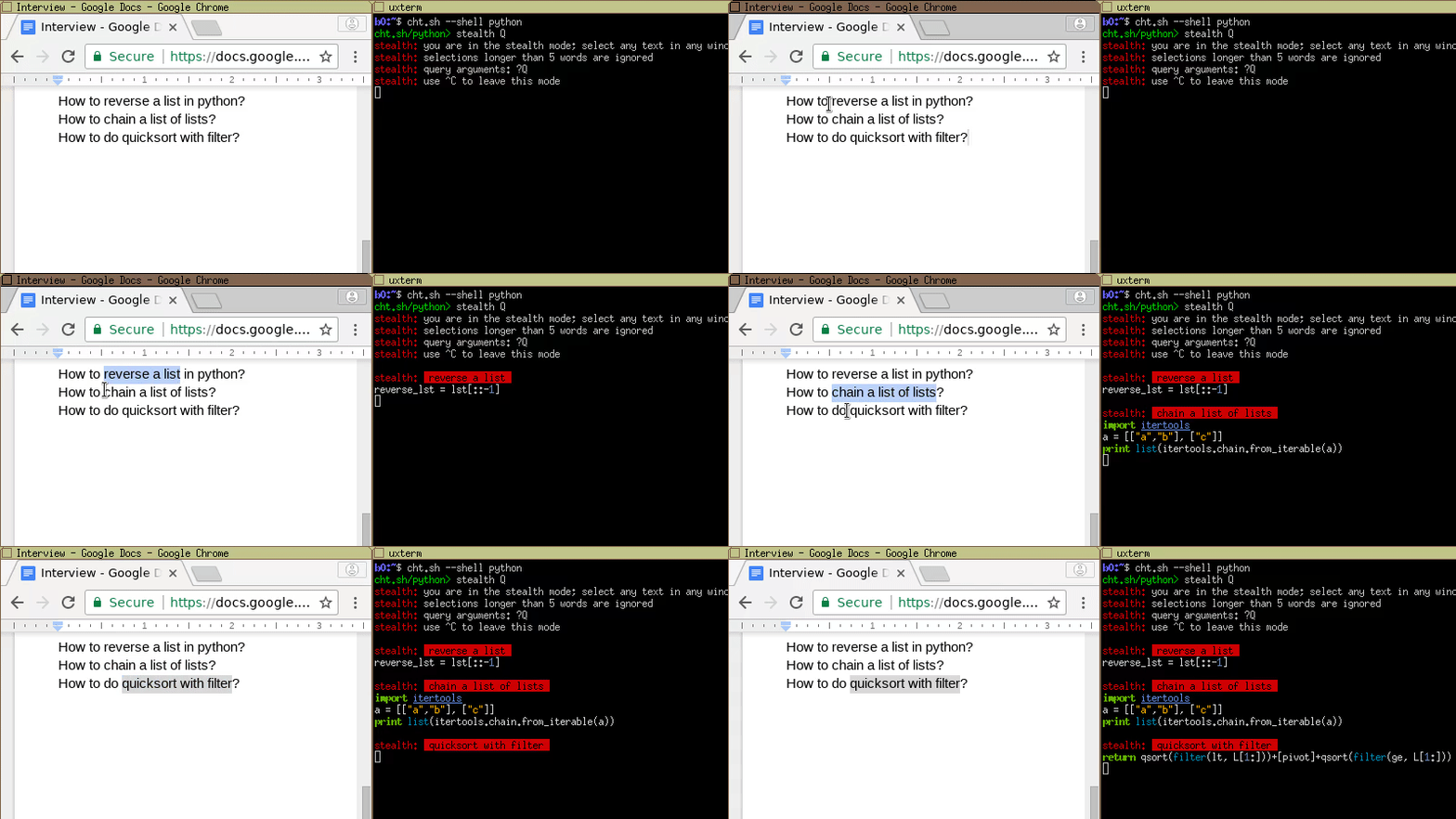
You: Hi!                                            | $ cht.sh --shell python
She: Hi!                                            | cht.sh/python> stealth Q
She: Are you ready for a small interview?           | stealth: you are in the stealth mode; select any text
She: Just a couple of questions                     | stealth: selections longer than 5 words are ignored
She: We will talk about python                      | stealth: query arguments: ?Q
She: Let's start from something simple.             | stealth: use ^C to leave this mode
She: Do you know how to reverse a list in python?   |
You: Sure                                           |
You: (selecting "reverse a list")                   | stealth: reverse a list
                                                    | reverse_lst = lst[::-1]
You: lst[::-1]?                                     |
She: Good.                                          |
She: Do you know how to chain a list of lists?      |
You: (selecting "chain a list of lists")            | stealth: chain a list of lists
                                                    | import itertools
                                                    | a = [["a","b"], ["c"]]
                                                    | print list(itertools.chain.from_iterable(a))
You: May I use external modules?                    |
She: What module do you want to use?                |
You: itertools                                      |
She: Yes, you may use it                            |
You: Ok, then:                                      |
You: itertools.chain.from_iterable(a)               |
She: Good. Let's try something harder.              |
She: What about quicksort implementation?           |
You: (selecting "quicksort implementation")         | stealth: quicksort implementation
You: Let me think about it.                         | (some big and clumsy lowlevel implementation shown)
You: Well...(starting typing it in)                 | def sort(array=[12,4,5,6,7,3,1,15]):
                                                    |     less = []
She: (seeing your ugly pascal style)                |     equal = []
She: Could you write it more concise?               |     greater = []
                                                    |     if len(array) > 1:
You: What do you mean?                              |         pivot = array[0]
                                                    |         for x in array:
She: I mean,                                        |             if x < pivot: less.append(x)
She: do you really need all these ifs and fors?     |             if x == pivot: equal.append(x)
She: Could you maybe just use filter instead?       |             if x > pivot: greater.append(x)
                                                    |         return sort(less)+equal+sort(greater)
You: quicksort with filter?                         |     else:
                                                    |         return array
She: Yes                                            |
You: (selecting "quicksort with filter")            | stealth: quicksort with filter
You: Ok, I will try.                                | return qsort(filter(lt, L[1:]))+[pivot] \
You: Something like this?                           |     +qsort(filter(ge, L[1:]))
You: qsort(filter(lt, L[1:]))+[pivot] \             |
       + qsort(filter(ge, L[1:]))                   |
                                                    |
She: Yes! Perfect! Exactly what I wanted to see!    |
                                                    |
Of course, this is just for fun, and you should never cheat in your coding interviews,
because you know what happens when you do.

Windows command line client
You can access cheat.sh from Windows command line too.
Use cheat.sh command line client for that: cht.exe.
It supports:
- output colorization;
- command line options;
- its own configuration file.
You can also use scoop command-line installer for Windows to get it:
scoop install cht
Self-Hosting
Docker
Currently, the easiest way to get a self-hosted instance running is by using
the docker-compose.yml file.
docker-compose up
This builds and runs the image with baked in cheatsheets and starts the app
and a Redis instance to back it, making the service available at
http://localhost:8002 This is currently an early implementation and should
probably not be used for anything outside of internal/dev/personal use right
now.
Editors integration
You can use cheat.sh directly from the editor
(Emacs, Sublime, Vim, and Visual Studio Code are currently supported;
not all features are supported by all plugins though; see below).
Instead of opening your browser, googling, browsing Stack Overflow
and eventually copying the code snippets you need into the clipboard
and later pasting them into the editor,
you can achieve the same instantly and without leaving the editor at all!
Here is what it looks like in Vim:
If you have a question while editing a program, you can just type
your question directly in the buffer and press <leader>KK. You will get
the answer to your question in pager. (with <leader>KB you'll get the answer
in a separate buffer).
If you like the answer, you can manually paste it from the buffer or
the pager, or if you are lazy you can use <leader>KP to paste it below/under
your question (or replace you question using <leader>KR). If you want the
answer without the comments, <leader>KC replays the last query
toggling them.
If you use some static analysis plugin such as syntastic (for Vim), you can use
its warning and error messages as cheat.sh queries: place the cursor on the problem line
and press <leader>KE: explanation for the warning will be opened in a new buffer.
Features supported by cheat.sh plugins for different editors:
| Feature |
Emacs |
Sublime |
Vim |
VSCode |
IDEA |
QtCreator |
| Command queries |
✓ |
✓ |
✓ |
✓ |
✓ |
✓ |
| Queries from buffer |
|
|
✓ |
✓ |
|
✓ |
| Toggle comments |
|
|
✓ |
✓ |
✓ |
✓ |
| Prev/next answer |
|
|
✓ |
✓ |
✓ |
✓ |
| Multiple answers |
|
✓ |
|
|
✓ |
|
| Warnings as queries |
|
|
✓ |
|
|
|
| Queries history |
|
|
✓ |
✓ |
|
|
| Session id |
|
|
✓ |
|
|
|
| Configurable server |
✓ |
|
✓ |
✓ |
|
✓ |
Vim
Here is Vim configuration example:
" some configuration above ...

let mapleader=" "

call vundle#begin()
Bundle 'gmarik/vundle'
Bundle 'scrooloose/syntastic'
Bundle 'dbeniamine/cheat.sh-vim'
call vundle#end()

let g:syntastic_javascript_checkers = [ 'jshint' ]
let g:syntastic_ocaml_checkers = ['merlin']
let g:syntastic_python_checkers = ['pylint']
let g:syntastic_shell_

 cheat.sh is a unified cheat-sheet service: ask about a UNIX command or a programming language and get a concise answer right in your terminal, browser or editor. It aggregates the best community-driven cheat sheet repositories, on par with StackOverflow.