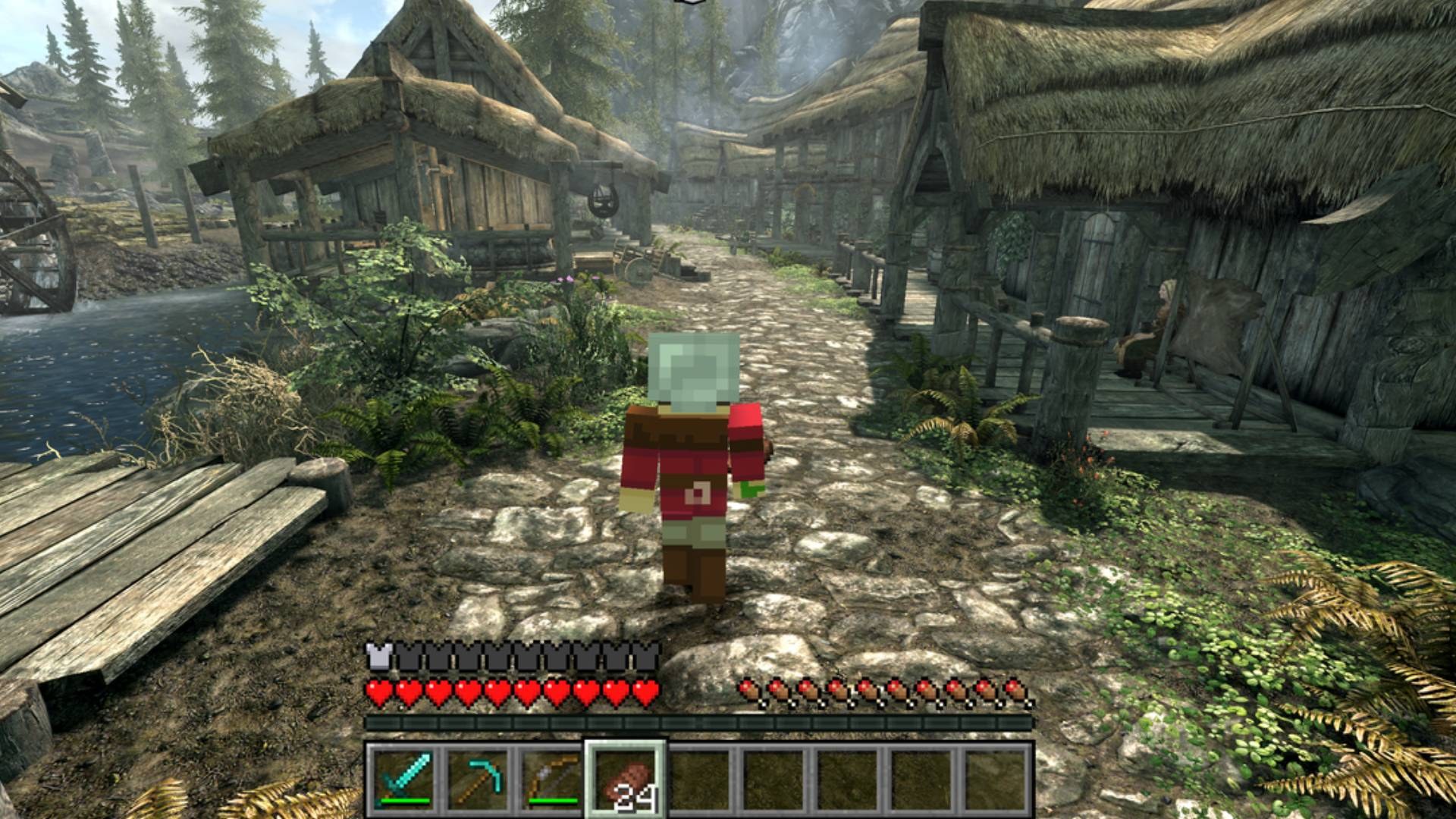
What is this?
 SkyCraft lets you play Skyrim as if you were a Minecraft player: you move with Minecraft's physics, carry Minecraft's inventory and HUD, and place/break Minecraft blocks inside Skyrim's actual world, fighting Skyrim's NPCs with Minecraft weapons.
SkyCraft lets you play Skyrim as if you were a Minecraft player: you move with Minecraft's physics, carry Minecraft's inventory and HUD, and place/break Minecraft blocks inside Skyrim's actual world, fighting Skyrim's NPCs with Minecraft weapons.Is this a standalone game or a mod for existing games?It's two mods glued together: a Skyrim SKSE plugin and a Minecraft Fabric mod that talk through shared memory. Neither game is rewritten; Minecraft runs hidden in the background while Skyrim renders everything.
It's two mods glued together: a Skyrim SKSE plugin and a Minecraft Fabric mod that talk through shared memory. Neither game is rewritten; Minecraft runs hidden in the background while Skyrim renders everything.How do I install and start it?Install the SkyCraft .zip with Mod Organizer 2 or Vortex like any SKSE plugin, then start Skyrim through SKSE. On first run it unpacks a bundled Prism Launcher, asks you to sign into your Microsoft account, and downloads Minecraft, Fabric and Java automatically; after that it starts Minecraft hidden alongside Skyrim every time.
Install the SkyCraft .zip with Mod Organizer 2 or Vortex like any SKSE plugin, then start Skyrim through SKSE. On first run it unpacks a bundled Prism Launcher, asks you to sign into your Microsoft account, and downloads Minecraft, Fabric and Java automatically; after that it starts Minecraft hidden alongside Skyrim every time.What do I need to own and install beforehand?You need Skyrim Special Edition/Anniversary Edition (runtime 1.6.x/1.7.x, tested on 1.7.104) with SKSE64 and Address Library installed, plus your own Microsoft account that owns Minecraft: Java Edition — SkyCraft bundles Prism Launcher, Fabric and Java for the Minecraft side.
You need Skyrim Special Edition/Anniversary Edition (runtime 1.6.x/1.7.x, tested on 1.7.104) with SKSE64 and Address Library installed, plus your own Microsoft account that owns Minecraft: Java Edition — SkyCraft bundles Prism Launcher, Fabric and Java for the Minecraft side.What doesn't work yet, or could trip me up?It's early and experimental: Skyrim's inventory, magic, shouts and perks can't be opened while Minecraft is driving the player, Minecraft hits don't reach non-NPC Skyrim objects, there's no switch back to plain Skyrim, sign text isn't drawn, all interiors share one Minecraft world (so blocks can leak between them), and camera-mod conflicts (SmoothCam, Improved Camera SE) will break it. Skyrim's scripted opening (cart ride/Helgen) may also get you stuck.
It's early and experimental: Skyrim's inventory, magic, shouts and perks can't be opened while Minecraft is driving the player, Minecraft hits don't reach non-NPC Skyrim objects, there's no switch back to plain Skyrim, sign text isn't drawn, all interiors share one Minecraft world (so blocks can leak between them), and camera-mod conflicts (SmoothCam, Improved Camera SE) will break it. Skyrim's scripted opening (cart ride/Helgen) may also get you stuck.Which OS does this run on?Windows only — it's built around SKSE64 and Mod Organizer 2/Vortex, and starts Minecraft through Windows' shell.
Windows only — it's built around SKSE64 and Mod Organizer 2/Vortex, and starts Minecraft through Windows' shell.Can I play with friends?Yes, up to 100 players, but only the Minecraft world is shared (blocks, items, mobs); everyone keeps their own separate Skyrim world, NPCs and quests. Hosting uses Minecraft's Open to LAN plus a bundled e4mc link, or Discord's rich presence Join button.
Yes, up to 100 players, but only the Minecraft world is shared (blocks, items, mobs); everyone keeps their own separate Skyrim world, NPCs and quests. Hosting uses Minecraft's Open to LAN plus a bundled e4mc link, or Discord's rich presence Join button.Does digging into Skyrim's terrain actually change the world?Yes — mining ground, rocks, roads and objects drops real Minecraft blocks (dirt, stone, ores, bedrock), craters from TNT or creepers are permanent, and what you dig is saved in your Minecraft world. A toggle in the Minecraft pause menu can turn Skyrim destruction off.
Yes — mining ground, rocks, roads and objects drops real Minecraft blocks (dirt, stone, ores, bedrock), craters from TNT or creepers are permanent, and what you dig is saved in your Minecraft world. A toggle in the Minecraft pause menu can turn Skyrim destruction off.Does playing SkyCraft affect my Skyrim character's skills?Yes — Minecraft actions train Skyrim skills automatically: swinging swords/tools trains One-Handed, axes/spears train Two-Handed, bows/thrown items train Archery, shields train Block, taking hits trains Armor, crafting trains Smithing, and sneaking trains Sneak.
Yes — Minecraft actions train Skyrim skills automatically: swinging swords/tools trains One-Handed, axes/spears train Two-Handed, bows/thrown items train Archery, shields train Block, taking hits trains Armor, crafting trains Smithing, and sneaking trains Sneak.What are similar projects?2010-rust-rewrite-mashup, iw4L, skate-3-rust-engine, ReSkate, luanti, CnC_Remastered_Collection, CircuitLordVRModInstaller, D2R-3D
2010-rust-rewrite-mashup, iw4L, skate-3-rust-engine, ReSkate, luanti, CnC_Remastered_Collection, CircuitLordVRModInstaller, D2R-3DWhich topics is it in?physics, multiplayer, game-modding, modding, protocol, game-engine, microsoft, game, windows-app, gaming, c++, java
physics, multiplayer, game-modding, modding, protocol, game-engine, microsoft, game, windows-app, gaming, c++, java