Table of Contents↗️
just
just is a handy way to save and run project-specific commands.
This readme is also available as a book. The
book reflects the latest release, whereas the
readme on GitHub
reflects latest master.
(中文文档在 这里,
快看过来!)
Commands, called recipes, are stored in a file called justfile with syntax
inspired by make:
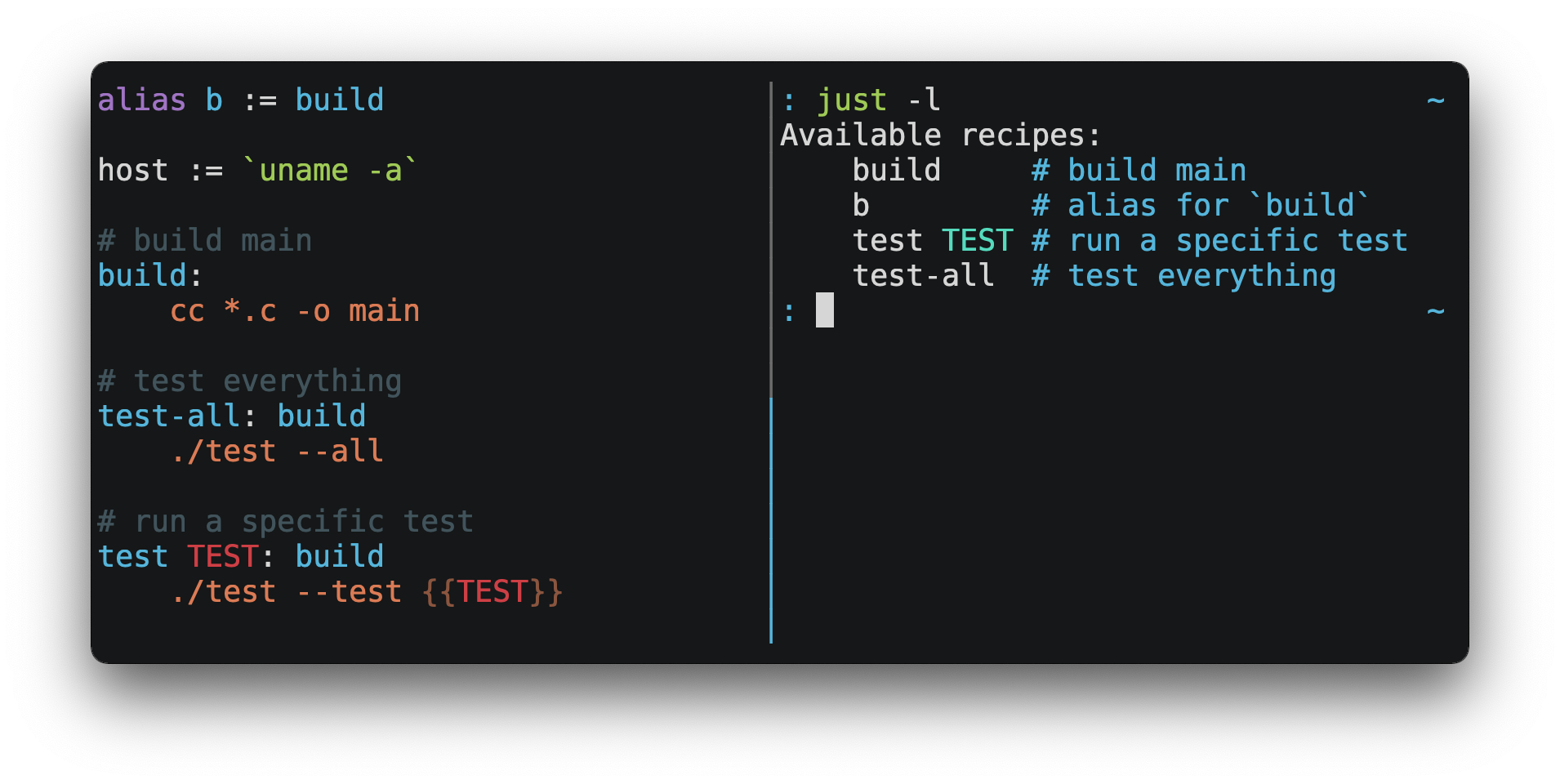
You can then run them with just RECIPE:
$ just test-all
cc *.c -o main
./test --all
Yay, all your tests passed!
just has a ton of useful features, and many improvements over make:
just is a command runner, not a build system, so it avoids much of
make's complexity and idiosyncrasies.
No need for .PHONY recipes!
Linux, macOS, Windows, and other reasonable unixes are supported with no
additional dependencies. (Although if your system doesn't have an sh,
you'll need to choose a different shell.)
Errors are specific and informative, and syntax errors are reported along
with their source context.
Recipes can accept command line arguments, including
flags and options.
just has a rich expression language and many
built-in-functions.
Wherever possible, errors are resolved statically. Unknown recipes and
circular dependencies are reported before anything runs.
just loads .env files, making it easy to populate
environment variables.
Recipes can be listed from the command line.
Command line completion scripts are
available for most popular shells.
Recipes can be written in
arbitrary languages, like Python or Node.js.
just can be invoked from any subdirectory, not just the directory that
contains the justfile.
justfiles can be organized into multiple files using modules
and imports.
And much more!
If you need help with just, please feel free to open an issue or ping me on
Discord. Feature requests and bug reports are
always welcome!
Installation
Just can be installed using your favorite package manager, by
downloading pre-built binaries, or building from source
with cargo install just.
Prerequisites
just should run on any system with a reasonable sh, including Linux, macOS,
and the BSDs.
Windows
On Windows, just works with the sh provided by
Git for Windows,
GitHub Desktop, or
Cygwin. After installation, sh must be available in
the PATH of the shell you want to invoke just from.
If you'd rather not install sh, you can use the shell setting to use the
shell of your choice.
Like PowerShell:
# use PowerShell instead of sh:
set shell := ["powershell.exe", "-c"]

hello:
  Write-Host "Hello, world!"
…or cmd.exe:
# use cmd.exe instead of sh:
set shell := ["cmd.exe", "/c"]

list:
  dir
You can also set the shell using command-line arguments. For example, to use
PowerShell, launch just with --shell powershell.exe --shell-arg -c.
(PowerShell is installed by default on Windows 7 SP1 and Windows Server 2008 R2
SP1 and later, and cmd.exe is quite fiddly, so PowerShell is recommended for
most Windows users.)
Packages
BSD
Linux
Windows
macOS
| Package Manager |
Package |
Command |
| MacPorts |
just |
port install just |

Pre-Built Binaries
Pre-built binaries for Linux, macOS, and Windows can be found on
the releases page.
You can use the following command on Linux, macOS, or Windows to download the
latest release, just replace DEST with the directory where you'd like to put
just:
curl --proto '=https' --tlsv1.2 -sSf https://just.systems/install.sh | bash -s -- --to DEST
For example, to install just to ~/bin:
# create ~/bin
mkdir -p ~/bin

# download and extract just to ~/bin/just
curl --proto '=https' --tlsv1.2 -sSf https://just.systems/install.sh | bash -s -- --to ~/bin

# add `~/bin` to the paths that your shell searches for executables
# this line should be added to your shell's initialization file,
# e.g. `~/.bashrc` or `~/.zshrc`
export PATH="$PATH:$HOME/bin"

# just should now be executable
just --help
Note that install.sh may fail on GitHub Actions, or in other environments
where many machines share IP addresses. install.sh calls GitHub APIs in order
to determine the latest version of just to install, and those API calls are
rate-limited on a per-IP basis. To make install.sh more reliable in such
circumstances, pass a specific tag to install with --tag.
Another way to avoid rate-limiting is to pass a GitHub authentication token to
install.sh as an environment variable named GITHUB_TOKEN, allowing it to
authenticate its requests.
Releases include a SHA256SUM file
which can be used to verify the integrity of pre-built binary archives.
To verify a release, download the pre-built binary archive along with the
SHA256SUM file and run:
shasum --algorithm 256 --ignore-missing --check SHA256SUMS
GitHub Actions
just can be installed on GitHub Actions in a few ways.
Using package managers pre-installed on GitHub Actions runners on macOS with
brew install just, and on Windows with choco install just.
With extractions/setup-just:
- uses: extractions/setup-just@v3
  with:
    just-version: 1.5.0  # optional semver specification, otherwise latest
Or with taiki-e/install-action:
- uses: taiki-e/install-action@just
Docker
just is available as a Docker image from
the GitHub Container Registry.
To copy just into a Docker image, add the following line to your
Dockerfile:
COPY --from=ghcr.io/casey/just:latest /just /usr/local/bin/
After copying, just may also be used as part of a docker build:
RUN just
An RSS feed of just releases is
available here.
Node.js Installation
just-install can be used to automate
installation of just in Node.js applications.
just is a great, more robust alternative to npm scripts. If you want to
include just in the dependencies of a Node.js application, just-install
will install a local, platform-specific binary as part of the npm install
command. This removes the need for every developer to install just
independently using one of the processes mentioned above. After installation,
the just command will work in npm scripts or with npx. It's great for teams
who want to make the setup process for their project as easy as possible.
For more information, see the
just-install README file.
Nix Flake
The just repository includes a
flake.nix that defines
a nix flake, allowing you to use just
as an input to another flake:
{
  inputs = {
    just.url = "github:casey/just";
  }

  outputs = {self, nixpkgs, just}: {
  }
}
Backwards Compatibility
With the release of version 1.0, just features a strong commitment to
backwards compatibility and stability.
Future releases will not introduce backwards incompatible changes that make
existing justfiles stop working, or break working invocations of the
command-line interface.
This does not, however, preclude fixing outright bugs, even if doing so might
break justfiles that rely on their behavior.
There will never be a just 2.0. Any desirable backwards-incompatible changes
will be opt-in on a per-justfile basis, so users may migrate at their
leisure.
Features that aren't yet ready for stabilization are marked as unstable and may
be changed or removed at any time. Using unstable features produces an error by
default, which can be suppressed by passing the --unstable flag,
set unstable, or setting the environment variable JUST_UNSTABLE to any
value other than false, 0, or the empty string.
Requiring a Minimum Just Version
If you use features of just which require a particular version, you may use
the minimum-version1.55.0 setting to make it an error to use older
versions of just:
set minimum-version := '1.55.0'
If just encounters a minimum version greater than its own version, it will
print an error message with the required version, which is hopefully better
than the confused error message it would have otherwise produced.
The minimum-version setting should be placed at the top of the justfile,
before any usage of the new feature that it guards.
Any features which change the lexer in forward-incompatible ways will still
produce an unhelpful error message, as the minimum version check is implemented
in the parser, which runs after the lexer.
Editor Support
justfile syntax is close enough to make that you may want to tell your
editor to use make syntax highlighting for just.
Vim and Neovim
Vim version 9.1.1042 or better and Neovim version 0.11 or better support
Justfile syntax highlighting out of the box, thanks to
pbnj.
vim-just
The vim-just plugin provides syntax
highlighting for justfiles.
Install it with your favorite package manager, like
Plug:
call plug#begin()

Plug 'NoahTheDuke/vim-just'

call plug#end()
Or with Vim's built-in package support:
mkdir -p ~/.vim/pack/vendor/start
cd ~/.vim/pack/vendor/start
git clone https://github.com/NoahTheDuke/vim-just.git
tree-sitter-just
tree-sitter-just is an
Nvim Treesitter plugin
for Neovim.
Emacs
just-mode provides syntax
highlighting and automatic indentation of justfiles. It is available on
MELPA as just-mode.
justl provides commands for executing and
listing recipes.
You can add the following to an individual justfile to enable make mode on
a per-file basis:
# Local Variables:
# mode: makefile
# End:
Visual Studio Code
An extension for VS Code is available here.
Unmaintained VS Code extensions include
skellock/vscode-just and
sclu1034/vscode-just.
JetBrains IDEs
A plugin for JetBrains IDEs by linux_china is
available here.
Kakoune
Kakoun






 'just' 是一个命令运行器,可以保存并运行项目专用的命令。这些命令定义在一个名为 justfile 的文件中,语法借鉴了 make。