



12.3K ·GitHub
What is this?
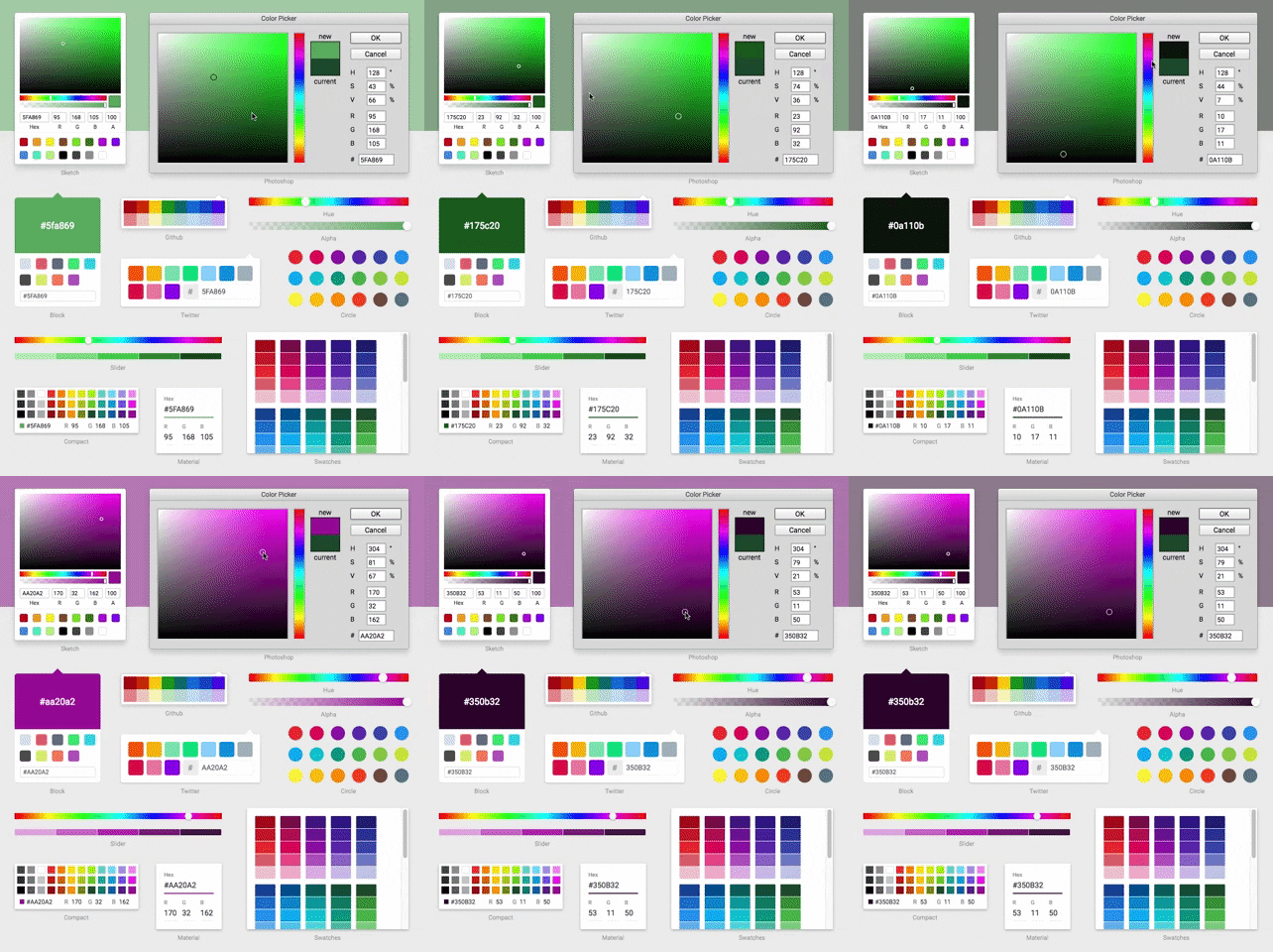
 React Color is a collection of 13 color picker components for React, recreating the pickers familiar from Sketch, Photoshop, Chrome, GitHub and Twitter.
React Color is a collection of 13 color picker components for React, recreating the pickers familiar from Sketch, Photoshop, Chrome, GitHub and Twitter.Is this a standalone app or a set of components I wire into my own React code?It's a React component library published on npm — each picker (SketchPicker, ChromePicker, PhotoshopPicker and so on) is a component you import and render inside your own app.
It's a React component library published on npm — each picker (SketchPicker, ChromePicker, PhotoshopPicker and so on) is a component you import and render inside your own app.How do I add a picker to my project?Install it from npm and import just the pickers you want — the package exports 13 components, from AlphaPicker and CirclePicker to SketchPicker and TwitterPicker.
Install it from npm and import just the pickers you want — the package exports 13 components, from AlphaPicker and CirclePicker to SketchPicker and TwitterPicker.What does it pull in besides React?reactcss powers the inline styling and tinycolor2 handles color conversions, with lodash, material-colors, prop-types and @icons/material alongside — all plain JavaScript, no native code.
reactcss powers the inline styling and tinycolor2 handles color conversions, with lodash, material-colors, prop-types and @icons/material alongside — all plain JavaScript, no native code.Will the pickers need a CSS setup or clash with my existing styles?No — the components ship no stylesheets because all styling is inline via ReactCSS, so there is nothing to import and nothing for your own CSS to clash with.
No — the components ship no stylesheets because all styling is inline via ReactCSS, so there is nothing to import and nothing for your own CSS to clash with.Which ready-made pickers does it include?Thirteen: Sketch, Photoshop, Chrome, GitHub and Twitter, plus Material, Compact, Swatches, Circle, Block, Slider, Hue and Alpha.
Thirteen: Sketch, Photoshop, Chrome, GitHub and Twitter, plus Material, Compact, Swatches, Circle, Block, Slider, Hue and Alpha.Can I build a picker that matches my own UI instead of using the presets?Yes — the README's second headline feature is making your own picker out of the building block components the library exports.
Yes — the README's second headline feature is making your own picker out of the building block components the library exports.Can I try the pickers before installing anything?Yes, the README links a live demo where you can play with all 13 pickers in the browser.
Yes, the README links a live demo where you can play with all 13 pickers in the browser.How battle-tested is it?It's been on GitHub since August 2015, has over 12,000 stars, and its test script runs Jest and ESLint.
It's been on GitHub since August 2015, has over 12,000 stars, and its test script runs Jest and ESLint.What are similar projects?drawably, shaders, chakra-ui, primitives, material, Libraries.dev, tweakcn, react-bootstrap
drawably, shaders, chakra-ui, primitives, material, Libraries.dev, tweakcn, react-bootstrapWhich topics is it in?react-component, color-picker, sketch, design-tools, chrome, component-library, javascript-library, design, ui-components, customization, ui, web-development
react-component, color-picker, sketch, design-tools, chrome, component-library, javascript-library, design, ui-components, customization, ui, web-development