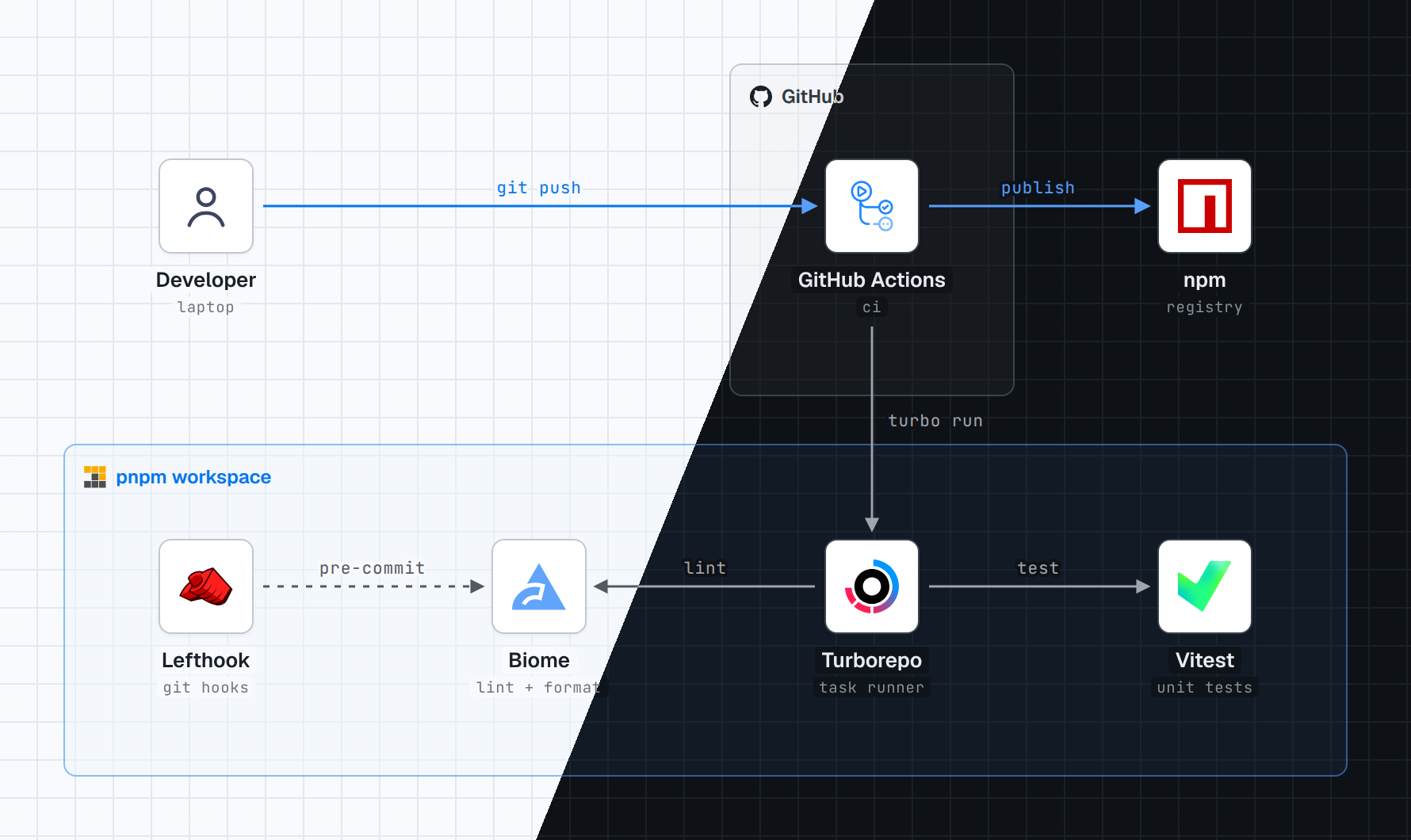
Draw our monorepo tooling: a pnpm workspace with Turborepo, Biome, Vitest and Lefthook. GitHub Actions runs CI and publishes to npm.
AI apps
Draw our docs chatbot: Next.js on Vercel searches Supabase pgvector and answers with Claude. Inngest syncs Notion every night.
AWS, with AWS's own icons
Draw our app on AWS: CloudFront in front of S3 and an ALB in a public subnet. Fargate, RDS and ElastiCache sit in a private subnet.
Google Cloud, with Google's own icons
Draw our app on Google Cloud: a global load balancer in front of Cloud Storage and GKE. GKE, Cloud SQL and Memorystore run in one region of a VPC.
Azure, with Microsoft's own icons
Draw our app on Azure: Front Door in front of Blob Storage and App Service. App Service reaches Azure SQL and Managed Redis through private endpoints in a VNet.
Light and dark
Every diagram is rendered in both themes. Tiles stay white so logos keep their own colors, and group labels switch to the brand's dark-theme logo.
Share it as an artifact
The diagram is one HTML file with its fonts and logos inlined, so it renders anywhere without a network. Publish it as a Claude artifact and share the link, or drop it into a repo or wiki. The PNGs and the React component are rendered from the same file.
Share it to the gallery
After drawing, the agent offers once to post the diagram to the public gallery at https://stacks.caru.moe. It shows what will be public (the light and dark PNGs, an English title, the tech stack and a display name) and posts only after you say yes twice. Your prompt is never sent. A GitHub login is optional and never shown; it only lets you delete the post later. The site's source is in site/.
What you get
Official logos, fetched for you. From svgl, then devicon, then gilbarbara/logos, or the brand's own repository. AWS, Google Cloud, Azure and Kubernetes icons come from each vendor's own package: AWS, Google Cloud, Azure, Kubernetes. Databricks has no icon package, so Databricks product icons are its own artwork from databricks.com, found through the community databricks-architecture-icons catalog. Never recolored or redrawn.
No arrows through text. Lines are routed around labels, and the agent renders the diagram and checks it before handing it over.
The format you need. A self-contained HTML file (default), PNG, a dependency-free React component, or an Artifact.
Requires Python 3.9+ and network access for the logos. PNG export uses Playwright with Chromium.
Star history
Licenses and trademarks
Code and docs: MIT — see LICENSE.
Bundled fonts: SIL Open Font License 1.1 — see skills/stack-diagram/assets/fonts/.
Logos are not bundled with the skill. They are downloaded at build time from svgl, devicon (MIT), gilbarbara/logos (CC0), AWS Architecture Icons, Google Cloud product icons, Azure icons, Kubernetes Community Icons (Apache-2.0 / CC-BY-4.0), Databricks artwork from databricks.com through databricks-architecture-icons (the catalog is MIT and unofficial, not endorsed by Databricks; the artwork remains Databricks'), and Lucide (ISC), or from the brand's own site or repository. The example images in docs/ show third-party logos. All brand names and logos are trademarks of their respective owners; their use in a diagram does not imply endorsement. The scripts never recolor or alter a logo. Microsoft permits the Azure icons in architecture diagrams, training materials and documentation.




 这是一个智能体技能。只需用一句话描述你的技术栈,它就能生成带有官方品牌标志的架构图,可在 Claude Code、Codex、Cursor 以及其他支持技能的智能体中使用。