🌐 English | 日本語 | 中文 | 한국어

Obsidian Mind









An Obsidian vault that gives AI coding agents persistent memory. Built for Claude Code, with working hooks for Codex CLI and Gemini CLI. Start a session, talk about your day, and the agent handles the rest — notes, links, indexes, performance tracking. Every conversation builds on the last.
🔴 The Problem
AI coding agents are powerful, but they forget. Every session starts from zero — no context on your goals, your team, your patterns, your wins. You re-explain the same things. You lose decisions made three conversations ago. The knowledge never compounds.
🟢 The Solution
Give your agent a brain.
You: "start session"
Agent: *reads North Star, checks active projects, scans recent memories*
Agent: "You're working on Project Alpha, blocked on the BE contract.
        Last session you decided to split the coordinator. Your 1:1
        with your manager is tomorrow — review brief is ready."
Works with Claude Code (full support), Codex CLI, and Gemini CLI — same hooks, same commands, same vault.
Install via shardmind install or git clone — same vault either way.
⚡ See It In Action
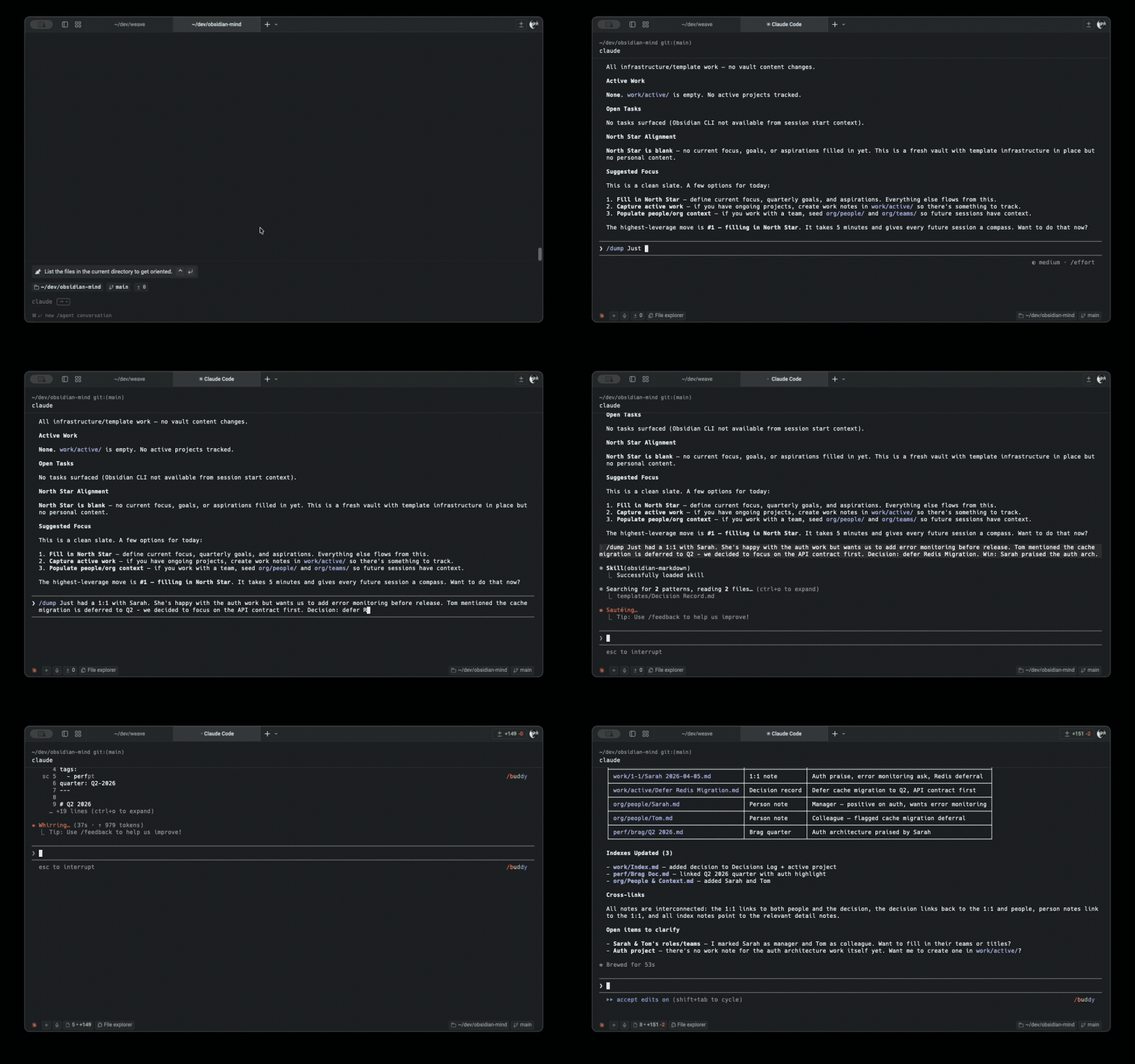
Morning kickoff:
/om-standup
# → loads North Star, active projects, open tasks, recent git changes
# → "You have 2 active projects. The auth refactor is blocked on API contract.
#    Your 1:1 with Sarah is at 2pm — last time she flagged observability."
Brain dump after a meeting:
/om-dump Just had a 1:1 with Sarah. She's happy with the auth work but wants
us to add error monitoring before release. Also, Tom mentioned the cache
migration is deferred to Q2 — we decided to focus on the API contract first.
Decision: defer Redis migration. Win: Sarah praised the auth architecture.
→ Updated org/people/Sarah Chen.md with meeting context
→ Created work/1-1/Sarah 2026-03-26.md with key takeaways
→ Created Decision Record: "Defer Redis migration to Q2"
→ Added to perf/Brag Doc.md: "Auth architecture praised by manager"
→ Updated work/active/Auth Refactor.md with error monitoring task
Incident response:
/om-incident-capture https://slack.com/archives/C0INCIDENT/p123456
# → slack-archaeologist reads every message, thread, and profile
# → people-profiler creates notes for new people involved
# → Full timeline, root cause analysis, brag doc entry
End of day:
You: "wrap up"
# → verifies all notes have links
# → updates indexes
# → brag-spotter finds uncaptured wins
# → suggests improvements
🚀 Quick Start
📦 Install via ShardMind (recommended)
npm install -g shardmind
mkdir my-vault && cd my-vault
shardmind install github:breferrari/obsidian-mind
shardmind install writes into the current directory, so create and enter a fresh folder first. The wizard collects your name, organization, vault purpose, agents to include, and whether to enable QMD; ShardMind then initializes git, optionally bootstraps QMD, and personalizes brain/North Star.md with your answers. Then:
- Open the installed folder as an Obsidian vault
- Enable the Obsidian CLI in Settings → General (requires Obsidian 1.12+)
- Run your agent in the vault directory:
claude, codex, or gemini
- Start talking about work
ShardMind is the package manager for Obsidian vault templates. The install adds a .shardmind/ sidecar that powers the wizard, optional modules (skip what you don't use), and three-way-merge upgrades. With every value at its default the install is byte-equivalent to git clone — clone-UX is preserved exactly. Delete .shardmind/ and shard-values.yaml from the installed vault and it keeps working: ShardMind is additive, not load-bearing.
Or clone directly
git clone https://github.com/breferrari/obsidian-mind.git
Or use it as a GitHub template. Skip the wizard, get the bare template. Then run through the same 4 steps above, plus fill in brain/North Star.md with your goals (the ShardMind wizard does this for you).
🔍 Recommended: QMD Semantic Search
QMD is where most of the agent's retrieval intelligence comes from. Optional in the strict sense — the vault falls back to grep + the Obsidian CLI — but the experience is meaningfully better with it:
- Semantic recall. Find "what did we decide about caching" even when the note is titled "Redis Migration ADR."
- Brain topics available on demand. Claude is instructed (via
CLAUDE.md) to consult brain/ guidance through QMD when the conversation touches a listed topic.
- Subagents get sharper context.
context-loader, review-prep, brag-spotter, and friends consult QMD first, then fall back to grep.
- Native agent tools via MCP. Registered as a Model Context Protocol server in
.mcp.json — when QMD is installed, mcp__qmd__query, mcp__qmd__get, and mcp__qmd__multi_get appear in the agent's tool menu alongside Read and Edit. Subagents, slash commands, and the main conversation all call the same typed contract. Add another MCP-aware tool later (a database, a ticketing system, a calendar) and it plugs in the same way.
npm install -g @tobilu/qmd
node --experimental-strip-types .scripts/qmd-bootstrap.ts
The bootstrap is idempotent — safe to re-run. It resolves this vault's index name — the qmd_index field from vault-manifest.json when set, otherwise the vault folder name slugified — reads qmd_context, registers the collection, attaches the context, and builds the index + embeddings. The SessionStart hook and .mcp.json wrapper both read the same manifest field, so CLI queries, the MCP server, and the re-index all scope to the same named SQLite store. This isolates the vault from any other QMD-using vault on the same machine.
If you want to use a different index name (for example, one vault per engineer on a shared workstation), edit qmd_index in vault-manifest.json before running the bootstrap. Once the store is populated, always pass --index <name> to the CLI:
qmd --index obsidian-mind query "what did we decide about caching"
qmd --index obsidian-mind update   # after bulk edits
qmd --index obsidian-mind embed    # after many new notes
How it works under the hood
QMD runs three small models locally, so there is no API key to set up, no per-query cost, and it works offline:
| model |
size |
job |
embeddinggemma-300M |
~328MB |
turns notes and queries into vectors |
qmd-query-expansion-1.7B |
~1.28GB |
rewrites your query into better search terms |
Qwen3-Reranker-0.6B |
~640MB |
reorders the shortlist by actual relevance |
They download on first use and are cached. QMD offloads to the GPU when it finds one — CUDA on a discrete card, Metal on Apple Silicon — and falls back to CPU otherwise. Check what yours is doing with qmd doctor.
The three CLI verbs map onto that stack, cheapest first: qmd search is BM25 keywords with no model at all, qmd vsearch is vector-only, and qmd query is the full hybrid. If you want to avoid the larger downloads, search alone is genuinely useful.
What that means for the MCP server
The om server sends a lexical and a vector sub-query, so retrieval finds the note that answers your question even when it shares no keywords with it. Practical consequences worth knowing:
- Reads are the expensive side, not writes. A query embeds locally before it can search, so
recall with a query takes a couple of seconds while recall without one is near-instant. search over notes is fast — it is the vector step that costs.
- Writing a memory does not wait for the model. The index update is synchronous, so a new memory is immediately retrievable; generating its vector happens in the background, because that only affects where it ranks, not whether it is found.
- No index, no problem. Without QMD the server falls back to lexical matching. Ordering gets worse; nothing disappears.
[!NOTE]
If QMD isn't installed, everything still works — the agent falls back to grep and the Obsidian CLI, and the MCP server entry is skipped with a harmless warning.
📋 Requirements
- Obsidian 1.12+ (for CLI support)
- An AI coding agent: Claude Code (full support), Codex CLI, or Gemini CLI
- Node 22+ LTS (for hook scripts — typically already installed alongside Claude Code / Codex / Gemini CLI)
- Git (for version history)
- QMD (optional, for semantic search)
Note on the Node flag. Hook scripts execute TypeScript directly via Node's --experimental-strip-types flag, stable in Node 22.6+ (Aug 2024) and the default behaviour in Node 23.6+. The flag is marked experimental but has been unchanged across 22 LTS and 24 LTS; if a future Node release retires or renames it, hook commands in .claude/settings.json, .codex/hooks.json, and .gemini/settings.json need a one-line update.
⚙️ How It Works
Procedural code owns the environment. The agent owns content. The hooks in .claude/scripts/ handle classification, validation, indexing, and lifecycle injection — deterministic, testable, runs the same for every agent. Writing notes, filing them, linking them, drafting briefs — those are judgments, and they stay with the agent. The two halves meet at small handoffs (hooks inject context, agent reads the vault) so neither has to do the other's job.
Folders group by purpose. Links group by meaning. A note lives in one folder (its home) but links to many notes (its context). Your agent maintains this graph — linking work notes to people, decisions, and competencies automatically. When review season arrives, the backlinks on each competency note are already the evidence trail. A note without links is a bug.
Vault-first memory keeps context across sessions and machines. All durable knowledge lives in brain/ topic notes (git-tracked, Obsidian-browsable, linked). Claude Code's MEMORY.md (~/.claude/) is an auto-loaded index that points to vault locations — never the storage itself. This means memories survive machine changes and are part of the graph.
Sessions have a designed lifecycle. The SessionStart hook auto-injects your North Star goals, active projects, recent changes, open tasks, and the full vault file listing — your agent starts every session with context, not a blank slate. At the end, say "wrap up" and the agent runs /om-wrap-up — verifying notes, updating indexes, and spotting uncaptured wins. The CLAUDE.md operating manual governs everything in between: where to file things, how to link, when to split a note, what to do with decisions and incidents.
🔗 Hooks
Five lifecycle hooks handle routing automatically:
| Hook |
When |
What |
| 🚀 SessionStart |
On startup/resume |
QMD re-index + self-heal, inject North Star focus, active work, recent changes, tasks, file listing, vault-hygiene drift flags — held under a byte budget, ending with an injection-size meter |
| 💬 UserPromptSubmit |
Every message |
Classifies content (decision, incident, win, 1:1, architecture, person, project update) and injects routing hints |
| ✍️ PostToolUse |
After writing .md |
Validates frontmatter + wikilinks, blocks misplaced memory files, flags oversized notes (split, don't trim) and write-time topic clusters |
| 💾 PreCompact |
Before context compaction |
Backs up session transcript to thinking/session-logs/ |
| 🏁 Stop |
End of session |
Checklist + concrete drift findings (same hygiene scan as SessionStart) |
[!TIP]
You just talk. The hooks handle the routing.
⚡ Token Efficiency
obsidian-mind does not dump your entire vault into context. It uses tiered loading to keep token costs low:
| Tier |
What |
When |
Cost |
| Always |
CLAUDE.md + SessionStart context (North Star excerpt, git summary, tasks, vault file listing) |
Session start |
capped by the manifest budget; the meter reports the real size every session |
| On-demand |
QMD semantic search results |
When the agent needs specific context |
Targeted |
| Triggered |
Classification routing hints |
Every message |
~100 tokens |
| Triggered |
PostToolUse validation |
After .md writes |
~200 tokens |
| Rare |
Full file reads |
Only when explicitly needed |
Variable |
SessionStart loads lightweight context — small excerpts from key files, filenames, and git summary — not full note contents. Five mechanisms keep the eager layer honest as the vault grows: source-aware injection (resume/compact re-inject only volatile sections — the static bulk is already in-conversation), an injection-size meter as the last line of every injection (you always see what context costs), an injection budget that enforces what the meter measures (over the ceiling, the cheapest-to-lose sections degrade to pointers — and the meter names every one it dropped, because a silent loss is worse than the bloat), a single hook spawn per write (the QMD refresh rides the validation hook), and listing collapse (any folder past a note-count threshold folds to one count line, so a vault can't outgrow the ceiling through whichever folder nobody thought to configure). Both the budget and the threshold are tunable in vault-manifest.json. The agent queries by meaning via QMD before reading files, so it pulls only what's relevant. The classification hook is one lightweight Node call per message. The validation hook only fires on markdown writes and skips excluded paths.
🌐 Using with Other Agents
obsidian-mind works with Claude Code, Codex CLI, and Gemini CLI. The vault conventions in CLAUDE.md, the hook scripts in .claude/scripts/, and the commands in .claude/commands/ are all agent-agnostic — pure Markdown, TypeScript, and shell with no SDK dependencies.
Claude Code — full support. Hooks, commands, subagents, and the memory system all work out of the box.
Codex CLI — reads AGENTS.md natively. Hook config at .codex/hooks.json wires the same hook scripts Claude Code uses — session context, message classification, and write validation work automatically. Commands work as regular prompts (e.g. type om-standup without the / prefix).
Gemini CLI — reads GEMINI.md natively. Hook config at .gemini/settings.json maps Gemini's event names to the shared hook scripts.
Other agents (Cursor, Windsurf, GitHub Copilot, JetBrains AI) — read AGENTS.md for vault conventions. Hook support varies by agent.
[!NOTE]
Hooks, commands, subagent prompts, and vault memory (brain/) are all agent-agnostic. Only the ~/.claude/ auto-memory loader is Claude Code-specific. See AGENTS.md for the full portability guide.
🧠 Reach Your Vault From Any Repo
Your vault normally only helps while you are sitting in it. The om MCP server changes that: a coding session in any other repository can search your notes, read them, follow the graph, and record what it learned back into the vault.
Step 1 — register the server once, for every repo
claude mcp add --scope user om node "/absolute/path/to/your-vault/.claude/scripts/om-mcp.mjs"
User scope is the right default here: it registers in your own config, so the server is available in every directory on the machine with nothing added to any repository. No env var is needed either, because the launcher resolves the vault from its own location.
Per-repo alternative, and one trap to avoid
If you would rather a specific repo carry the wiring (so a teammate gets it on clone), put it in that project's .mcp.json:
{
  "mcpServers": {
    "om": {
      "command": "node",
      "args": ["/absolute/path/to/your-vault/.claude/scripts/om-mcp.mjs"]
    }
  }
}
Note the cost: that path is absolute and machine-specific, so committing it breaks every collaborator and every other machine of yours.
Use an absolute path, and do not copy the relative one. This vault's own .mcp.json registers qmd with a relative path (.claude/scripts/qmd-mcp.mjs). That is correct there, because a relative path resolves against the current working directory and a session in the vault is already in it. Reused for om in a consuming project, the same shape silently resolves against that project instead, and the server never starts.
Step 2 — point the consuming project at the vault
Add this to that project's own CLAUDE.md, filling in the triggers:
## Where design decisions live

Design rationale for this project is recorded outside this repo, reachable
through the `om` MCP server.

- **`search`** reaches the written record: why a choice was made, what was
  rejected, what a constraint was set against. **Start here.**
- **`expand`** shows a known note's links and backlinks, which is cheaper than
  searching again for its neighbourhood.
- **`recall`** returns short durable lessons scoped to this project. It is empty
  until sessions put things in it, so early on it returns nothing, and that is
  *not* evidence the record is missing.
- **`health`** when something that should be there cannot be found. Every failure
  in this layer looks identical from outside (no results), and this tells them
  apart.

Consult the record before changing:

- <the storage format or schema>
- <the ID or key semantics>
- <the public surface: CLI flags, API shape, exported names>

If that record and this repo disagree, the record holds the *why*. Reconcile
before changing behaviour.

**Say what came back, in whatever you write before implementing:** a plan, a
design note, an issue comment. Name the recorded decisions the work rests on,
anything you found that argues *against* the approach, and an explicit "nothing
recorded on this" when the record is empty, which is a finding rather than a
blank to skip. Consulting once at the start of a task is consulting at the
moment you know least about what you will need; writing the result down moves it
to the moment you commit, while a contradiction is still free to fix.

## Recording what you learn

Two tools, and picking the wrong one is the common mistake. The test is whether
it would help someone working on a

 Obsidian Mind 是一个能自我整理的 Obsidian 库模板,它为 Claude Code 等 AI 编程代理提供持久记忆:它将笔记、决策和上下文以 Markdown 文件的形式保存,这样每次会话都能在上一次的基础上继续,而不必从零开始。