













Что это такое?
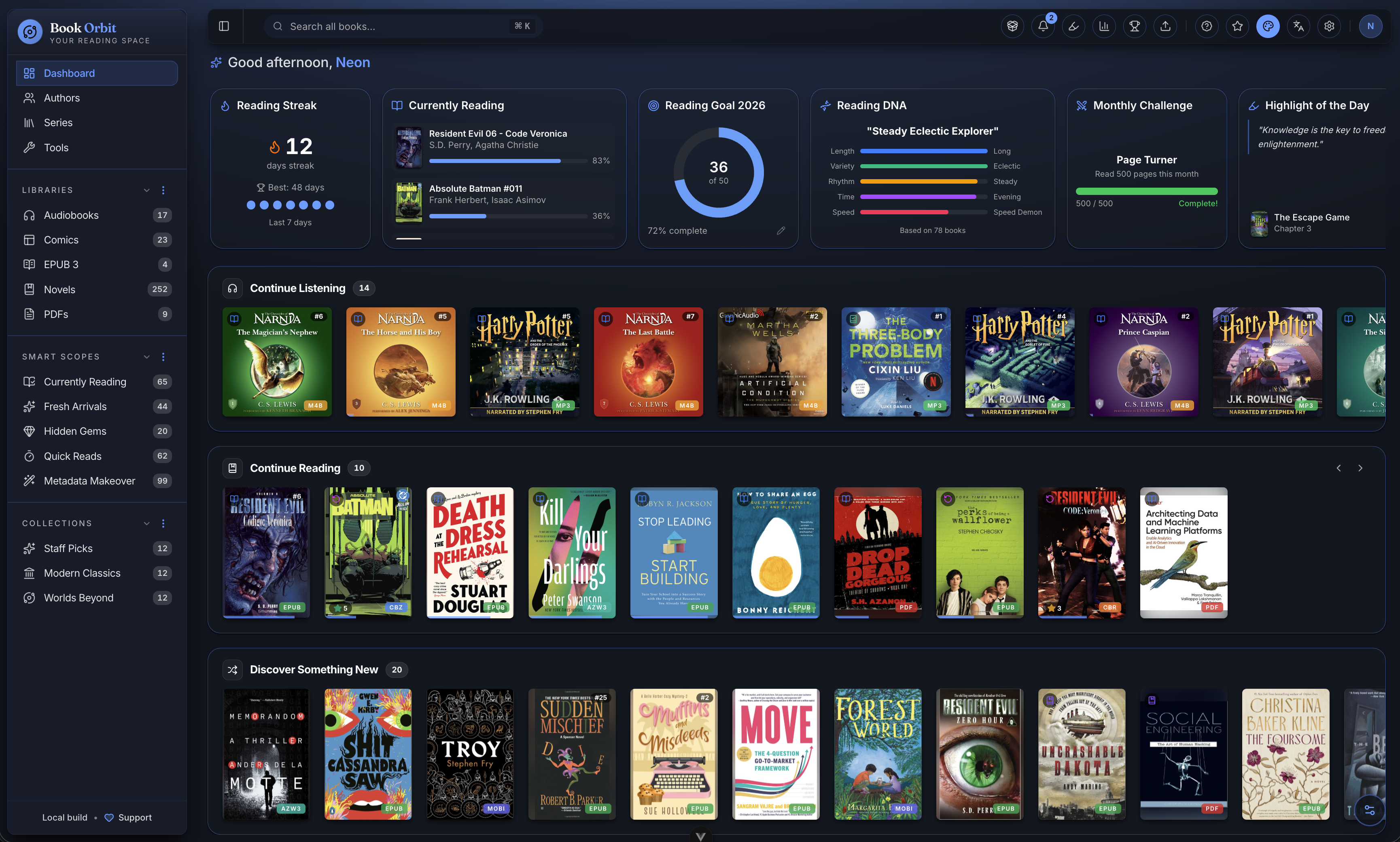
 BookOrbit — это самостоятельно размещаемая библиотека и платформа для чтения электронных книг, PDF, аудиокниг и комиксов со встроенными веб-читалками и синхронизацией между устройствами.
BookOrbit — это самостоятельно размещаемая библиотека и платформа для чтения электронных книг, PDF, аудиокниг и комиксов со встроенными веб-читалками и синхронизацией между устройствами.Это отдельный сервер или то, что добавляется в существующее приложение?Это отдельное серверное приложение для самостоятельного размещения (на основе Docker) со своим веб-клиентом и сервером, написанное на NestJS и Vue.
Это отдельное серверное приложение для самостоятельного размещения (на основе Docker) со своим веб-клиентом и сервером, написанное на NestJS и Vue.Как это запустить?Заполните файл .env нужными значениями, запустите через Docker Compose, затем откройте приложение и завершите настройку, используя SETUPBOOTSTRAPTOKEN.
Заполните файл .env нужными значениями, запустите через Docker Compose, затем откройте приложение и завершите настройку, используя SETUPBOOTSTRAPTOKEN.Нужно ли что-то особенное, например совпадающие ID пользователя и группы на NAS?На NAS или любом хосте, где папка с книгами принадлежит не UID 1000, нужно задать PUID и PGID, равные владельцу папки; их можно узнать командами id -u и id -g.
На NAS или любом хосте, где папка с книгами принадлежит не UID 1000, нужно задать PUID и PGID, равные владельцу папки; их можно узнать командами id -u и id -g.Какой самый серьёзный подвох при установке?Неверно заданные PUID/PGID — самая частая причина ошибок доступа при первом сканировании библиотеки. Также отключение локальной аутентификации без работающей привязки OIDC-администратора заблокирует доступ (в таком случае BookOrbit отказывается запускаться).
Неверно заданные PUID/PGID — самая частая причина ошибок доступа при первом сканировании библиотеки. Также отключение локальной аутентификации без работающей привязки OIDC-администратора заблокирует доступ (в таком случае BookOrbit отказывается запускаться).Может ли несколько человек использовать один экземпляр BookOrbit?Да, поддерживаются аккаунты для нескольких пользователей с детальными правами для каждого и изолированными данными чтения, а также встроенная поддержка OIDC/SSO через Authentik, Keycloak и Authelia.
Да, поддерживаются аккаунты для нескольких пользователей с детальными правами для каждого и изолированными данными чтения, а также встроенная поддержка OIDC/SSO через Authentik, Keycloak и Authelia.Остаются ли мои данные на инфраструктуре, которую я контролирую?Да, всё — включая провайдеров метаданных, синхронизацию и учётные записи пользователей — работает на инфраструктуре, которую вы контролируете, так как приложение полностью самостоятельно размещается.
Да, всё — включая провайдеров метаданных, синхронизацию и учётные записи пользователей — работает на инфраструктуре, которую вы контролируете, так как приложение полностью самостоятельно размещается.Как работает синхронизация между моим Kobo, KOReader и веб-читалкой?Прогресс и аннотации передаются в обоих направлениях между устройствами Kobo, KOReader и веб-читалкой BookOrbit, поэтому выделения, удаления и прогресс чтения объединяются во всех трёх.
Прогресс и аннотации передаются в обоих направлениях между устройствами Kobo, KOReader и веб-читалкой BookOrbit, поэтому выделения, удаления и прогресс чтения объединяются во всех трёх.Какие форматы файлов BookOrbit действительно умеет читать?Встроенные читалки поддерживают электронные книги в форматах EPUB, KEPUB, MOBI, AZW3, AZW, FB2, PDF, комиксы CBZ/CBR/CB7 и аудиокниги M4B/MP3/M4A/OPUS/OGG/FLAC, без дополнительных плагинов.
Встроенные читалки поддерживают электронные книги в форматах EPUB, KEPUB, MOBI, AZW3, AZW, FB2, PDF, комиксы CBZ/CBR/CB7 и аудиокниги M4B/MP3/M4A/OPUS/OGG/FLAC, без дополнительных плагинов.Умеет ли приложение подтягивать метаданные и синхронизировать мою статистику чтения с другими сервисами?Да, оно получает метаданные от 14 провайдеров (Google Books, Goodreads, Audible и др.) и может передавать статус, прогресс и оценки в Hardcover, Readwise и The StoryGraph.
Да, оно получает метаданные от 14 провайдеров (Google Books, Goodreads, Audible и др.) и может передавать статус, прогресс и оценки в Hardcover, Readwise и The StoryGraph.Что такое Book Dock?Это настраиваемая папка-приёмник для автоматического, без ручных действий, добавления книг в библиотеку.
Это настраиваемая папка-приёмник для автоматического, без ручных действий, добавления книг в библиотеку.What are similar projects?bookshelf, readest, calibre-web, grimmory, Kavita, audiobookshelf, koreader, overleaf
bookshelf, readest, calibre-web, grimmory, Kavita, audiobookshelf, koreader, overleaf