
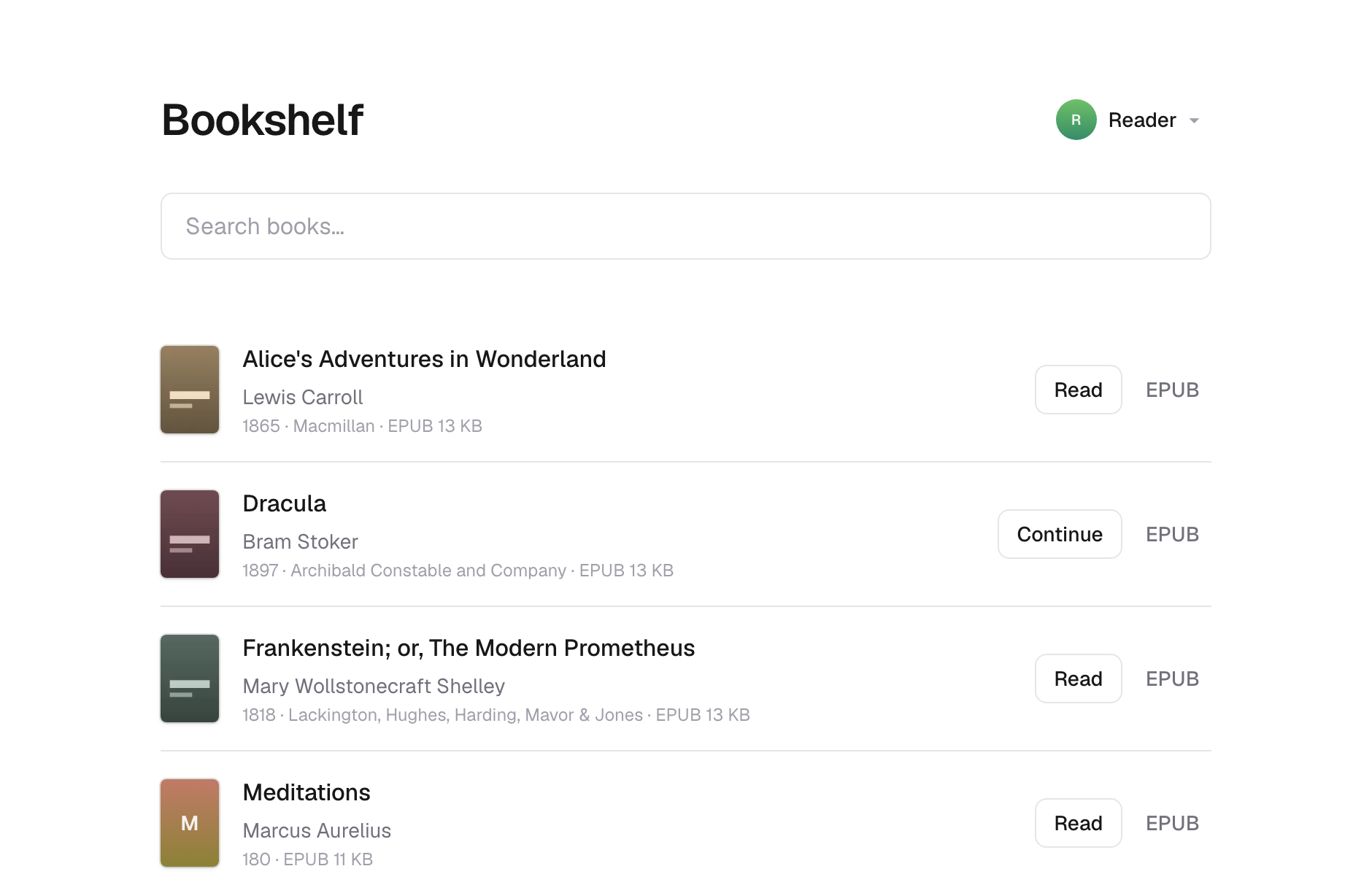
What is this?
 Bookshelf is a self-hosted library for ebooks you already own. You put EPUBs and PDFs in a folder, publish them, and read them in a browser or on a Kobo via the OPDS catalog.
Bookshelf is a self-hosted library for ebooks you already own. You put EPUBs and PDFs in a folder, publish them, and read them in a browser or on a Kobo via the OPDS catalog.Does it need a database or a separate backend service?No. It runs purely on object storage: either as a Cloudflare Worker over R2, or as a Node server over a plain directory on your own machine, with no database at all.
No. It runs purely on object storage: either as a Cloudflare Worker over R2, or as a Node server over a plain directory on your own machine, with no database at all.How do I get it running?Clone it, run 'npm run demo' to generate sample books, then publish and run with Docker, a local filesystem setup, or deploy to Cloudflare by editing bookshelf.config.json and wrangler.jsonc to point at your R2 bucket and Worker.
Clone it, run 'npm run demo' to generate sample books, then publish and run with Docker, a local filesystem setup, or deploy to Cloudflare by editing bookshelf.config.json and wrangler.jsonc to point at your R2 bucket and Worker.What do I need installed before trying this?Node 24 or newer and a Unix-like system; Windows isn't supported because the sync tool shells out to image tools with 'which'. If you deploy to Cloudflare you'll also need a Cloudflare account for R2 and Workers.
Node 24 or newer and a Unix-like system; Windows isn't supported because the sync tool shells out to image tools with 'which'. If you deploy to Cloudflare you'll also need a Cloudflare account for R2 and Workers.Is it safe to just put my library online as-is?No — there's no authentication, so anyone who reaches your shelf can download every book and switch profiles, and nothing is encrypted; object keys are even slugified titles, so storage listings leak your book names.
No — there's no authentication, so anyone who reaches your shelf can download every book and switch profiles, and nothing is encrypted; object keys are even slugified titles, so storage listings leak your book names.Can I run this on my own machine or does it have to be Cloudflare?Both: run it locally or on a VPS as a Node server over a directory with the filesystem provider, or deploy it as a Cloudflare Worker backed by R2 — same code, same library either way.
Both: run it locally or on a VPS as a Node server over a directory with the filesystem provider, or deploy it as a Cloudflare Worker backed by R2 — same code, same library either way.Is my library data encrypted anywhere?No. The library is stored in the clear with no encryption, though the filesystem provider lets you put it on an encrypted volume yourself.
No. The library is stored in the clear with no encryption, though the filesystem provider lets you put it on an encrypted volume yourself.What's the OPDS catalog for?It exposes your library in a machine-readable catalog format so e-readers like a Kobo or Kindle can browse and download books directly, without a browser.
It exposes your library in a machine-readable catalog format so e-readers like a Kobo or Kindle can browse and download books directly, without a browser.What happens if I read the same profile on two devices at once?Reading position syncing is last-write-wins, so simultaneous reading on two devices under one profile can overwrite each other's progress.
Reading position syncing is last-write-wins, so simultaneous reading on two devices under one profile can overwrite each other's progress.Can I lock the library down for public access?Yes, setting BOOKSHELFREADONLY to 1 keeps storage serving reads but blocks profile creation, renaming, deletion, and persisted reading positions — meant for shelves strangers can reach.
Yes, setting BOOKSHELFREADONLY to 1 keeps storage serving reads but blocks profile creation, renaming, deletion, and persisted reading positions — meant for shelves strangers can reach.Is there a quick way to run it with Docker?Yes, the Docker image is the shortest route and already bundles the tools needed to generate covers, so you just mount your books and run it.
Yes, the Docker image is the shortest route and already bundles the tools needed to generate covers, so you just mount your books and run it.What are similar projects?calibre-web, grimmory, bookorbit, audiobookshelf, readest, Kavita, koreader, nodewarden
calibre-web, grimmory, bookorbit, audiobookshelf, readest, Kavita, koreader, nodewardenWhich topics is it in?opds, ebook-reader, object-storage, epub, vps, cloudflare-workers, s3, serverless, ebook, backup, pdf, cloud
opds, ebook-reader, object-storage, epub, vps, cloudflare-workers, s3, serverless, ebook, backup, pdf, cloud