




383 ·GitHub
Что это?
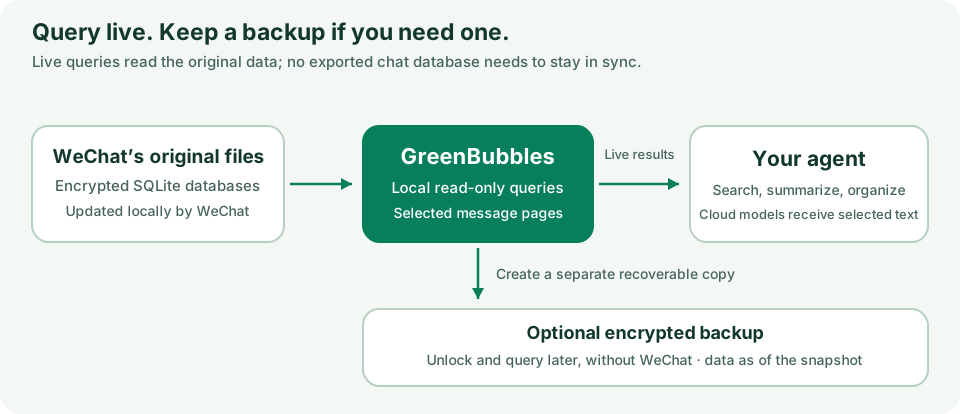
 GreenBubbles — это инструмент командной строки для Mac (с опциональным приложением и навыком для агента), который читает вашу историю переписки WeChat прямо из файлов баз данных, которые WeChat уже хранит на вашем Mac, позволяя просматривать её, искать, создавать резервные копии или просить агента для кодинга превратить выбранные переписки в заметки Markdown со ссылками на источники.
GreenBubbles — это инструмент командной строки для Mac (с опциональным приложением и навыком для агента), который читает вашу историю переписки WeChat прямо из файлов баз данных, которые WeChat уже хранит на вашем Mac, позволяя просматривать её, искать, создавать резервные копии или просить агента для кодинга превратить выбранные переписки в заметки Markdown со ссылками на источники.Это инструмент CLI или приложение с GUI?Это прежде всего инструмент CLI, устанавливаемый через Homebrew, но также доступно приложение macOS (DMG), подписанное Developer ID и нотаризованное, с окнами Browse Live и Snapshot, которые читают те же данные WeChat.
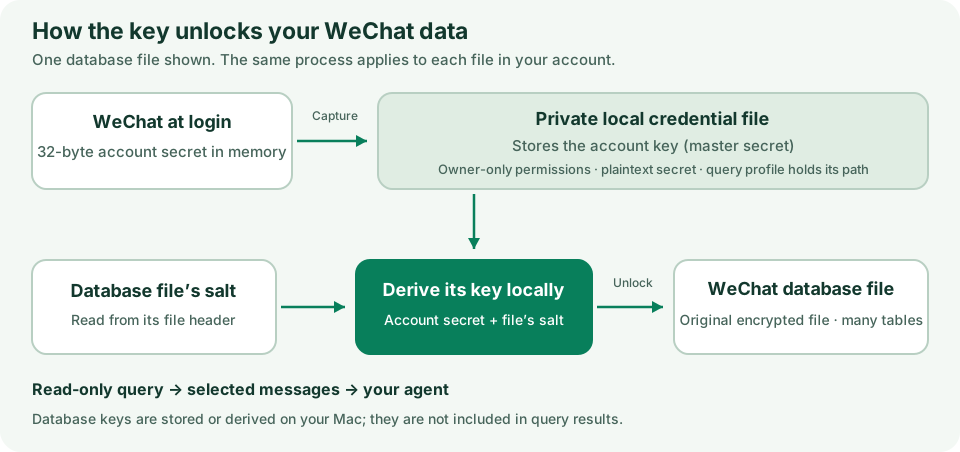
Это прежде всего инструмент CLI, устанавливаемый через Homebrew, но также доступно приложение macOS (DMG), подписанное Developer ID и нотаризованное, с окнами Browse Live и Snapshot, которые читают те же данные WeChat.Как его установить и начать читать свои переписки?Установите CLI через Homebrew или скачайте приложение DMG из раздела Releases, затем запустите одноразовую настройку ключа, которая извлекает ключ расшифровки WeChat из запущенного приложения WeChat; после этого команды вроде greenbubbles chats работают без дополнительных флагов.
Установите CLI через Homebrew или скачайте приложение DMG из раздела Releases, затем запустите одноразовую настройку ключа, которая извлекает ключ расшифровки WeChat из запущенного приложения WeChat; после этого команды вроде greenbubbles chats работают без дополнительных флагов.Готово ли это к надёжному повседневному использованию?Нет, это помечено как исследовательская альфа для технических пользователей: WeChat меняет свои закрытые форматы баз данных, поэтому GreenBubbles честно сообщает об этом вместо догадок, когда встречает данные, которые не может прочитать, а публичные сборки не умеют отправлять сообщения.
Нет, это помечено как исследовательская альфа для технических пользователей: WeChat меняет свои закрытые форматы баз данных, поэтому GreenBubbles честно сообщает об этом вместо догадок, когда встречает данные, которые не может прочитать, а публичные сборки не умеют отправлять сообщения.Работает ли это и на Mac с Intel?Нет, требуется Mac с Apple silicon и macOS 14 или новее.
Нет, требуется Mac с Apple silicon и macOS 14 или новее.Куда на самом деле попадают мои данные WeChat?Всё, что GreenBubbles читает или записывает, остаётся на вашем Mac, без телеметрии и проверки обновлений; текст сообщений покидает ваш компьютер, только если вы решите, что его прочитает облачный ИИ-агент или встроенный суммаризатор Gemini.
Всё, что GreenBubbles читает или записывает, остаётся на вашем Mac, без телеметрии и проверки обновлений; текст сообщений покидает ваш компьютер, только если вы решите, что его прочитает облачный ИИ-агент или встроенный суммаризатор Gemini.Как это работает с Claude Code или Codex?GreenBubbles поставляет файл SKILL.md в формате Markdown со вспомогательными файлами; вы направляете на него своего агента для кодинга и просите организовать выбранные переписки в заметки Markdown со ссылками на источники, ничего дополнительно устанавливать не нужно.
GreenBubbles поставляет файл SKILL.md в формате Markdown со вспомогательными файлами; вы направляете на него своего агента для кодинга и просите организовать выбранные переписки в заметки Markdown со ссылками на источники, ничего дополнительно устанавливать не нужно.Что такое встроенный суммаризатор?Опциональная функция, запускаемая через ai-summarize-direct, которая отправляет в Google Gemini (используя ваш собственный API-ключ) только те чаты, что вы явно разрешили в файле политик, и записывает memory.md/memory.json со ссылками на источники.
Опциональная функция, запускаемая через ai-summarize-direct, которая отправляет в Google Gemini (используя ваш собственный API-ключ) только те чаты, что вы явно разрешили в файле политик, и записывает memory.md/memory.json со ссылками на источники.Как защищены резервные копии?Резервные копии зашифрованы и защищены фразой восстановления из 24 слов, так что вы сможете открыть историю переписки позже даже без установленного WeChat.
Резервные копии зашифрованы и защищены фразой восстановления из 24 слов, так что вы сможете открыть историю переписки позже даже без установленного WeChat.Почему настройке нужен доступ администратора?Одноразовое извлечение ключа копирует ключ расшифровки из запущенного приложения WeChat и переподписывает вашу копию WeChat, что требует прав администратора.
Одноразовое извлечение ключа копирует ключ расшифровки из запущенного приложения WeChat и переподписывает вашу копию WeChat, что требует прав администратора.What are similar projects?wechat-intelligence-hub, WeChatBridge, ambient-context, graph-memory-starter, chubbyskills, RemoveMacAI, leviathan, course2md
wechat-intelligence-hub, WeChatBridge, ambient-context, graph-memory-starter, chubbyskills, RemoveMacAI, leviathan, course2mdWhich topics is it in?personal-knowledge-management, privacy-tools, backup, note-taking, wechat, agent-memory, memory, macos-app, homebrew, knowledge-base, apple-silicon, cli-tool
personal-knowledge-management, privacy-tools, backup, note-taking, wechat, agent-memory, memory, macos-app, homebrew, knowledge-base, apple-silicon, cli-tool