



54.3K ·GitHub
Что это такое?
 BMad Method — это open-source agile-фреймворк для разработки с помощью ИИ: он превращает идею или запрос на изменение в работающий софт, охватывая планирование и доставку, а не только генерацию кода.
BMad Method — это open-source agile-фреймворк для разработки с помощью ИИ: он превращает идею или запрос на изменение в работающий софт, охватывая планирование и доставку, а не только генерацию кода.Это система «всё или ничего», или можно взять только часть для планирования?И так, и так — используйте BMad от начала до конца или перенесите его брифы, спецификации и архитектуру в свой привычный процесс доставки.
И так, и так — используйте BMad от начала до конца или перенесите его брифы, спецификации и архитектуру в свой привычный процесс доставки.Как добавить BMad в свой проект?Установите через Skills CLI (нужны Node.js, npm и Git) или плагин bmad-method из маркетплейса Claude Code / Codex, затем попросите скилл bmad в своём проекте выполнить bmad setup.
Установите через Skills CLI (нужны Node.js, npm и Git) или плагин bmad-method из маркетплейса Claude Code / Codex, затем попросите скилл bmad в своём проекте выполнить bmad setup.Что должно быть установлено на моей машине, чтобы всё это заработало?Инструмент для кодинга с поддержкой ИИ-скиллов, плюс uv для bmad setup и его Python-скриптов; вариант со Skills CLI также требует Node.js, npm и Git.
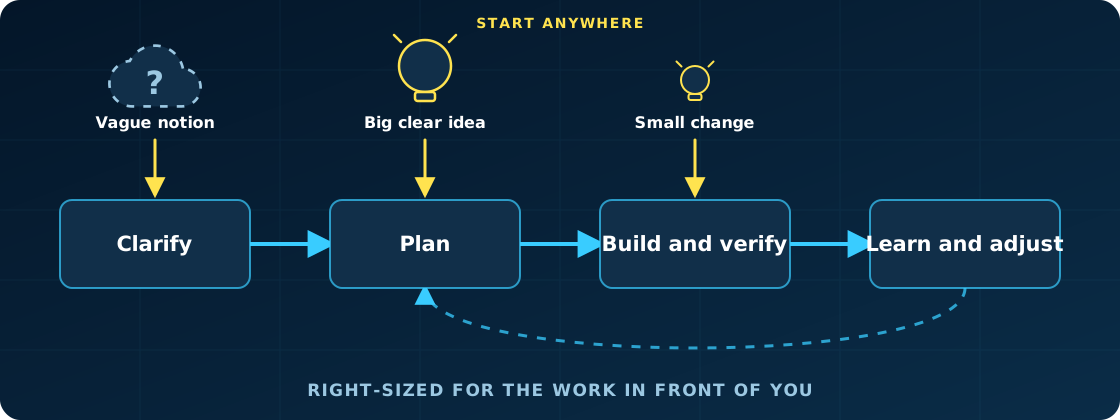
Инструмент для кодинга с поддержкой ИИ-скиллов, плюс uv для bmad setup и его Python-скриптов; вариант со Skills CLI также требует Node.js, npm и Git.Каждое изменение обязано проходить через полный цикл планирования, даже совсем мелкое?Нет — процесс подстраивается под объём работы: небольшие изменения идут сразу в разработку, а крупным инициативам достаётся более глубокое планирование, которое им нужно.
Нет — процесс подстраивается под объём работы: небольшие изменения идут сразу в разработку, а крупным инициативам достаётся более глубокое планирование, которое им нужно.Моей кодовой базе уже много лет — BMad всё ещё для меня вариант?Да — один и тот же метод подходит и для прототипа за выходные, и для системы с многолетней историей; на унаследованном коде вы сначала формируете проверенный контекст о том, что там реально есть.
Да — один и тот же метод подходит и для прототипа за выходные, и для системы с многолетней историей; на унаследованном коде вы сначала формируете проверенный контекст о том, что там реально есть.Можно ли заниматься планированием вне инструмента для кодинга, например в браузере?Да — web bundles упаковывают выбранные workflow BMad в Google Gemini Gems и ChatGPT Custom GPTs; вы планируете там, а затем возвращаете артефакты для реализации.
Да — web bundles упаковывают выбранные workflow BMad в Google Gemini Gems и ChatGPT Custom GPTs; вы планируете там, а затем возвращаете артефакты для реализации.Есть ли что-то необычное в лицензировании, о чём стоит знать?Код распространяется по лицензии MIT, но BMad и BMAD-METHOD являются товарными знаками BMad Code, LLC — перед использованием названия загляните в TRADEMARK.md.
Код распространяется по лицензии MIT, но BMad и BMAD-METHOD являются товарными знаками BMad Code, LLC — перед использованием названия загляните в TRADEMARK.md.Почему бы просто не писать промпты своему ассистенту для кодинга напрямую, без всякого метода?Ассистенты для кодинга хороши в реализации, но часто превращают неозвученные допущения в код; BMad сохраняет контроль у вас, а его агенты и workflow делают важные решения явными и сохраняют их как контекст для дальнейшей работы.
Ассистенты для кодинга хороши в реализации, но часто превращают неозвученные допущения в код; BMad сохраняет контроль у вас, а его агенты и workflow делают важные решения явными и сохраняют их как контекст для дальнейшей работы.Какие официальные модули можно добавить поверх базового метода?BMad Builder для создания скиллов, workflow и агентов; Creative Intelligence Suite для дизайн-мышления и сторителлинга; BMad Test Architect для корпоративного тестирования; BMad Loop, который прогоняет целый эпик без присмотра; и BMad Game Dev Studio для Unity, Unreal, Godot и Phaser.
BMad Builder для создания скиллов, workflow и агентов; Creative Intelligence Suite для дизайн-мышления и сторителлинга; BMad Test Architect для корпоративного тестирования; BMad Loop, который прогоняет целый эпик без присмотра; и BMad Game Dev Studio для Unity, Unreal, Godot и Phaser.Что-то из этого платное или спрятано за закрытым сообществом?Нет — BMad бесплатный и open source, без платных workflow и закрытых сообществ; поддержка необязательна — звёздочка на GitHub, кофе или корпоративный спонсор.
Нет — BMad бесплатный и open source, без платных workflow и закрытых сообществ; поддержка необязательна — звёздочка на GitHub, кофе или корпоративный спонсор.Как обновляться после установки?Попросите bmad update проверить версии, установите обновление через npx skills update или маркетплейс плагинов, затем запустите bmad doctor, чтобы починить уже настроенный рантайм проекта.
Попросите bmad update проверить версии, установите обновление через npx skills update или маркетплейс плагинов, затем запустите bmad doctor, чтобы починить уже настроенный рантайм проекта.What are similar projects?superpowers, OpenSpec, orca, pragma, Orbital, Claude-Code-Game-Studios, planning-with-files, omnigent
superpowers, OpenSpec, orca, pragma, Orbital, Claude-Code-Game-Studios, planning-with-files, omnigentWhich topics is it in?methodology, planning, software-development, spec-driven-development, context-engineering, coding-agents, claude-skills, workflow, skills, multi-agent, agents, codex
methodology, planning, software-development, spec-driven-development, context-engineering, coding-agents, claude-skills, workflow, skills, multi-agent, agents, codex