



54.3K ·GitHub
What is this?
 BMad Method is an open-source agile framework for AI-driven development: it turns an idea or change request into working software, covering planning and delivery, not just code generation.
BMad Method is an open-source agile framework for AI-driven development: it turns an idea or change request into working software, covering planning and delivery, not just code generation.Is it an all-or-nothing system, or can I adopt just the planning parts?Either — use BMad end to end, or carry its briefs, specifications, and architecture into your existing delivery workflow.
Either — use BMad end to end, or carry its briefs, specifications, and architecture into your existing delivery workflow.How do I add BMad to my project?Install through the Skills CLI (needs Node.js, npm and Git) or the bmad-method plugin from the Claude Code / Codex marketplace, then ask the bmad skill in your project to run bmad setup.
Install through the Skills CLI (needs Node.js, npm and Git) or the bmad-method plugin from the Claude Code / Codex marketplace, then ask the bmad skill in your project to run bmad setup.What has to be on my machine before that works?An AI coding tool that supports skills, plus uv for BMad setup and its Python scripts; the Skills CLI route also needs Node.js, npm and Git.
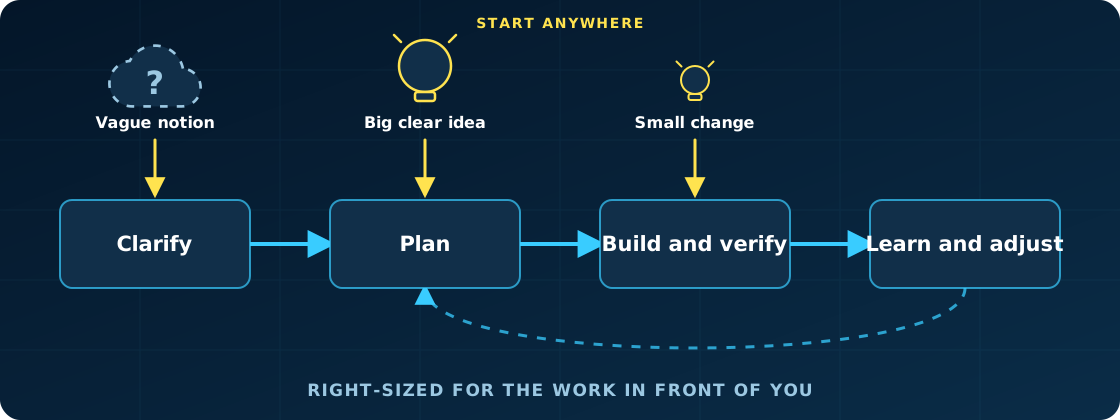
An AI coding tool that supports skills, plus uv for BMad setup and its Python scripts; the Skills CLI route also needs Node.js, npm and Git.Does every change have to go through the full planning flow, even tiny ones?No — the process sizes itself to the work: small changes go straight to build, while bigger initiatives get the deeper planning they need.
No — the process sizes itself to the work: small changes go straight to build, while bigger initiatives get the deeper planning they need.My codebase is already years old — is BMad still an option for me?Yes — the same method covers a weekend prototype and a system with years of history; on inherited code you establish verified context on what is actually there.
Yes — the same method covers a weekend prototype and a system with years of history; on inherited code you establish verified context on what is actually there.Can I do the planning outside my coding tool, like in a browser?Yes — web bundles package selected BMad workflows as Google Gemini Gems and ChatGPT Custom GPTs; you plan there, then bring the artifacts back for implementation.
Yes — web bundles package selected BMad workflows as Google Gemini Gems and ChatGPT Custom GPTs; you plan there, then bring the artifacts back for implementation.Is there anything unusual in the licensing I should know about?The code is MIT-licensed, but BMad and BMAD-METHOD are trademarks of BMad Code, LLC — see TRADEMARK.md before using the name.
The code is MIT-licensed, but BMad and BMAD-METHOD are trademarks of BMad Code, LLC — see TRADEMARK.md before using the name.Why not just prompt my coding assistant directly without a method?Coding assistants are effective at implementation but often turn unstated assumptions into code; BMad keeps you in control while its agents and workflows make the important decisions explicit and preserve them as context for later work.
Coding assistants are effective at implementation but often turn unstated assumptions into code; BMad keeps you in control while its agents and workflows make the important decisions explicit and preserve them as context for later work.What official modules can I add on top of the core method?BMad Builder for building skills, workflows and agents; the Creative Intelligence Suite for design thinking and storytelling; BMad Test Architect for enterprise testing; BMad Loop, which runs a whole epic unattended; and BMad Game Dev Studio for Unity, Unreal, Godot and Phaser.
BMad Builder for building skills, workflows and agents; the Creative Intelligence Suite for design thinking and storytelling; BMad Test Architect for enterprise testing; BMad Loop, which runs a whole epic unattended; and BMad Game Dev Studio for Unity, Unreal, Godot and Phaser.Is any of it paywalled or locked behind a community?No — BMad is free and open source with no paywalled workflows or gated community; support is optional via stars, coffee or corporate sponsorship.
No — BMad is free and open source with no paywalled workflows or gated community; support is optional via stars, coffee or corporate sponsorship.How do updates work once it is installed?Ask bmad update to check versions, install with npx skills update or your plugin marketplace, then ask for bmad doctor to repair the project's existing runtime.
Ask bmad update to check versions, install with npx skills update or your plugin marketplace, then ask for bmad doctor to repair the project's existing runtime.What are similar projects?superpowers, OpenSpec, orca, pragma, Orbital, Claude-Code-Game-Studios, planning-with-files, omnigent
superpowers, OpenSpec, orca, pragma, Orbital, Claude-Code-Game-Studios, planning-with-files, omnigentWhich topics is it in?methodology, planning, software-development, spec-driven-development, context-engineering, coding-agents, claude-skills, workflow, skills, multi-agent, agents, codex
methodology, planning, software-development, spec-driven-development, context-engineering, coding-agents, claude-skills, workflow, skills, multi-agent, agents, codex