rpi — a Rust-native coding-agent runtime





rpi is a library-first coding-agent runtime written in Rust, plus a terminal
agent built on top of it. Nine composable crates span provider adapters, a
durable crash-resumable agent loop, a terminal UI, and a stable plugin ABI — so
the same code works as an embedded SDK or as a ready-to-run rpi command.
Website: https://rpi.laofu.online/ · Docs: https://rpi.laofu.online/docs.html
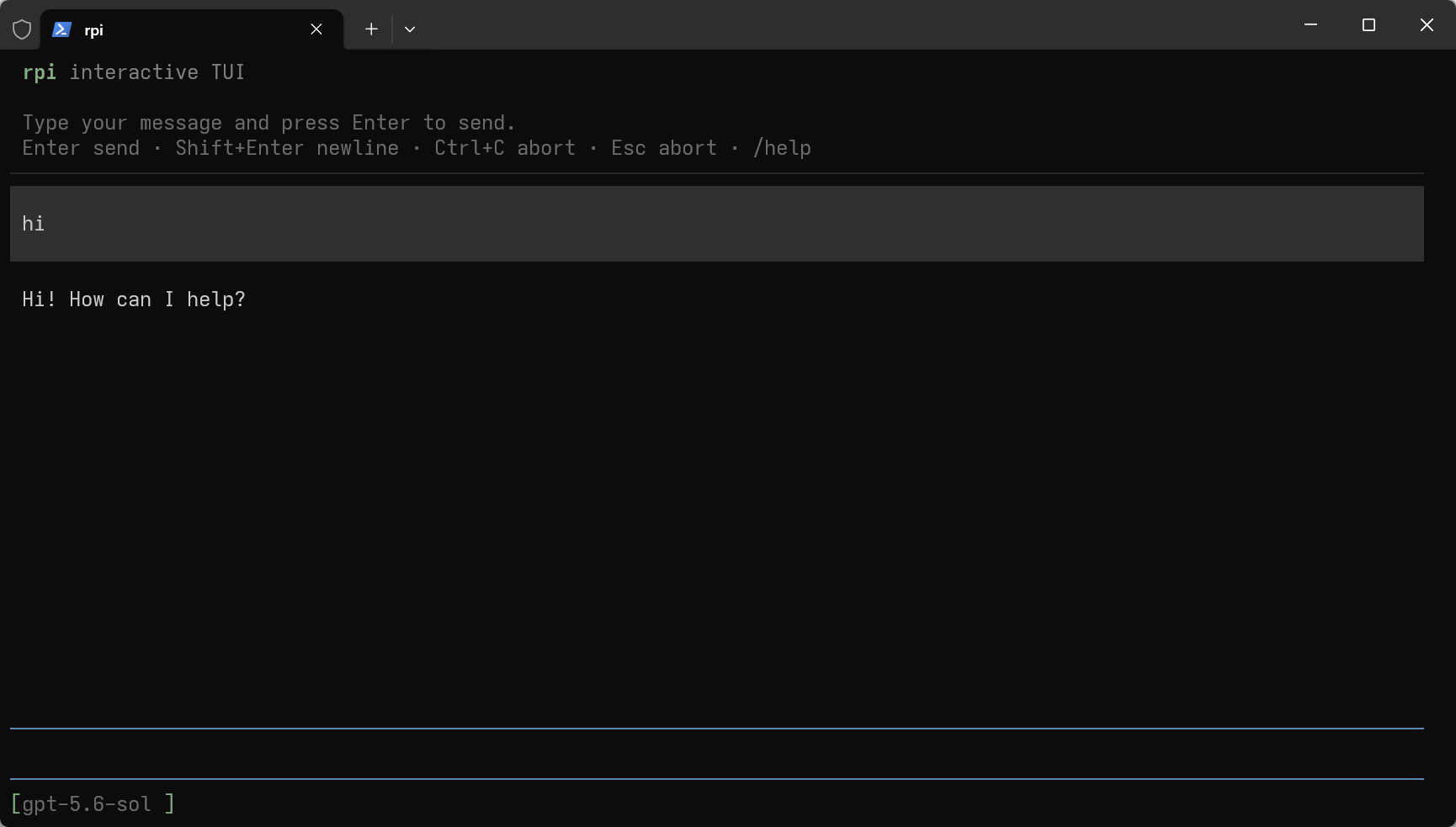
Interactive TUI. See docs/guides/user-guide.md for the full command surface.

The agent loop and a real write tool round-trip, recorded with no API key and no network — the same path the tests take. Source of truth is demo/sdk.tape; regenerate with task demo.
Three ways to use it
| You want |
Depend on |
Start at |
| A working terminal coding agent |
nothing |
cargo install rpi-cli |
| Your own agent inside your process |
rpi-agent (+ rpi-ai, rpi-tools) |
examples/minimal |
| A tool/provider that extends every session |
rpi-plugin-sdk |
examples/plugin-stub |
The three share one implementation. Build your tools once, debug them inside an
embedded agent, and ship the same code as a cdylib plugin that the global rpi
loads. See docs/agent/project-structure.md for the recommended
project layout.
Install
Prebuilt binary (no Rust toolchain needed):
curl -fsSL https://raw.githubusercontent.com/bigfish1913/pi-rust/main/scripts/install.sh | sh
Verifies the published SHA-256 checksum and installs to /usr/local/bin or
~/.local/bin. Preview first with --dry-run.
On Windows (x64), run in PowerShell 5.1 or later:
& ([scriptblock]::Create((Invoke-WebRequest -UseBasicParsing https://raw.githubusercontent.com/bigfish1913/pi-rust/main/scripts/install.ps1).Content))
Verifies the published SHA-256 checksum and installs to
$env:LOCALAPPDATA\Programs\rpi. Follow the printed instructions to add it to
PATH, then run rpi --version. Append -DryRun to preview, or use
-Version 0.3.22 and -Dir 'C:\Tools\rpi' to select a version and directory.
From crates.io (requires Rust 1.78+):
cargo install rpi-cli
rpi --version
Package managers:
brew tap bigfish1913/tap && brew install rpi          # macOS (Apple silicon), Linux
scoop bucket add bigfish1913 https://github.com/bigfish1913/scoop-bucket
scoop install rpi                                     # Windows
The Homebrew formula currently supports Apple silicon on macOS. Intel Macs can
use the prebuilt installer for releases with an x86_64-apple-darwin asset, or
cargo install rpi-cli. A winget manifest is open for
review.
From source:
git clone https://github.com/bigfish1913/pi-rust.git
cd pi-rust && cargo run -p minimal   # offline agent, no API key required
Real output of the two offline examples — no credentials, no network, identical
bytes every run. Regenerate with task demo-transcript:
$ cargo run -q -p minimal
minimal example: 2 messages after run
  - user
  - assistant
assistant reply: Hello from the faux provider!
AgentEnd observed.

$ cargo run -q -p tools-example
tools example: 4 messages after run
wrote out.txt (28 bytes): "hello from the tools example"
AgentEnd observed; tool ran against OsExecutionEnv.
Quick start
The CLI
export ANTHROPIC_API_KEY=...          # or OPENAI_API_KEY, or ~/.rpi/agent/models.json
rpi                                   # interactive TUI
rpi -p "summarize the README"         # one-shot
rpi --mode json -p "list the crates"  # machine-readable event stream
Sessions persist as JSONL and survive a crash mid-run; rpi resumes from the
last committed frame rather than replaying the turn. Custom Anthropic or
OpenAI-compatible gateways are declared in ~/.rpi/agent/models.json and
selected with --model <provider>/<model>.
The SDK
Build an agent against a deterministic in-process provider — no API key, no
network, no flakiness:
use rpi_agent::AgentBuilder;
use rpi_ai::providers::faux::{FauxProvider, FauxScript};
use rpi_ai::Provider;

#[tokio::main]
async fn main() {
    // `FauxProvider::new` already returns an `Arc<Self>`.
    let provider = FauxProvider::new(FauxScript::new().with_text("Hello from the faux provider!"));
    let model = provider.default_model().clone();

    let agent = AgentBuilder::new()
        .model(model)
        .system_prompt("You are a helpful assistant.")
        .stream_fn(make_stream_fn(provider))
        .build()
        .expect("agent builds");

    let mut events = agent.subscribe();
    agent.prompt("hi").await.expect("prompt completes");

    while let Ok(ev) = events.try_recv() {
        let _ = ev; // AgentEvent::{MessageUpdate, ToolEnd, AgentEnd, …}
    }
    println!("{} messages after the run", agent.state().messages.len());
}
make_stream_fn bridges the synchronous StreamFn contract to the async
provider — the full version is in examples/minimal/src/main.rs
(cargo run -p minimal).
Crates
Nine crates, one version, published together. Dependency direction is one-way
and enforced in review:
rpi-telemetry → rpi-ai → rpi-agent → rpi-tools → rpi-harness
Three crates sit outside that chain:
rpi-tui depends on no other rpi-* crate.rpi-plugin-sdk is a leaf too (it has no rpi-* deps), but it is not only
the host's plugin contract: rpi-tools also reads its env-var names, so the
host and its plugins cannot disagree about the strings they exchange across
the ABI. That edge is names-only — nothing is linked or called.rpi-extensions is rpi-plugin-sdk plus rpi-ai/rpi-agent, since it hosts
plugins that run tools.rpi-cli depends on all eight of the others, which is how the rpi binary
gets the TUI, the harness and the plugin loader at once.
| Crate |
What it is |
rpi-telemetry |
Span/event contracts with a no-op default — instrumentation is opt-in, and pulls in no tracing or OpenTelemetry backend |
rpi-ai |
Provider-agnostic message, streaming and tool-schema types; Anthropic + OpenAI-compatible + faux providers |
rpi-agent |
The agent loop: AgentTool, events, hooks, queues, cancellation |
rpi-tools |
read/write/edit/bash (+ grep, find, ls, powershell) and the ExecutionEnv seam |
rpi-harness |
Session tree, JSONL persistence, compaction, crash recovery, the run loop |
rpi-tui |
Terminal UI primitives: components, layout, editor, transcript rendering |
rpi-cli |
The rpi binary: TUI, one-shot and JSON modes, config, plugin loading |
rpi-plugin-sdk |
The stable #[repr(C)] ABI contract for plugins. No rpi-* deps; only serde_json, behind a default json feature that can be turned off |
rpi-extensions |
Host-side plugin loader and the async-across-ABI tool bridge |
Every crate has its own README and docs.rs page. The crates/rpi-*
directories and the published crate names use the same rpi- prefix.
Why rpi
Most coding agents are CLIs. rpi is a runtime with a CLI attached, which
changes what you can build with it:
- Embeddable. The agent loop is a library.
rpi-agent + rpi-ai is enough
to run an agent inside your own process, with your own event handling and
output — no shelling out to a tool and scraping stdout.
- Testable offline. A deterministic
faux provider and an in-memory
execution environment are first-class, not mocks bolted on. rpi-ai puts its
real HTTP providers behind a providers feature flag, so your test suite
cannot silently depend on the network for the paths you exercise.
- Durable. Sessions are a tree with JSONL persistence and per-frame
progress. A crash mid-tool-call resumes instead of losing the turn or
double-executing the tool.
- Extensible across a stable boundary. Plugins are Rust
cdylibs behind a
hand-written, panic-contained C ABI with version negotiation — the ABI
survives compiler and crate version skew, so extensions do not break on every
release.
- One implementation, two surfaces. The global CLI and an embedded agent load
the same tools. You do not maintain a plugin and a library variant separately.
How it compares
Structural differences against other terminal coding agents. Facts about other
tools are as of 2026-09 and change often — check their documentation; only the
rpi column is maintained here.
|
rpi |
Claude Code |
Codex CLI |
opencode |
aider |
| Language |
Rust |
TypeScript |
Rust |
TypeScript/Go |
Python |
| Source available |
✅ MIT |
❌ |
✅ |
✅ |
✅ |
| Usable as an embedded library |
✅ |
❌ |
❌ |
⚠️ |
⚠️ |
| First-class plugin ABI |
✅ |
hooks/MCP |
❌ |
plugin API |
❌ |
| Headless server + remote client |
✅ |
⚠️ |
✅ |
✅ |
⚠️ |
| Provider-agnostic gateways |
✅ |
❌ |
❌ |
✅ |
✅ |
If you want the most polished single-vendor experience, use the vendor's tool.
rpi is for people who want to own the loop.
Measured on Windows 11 (x86_64), rustc 1.97.1, --release. Both scripts
rebuild and re-measure on your own machine.
sh scripts/bench.sh — standalone numbers:
| Metric |
Value |
| Release binary size |
21.8 MiB |
rpi --version wall time |
~17 ms median |
| RSS once the agent is ready |
12.0 MiB |
node scripts/bench-vs-pi.mjs --pi <path-to-pi> — against native Pi on the same
machine, both offline, each with a fresh isolated config directory:
| Metric |
rpi (Rust) |
pi (TypeScript) |
Difference |
--version |
17.5 ms |
169.5 ms |
9.7× faster |
| Cold start |
17.7 ms |
189.5 ms |
10.7× faster |
| RSS at ready |
12.0 MiB |
91.5 MiB |
7.6× smaller |
| Install footprint |
21.8 MiB (one binary) |
~385 MiB (+ ~91 MiB Node) |
~18–22× smaller |
Cold start is spawn → the agent answering its first command: process creation
plus full initialisation, excluding teardown and any LLM work. rpi's --version
(17.5 ms) and cold start (17.7 ms) are effectively equal, so startup is process
creation, not initialisation; Pi is dominated by Node boot.
Isolation caveat: rpi reads RPI_CODING_AGENT_DIR / RPI_OFFLINE, native Pi reads
PI_CODING_AGENT_DIR / PI_OFFLINE. Set the matching pair for each, or rpi
silently loads the machine's global plugins.
Method, raw per-run numbers, and what is not measured (LLM latency, tool-loop
throughput, long sessions, TUI frame cost) are in
docs/performance/benchmark-vs-pi.md.
Plugins
Plugins are Rust cdylib libraries behind a stable #[repr(C)] ABI. A plugin
can register tools, providers, slash commands, event handlers, markdown
renderers and discovered resources.
rpi install rpi-todo                    # build from crates.io and install
rpi install my-ext --path ../my-ext     # local, for development
rpi dev                                 # build + watch + live reload
The host loads project .rpi/extensions, then global
~/.rpi/agent/extensions, then any --extensions-dir.
Ready-to-install extensions live in the companion
pi-rust/rpi-package repository, with
an online catalog.
use rpi_plugin_sdk::{export_plugin, StbStringRef};

export_plugin!(|api| {
    if let Some(declare) = api.declare {
        declare(StbStringRef::from_str(r#"{"priority":60,"platforms":["linux"]}"#));
    }
    // register tools / handlers through `api`
    0
});
Start from examples/plugin-stub — a complete plugin
with the full execute→poll→cancel→destroy lifecycle — and read
docs/extensions/authoring.md for the safety
rules, which are load-bearing rather than stylistic.
Remote mode
rpi --server                        # headless agent over TCP, prints an auth token
rpi --connect host:port --token T   # TUI client with zero local agent resources
The client holds no provider, tools, extensions or session files — all agent
work happens on the server, so a thin terminal anywhere can drive a beefy
machine. See docs/remote/user-guide.md.
Project status
|
|
| Current release |
0.3.22 (nine crates, published together) |
| Stability |
rpi-ai, rpi-agent, rpi-tools, rpi-harness, rpi-plugin-sdk are the intended stable surface |
| MSRV |
1.78 |
| Platforms |
Linux, macOS, Windows (CI runs the suite on Linux) |
| Binary release targets |
Linux (x86_64/aarch64), macOS (Intel/Apple silicon), Windows (x86_64) |
rpi is a self-contained Rust coding-agent stack. No Node component is
required and none is loaded.
Documentation
Start with the documentation index, grouped by feature.
Start with the documentation index, grouped by feature.
Contributing
Issues and PRs are welcome. Start with CONTRIBUTING.md for the
build/test commands and the repository layout, and the
roadmap for what is already planned. Security problems should go
through SECURITY.md, not a public issue.
The whole test suite runs offline: cargo test --workspace --locked.
Questions, ideas and early builds are welcome in either group:
Group invite codes expire — WeChat's rotates every few days. If a QR code stops working, open an issue and it will be refreshed.
License
MIT. See LICENSE and NOTICE.
The rpi-* crates are a Rust-native coding-agent stack.
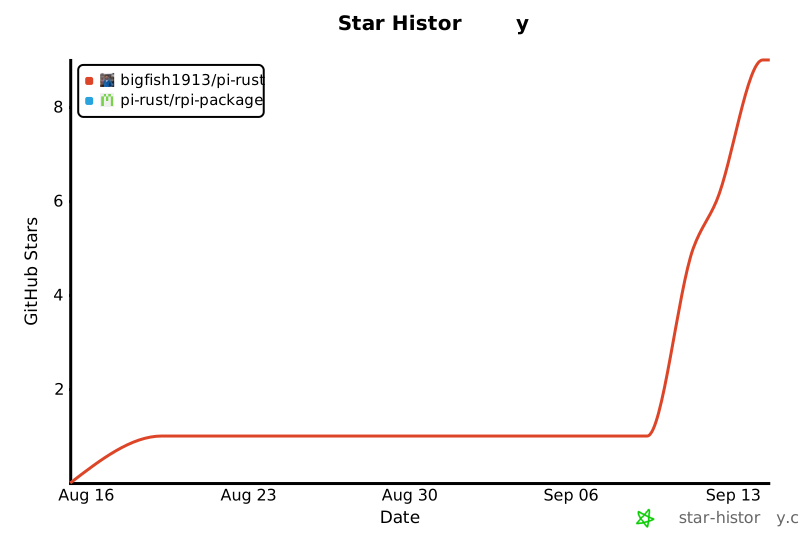
Star history



 rpi is a Rust-native, library-first coding-agent runtime with a terminal CLI (rpi) built on top of it — the same code runs as an embedded SDK inside your app, a ready-to-run terminal agent, or a plugin.