🌐 EN | PT-BR | ES | DE | FR | EL | JA | IT | KO | ID | SW
Beekeeper Studio
Beekeeper Studio is a cross-platform SQL editor and database manager available for Linux, Mac, and Windows.
Download Beekeeper Studio
We publish binaries for MacOS, Windows, and Linux.
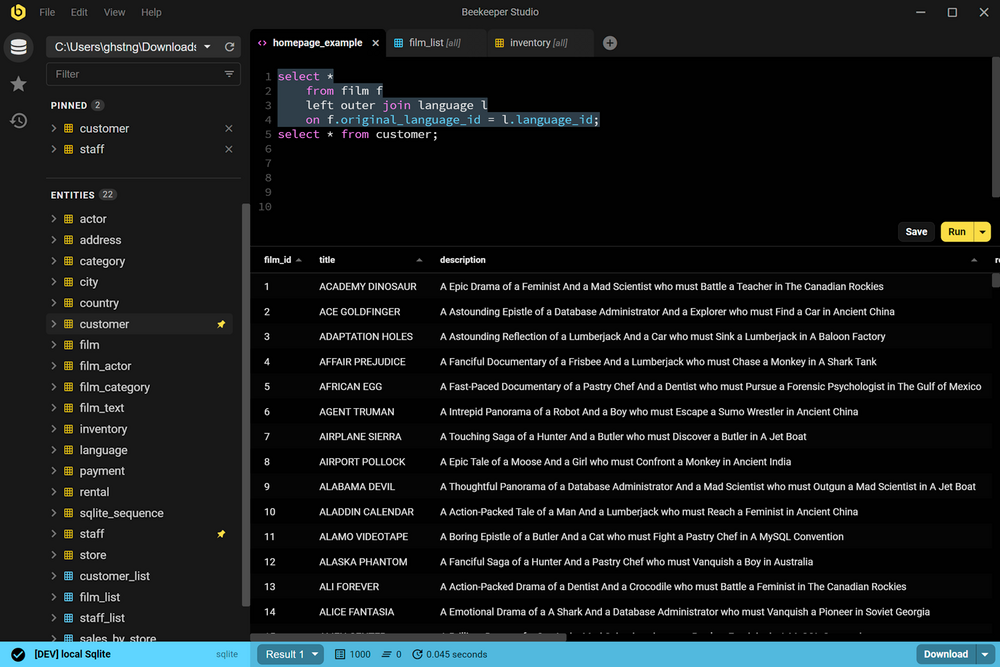
Beekeeper Studio is free to download and provides a lot of features for free, no sign-up, registration, or credit card required. The app provides some premium features for a reasonable cost license fee. Learn more here
Most of the code in this repo is open source under the GPLv3 license. Paid features are also in this repository under a commercial source-available license.
We welcome community contributions!
Supported Databases
| Database |
Support |
Community |
Paid Editions |
Beekeeper Links |
| PostgreSQL |
⭐ Full Support |
✅ |
✅ |
Features |
| MySQL |
⭐ Full Support |
✅ |
✅ |
Features |
| SQLite |
⭐ Full Support |
✅ |
✅ |
Features, Docs |
| SQL Server |
⭐ Full Support |
✅ |
✅ |
Features |
| Amazon Redshift |
⭐ Full Support |
✅ |
✅ |
Features |
| CockroachDB |
⭐ Full Support |
✅ |
✅ |
Features, Docs |
| MariaDB |
⭐ Full Support |
✅ |
✅ |
Features |
| TiDB |
⭐ Full Support |
✅ |
✅ |
Features |
| Google BigQuery |
⭐ Full Support |
✅ |
✅ |
Features, Docs |
| Redis |
⭐ Full Support |
✅ |
✅ |
Features, Docs |
| GreengageDB |
⭐ Full Support |
✅ |
✅ |
Docs |
| Oracle Database |
⭐ Full Support |
|
✅ |
Features, Docs |
| Cassandra |
⭐ Full Support |
|
✅ |
Features |
| ScyllaDB |
⭐ Full Support (via Cassandra driver) |
|
✅ |
Drop-in compatible with Cassandra |
| Firebird |
⭐ Full Support |
|
✅ |
Features, Docs |
| LibSQL |
⭐ Full Support |
|
✅ |
Features |
| ClickHouse |
⭐ Full Support |
|
✅ |
Features, Docs |
| DuckDB |
⭐ Full Support |
|
✅ |
Features, Docs |
| SQL Anywhere |
⭐ Full Support |
|
✅ |
Features |
| MongoDB |
⭐ Full Support |
|
✅ |
Features, Docs |
| Trino / Presto |
⭐ Full Support |
|
✅ |
Features, Docs |
| SurrealDB |
⭐ Full Support |
|
✅ |
Docs |
| DynamoDB |
🧪 Beta Support |
|
✅ |
Features, Docs |
| Snowflake |
⏳ Coming Soon |
|
✅ |
-- |
Editions of Beekeeper Studio
Beekeeper Studio is a single download with in-app upgrades for premium features.
We'd love to make Beekeeper Studio totally free for everyone, but building good software is hard work and expensive. We think our paid editions are fairly priced, I hope you do too.
👉 Compare Beekeeper Studio Editions
Beekeeper Studio Features
Top feature: It's smooth 🍫, fast 🏎, and you'll actually enjoy using it 🥰
- Truly cross-platform: Windows, MacOS, and Linux
- Autocomplete SQL query editor with syntax highlighting
- Tabbed interface, so you can multitask
- Sort and filter table data to find just what you need
- Sensible keyboard-shortcuts
- Save queries for later
- Query run-history, so you can find that one query you got working 3 days ago
- Great dark theme
- Import/export
- Backup/restore
- View data as JSON
- Loads more
Our approach to UX
One of our frustrations with other open-source SQL editors and database managers is that they take a 'kitchen sink' approach to features, adding so many features that the UI becomes cluttered and hard to navigate. We wanted a good looking, open source SQL workbench that's powerful, but also easy to use. We couldn't find one, so we created Beekeeper Studio!
Generally our guiding star is to only build software that 'feels good' to use. That means at the very least we value Beekeeper being fast, straightforward to use, and modern. If a new feature compromises this vision, we kill it.
Supporting Beekeeper Studio
We love working on Beekeeper Studio, and we'd love to keep growing and improving it forever. To do that I need your help.
The best way to support Beekeeper Studio is to purchase a paid license. Every purchase directly supports our work on Beekeeper Studio.
If you're at a business and using Beekeeper Studio for your job, you should probably get your boss to buy you a license.
If you can't afford a license, please use the free version, that's why we make a free version!
Thank you for your continued support!
Documentation
Check out docs.beekeeperstudio.io for user guides, FAQs, troubleshooting tips, and more.
License
Beekeeper Studio Community Edition (the code in this repository) is licensed under the GPLv3 license.
Beekeeper Studio Ultimate Edition contains extra features and is licensed under a commercial end user agreement (EULA).
Beekeeper Studio's trademarks (words marks and logos) are not open source. See our trademark guidelines for more information.
Third party assets bundled with the app, such as the database icons, are credited in ATTRIBUTIONS.md.
Trademark Guidelines
Trademarks can be complicated with open source projects, so we have adapted a set of standard guidelines for using our trademarks that are common to many open source projects.
If you are just using the Beekeeper Studio app, and you are not forking or distributing Beekeeper Studio code in any way, these probably don't apply to you.
👉 Beekeeper Studio Trademark Guidelines
Contributing to Beekeeper Studio
We love any community engagement. Even if you're complaining because you don't like something about the app!
Contributor Agreements
Building an inclusive and welcoming community is important to us, so please follow our code of conduct as you engage with the project.
By contributing to the project you agree to the terms of our contributor guidelines.
Contribute without coding
We have you covered, read our guide to contributing in 10 minutes without coding.
Compiling and Running Beekeeper Studio Locally
Want to write some code and improve Beekeeper Studio? Getting set-up is easy on Mac, Linux, or Windows.
# First: Install NodeJS 20, NPM, and Yarn
# ...

# 1. Fork the Beekeeper Studio Repo (click fork button at top right of this screen)
# 2. Check out your fork:
git clone [email protected]:<your-username>/beekeeper-studio.git beekeeper-studio
cd beekeeper-studio/
yarn set version classic
nvm use 22
yarn install # installs dependencies


# Now you can start the app:
yarn run electron:serve ## the app will now start
If you get error:03000086:digital envelope routines::initialization error, you'll have to update openssl.
sudo apt-get update
sudo apt-get upgrade openssl
sudo yum update openssl
- On macOS (using Homebrew):
brew update
brew upgrade openssl
Where to make changes?
This repo is now a monorepo, we have several places with code, but only really a couple of important entry points.
All app code lives in apps/studio, some shared code lives in shared/src. This is shared with other apps.
Beekeeper Studio has two entry points:
background.js - this is the electron-side code that controls native things like showing windows.main.js - this is the entry point for the Vue.js app. You can follow the Vue component breadcrumbs from App.vue to find the screen you need.
Generally we have two 'screens':
- ConnectionInterface - connecting to a DB
- CoreInterface - interacting with a database
How to submit a change?
- Push your changes to your repository and open a Pull Request from our github page (this page)
- Make sure to write some notes about what your change does! A gif is always welcome for visual changes.
Maintainer notes (casual readers can ignore this stuff)
Upgrading Electron Gotchas
This is always a total pain and will break the build 9/10.
Some things you need to consider when upgrading Electron:
- Does it use a different node version. Eg Electron-18 uses node 14, 22 uses node 16. So everyone needs to upgrade
- Does node-abi need to be upgraded to be able to understand the electron version? This is used in the build to fetch prebuilt packages. You need to upgrade this in root/package.json#resolutions
- Were any APIs deprecated or removed? Make sure all features that interact with the Electron APIs still work, stuff like - selecting a file, maximizing a window, running a query, etc.
Release Process
- Up the version number in package.json
- Replace
build/release-notes.md with the latest release notes. Follow the format that is there.
- run
git log <last-tag>..HEAD --oneline | grep 'Merge pull' to find PRs merged
- Commit
- Push to master
- Create a tag
git tag v<version>. It must start with a 'v'
git push origin <tagname>
- Now wait for the build/publish action to complete on Github
- Push the new release live
- Go to the new 'draft' release on the releases tab of github, edit the notes, publish
- Log into snapcraft.io, drag the uploaded release into the 'stable' channel for each architecture.
This should also publish the latest docs
Post Release:
- Copy release notes to a blog post, post on website
- Tweet link
- Share on LinkedIn
- Send to mailing list on SendInBlue
Big Thanks
Beekeeper Studio wouldn't exist without Sqlectron-core, the core database libraries from the Sqlectron project. Beekeeper Studio started as an experimental fork of that repository. A big thanks to @maxcnunes and the rest of the Sqlectron community.
The original license from sqlectron-core is included here:
Copyright (c) 2015 The SQLECTRON Team

Permission is hereby granted, free of charge, to any person obtaining
a copy of this software and associated documentation files (the
'Software'), to deal in the Software without restriction, including
without limitation the rights to use, copy, modify, merge, publish,
distribute, sublicense, and/or sell copies of the Software, and to
permit persons to whom the Software is furnished to do so, subject to
the following conditions:

The above copyright notice and this permission notice shall be
included in all copies or substantial portions of the Software.

THE SOFTWARE IS PROVIDED 'AS IS', WITHOUT WARRANTY OF ANY KIND,
EXPRESS OR IMPLIED, INCLUDING BUT NOT LIMITED TO THE WARRANTIES OF
MERCHANTABILITY, FITNESS FOR A PARTICULAR PURPOSE AND NONINFRINGEMENT.
IN NO EVENT SHALL THE AUTHORS OR COPYRIGHT HOLDERS BE LIABLE FOR ANY
CLAIM, DAMAGES OR OTHER LIABILITY, WHETHER IN AN ACTION OF CONTRACT,
TORT OR OTHERWISE, ARISING FROM, OUT OF OR IN CONNECTION WITH THE
SOFTWARE OR THE USE OR OTHER DEALINGS IN THE SOFTWARE.

 Beekeeper Studio — кроссплатформенный редактор SQL и менеджер баз данных для MySQL, Postgres, SQLite, SQL Server и многих других баз. Его создали так, чтобы он работал быстро и без лишнего нагромождения по сравнению с другими графическими инструментами для баз данных.