

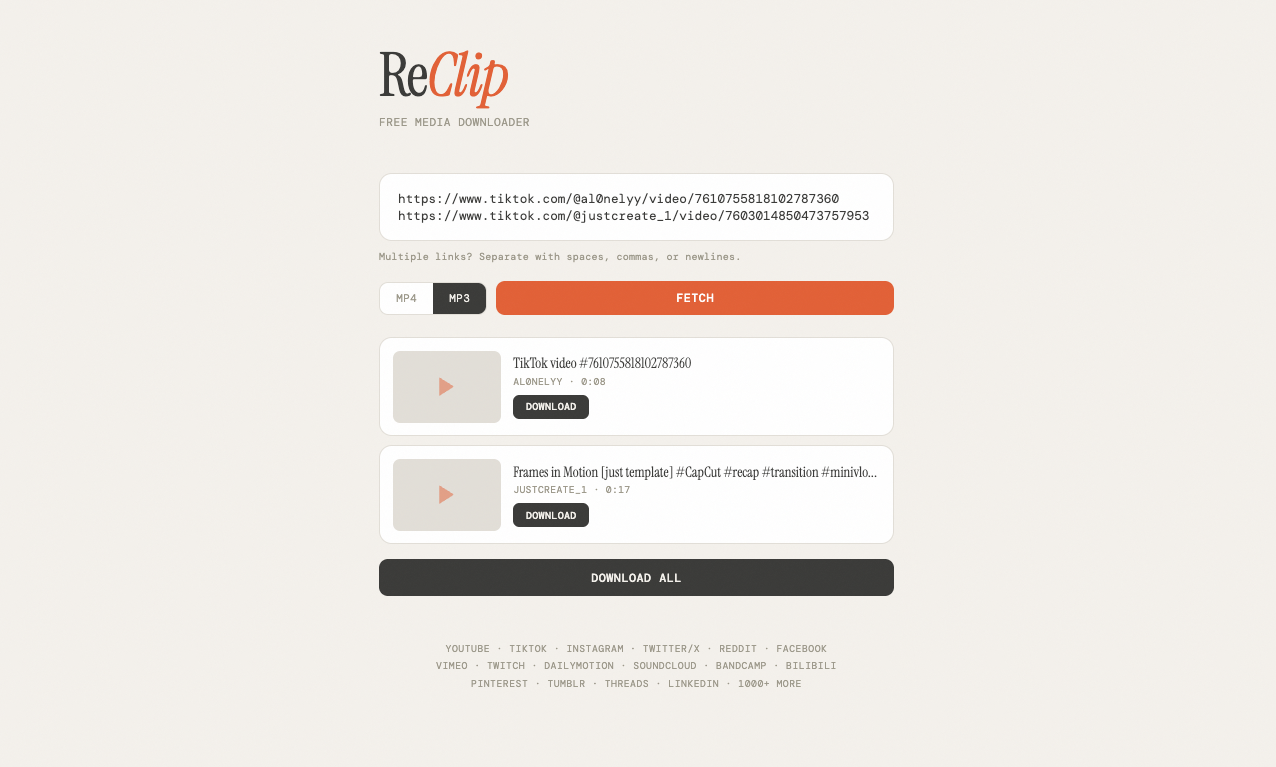
What is this?
 ReClip is a self-hosted web app for downloading videos and audio: paste a link from YouTube, TikTok, Instagram or any of 1000+ supported sites and save it as MP4 or MP3.
ReClip is a self-hosted web app for downloading videos and audio: paste a link from YouTube, TikTok, Instagram or any of 1000+ supported sites and save it as MP4 or MP3.So is it an app I install, or a website I run myself?A website you run yourself: a small Flask server serving a browser interface. You host it on your own machine or server and use it from a browser — nothing to install on your phone.
A website you run yourself: a small Flask server serving a browser interface. You host it on your own machine or server and use it from a browser — nothing to install on your phone.How do I get it running?Two routes in the Quick Start: run it directly with Python, or launch it via Docker — the repo ships a Dockerfile and a docker-compose file. Once it's up, open its web page and start pasting links.
Two routes in the Quick Start: run it directly with Python, or launch it via Docker — the repo ships a Dockerfile and a docker-compose file. Once it's up, open its web page and start pasting links.Do I need Python and ffmpeg on my machine first?For the direct route, Python with just two dependencies — Flask and yt-dlp — plus ffmpeg, which yt-dlp uses as its media engine. With Docker you skip the local setup entirely.
For the direct route, Python with just two dependencies — Flask and yt-dlp — plus ffmpeg, which yt-dlp uses as its media engine. With Docker you skip the local setup entirely.Is it actually allowed to download from these sites?The README says it's meant for personal use only: respect copyright laws and each platform's terms of service, and the authors accept no responsibility for misuse.
The README says it's meant for personal use only: respect copyright laws and each platform's terms of service, and the authors accept no responsibility for misuse.Which sites does it actually work with?Anything yt-dlp supports — 1000+ sites in total, with YouTube, TikTok, Instagram, Twitter/X, Reddit, Facebook, Vimeo, Twitch, SoundCloud, Dailymotion and many more named in the README.
Anything yt-dlp supports — 1000+ sites in total, with YouTube, TikTok, Instagram, Twitter/X, Reddit, Facebook, Vimeo, Twitch, SoundCloud, Dailymotion and many more named in the README.Can I queue several videos at once?Yes — paste multiple URLs in one go for bulk downloading, and repeated links are deduplicated automatically. You can download items individually or hit Download All.
Yes — paste multiple URLs in one go for bulk downloading, and repeated links are deduplicated automatically. You can download items individually or hit Download All.Can I control the quality of what I download?After Fetch loads a video's info and thumbnail, a picker lets you choose from the available resolutions before you save it.
After Fetch loads a video's info and thumbnail, a picker lets you choose from the available resolutions before you save it.Is the backend really just one Python file?Yes — the whole backend is a single ~150-line Flask file, and the frontend is a single vanilla HTML/CSS/JS file with no frameworks and no build step.
Yes — the whole backend is a single ~150-line Flask file, and the frontend is a single vanilla HTML/CSS/JS file with no frameworks and no build step.What are similar projects?linksift, wechat-article-exporter, metube, ytDownloader, pytube, Seal, Douyin_TikTok_Download_API, you-get
linksift, wechat-article-exporter, metube, ytDownloader, pytube, Seal, Douyin_TikTok_Download_API, you-getWhich topics is it in?yt-dlp, flask, video-downloader, download, downloader, audio, video, css, docker-compose, html, web-app, free
yt-dlp, flask, video-downloader, download, downloader, audio, video, css, docker-compose, html, web-app, free