github-readme-stats README

The project's README from github.com/anuraghazra/github-readme-stats. As one markdown file: README.md.

GitHub Readme Stats

GitHub Readme Stats

Get dynamically generated GitHub stats on your READMEs!

Tests Passing GitHub Contributors Tests Coverage Issues GitHub pull requests OpenSSF Scorecard

Love the project? Please consider donating to support the original creator!

[!CAUTION] This repository is no longer maintained. Please use the successor project GitHub Stats Extended instead! GitHub Stats Extended is an actively maintained fork of this repository with additional features and improved stability. Alternatively you can also use GitHub Readme Stats Action.

Click here to view the outdated documentation. Kept for reference only.

View Demo · Report Bug · Request Feature · FAQ · Ask Question

Table of contents (Click to show)

Important Notices

⚠️Warning

The public Vercel instance at https://github-readme-stats.vercel.app/api is best-effort and can be unreliable due to rate limits and traffic spikes (see #1471). We use caching to improve stability (see common options), but for reliable cards we recommend self-hosting (Vercel or other) or using the GitHub Actions workflow to generate cards in your profile repository.

⚠️Warning

We're a small team, and to prioritize, we rely on upvotes :+1:. We use the Top Issues dashboard for tracking community demand (see #1935). Do not hesitate to upvote the issues and pull requests you are interested in. We will work on the most upvoted first.

GitHub Stats Card

Copy and paste this into your markdown, and that's it. Simple!

Change the ?username= value to your GitHub username.

[![Anurag's GitHub stats](https://github-readme-stats.vercel.app/api?username=anuraghazra)](https://github.com/anuraghazra/github-readme-stats)
⚠️Warning

By default, the stats card only shows statistics like stars, commits, and pull requests from public repositories. To show private statistics on the stats card, you should deploy your own instance using your own GitHub API token.

ℹ️Note

Available ranks are S (top 1%), A+ (12.5%), A (25%), A- (37.5%), B+ (50%), B (62.5%), B- (75%), C+ (87.5%) and C (everyone). This ranking scheme is based on the Japanese academic grading system. The global percentile is calculated as a weighted sum of percentiles for each statistic (number of commits, pull requests, reviews, issues, stars, and followers), based on the cumulative distribution function of the exponential and the log-normal distributions. The implementation can be investigated at src/calculateRank.js. The circle around the rank shows 100 minus the global percentile.

Hiding individual stats

You can pass a query parameter &hide= to hide any specific stats with comma-separated values.

Options: &hide=stars,commits,prs,issues,contribs

![Anurag's GitHub stats](https://github-readme-stats.vercel.app/api?username=anuraghazra&hide=contribs,prs)

Showing additional individual stats

You can pass a query parameter &show= to show any specific additional stats with comma-separated values.

Options: &show=reviews,discussions_started,discussions_answered,prs_merged,prs_merged_percentage

![Anurag's GitHub stats](https://github-readme-stats.vercel.app/api?username=anuraghazra&show=reviews,discussions_started,discussions_answered,prs_merged,prs_merged_percentage)

Showing icons

To enable icons, you can pass &show_icons=true in the query param, like so:

![Anurag's GitHub stats](https://github-readme-stats.vercel.app/api?username=anuraghazra&show_icons=true)

Showing commits count for specified year

You can specify a year and fetch only the commits that were made in that year by passing &commits_year=YYYY to the parameter.

![Anurag's GitHub stats](https://github-readme-stats.vercel.app/api?username=anuraghazra&commits_year=2020)

Themes

With inbuilt themes, you can customize the look of the card without doing any manual customization.

Use &theme=THEME_NAME parameter like so :

![Anurag's GitHub stats](https://github-readme-stats.vercel.app/api?username=anuraghazra&show_icons=true&theme=radical)

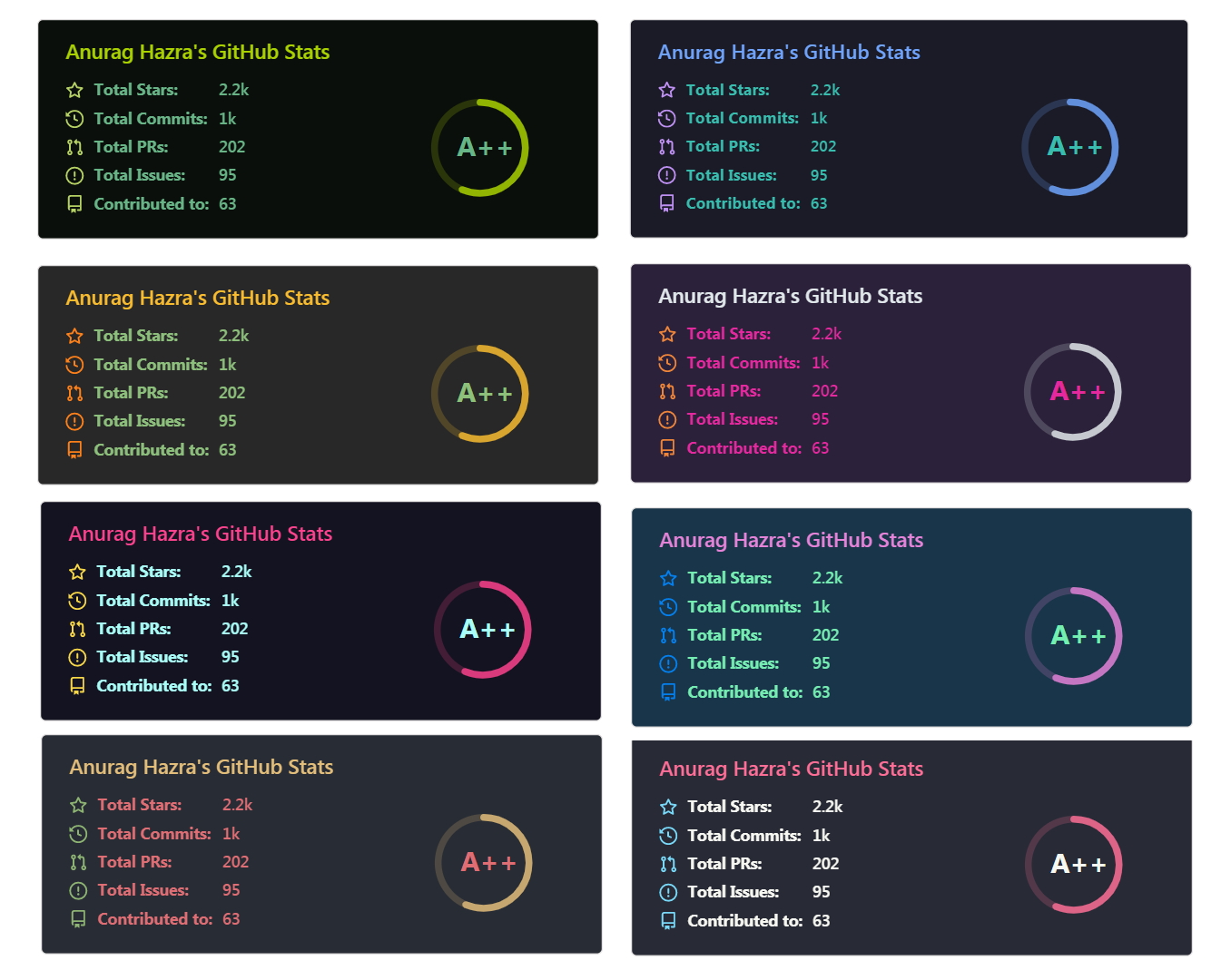
All inbuilt themes

GitHub Readme Stats comes with several built-in themes (e.g. dark, radical, merko, gruvbox, tokyonight, onedark, cobalt, synthwave, highcontrast, dracula).

GitHub Readme Stats Themes

You can look at a preview for all available themes or checkout the theme config file. Please note that we paused the addition of new themes to decrease maintenance efforts; all pull requests related to new themes will be closed.

Responsive Card Theme

Anurag's GitHub stats-Dark Anurag's GitHub stats-Light

Since GitHub will re-upload the cards and serve them from their CDN, we can not infer the browser/GitHub theme on the server side. There are, however, four methods you can use to create dynamics themes on the client side.

Use the transparent theme

We have included a transparent theme that has a transparent background. This theme is optimized to look good on GitHub's dark and light default themes. You can enable this theme using the &theme=transparent parameter like so:

![Anurag's GitHub stats](https://github-readme-stats.vercel.app/api?username=anuraghazra&show_icons=true&theme=transparent)
:eyes: Show example

Anurag's GitHub stats

Add transparent alpha channel to a themes bg_color

You can use the bg_color parameter to make any of the available themes transparent. This is done by setting the bg_color to a color with a transparent alpha channel (i.e. bg_color=00000000):

![Anurag's GitHub stats](https://github-readme-stats.vercel.app/api?username=anuraghazra&show_icons=true&bg_color=00000000)
:eyes: Show example

Anurag's GitHub stats

Use GitHub's theme context tag

You can use GitHub's theme context tags to switch the theme based on the user GitHub theme automatically. This is done by appending #gh-dark-mode-only or #gh-light-mode-only to the end of an image URL. This tag will define whether the image specified in the markdown is only shown to viewers using a light or a dark GitHub theme:

[![Anurag's GitHub stats-Dark](https://github-readme-stats.vercel.app/api?username=anuraghazra&show_icons=true&theme=dark#gh-dark-mode-only)](https://github.com/anuraghazra/github-readme-stats#gh-dark-mode-only)
[![Anurag's GitHub stats-Light](https://github-readme-stats.vercel.app/api?username=anuraghazra&show_icons=true&theme=default#gh-light-mode-only)](https://github.com/anuraghazra/github-readme-stats#gh-light-mode-only)
:eyes: Show example

Anurag's GitHub stats-Dark Anurag's GitHub stats-Light

Use GitHub's new media feature

You can use GitHub's new media feature in HTML to specify whether to display images for light or dark themes. This is done using the HTML <picture> element in combination with the prefers-color-scheme media feature.

<picture>
  <source
    srcset="https://github-readme-stats.vercel.app/api?username=anuraghazra&show_icons=true&theme=dark"
    media="(prefers-color-scheme: dark)"
  />
  <source
    srcset="https://github-readme-stats.vercel.app/api?username=anuraghazra&show_icons=true"
    media="(prefers-color-scheme: light), (prefers-color-scheme: no-preference)"
  />
  <img src="https://github-readme-stats.vercel.app/api?username=anuraghazra&show_icons=true" />
</picture>
:eyes: Show example

Customization

You can customize the appearance of all your cards however you wish with URL parameters.

Common Options

Name Description Type Default value
title_color Card's title color. string (hex color) 2f80ed
text_color Body text color. string (hex color) 434d58
icon_color Icons color if available. string (hex color) 4c71f2
border_color Card's border color. Does not apply when hide_border is enabled. string (hex color) e4e2e2
bg_color Card's background color. string (hex color or a gradient in the form of angle,start,end) fffefe
hide_border Hides the card's border. boolean false
theme Name of the theme, choose from all available themes. enum default
cache_seconds Sets the cache header manually (min: 21600, max: 86400). integer 21600
locale Sets the language in the card, you can check full list of available locales here. enum en
border_radius Corner rounding on the card. number 4.5
⚠️Warning

We use caching to decrease the load on our servers (see https://github.com/anuraghazra/github-readme-stats/issues/1471#issuecomment-1271551425). Our cards have the following default cache hours: stats card - 24 hours, top languages card - 144 hours (6 days), pin card - 240 hours (10 days), gist card - 48 hours (2 days), and wakatime card - 24 hours. If you want the data on your cards to be updated more often you can deploy your own instance and set environment variable CACHE_SECONDS to a value of your choosing.

Gradient in bg_color

You can provide multiple comma-separated values in the bg_color option to render a gradient with the following format:

&bg_color=DEG,COLOR1,COLOR2,COLOR3...COLOR10
Available locales

Here is a list of all available locales:

Code Locale
ar Arabic
az Azerbaijani
bn Bengali
bg Bulgarian
my Burmese
ca Catalan
cn Chinese
zh-tw Chinese (Taiwan)
cs Czech
nl Dutch
en English
fil Filipino
fi Finnish
fr French
de German
el Greek
Code Locale
he Hebrew
hi Hindi
hu Hungarian
id Indonesian
it Italian
ja Japanese
kr Korean
ml Malayalam
np Nepali
no Norwegian
fa Persian (Farsi)
pl Polish
pt-br Portuguese (Brazil)
pt-pt Portuguese (Portugal)
ro Romanian
Code Locale
ru Russian
sa Sanskrit
sr Serbian (Cyrillic)
sr-latn Serbian (Latin)
sk Slovak
es Spanish
sw Swahili
se Swedish
ta Tamil
th Thai
tr Turkish
uk-ua Ukrainian
ur Urdu
uz Uzbek
vi Vietnamese

If we don't support your language, please consider contributing! You can find more information about how to do it in our contributing guidelines.

Stats Card Exclusive Options

Name Description Type Default value
hide Hides the specified items from stats. string (comma-separated values) null
hide_title Hides the title of your stats card. boolean false
card_width Sets the card's width manually. number 500px (approx.)
hide_rank Hides the rank and automatically resizes the card width. boolean false
rank_icon Shows alternative rank icon (i.e. github, percentile or default). enum default
show_icons Shows icons near all stats. boolean false
include_all_commits Count total commits instead of just the current year commits. boolean false
line_height Sets the line height between text. integer 25
exclude_repo Excludes specified repositories. string (comma-separated values) null
custom_title Sets a custom title for the card. string <username> GitHub Stats
text_bold Uses bold text. boolean true
disable_animations Disables all animations in the card. boolean false
ring_color Color of the rank circle. string (hex color) 2f80ed
number_format Switches between two available formats for displaying the card values short (i.e. 6.6k) and long (i.e. 6626). enum short
number_precision Enforce the number of digits after the decimal point for short number format. Must be an integer between 0 and 2. Will be ignored for long number format.


github-readme-stats (anuraghazra/github-readme-stats)

Searching Database…

这是什么?一个可以生成动态 SVG 统计卡片(提交数、星标数、PR 数、排名)以及最常用语言卡片的服务,你可以把这些卡片嵌入 GitHub 个人主页的 README 中。
这是需要安装的应用,还是只是一个图片链接?它本质上是一个生成图片的 API:只要在 README 中放入一个指向该接口的 markdown 图片,并填上你的用户名即可,基础用法无需安装任何客户端软件。
我要怎样把统计卡片添加到 README 中?把提供的 markdown 图片代码粘贴到你的 README 中,并将 ?username= 后面的值改成你的 GitHub 用户名;直接使用公共实例即可生效,无需额外设置。
使用它需要 GitHub 令牌吗?默认的公开统计数据不需要;但如果要显示私有仓库的统计数据,或者想稳定地自托管,就需要你自己的 GitHub 个人访问令牌(Personal Access Token)。
这个项目还在维护吗?不再维护,官方已经停止维护;README 中推荐用户改用仍在积极维护的分支 'GitHub Stats Extended',或者使用 GitHub Readme Stats Action。
除了统计卡片,它还提供哪些其他卡片类型?除主要的统计卡片外,还支持多种布局的最常用语言卡片(紧凑型、环形图、饼图)、WakaTime 编码时长卡片,以及仓库和 Gist 的置顶卡片。
用户的排名是怎样计算的?排名是基于提交数、PR、代码审查、Issue、星标和关注者等指标的加权百分位数,采用日式等级制,从 S(前 1%)到 C 依次递减。
我怎样自托管自己的实例?把仓库部署到 Vercel(或其他 Node 主机),并将你的 GitHub PAT 设为环境变量;也可以使用 GitHub Actions 工作流,在你自己的个人主页仓库中重新生成卡片。
怎样让卡片颜色在 GitHub 的浅色和深色模式下保持一致?使用内置的透明主题、透明的 bgcolor 参数,或者使用 GitHub 的 #gh-dark-mode-only / #gh-light-mode-only URL 标签(也可以使用 HTML 媒体特性技巧),让图片按主题切换。
Size
7.8 MB
Stars
79.8K
Updated
CommitJun 30
Age
6y
Commits · 90 Days