




Что это?
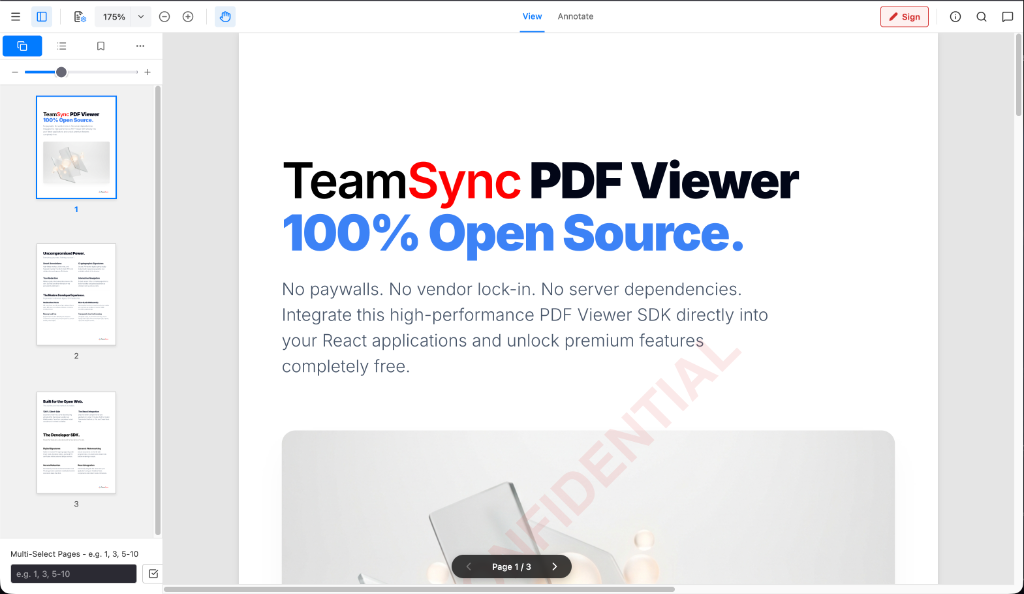
 TeamSync PDF Viewer — опенсорсный SDK для просмотра PDF в React-приложениях, полностью клиентский (100% на стороне браузера), с аннотациями, защищённым редактированием (redaction), форензик-водяными знаками и поиском; построен на WebAssembly (PDF.js + pdf-lib).
TeamSync PDF Viewer — опенсорсный SDK для просмотра PDF в React-приложениях, полностью клиентский (100% на стороне браузера), с аннотациями, защищённым редактированием (redaction), форензик-водяными знаками и поиском; построен на WebAssembly (PDF.js + pdf-lib).Это отдельное приложение или то, что встраивается в мой проект?Это headless SDK или компонент, встраиваемый в React/TypeScript-приложение через вызов API WebViewer({...}) или нативный React-компонент, — а не отдельная программа для чтения PDF.
Это headless SDK или компонент, встраиваемый в React/TypeScript-приложение через вызов API WebViewer({...}) или нативный React-компонент, — а не отдельная программа для чтения PDF.Как добавить его в свой React-проект?Установите пакет из npm в свой React/TypeScript-проект (или из GitHub Packages через файл .npmrc), затем инициализируйте его вызовом WebViewer({...}) или вставьте нативный React-компонент.
Установите пакет из npm в свой React/TypeScript-проект (или из GitHub Packages через файл .npmrc), затем инициализируйте его вызовом WebViewer({...}) или вставьте нативный React-компонент.Нужен ли ему бэкенд-сервер или API-ключи?Нет — он работает целиком на клиенте, используя WebAssembly (PDF.js + pdf-lib) внутри песочницы браузера, без зависимости от серверной обработки.
Нет — он работает целиком на клиенте, используя WebAssembly (PDF.js + pdf-lib) внутри песочницы браузера, без зависимости от серверной обработки.Работает ли он с любой конфигурацией React?Он создан специально под современные SPA-жизненные циклы React 19 и сознательно не использует iframe ради полного контроля над стилями, поэтому старые версии React или вставки на основе iframe могут не подойти напрямую.
Он создан специально под современные SPA-жизненные циклы React 19 и сознательно не использует iframe ради полного контроля над стилями, поэтому старые версии React или вставки на основе iframe могут не подойти напрямую.Куда попадают мои PDF-документы при использовании?Документы обрабатываются целиком в браузере через WebAssembly и никогда не покидают песочницу браузера — этапа загрузки на сервер нет.
Документы обрабатываются целиком в браузере через WebAssembly и никогда не покидают песочницу браузера — этапа загрузки на сервер нет.Лицензия такая же разрешительная, как MIT?Используется CPAL 1.0 (Common Public Attribution License), а не обычная MIT/Apache, но она бесплатна и для личного, и для коммерческого использования без платы за каждый домен.
Используется CPAL 1.0 (Common Public Attribution License), а не обычная MIT/Apache, но она бесплатна и для личного, и для коммерческого использования без платы за каждый домен.Какие инструменты аннотирования есть из коробки?Рисование от руки (перо/кисть), маркеры, геометрические фигуры, стрелки и линии, стикеры, выносные текстовые блоки, а также кликабельные внутренние переходы на страницы и внешние гиперссылки.
Рисование от руки (перо/кисть), маркеры, геометрические фигуры, стрелки и линии, стикеры, выносные текстовые блоки, а также кликабельные внутренние переходы на страницы и внешние гиперссылки.Насколько надёжно работает редактирование (redaction)?Вырезанные фрагменты навсегда растрируются в векторной структуре PDF, а удалённый текст изымается из текстового слоя DOM и потоков содержимого, так что его нельзя скопировать или найти поиском; также поддерживается автоматическое удаление персональных данных (PII) по регулярным выражениям.
Вырезанные фрагменты навсегда растрируются в векторной структуре PDF, а удалённый текст изымается из текстового слоя DOM и потоков содержимого, так что его нельзя скопировать или найти поиском; также поддерживается автоматическое удаление персональных данных (PII) по регулярным выражениям.Умеет ли он ставить водяные знаки?Да, поддерживаются динамические форензик-водяные знаки, отрисовываемые на лету одной меткой по центру или плиткой на всю страницу, с настраиваемым текстом, цветом, прозрачностью, размером и поворотом.
Да, поддерживаются динамические форензик-водяные знаки, отрисовываемые на лету одной меткой по центру или плиткой на всю страницу, с настраиваемым текстом, цветом, прозрачностью, размером и поворотом.Можно ли расширять его своими функциями?Да, у него развязанная плагинная архитектура — ядро рендеринга, аннотаций, redaction и поиска остаётся лёгким, а корпоративные расширения подключаются как независимые модули.
Да, у него развязанная плагинная архитектура — ядро рендеринга, аннотаций, redaction и поиска остаётся лёгким, а корпоративные расширения подключаются как независимые модули.What are similar projects?pdfcraft, bentopdf, pdfcraft, PDFPatcher, react-pdf, Stirling-PDF, pdfcn, nativePDF-structurer
pdfcraft, bentopdf, pdfcraft, PDFPatcher, react-pdf, Stirling-PDF, pdfcn, nativePDF-structurerWhich topics is it in?pdf-processing, watermark, pdf-editor, pdf-tools, pdf-viewer, annotation, webassembly, npm-package, privacy-first, document-processing, search, plugin-system
pdf-processing, watermark, pdf-editor, pdf-tools, pdf-viewer, annotation, webassembly, npm-package, privacy-first, document-processing, search, plugin-system