Что это такое?
 Стартовый набор, который превращает фотографии товаров одежды в интерактивный сайт: наведите курсор на вещь, чтобы повернуть её, уведите курсор, и она повернётся обратно, а клик открывает подробный просмотр. Создан с помощью агента для программирования, например Codex или Claude Code.
Как всё запустить?Передайте репозиторий (или локальную папку из скачанного ZIP-архива) в Codex или Claude Code со стартовым сообщением из README, чтобы агент сначала запустил два готовых примера с рубашками. Вручную нужны только Node.js 20.6+ и никаких npm-пакетов, чтобы выполнить проверки и статическую сборку из корня репозитория.
Передайте репозиторий (или локальную папку из скачанного ZIP-архива) в Codex или Claude Code со стартовым сообщением из README, чтобы агент сначала запустил два готовых примера с рубашками. Вручную нужны только Node.js 20.6+ и никаких npm-пакетов, чтобы выполнить проверки и статическую сборку из корня репозитория.Нужен ли API-ключ или аккаунт, чтобы попробовать?Для двух готовых рубашек — нет: они уже анимированы и доступны бесплатно. Аккаунт для генерации изображений или видео и лимит расходов понадобятся только если вы хотите создать поворот для своей вещи. Для необязательной локальной обработки видео потребуются Python 3.10+, Pillow, NumPy и FFmpeg.
Для двух готовых рубашек — нет: они уже анимированы и доступны бесплатно. Аккаунт для генерации изображений или видео и лимит расходов понадобятся только если вы хотите создать поворот для своей вещи. Для необязательной локальной обработки видео потребуются Python 3.10+, Pillow, NumPy и FFmpeg.Что это не умеет из коробки?Оно проигрывает только заранее подготовленный поворот между двумя фиксированными положениями и статичные детальные виды спереди и сзади. Корзины, оплаты и учёта товаров здесь нет, а повороты, созданные ИИ, всё равно нужно проверять вручную по вашим исходным фотографиям.
Оно проигрывает только заранее подготовленный поворот между двумя фиксированными положениями и статичные детальные виды спереди и сзади. Корзины, оплаты и учёта товаров здесь нет, а повороты, созданные ИИ, всё равно нужно проверять вручную по вашим исходным фотографиям.Не видны ли где-нибудь мои исходные фото или ключи?Нет — в README указано публиковать только собранную папку dist/, а исходные фото, API-ключи и промежуточные генерации держать в тайне.
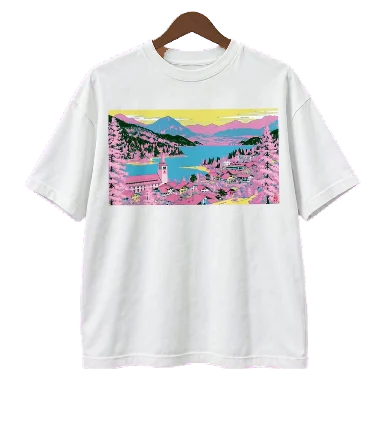
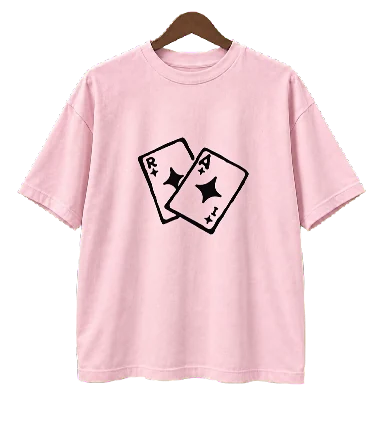
Нет — в README указано публиковать только собранную папку dist/, а исходные фото, API-ключи и промежуточные генерации держать в тайне.Что за два готовых примера одежды?Белая рубашка с принтом «Альпийское озеро», поворот для которой создан в LTX-2.5 Pro, и розовая рубашка с принтом «Джокер», повёрнутая с помощью Kling 3.0 через Pika; оба воспроизводятся локально без затрат на генерацию.
Белая рубашка с принтом «Альпийское озеро», поворот для которой создан в LTX-2.5 Pro, и розовая рубашка с принтом «Джокер», повёрнутая с помощью Kling 3.0 через Pika; оба воспроизводятся локально без затрат на генерацию.Кто придумал взаимодействие «поворот при наведении»?Идея этого взаимодействия принадлежит @cambreedesigns; этот репозиторий — независимая реализация данной идеи.
Идея этого взаимодействия принадлежит @cambreedesigns; этот репозиторий — независимая реализация данной идеи.Можно ли опубликовать результат где угодно?Да — после того как вы одобрите локальный предпросмотр, можно попросить агента опубликовать его на выбранном хостинге; развернуть нужно только папку dist/.
Да — после того как вы одобрите локальный предпросмотр, можно попросить агента опубликовать его на выбранном хостинге; развернуть нужно только папку dist/.Какие есть похожие проекты?herk-edit-kit, openfilm, ClaudeAnimationBase, reelmimic, motion-prompt, livecanvas, huashu-art-motion, onetake
herk-edit-kit, openfilm, ClaudeAnimationBase, reelmimic, motion-prompt, livecanvas, huashu-art-motion, onetakeВ каких он темах?starter-kit, static-site, interactive, template, ffmpeg, image-generation, video-generation, design, prompt-engineering, animation, generative-ai, ui
starter-kit, static-site, interactive, template, ffmpeg, image-generation, video-generation, design, prompt-engineering, animation, generative-ai, ui- Автор
- amirmushichge
- Размер
- 2.6 MB
- Звёзды
- 212
- Обновлён
- КоммитOct 19Релизv0.2.0Oct 19
- Возраст
- 1 мес
- Коммиты · 90 дней