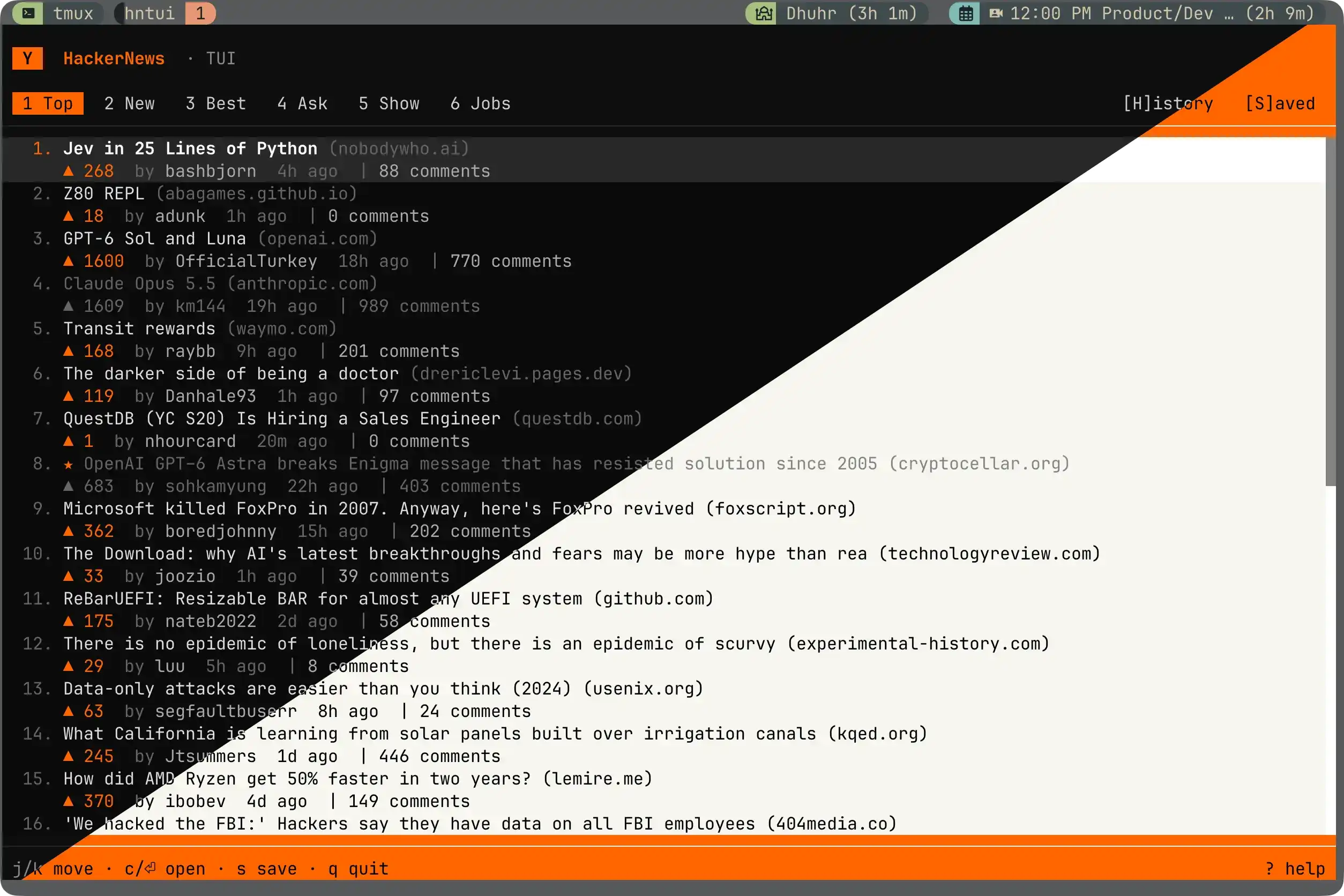
hntui: Hacker News in your terminal!
A sleek and elegant tui for browsing one of the best tech news sources.
curl -fsSL https://raw.githubusercontent.com/ahmd-sh/hntui/main/install.sh | sh
hntui
What it does
- Browse all six HN feeds: Top, New, Best, Ask, Show, and Jobs.
- Navigate through a post's comments.
- Save posts for later.
- Vim + mouse support.
- Themes.
- ... and a really cool Knight Rider scanner animation for loaders (◕ᴗ◕ )
Requirements
Any modern terminal with truecolor, mouse support, and UTF-8 will work. I've tested it in Ghostty on MacOS. Linux/Windows is supported by OpenTUI but I haven't tried it (yet).
The prebuilt binaries have no dependencies. Installing through npm (or hacking on the code) needs Bun 1.2 or newer.
Install
Standalone binary (recommended)
curl -fsSL https://raw.githubusercontent.com/ahmd-sh/hntui/main/install.sh | sh
Installs a self-contained binary to ~/.local/bin. You can also grab a binary for your platform directly from the releases page. Binaries cover macOS (Apple Silicon) and Linux (x64, arm64) — on an Intel Mac, use the Bun install below.
With Bun
bun add -g @ahmd-sh/hntui
Or run it once without installing:
bunx @ahmd-sh/hntui
Run
hntui
Press q (or Ctrl-C) to quit.
Updating
hntui update
Checks the latest release and, for binary installs, replaces itself in place. Bun installs update with bun add -g @ahmd-sh/hntui instead (hntui update will tell you so). When a newer release exists, the status bar shows a quiet hint. hntui --version prints the installed version.
Keybindings
Story list
| Key |
Action |
j / ↓, k / ↑ |
Move cursor |
gg, G |
Jump to first or last |
Ctrl-D, Ctrl-U, PgDown, PgUp |
Scroll a half page |
c, Enter |
Open the story and read its comments |
h / ←, l / → |
Previous or next tab |
Tab, Shift-Tab |
Cycle through tabs |
1 through 6 |
Jump to a specific category |
S |
Jump to the Saved list |
s |
Save or unsave the highlighted post |
o |
Open the story's URL in your browser |
r |
Refresh the current feed |
t |
Toggle theme |
q, Ctrl-C |
Quit |
| Key |
Action |
j / ↓, k / ↑ |
Move the comment cursor |
gg, G |
Jump to first or last comment |
Ctrl-D, Ctrl-U, PgDown, PgUp |
Scroll a half page |
Space |
Collapse or expand the current subtree |
Enter |
Open the links popup for the current comment |
s |
Save or unsave this story |
o |
Open the story's URL |
Esc, Backspace, h / ← |
Back to the list |
t |
Toggle theme |
q |
Quit |
| Key |
Action |
j, k, ↑, ↓ |
Move |
gg, G |
First or last link |
o, Enter |
Open the highlighted link |
Esc, Backspace |
Close the popup |
| Key |
Action |
j / ↓, k / ↑ |
Move |
Enter |
Activate |
Esc, Backspace |
Close |
Mouse
Most things you can do with the keyboard, you can do with a mouse too.
- Click a tab to switch feeds.
- Click the
Y tile to refresh the current feed (or to exit a story back to its list).
- Click any story row to select it. Click it again to open the comments.
- Right-click a story to open a context menu with Save, Open URL, and Open Comments.
- Click a comment's header line to collapse or expand its subtree.
- Double-click a comment's body to open its links popup.
- Click the story URL in the detail header to open it in your browser.
- Click outside a popup or context menu to dismiss it.
- Use your scroll wheel to scroll lists and comment trees.
Selecting and copying text
Because the app captures mouse events, your terminal's normal click-and-drag selection is intercepted. To select text the regular way:
- On macOS (Terminal.app, iTerm2, WezTerm, Ghostty), hold
Option while you drag, then Cmd-C.
- On Linux (Kitty, Alacritty, WezTerm, GNOME Terminal), hold
Shift while you drag, then Ctrl-Shift-C.
Themes
Press t to toggle. The dark theme is mostly black with orange accents. The light theme is faithful to news.ycombinator.com: white background, orange topbar, the familiar beige row highlight, and HN's classic grey byline text.
Saved posts
Press s on any story to save it. Saved posts get a small star next to the title and show up in the Saved tab on the right side of the tab strip. The list persists across sessions in ~/.config/hntui/saved.json as a small JSON file. (Config from the app's hackernuis days is migrated automatically on first run.) Press s again to remove a post from the list.
S jumps straight to the Saved list from anywhere.
Development
git clone https://github.com/ahmd-sh/hntui.git
cd hntui
bun install
bun dev    # hot reload
Data comes from the public Hacker News Firebase API.
Releases
Pushing a v* tag triggers two workflows:
.github/workflows/release.yml cross-compiles standalone binaries (bun build --compile) for macOS and Linux (arm64 and x64), smoke-tests the Linux build against the live API, and attaches the tarballs to a GitHub release. This is what install.sh downloads..github/workflows/publish.yml publishes @ahmd-sh/hntui to npm via OIDC trusted publishing, with a SLSA provenance attestation linking the tarball back to the exact commit and workflow run that produced it. It skips gracefully if the version is already on npm.
To release a new version:
npm version patch   # or minor / major
git push --follow-tags
Acknowledgments
- OpenTUI by Anomaly. The native TUI core that makes all of this possible.
- opentui-spinner by Matt Simpson. The Knight Rider loading scanner is adapted from
examples/knight-rider/utils.ts (MIT).
- Effect for empowering the data layer under the hood.
- Hacker News for the content and the open API.
License
MIT, Copyright (c) 2026 Ahmed Shaikh.

 hntui 是一个用来浏览 Hacker News 的终端界面:覆盖全部六个信息流(Top、New、Best、Ask、Show、Jobs),支持评论导航、收藏帖子、vim 键位和鼠标操作、主题,还有霹雳游侠(Knight Rider)风格的加载动画。