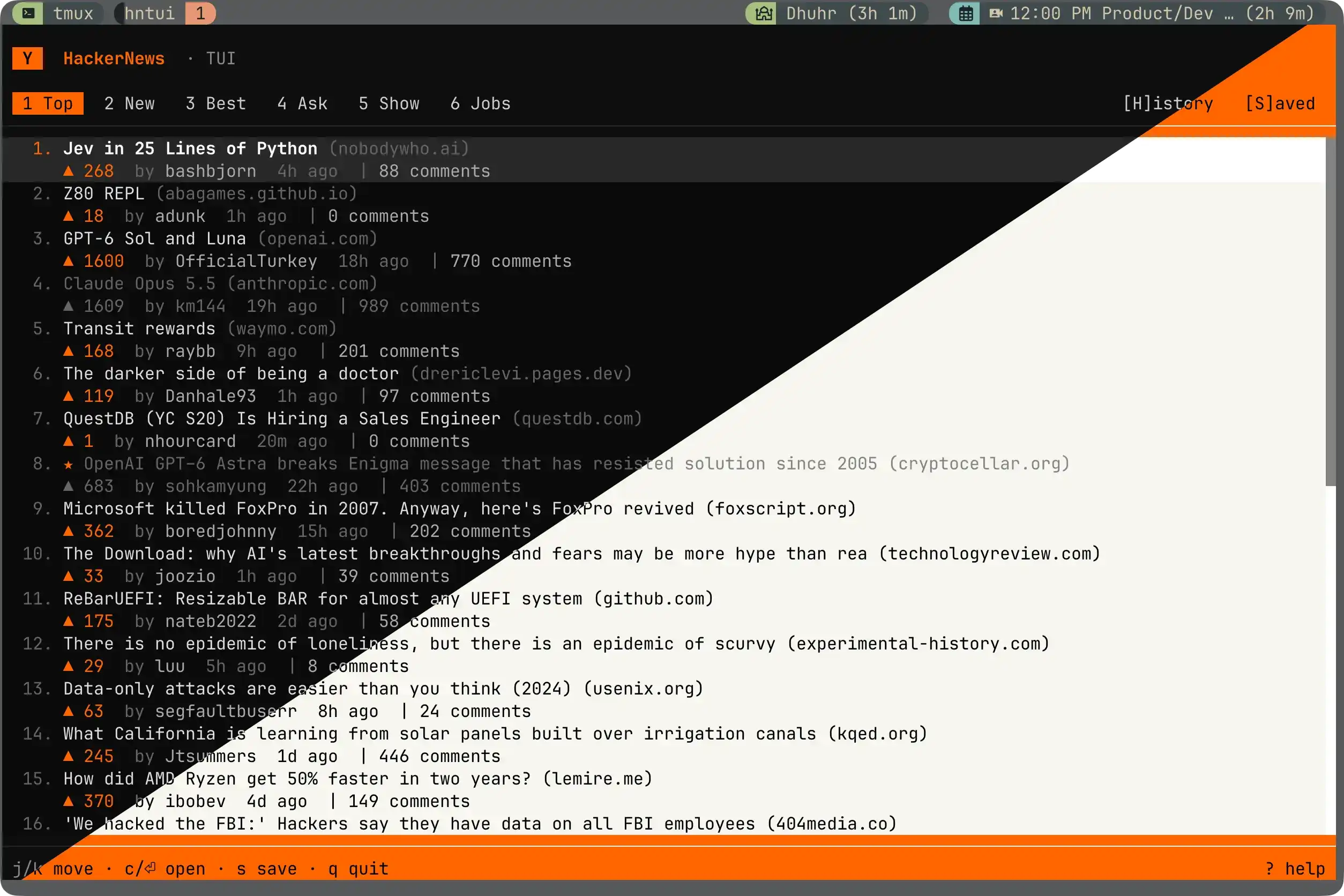
Что это?
 hntui — терминальный интерфейс для чтения Hacker News: все шесть лент (Top, New, Best, Ask, Show, Jobs), навигация по комментариям, сохранённые посты, поддержка vim и мыши, темы и загрузочная анимация в духе Knight Rider.
hntui — терминальный интерфейс для чтения Hacker News: все шесть лент (Top, New, Best, Ask, Show, Jobs), навигация по комментариям, сохранённые посты, поддержка vim и мыши, темы и загрузочная анимация в духе Knight Rider.Это отдельное приложение или библиотека, которую я подключу?Это отдельное терминальное приложение, которое запускается напрямую, построенное на нативном TUI-фреймворке OpenTUI, а не библиотека для других проектов.
Это отдельное терминальное приложение, которое запускается напрямую, построенное на нативном TUI-фреймворке OpenTUI, а не библиотека для других проектов.Как его установить и запустить?Проще всего установщик автономного бинарника, кладущий самодостаточный бинарник в ~/.local/bin, либо можно скачать бинарник для своей платформы со страницы релизов. Альтернативно, при установленном Bun, его можно запустить один раз без установки или поставить как пакет.
Проще всего установщик автономного бинарника, кладущий самодостаточный бинарник в ~/.local/bin, либо можно скачать бинарник для своей платформы со страницы релизов. Альтернативно, при установленном Bun, его можно запустить один раз без установки или поставить как пакет.Нужен ли установленный Bun, чтобы этим пользоваться?Готовые бинарники вообще не имеют зависимостей. Bun 1.2 или новее нужен, только если ставите через npm/Bun или хотите ковыряться в коде.
Готовые бинарники вообще не имеют зависимостей. Bun 1.2 или новее нужен, только если ставите через npm/Bun или хотите ковыряться в коде.Работает ли он на Intel Mac или Windows?Готовые бинарники покрывают только macOS на Apple Silicon и Linux (x64, arm64); на Intel Mac придётся идти путём установки через Bun. Поддержку Windows даёт OpenTUI, но автор её ещё не проверял.
Готовые бинарники покрывают только macOS на Apple Silicon и Linux (x64, arm64); на Intel Mac придётся идти путём установки через Bun. Поддержку Windows даёт OpenTUI, но автор её ещё не проверял.Какие терминалы и платформы он поддерживает?Подойдёт любой современный терминал с truecolor, поддержкой мыши и UTF-8; автор тестировал его в Ghostty на macOS, а поддержка Linux и Windows идёт от фреймворка OpenTUI.
Подойдёт любой современный терминал с truecolor, поддержкой мыши и UTF-8; автор тестировал его в Ghostty на macOS, а поддержка Linux и Windows идёт от фреймворка OpenTUI.Где хранятся мои сохранённые данные?Сохранённые посты лежат локально в небольшом JSON-файле ~/.config/hntui/saved.json; наружу ничего не отправляется, кроме запросов данных HN к его публичному API.
Сохранённые посты лежат локально в небольшом JSON-файле ~/.config/hntui/saved.json; наружу ничего не отправляется, кроме запросов данных HN к его публичному API.Как сохранить пост на потом?Нажмите s на любой новости, чтобы сохранить её (повторное нажатие убирает из сохранённых). У сохранённых постов появляется маленькая звёздочка, и они собраны на вкладке Saved, куда мгновенно переносит клавиша S.
Нажмите s на любой новости, чтобы сохранить её (повторное нажатие убирает из сохранённых). У сохранённых постов появляется маленькая звёздочка, и они собраны на вкладке Saved, куда мгновенно переносит клавиша S.Можно пользоваться мышью вместо клавиш vim?Да, почти всё работает мышью: клик по вкладкам переключает ленты, клик по строкам выделяет или открывает новости, правый клик вызывает контекстное меню, колесо прокручивает.
Да, почти всё работает мышью: клик по вкладкам переключает ленты, клик по строкам выделяет или открывает новости, правый клик вызывает контекстное меню, колесо прокручивает.Как выделить и скопировать текст из терминала?hntui перехватывает события мыши, поэтому обычное выделение протяжкой не работает. На macOS удерживайте Option во время выделения, затем Cmd-C; на Linux удерживайте Shift, затем Ctrl-Shift-C.
hntui перехватывает события мыши, поэтому обычное выделение протяжкой не работает. На macOS удерживайте Option во время выделения, затем Cmd-C; на Linux удерживайте Shift, затем Ctrl-Shift-C.Откуда берутся данные Hacker News?Данные приходят из публичного Firebase API Hacker News.
Данные приходят из публичного Firebase API Hacker News.What are similar projects?Horizon, opentui, Inquirer.js, tokscale, tincan-cli, gh-dash, wuzz, dsh-TUI
Horizon, opentui, Inquirer.js, tokscale, tincan-cli, gh-dash, wuzz, dsh-TUIWhich topics is it in?news-aggregator, reader, terminal-ui, news, vim, bun, github-actions, tui, cli-tool, command-line, command-line-tool, npm
news-aggregator, reader, terminal-ui, news, vim, bun, github-actions, tui, cli-tool, command-line, command-line-tool, npm